
A professional crawler for American Chemical Society papers with modern web dashboard

Project description
ACS Paper Crawler / ACS 论文爬虫




A professional web-based crawler for American Chemical Society (ACS) papers with modern dashboard and analytics.
专业的 ACS(美国化学会)论文网络爬虫,具有现代化仪表板和分析功能。
English | 中文 | 📚 Documentation
English
Features
- 43 Built-in Journals: Pre-configured ACS journal list
- Real-time Crawling: Extract papers from ACS Publications
- Complete Metadata: Title, DOI, authors, abstract, keywords, citation info
- Modern Dashboard: Interactive charts and statistics
- Advanced Filtering: Search by title, author, journal, year
- Background Jobs: Async crawling with progress tracking
- RESTful API: Full API documentation at
/docs
Quick Start
Option 1: Docker (Recommended)
# Start with Docker Compose
docker compose up -d

# Access at http://localhost:8000

# Stop
docker compose down
Option 2: Local Installation
# Install dependencies
pip install -r requirements.txt

# (Optional) Configure ChromeDriver path
# Copy .env.example to .env and set CHROMEDRIVER_PATH if needed
cp .env.example .env
# Edit .env to set your ChromeDriver path (Windows users especially)

# Run the application
python run.py

# Open browser
http://localhost:8000
Option 3: Install from PyPI
pip install acs_crawler

# Run the web interface
python -m uvicorn acs_crawler.api.main:app --host 0.0.0.0 --port 8000
Requirements
- Docker: 20.10+ (for Docker installation), OR
- Python: 3.9+ (for local installation)
- Chrome browser: Latest stable version
- ChromeDriver: Auto-downloaded by webdriver-manager (or configure manually)
Configuration
ChromeDriver Path (Optional)
By default, ChromeDriver is automatically downloaded. If you want to use your own ChromeDriver:
- Copy
.env.exampleto.env - Set
CHROMEDRIVER_PATHto your ChromeDriver executable path
Examples:
# Windows
CHROMEDRIVER_PATH=C:\Program Files\Google\Chrome\Application\chromedriver-win64\chromedriver.exe

# Linux/Mac
CHROMEDRIVER_PATH=/usr/local/bin/chromedriver

# WSL (Windows path from WSL)
CHROMEDRIVER_PATH=/mnt/c/Program Files/Google/Chrome/Application/chromedriver-win64/chromedriver.exe
Known Limitations
- No Search URL Crawling: ACS search pages are protected by Cloudflare Turnstile CAPTCHA
- Automated tools (Selenium, curl, etc.) are blocked
- Workaround: Use journal issue URLs which work perfectly
- Local filtering available in Papers UI after crawling
- Performance: Selenium-based (slower than HTTP-only crawlers, ~3-5s startup per job)
- Rate Limiting: No automatic limits - space out jobs manually (1-2 concurrent max)
- Data Extraction: Only public metadata (no paywalled content, no author affiliations)
- Scalability: Sequential job processing, SQLite storage (not for production)
- ACS Only: Designed for ACS journals, relies on current page structure
- Legal: Users responsible for complying with ACS Terms of Service
See full documentation for workarounds and best practices.
Documentation
Full documentation available in the docs/ directory:
cd docs
make html
# Open docs/_build/html/index.html
Or read online: Documentation
Screenshots
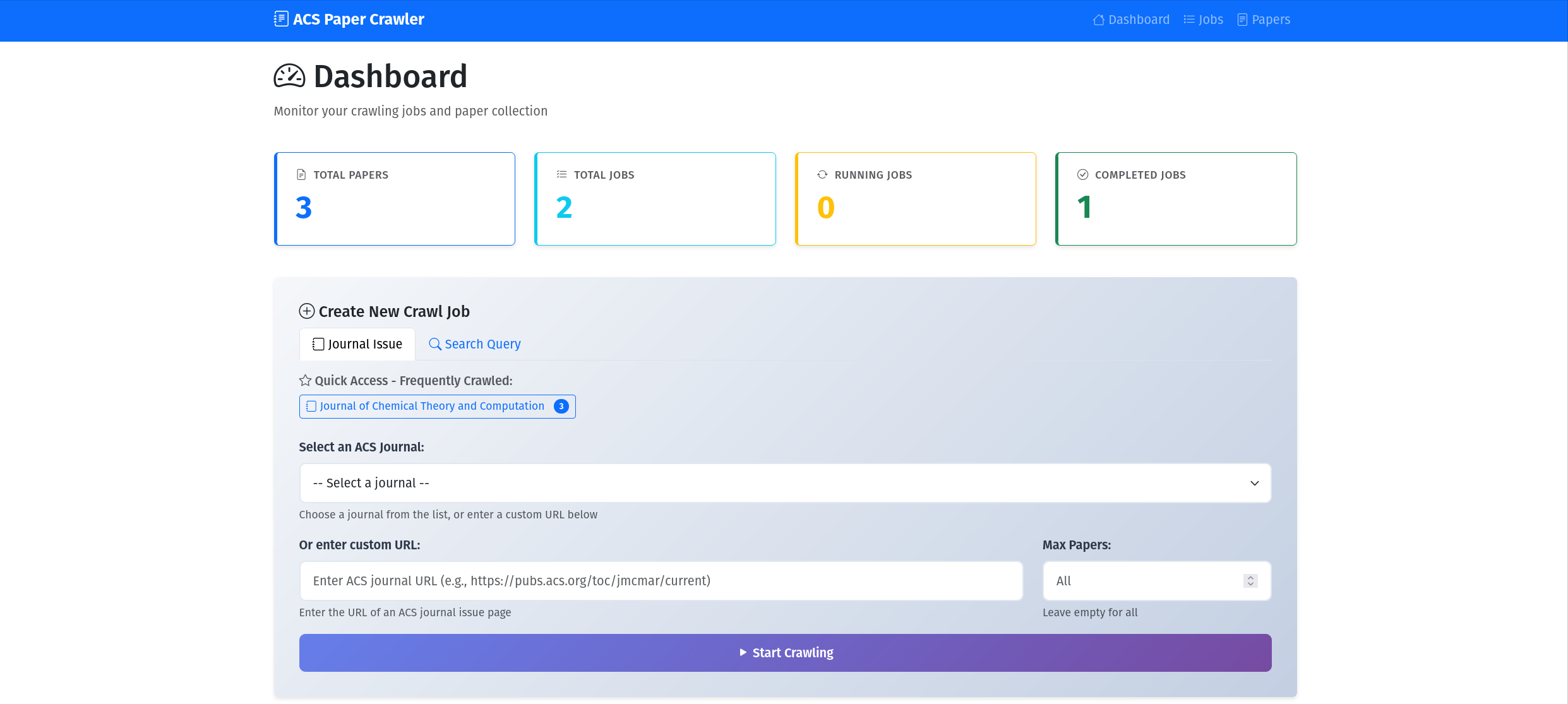
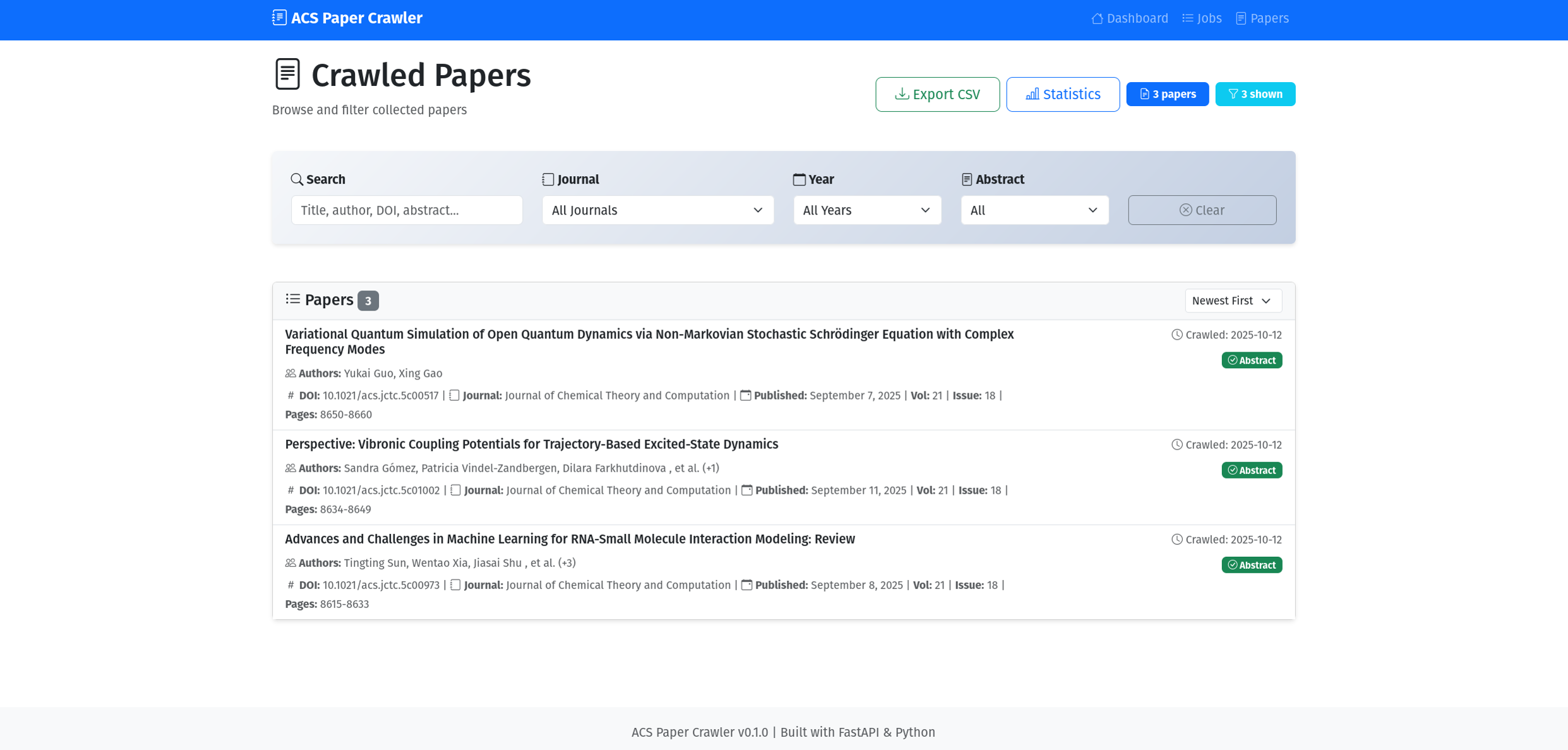
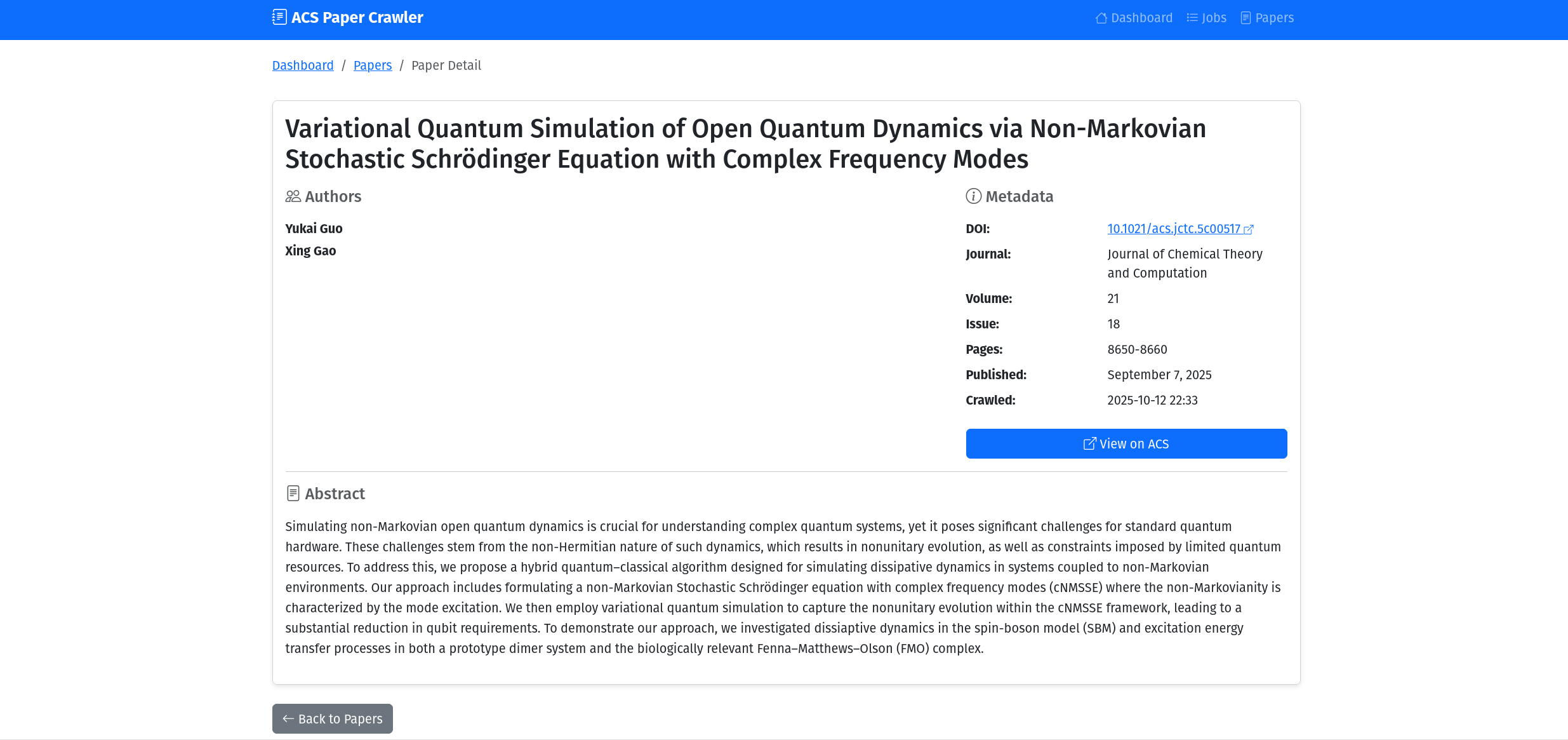
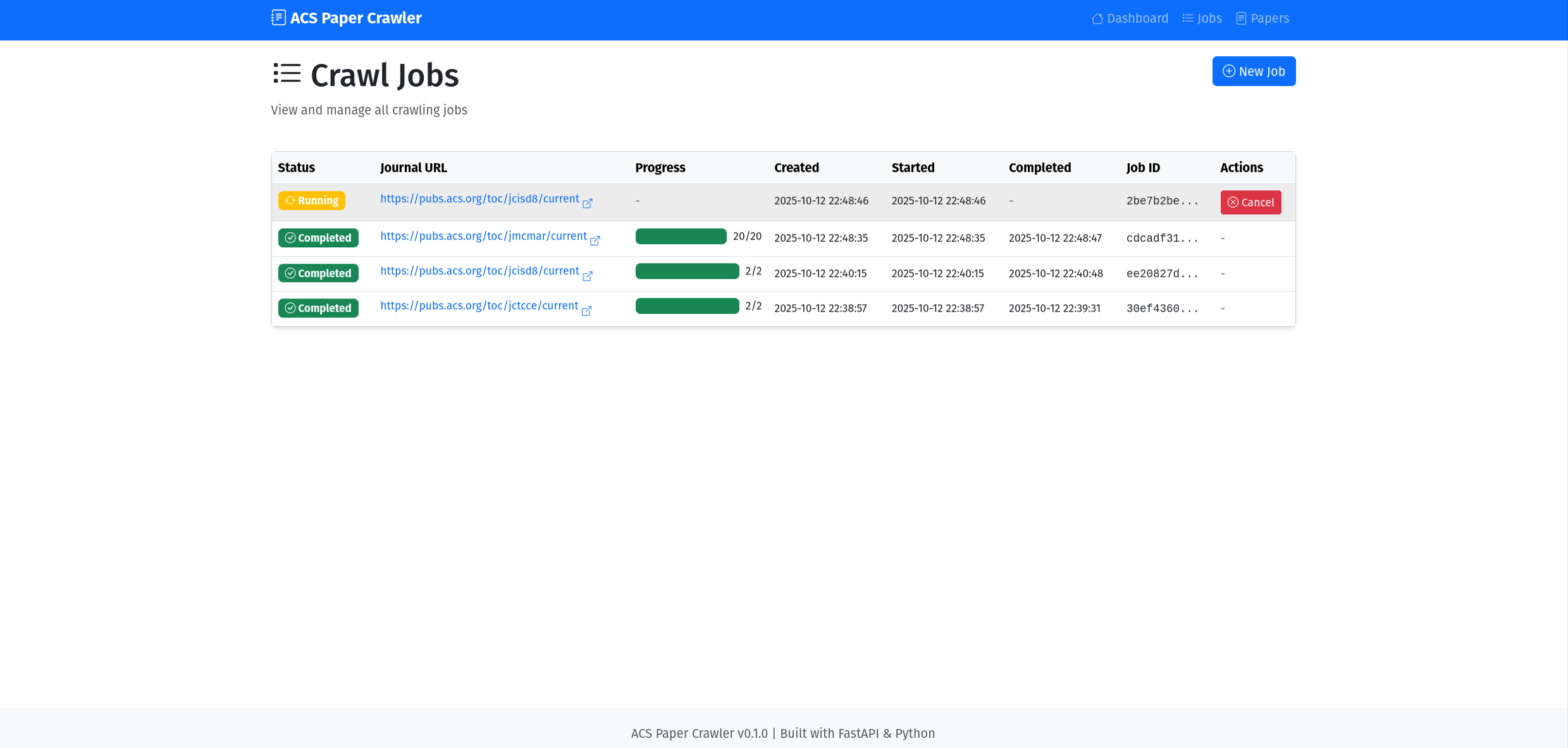
License & Copyright
Copyright (c) 2025 ACS Paper Crawler Contributors
This software is for educational and research purposes only.
- ✅ Academic & Educational Use
- ✅ Research & Study
- ❌ Commercial Use (requires permission)
- ⚠️ Respect ACS Terms of Service
See LICENSE and full documentation for details.
中文
功能特性
- 43 个内置期刊:预配置的 ACS 期刊列表
- 实时爬取:从 ACS Publications 提取论文
- 完整元数据:标题、DOI、作者、摘要、关键词、引用信息
- 现代化仪表板:交互式图表和统计
- 高级过滤:按标题、作者、期刊、年份搜索
- 后台任务:异步爬取,进度追踪
- RESTful API:完整 API 文档位于
/docs
快速开始
方式一:Docker(推荐)
# 使用 Docker Compose 启动
docker compose up -d

# 访问 http://localhost:8000

# 停止
docker compose down
方式二:本地安装
# 安装依赖
pip install -r requirements.txt

# 运行应用
python run.py

# 打开浏览器
http://localhost:8000
环境要求
- Docker: 20.10+(Docker 安装方式),或
- Python: 3.9+(本地安装方式)
- Chrome 浏览器: 最新稳定版
- ChromeDriver: 由 webdriver-manager 自动下载
已知限制
- 无法爬取搜索 URL:ACS 搜索页面受 Cloudflare Turnstile 验证码保护
- 自动化工具(Selenium、curl 等)被阻止
- 解决方法:使用期刊页面 URL,完美工作
- 爬取后可在论文界面进行本地过滤
- 性能:基于 Selenium(比纯 HTTP 爬虫慢,每个任务启动约 3-5 秒)
- 速率限制:无自动限制 - 需手动间隔任务(最多 1-2 个并发)
- 数据提取:仅公开元数据(无付费内容,无作者单位)
- 可扩展性:顺序任务处理,SQLite 存储(不适用于生产环境)
- 仅限 ACS:专为 ACS 期刊设计,依赖当前页面结构
- 法律:用户需自行遵守 ACS 服务条款
详见完整文档获取解决方法和最佳实践。
文档
完整文档位于 docs/ 目录:
cd docs
make html
# 打开 docs/_build/html/index.html
或在线阅读:文档
截图
许可证与版权
版权所有 (c) 2025 ACS Paper Crawler 贡献者
本软件仅用于教育和研究目的。
- ✅ 学术与教育用途
- ✅ 研究与学习
- ❌ 商业用途(需要许可)
- ⚠️ 遵守 ACS 服务条款
Project Structure / 项目结构
ACS_crawler/
├── src/acs_crawler/      # Source code / 源代码
├── docs/                 # Documentation / 文档
├── data/                 # Database / 数据库
├── logs/                 # Logs / 日志
├── run.py               # Entry point / 入口
└── README.md            # This file / 本文件
Technology Stack / 技术栈
Backend: FastAPI, SQLite, Selenium, BeautifulSoup4 Frontend: Bootstrap 5, Chart.js, Vanilla JavaScript
Contributing / 贡献
Contributions welcome! Please see CONTRIBUTING.md
欢迎贡献!请查看贡献指南
Support / 支持
Happy Crawling! / 爬取愉快! 🚀
Release history Release notifications | RSS feed


Download files
Download the file for your platform. If you're not sure which to choose, learn more about installing packages.
Source Distribution
Built Distribution
Filter files by name, interpreter, ABI, and platform.
If you're not sure about the file name format, learn more about wheel file names.
Copy a direct link to the current filters
File details
Details for the file acs_crawler-0.1.3.tar.gz.
File metadata
- Download URL: acs_crawler-0.1.3.tar.gz
- Upload date:
- Size: 59.0 kB
- Tags: Source
- Uploaded using Trusted Publishing? No
- Uploaded via: twine/6.2.0 CPython/3.10.13
File hashes
| Algorithm | Hash digest | |
|---|---|---|
| SHA256 |
c5a732cd7de205a9dd80159b7b3007b642b1f8da904837cc0df600e85e3bb1e6
|
|
| MD5 |
b9f8c13abb59792c43e10abbef5b19b5
|
|
| BLAKE2b-256 |
e43729e2f71ad748dd5a41a5cbd7beb07ad329702dc96479b385f9f9cc914d6b
|
File details
Details for the file acs_crawler-0.1.3-py3-none-any.whl.
File metadata
- Download URL: acs_crawler-0.1.3-py3-none-any.whl
- Upload date:
- Size: 64.3 kB
- Tags: Python 3
- Uploaded using Trusted Publishing? No
- Uploaded via: twine/6.2.0 CPython/3.10.13
File hashes
| Algorithm | Hash digest | |
|---|---|---|
| SHA256 |
0039964756f1c0fbe5a4b8b2caf5d4439a22bba5dff5437ff2324a9262cb255f
|
|
| MD5 |
b26a7f1438facf6933afe0a7e56a9d0d
|
|
| BLAKE2b-256 |
3884622031dd9456e5c2c927757588405a0f65a28ed234db53849b899496e512
|






