
Active Erroring
Active Erroring is a Python package that provides a simple way to raise custom errors with customizable error names and messages.
Installation
You can install Active Erroring using pip.
pip install active-erroring
Usage
To use Active Erroring in your Python code, follow these steps:
-
Import the
CustomErrorclass from theactive_erroringmodule. -
Create an instance of
CustomErrorand provide the error message. You can also specify a custom error name. -
Raise the custom error.
Example
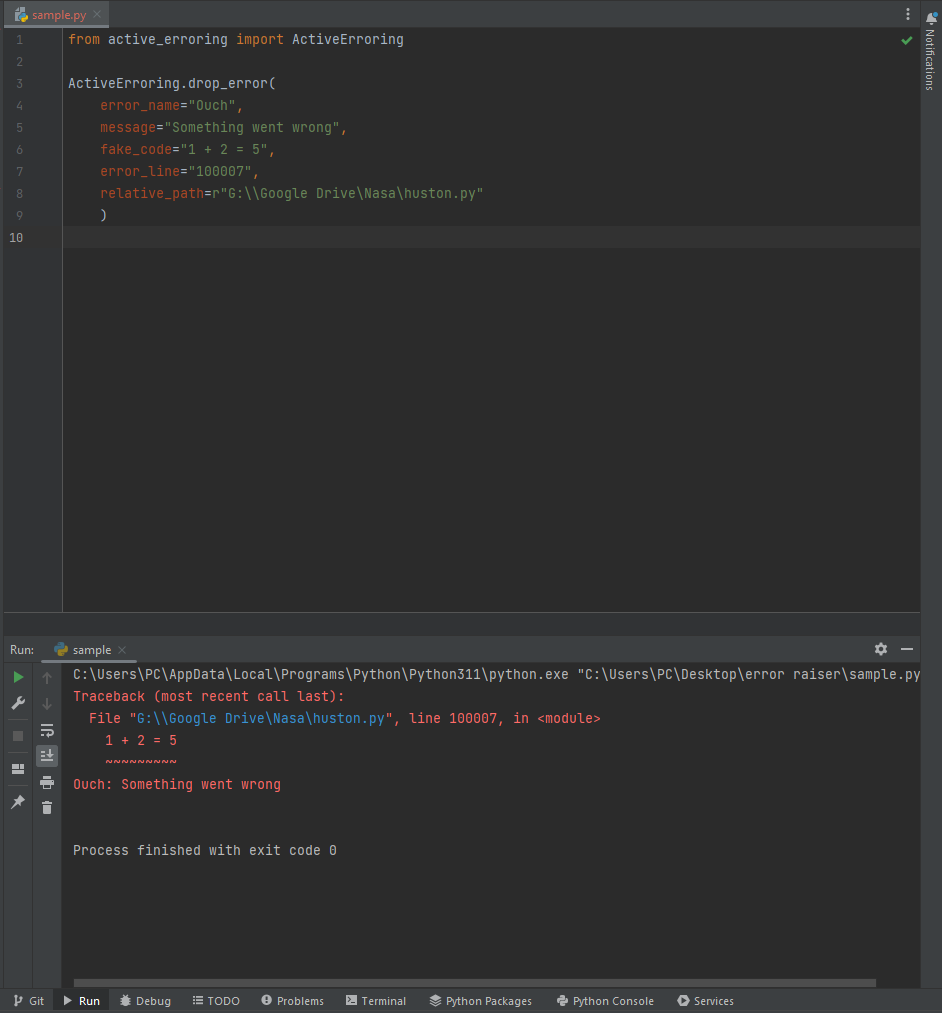
Here's a complete example of using Active Erroring in a Python script.
Demo
License
This project is licensed under the MIT License. See the LICENSE file for details.
1 maintainer

Download files
Download the file for your platform. If you're not sure which to choose, learn more about installing packages.
Source Distributions
Built Distribution
Filter files by name, interpreter, ABI, and platform.
If you're not sure about the file name format, learn more about wheel file names.
Copy a direct link to the current filters
File details
Details for the file Active_Erroring-1.1.1-py3-none-any.whl.
File metadata
- Download URL: Active_Erroring-1.1.1-py3-none-any.whl
- Upload date:
- Size: 2.7 kB
- Tags: Python 3
- Uploaded using Trusted Publishing? No
- Uploaded via: twine/4.0.2 CPython/3.11.4
File hashes
| Algorithm | Hash digest | |
|---|---|---|
| SHA256 |
c6395c47c26a19e97d64caaa3410641a7a243c65df010013e7ff9c7c368b3a08
|
|
| MD5 |
6cf3edf87d3309f2874acd91705e3deb
|
|
| BLAKE2b-256 |
1577a102245a118fe4f30fa7851b836103b3c2eae092321dbc39a8854fe7cb38
|







