













Welcome to afwf_github Documentation

It is an Alfred Workflow for GitHub operations. There already is a PHP alfred-github-workflow library for this. But the searching is based on Alfred built-in word level filtering, which doesn’t allow any typo, fuzzy, and full text search. This project aims to provide the best searching experience powered by tantivy (via sayt2), a Rust-based full-text search engine.
Install
Make sure you have Alfred 5 + installed and bought the Power Pack.
Go to Release, download the latest release.
Double click the file to install.
Prepare your GitHub Personal Access Token: go to https://github.com/settings/tokens, create a new token, make sure you checked repo -> public_repo, admin:org -> read:org, admin:enterprise -> read:enterprise so the workflow can get your public repo name and url information. If you want to get your private repo as well, you should check repo (Full control of private repositories).
Usage
Configuration.
In Alfred UI, type gh-config, it should open the ~/.alfred-afwf/afwf_github/config.json``
Build Index
In Alfred UI, type gh-rebuild-index, it should start to crawl your GitHub repos. It will take a while to finish. You can check the progress in the ~/.alfred-afwf/afwf_github/.repo_index/
Search GitHub
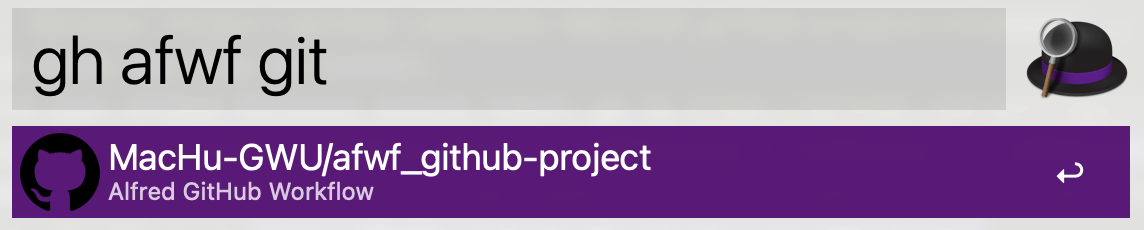
In Alfred UI, type gh ${query}, it should show the following UI:
Open Git Repo in Browser
Copy any absolute path of a file in any git repo, type gh-view-in-browser ${path} then hit Enter, it should open the repo in browser.



Trouble Shooting
gh ${query} doesn’t show any result.
Check the ${HOME}/.alfred-afwf/afwf_github/ folder, if there’s no folder name equal to your github username(where to store the index), it means the Workflow failed to crawl your GitHub repos. Please double check ${HOME}/.alfred-afwf/afwf_github/config.json to make sure you have the correct GitHub Personal Access Token.
1 maintainer

Metadata
1 maintainer
Release files for afwf_github 1.0.4
For a detailed explanation of source distributions (sdists) and built distributions (wheels), please see the package formats documentation.
Source distribution (sdist)
| File | Size | Uploaded | |
|---|---|---|---|
| afwf_github-1.0.4.tar.gz | 19.1 kB | Details |
Built distribution (wheel)
| File | Interpreter | ABI | Platform | Reset |
|---|---|---|---|---|
| afwf_github-1.0.4-py3-none-any.whl | Python 3 | none | any | Details |
Total release size: 36.0 kB
Release files / afwf_github-1.0.4.tar.gz
| Download URL | afwf_github-1.0.4.tar.gz |
|---|---|
| Size | 19.1 kB |
| Tags | Source |
|
SHA-256 checksum How to use checksums |
3f2fd629e14df775d90141af2e4ec07209ec5897e247a6af6b3029751a1ede4c
|
|
BLAKE2b-256 checksum How to use checksums |
f251ce6b2e2773f6392354c2ba823b543782acfefaac61ff8ad1ed0dbe04c8ff
|
| Upload date | |
|
Uploaded using Trusted Publishing? What is trusted publishing? |
No |
| Uploaded via |
uv/0.11.7 {"installer":{"name":"uv","version":"0.11.7","subcommand":["publish"]},"python":null,"implementation":{"name":null,"version":null},"distro":{"name":"macOS","version":null,"id":null,"libc":null},"system":{"name":null,"release":null},"cpu":null,"openssl_version":null,"setuptools_version":null,"rustc_version":null,"ci":null}
|
Release files / afwf_github-1.0.4-py3-none-any.whl
| Download URL | afwf_github-1.0.4-py3-none-any.whl |
|---|---|
| Size | 16.9 kB |
| Tags | Python 3 |
|
SHA-256 checksum How to use checksums |
25cc4098418413f9d3c533f4c964017267f32d0775026b96a17dede8aac7ddc9
|
|
BLAKE2b-256 checksum How to use checksums |
185637aed96ea818556368a2e3aac9d036d20e6c6dd22d9262b7154069310648
|
| Upload date | |
|
Uploaded using Trusted Publishing? What is trusted publishing? |
No |
| Uploaded via |
uv/0.11.7 {"installer":{"name":"uv","version":"0.11.7","subcommand":["publish"]},"python":null,"implementation":{"name":null,"version":null},"distro":{"name":"macOS","version":null,"id":null,"libc":null},"system":{"name":null,"release":null},"cpu":null,"openssl_version":null,"setuptools_version":null,"rustc_version":null,"ci":null}
|














