
AgentJet




AgentJet (AJet) is a cutting-edge, user-friendly training framework designed to optimize agents and workflows (built with OpenAI SDK, AgentScope, and even vllm http requests), fine-tuning language model weights behind the scenes.
Simply provide your Agent workflow, training data, and reward function, and we will be ready to enhance your agents to their optimal performance!
💡 Minimum Example
Let's begin with the simplest example: a math agent with a tool call.
- First, please check out the installation guide to set up the training environment.
- Then, tune your first model using the minimum example.
ajet --conf tutorial/example_math_agent/math_agent.yaml --backbone='verl' --with-ray
Features
We aim to build a easy-to-learn Agent tuner that unlock more possibilities for agent developers:
- Easy and Friendly. AgentJet helps you tune models behind your agent workflows easily, optimizing your agents for top performance with minimal effort.
- Rich Tutorial Library. AgentJet provides a rich library of examples as tutorials.
- Efficient and Scalable. AgentJet uses [verl] as the default backbone (
--backbone=verl). However, we also support trinity as alternative backbone, accelerating your tuning process via fully asynchronous RFT. - Flexible and Fast. AgentJet supports multi-agent workflows and adopts a context merging technique, accelerating training by 1.5x to 10x when the workflow involves multi-turn (or multi-agent) conversations.
- Reliability and Reproducibility. Our team keeps track of framework performance across multiple tasks + major-git-version + training-backbones (under construction, still gathering data, comming soon).
For advanced researchers, AgentJet also provides high-resolution logging and debugging solutions:
- High-Resolution Logging: AgentJet allows users to save and inspect token-level rollout details, recording token IDs, token loss masks, and even token logprobs to facilitate workflow development and agent diagnostics.
- Fast Debugging: AgentJet also provides the
--backbone=debugoption for the best debugging experience, shortening your wait period from minutes to seconds after code changes and enabling breakpoint debugging in IDEs.
🚀 Quick Start
Installation
We recommend using uv for dependency management.
- Clone the Repository:
git clone https://github.com/modelscope/AgentJet.git
cd AgentJet
- Set up Environment:
uv venv --python=3.10.16 && source .venv/bin/activate
uv pip install -e .[trinity]
# Note: flash-attn must be installed after other dependencies
uv pip install flash_attn==2.8.1 --no-build-isolation --no-cache-dir
Run Training
You can start training your first agent with a single command using a pre-configured YAML file. Take the Math agent as an example:
ajet --conf tutorial/example_math_agent/math_agent.yaml
Example Library
Explore our rich library of examples to kickstart your journey:
- 🔢 Training a math agent that can write python code.
- 📱 Creating an AppWorld agent using AgentScope and training it.
- 🐺 Developing Werewolves RPG agents and training them.
- 👩🏻⚕️ Learning to ask questions like a doctor.
- 🎴 Writing a countdown game using AgentScope and solving it.
- 🚶 Solving a frozen lake walking puzzle using AgentJet.
🧩 Core Concepts
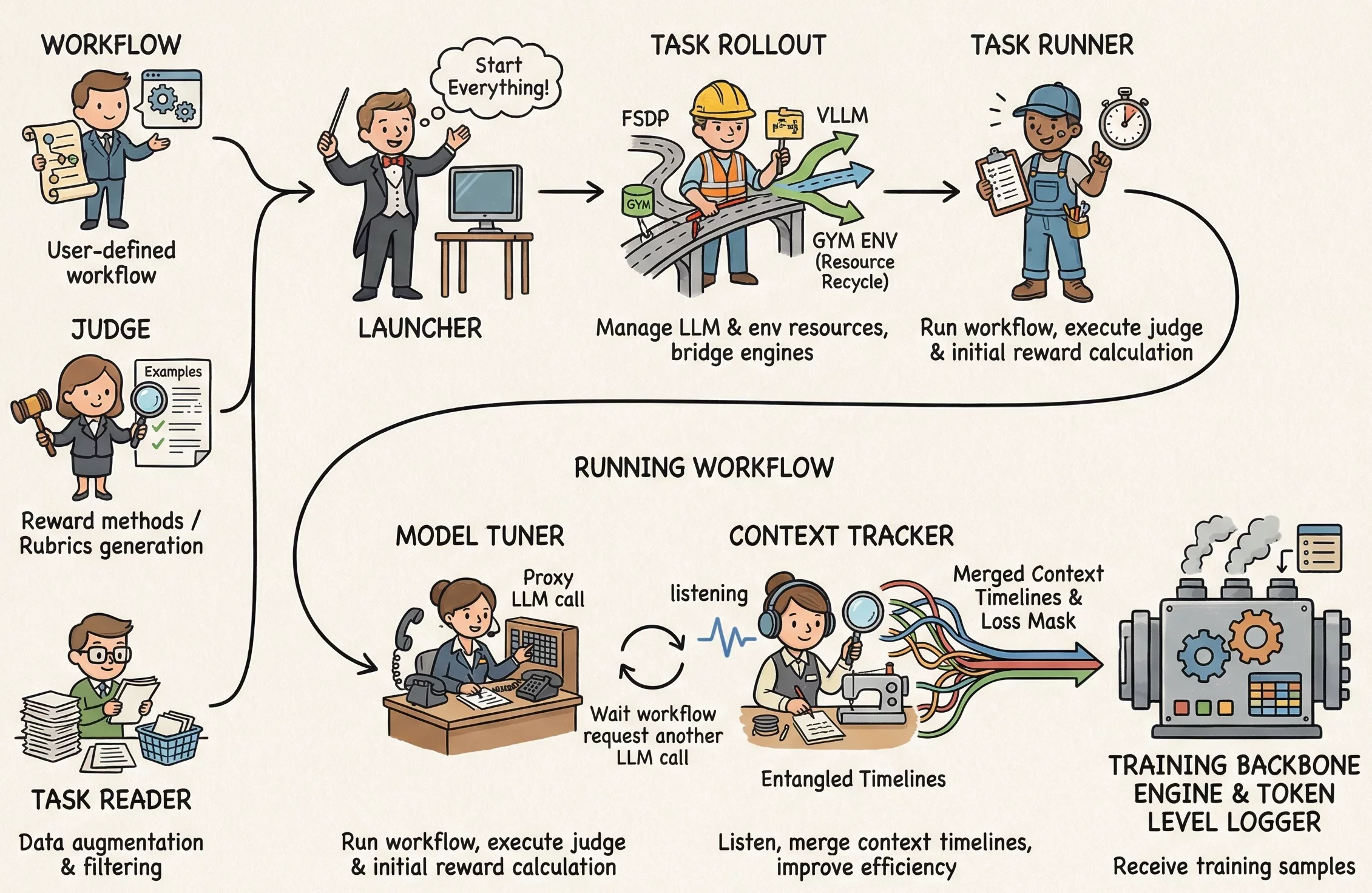
AgentJet makes agent fine-tuning straightforward by separating the developer interface from the internal execution logic.
1. The User-Centric Interface
To optimize an agent, you provide three core inputs:
- Trainable Workflow: Define your agent logic by inheriting the Workflow class, supporting both simple agent setups and advanced multi-agent collaborations.
- Task Reader: Load training tasks from JSONL files, HuggingFace datasets, interactive environments, or auto-generate them from documents.
- Task Judger: Evaluates agent outputs and assigns rewards to guide training.
2. Internal System Architecture
The internal system orchestrates several specialized modules to handle the complexities of RL training and agent interactions.
- Launcher: Manages background service processes (Ray, vLLM) and routes the backbone.
- Task Reader: Handles data ingestion, augmentation, and filtering.
- Task Rollout: Bridges LLM engines and manages the Gym environment lifecycle.
- Task Runner: Executes the Agent workflow and calculates rewards.
- Model Tuner: Forwards inference requests from the workflow to the LLM engine.
- Context Tracker: Monitors LLM calls and automatically merges shared-history timelines to improve training efficiency by 1.5x to 10x.
🚦 Navigation
- 📖 Tutorials: From Installation to Tuning your first agent — the essential path for beginners.
- 🛠️ Core Components: Define your Trainable Workflow and manage Data and Reward.
- 💡 Example: Check the Example Library above for real-world cases like Math, Werewolves game and Learning to ask task.
- ⚙️ Deep Dive: Master advanced Configuration.
🗺️ Roadmap
AgentJet is a constantly evolving project. We are planning to add the following features in the near future.
- Advanced LLM-based multi-agent reinforcement learning.
- Training dataset generation from few-shot samples.
- Prompt tuning.
- Multi-modal training support.
- Cross-process Tuner wrapper to pass though process forking.
- Providing training → user feedback → data augmentation → retraining data flywheel example.
- Optimize configurations for long-context adaptation on smaller GPUs.
- Add LoRA training examples.
- Covering LangGraph and AutoGen frameworks.
1 maintainer

Metadata
1 maintainer
Release files for AgentJet 0.0.1
For a detailed explanation of source distributions (sdists) and built distributions (wheels), please see the package formats documentation.
Built distribution (wheel)
| File | Interpreter | ABI | Platform | Reset |
|---|---|---|---|---|
| agentjet-0.0.1-py3-none-any.whl | Python 3 | none | any | Details |
Release files / agentjet-0.0.1-py3-none-any.whl
| Download URL | agentjet-0.0.1-py3-none-any.whl |
|---|---|
| Size | 172.8 kB |
| Tags | Python 3 |
|
SHA-256 checksum How to use checksums |
4a2b4f7c6360360d06e53ceeadc9834e6216e93a1e2bb81de501c3d9d41df968
|
|
BLAKE2b-256 checksum How to use checksums |
e658409b4527356c5b81098cbc7e8ec7230644dcd4b42ac2d83814cb16bd2f44
|
| Upload date | |
|
Uploaded using Trusted Publishing? What is trusted publishing? |
No |
| Uploaded via |
twine/6.2.0 CPython/3.10.12
|













