

中文主页 | Documentation | Roadmap








What is AgentScope 2.0?
AgentScope 2.0 is a production-ready, easy-to-use agent framework with essential abstractions that keep up with rising model capability.
We design for increasingly agentic LLMs. Our approach leverages the models' reasoning and tool use abilities rather than constraining them with strict prompts and opinionated orchestrations.
News
- [2026-10]
FEATExperimental: Agent service supports realtime voice conversations over WebRTC, with text and voice sharing the same session history. - [2026-09]
FEATExperimental: SOP supported — run multi-step tasks as standard operating procedures, in both the framework and agent service. Docs | Service - [2026-09]
FEAT:TeamPipelinesupported — a leader agent delegates tasks to member agents. Docs - [2026-09]
INTE: MiniMax chat models supported viaMiniMaxChatModel(MiniMax-M3 by default). - [2026-09]
FEAT: Model routing supported — useModelRouterMiddlewareto select an appropriate chat model for each reply. - [2026-09]
INTE: Jev classifier model supported through the TypeSafe SDK viaJevClassifierModel. - [2026-09]
FEAT: agentscope-skill now supports AgentScope v2. - [2026-09]
INTE: Support DashScope, OpenAI, Gemini and xAI realtime APIs inRealtimeAgent. Example | Docs - [2026-09]
FEATExperimental: Realtime voice agent supported. Example | Docs - [2026-09]
FEAT: A2A protocol supported — chat with any remote A2A agent viaA2AAgent. Example | Docs
Community
Welcome to join our community on
| Discord | DingTalk |
|---|---|
 |
 |
Quickstart
Installation
AgentScope requires Python 3.11 or higher.
From PyPI
uv pip install agentscope
From source
# Pull the source code from GitHub
git clone -b main https://github.com/agentscope-ai/agentscope.git

# Install the package in editable mode
cd agentscope

uv pip install -e .
Agent
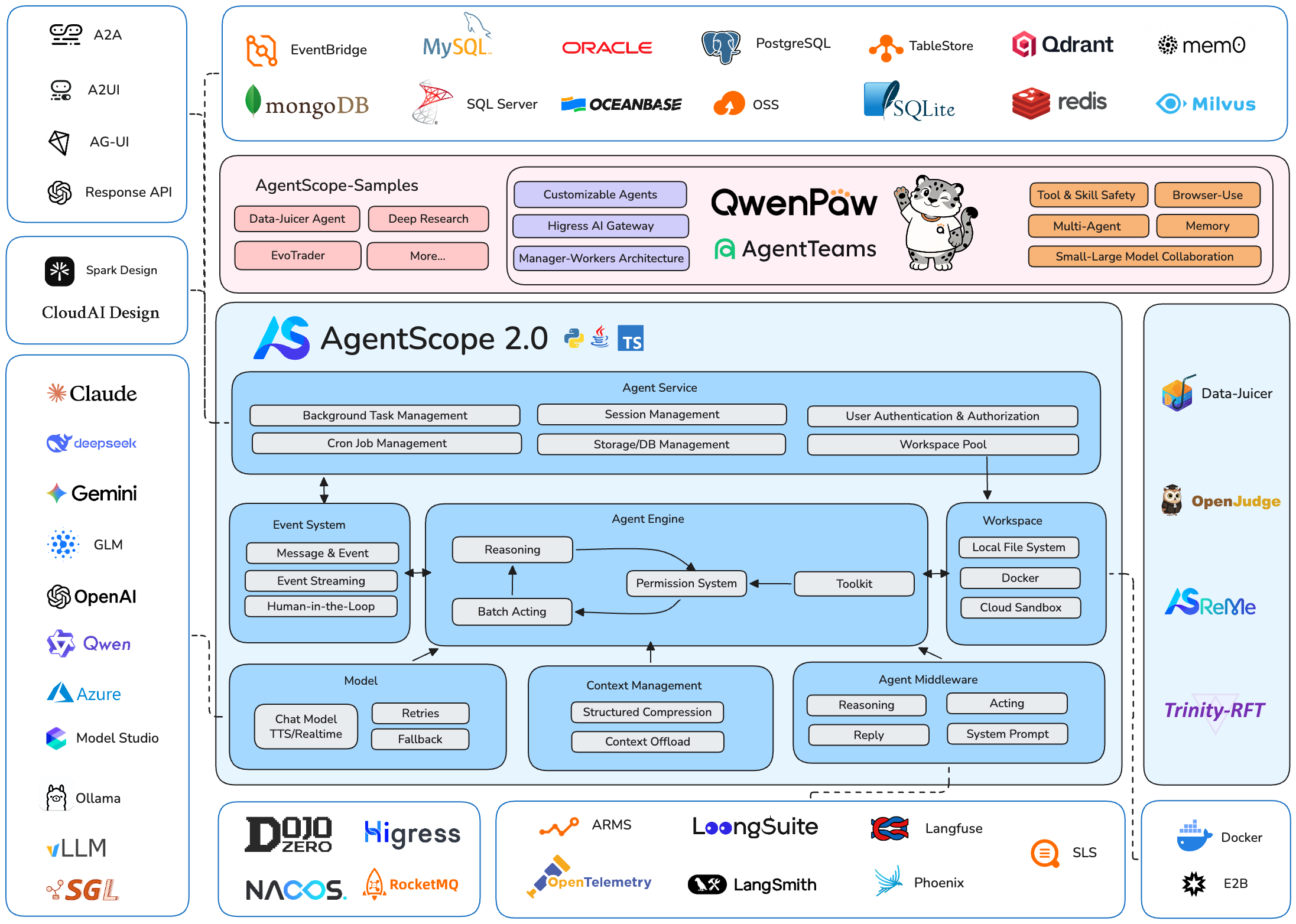
The SDK layer — compose an agent from a rich set of building blocks:
| Building block | What's inside |
|---|---|
| ReAct | Reasoning-acting loop with structured output, realtime interruption & resume, and batched (sequential / concurrent) tool acting |
| Toolkit | Agentic tool management over Python tools, MCP servers, and skills; ships with built-in coding tools (shell, file edit, search) and task/plan tools |
| Model | LLM, embedding, and TTS across major providers (OpenAI, Anthropic, Gemini, DashScope, DeepSeek, Moonshot, Volcengine, xAI, Ollama) |
| Context | Automatic compaction, tool-result offload, and context injection (system prompt, RAG, memory) via built-in middleware |
| Event System | Unified event bus streaming reasoning, tool calls, and multimodal content (text, image, audio) to the frontend |
| Permission & HITL | Fine-grained control over tools and resources, confirmation, bypass mode |
| Middleware | Composable hooks across the loop — reply, reasoning, acting, model calling, permission checking, context compression, system prompt |
| Memory | Agentic memory with switchable backends (ReMe, Mem0) |
| Workspace / Sandbox | Isolated tool & code execution — local, Docker, Apple Container, Bubblewrap, E2B, OpenSandbox, Daytona, K8s |
Start your first agent with AgentScope 2.0 in console:
from agentscope.agent import Agent
from agentscope.console import launch_console
from agentscope.tool import Toolkit, Bash, Grep, Glob, Read, Write, Edit
from agentscope.credential import DashScopeCredential
from agentscope.model import DashScopeChatModel

import os, asyncio


async def main() -> None:
    agent = Agent(
        name="Friday",
        system_prompt="You're a helpful assistant named Friday.",
        model=DashScopeChatModel(
            credential=DashScopeCredential(
              api_key=os.environ["DASHSCOPE_API_KEY"]
            ),
            model="qwen3.6-plus",
        ),
        toolkit=Toolkit(
            tools=[
                Bash(),
                Grep(),
                Glob(),
                Read(),
                Write(),
                Edit(),
            ]
        ),
    )

    # Chat with the agent in the terminal — streamed output, tool-call
    # confirmation and Ctrl+C interruption are all handled for you
    await launch_console(agent)

asyncio.run(main())
Agent Service — All You Need to Build Your App
AgentScope ships a batteries-included agent service — a FastAPI backend with a pre-built Web UI (examples/web_ui) that turns your agents into a multi-tenant, multi-session application, with rich capabilities out of the box:
| Capability | What you get |
|---|---|
| Serving | Multi-tenancy, multi-session isolation, FastAPI backend, pre-built Web UI |
| Agent Team | Leader–worker orchestration, built-in team tools, task planning |
| Channels | Connect agents to IM platforms — Feishu (Lark), Discord, custom channels, message routing |
| RAG Service | Blob storage, index worker, multi-tenant retrieval |
| MCP & Skill Hub | Browse hubs (GitHub MCP Registry, ClawHub), install into your library, add to a workspace |
| Resource Sharing | Group- and org-level management for sharing models, MCP servers, skills, and workspaces |
| Persistence | SQL & NoSQL persistence of agent state and sessions |
| Scheduling | Scheduled tasks, agent wakeup, background task offloading |
Everything above is composable, so you can assemble your own application on top of the service with minimal glue code.

Agent team — a leader agent spawns workers and coordinates them through the built-in team tools. |

Task planning — the agent breaks complex work into a tracked plan and updates it as it goes. |

Permission control in bypass mode — the agent runs end-to-end without pausing for tool-call confirmations. |

Background task offloading — a long-running tool moves to the background; its result later wakes the agent up and the conversation resumes. |
Run the following commands to start the agent service backend and the web UI:
git clone -b main https://github.com/agentscope-ai/agentscope.git
cd agentscope/examples/agent_service

# start the agent service backend
python main.py
Then open another terminal to start the web UI:
cd agentscope/examples/web_ui

# start the webui
pnpm install
pnpm dev
Contributing
We welcome contributions from the community! Please refer to our CONTRIBUTING.md for guidelines on how to contribute.
License
AgentScope is released under Apache License 2.0.
Publications
If you find our work helpful for your research or application, please cite our papers.
@article{agentscope_v1,
    author  = {Dawei Gao, Zitao Li, Yuexiang Xie, Weirui Kuang, Liuyi Yao, Bingchen Qian, Zhijian Ma, Yue Cui, Haohao Luo, Shen Li, Lu Yi, Yi Yu, Shiqi He, Zhiling Luo, Wenmeng Zhou, Zhicheng Zhang, Xuguang He, Ziqian Chen, Weikai Liao, Farruh Isakulovich Kushnazarov, Yaliang Li, Bolin Ding, Jingren Zhou}
    title   = {AgentScope 1.0: A Developer-Centric Framework for Building Agentic Applications},
    journal = {CoRR},
    volume  = {abs/2508.16279},
    year    = {2025},
}

@article{agentscope,
    author  = {Dawei Gao, Zitao Li, Xuchen Pan, Weirui Kuang, Zhijian Ma, Bingchen Qian, Fei Wei, Wenhao Zhang, Yuexiang Xie, Daoyuan Chen, Liuyi Yao, Hongyi Peng, Zeyu Zhang, Lin Zhu, Chen Cheng, Hongzhu Shi, Yaliang Li, Bolin Ding, Jingren Zhou}
    title   = {AgentScope: A Flexible yet Robust Multi-Agent Platform},
    journal = {CoRR},
    volume  = {abs/2402.14034},
    year    = {2024},
}
Contributors
All thanks to our contributors:

2 maintainers


Metadata
2 maintainers
Release files for agentscope 2.0.11
For a detailed explanation of source distributions (sdists) and built distributions (wheels), please see the package formats documentation.
Source distribution (sdist)
| File | Size | Uploaded | Provenance | Actions |
|---|---|---|---|---|
| agentscope-2.0.11.tar.gz | 1.1 MB | Without provenance | Details for agentscope-2.0.11.tar.gz |
Built distribution (wheel)
| File | Interpreter | ABI | Platform | Actions Reset |
|---|---|---|---|---|
| agentscope-2.0.11-py3-none-any.whl | Python 3 | none | any | Details for agentscope-2.0.11-py3-none-any.whl |
Total release size: 2.5 MB
Release files / agentscope-2.0.11.tar.gz
| Download URL | agentscope-2.0.11.tar.gz |
|---|---|
| Size | 1.1 MB |
| Tags | Source |
|
SHA-256 checksum How to use checksums |
33e816fc022a1e592d3dce9b06951d11cb048bd8f5ea7306453311b850a4fd5c
|
|
BLAKE2b-256 checksum How to use checksums |
5e799ae38d428bfcb3c4fce9d0a1919643f9b1f3ec5ee9cd5ca101245261d532
|
| Upload date | |
|
Uploaded using Trusted Publishing? What is trusted publishing? |
No |
| Uploaded via |
twine/7.0.0 CPython/3.13.16
|
Release files / agentscope-2.0.11-py3-none-any.whl
| Download URL | agentscope-2.0.11-py3-none-any.whl |
|---|---|
| Size | 1.4 MB |
| Tags | Python 3 |
|
SHA-256 checksum How to use checksums |
9b602aebc76d349425193469f2c4dd413d2bff837a4d22b27cac57653349877a
|
|
BLAKE2b-256 checksum How to use checksums |
9f8b9e637f3e0cc55238f434651f8558c851292a8f33918d80b82580c3918fb4
|
| Upload date | |
|
Uploaded using Trusted Publishing? What is trusted publishing? |
No |
| Uploaded via |
twine/7.0.0 CPython/3.13.16
|
Security for agentscope 2.0.11
Provenance
Provenance describes where a file came from. On PyPI, provenance is shared via attestations, which provide a verifiable record of the build or publishing details. View details, limitations and caveats.
No provenance found
None of the files in this release were uploaded with provenance metadata.
A note on package security
PyPI is a repository for distributing packages, not a service for auditing them. While third-party security researchers and our staff do their best to detect and remove malicious packages, PyPI cannot guarantee the quality, security or suitability of any given package.
To learn more about protecting yourself from malicious actors, visit our package security documentation.














