
AgileCLU is a command line implementation of Limelight Networks Agile Storage cloud platform. It is also a Python library to simplify integrating Python applications with cloud object storage.
The tools and library leverage Agile's JSON-RPC APIs and HTTP ingest and egress capabilities in an easy to use way. To use these tools, you must have:
* An account on Limelight Network's Agile Storage cloud platform. (http://www.limelightnetworks.com)
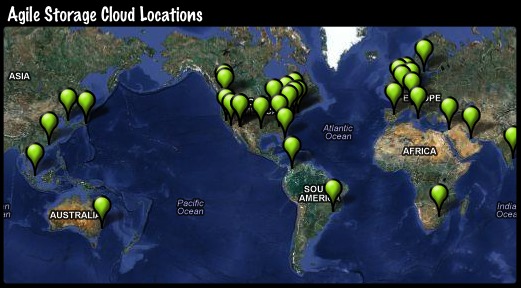
## Agile Storage Locations ##
As of October 2012, the Agile Storage Cloud has storage capacity in 34 geographies around the world.
## Communication ##
Feel free to send any questions, comments, or patches using the AgileCLU Development at Github page (you'll need to join to send a message):
* [AgileCLU Release Documentation](http:/wylieswanson.github.com/AgileCLU)
* [AgileCLU Development at GitHub](https://github.com/wylieswanson/AgileCLU)
* [AgileCLU at Python Package Index](http://pypi.python.org/pypi/AgileCLU)
# Basic Installation #
If you already have Python and [Python Package Index](http://pypi.python.org/pypi/setuptools) (PyPI) installed on your machine, the installation of AgileCLU is simple and straightfoward. Simply execute one of the following commands (sudo is usually required on Linux):
easy_install AgileCLU
or,
pip install AgileCLU
If the above method worked for you, you can skip the operating system-specific installation sections and move to Configuration, as you have now completed the installation of AgileCLU. If not, consult the relevant operating system-specific sections in the Advanced Configuration sections.
# Upgrading #
If you are upgrading from a release prior to 0.3.1, you may need to manually delete the files from your Python installation (egg and easy-install.pth) prior to invoking easy_install or pip. For future upgrades, can force to latest version with:
easy_install -U AgileCLU
# Configuration #
Since AgileCLU 0.4.0 the configuration of profiles has been greatly simplified. Configuration profiles are stored in ~/.agileclu (off of active user accounts home directory). After installing AgileCLU, use 'agileprofile create' to configure a default account. You can create as many configuration profiles as you like, with 'agileprofile create profilename'. To use different profiles from the command line tools, specify the -l option for any given command. If you are using Windows, you need to include the .py extension, substituting agileprofile with agileprofile.py.
agileprofile create
Example output:
agileprofile.py (AgileCLU 0.4.0)
CREATE PROFILE: test
Username : testcompany
Password :
Re-enter password :
Egress protocol [http] :
Egress hostname [global.mt.lldns.net] :
Egress base path : /testcompany
Ingest protocol [https] :
Ingest hostname : test-company.api.agile.lldns.net
Profile (test) has been saved. Exiting.
# AgileCLU from Command Line #
The commands that are currently available are:
*agileprofile* - Generate a profile based on account credentials and ingest/egress information
*agilefetch* - Automatically download a file from any URL and place it in your storage in a specified directory
*agilemkdir* - Make a directory
*agilerm* - Remove a file
*agilels* - List a directory
*agilepost* - Upload a file
NOTE: For Windows, add a ".py" extension to the above commands.
# Advanced Installation #
The advanced installation covers installing prerequisites, like Python and Python Setuptools. Specific Python libraries will be installed automaticaly when you run easy_install. If you already have Python and Easysetup installed, you do not need to use the following directions.
## Installation:Linux ##
On most Linux distributions, Python is already installed, you only need to install PyPI. For Debian, Ubuntu and other distributions using APT, install PyPI with the following:
sudo apt-get install python-pip
If you are running another distribution, consult the [Python setuptools](http://pypi.python.org/pypi/setuptools) documentation. After you complete this step, complete Basic Installation and move on to Configuration.
## Installation:Mac OSX ##
Python is already installed by default on modern OS X.
## Installation:Windows 32-bit and 64-bit ##
The Windows 32-bit and 64-bit Installation section covers Windows environment variables, along with Python and Python Setuptools.
### Windows Python ###
Python must be installed on the machine. You can download from http://www.python.org/getit/ or, specifically, for Windows 32 and 64-bit:
* Python 2.7.3 Windows Installer (Windows binary - does not include source)
* http://www.python.org/ftp/python/2.7.3/python-2.7.3.msi
* Python 2.7.3 Windows X86-64 Installer (Windows AMD64 / Intel 64 / X86-64 bainry - does not include source)
* http://www.python.org/ftp/python/2.7.3/python-2.7.3.amd64.msi
### Windows Environment Variables ###
Once Python has been installed, you will want to add setuptools, the mainstream package manager for Python, also known as PyPI.
Next, set the system's PATH variable to include directories that include Python components and packages we'll add later. To do this:
* Click the bottom left Windows icon
* In the search field, type 'system'
* In the Control Panel section of the search results, select "Edit system environment variables"
* Select "Environment Variables"
* In the "System variables" section, scroll down to Path and click "Edit...", and then append the below text to the "Variable Value" field, then select OK.
> ;C:\Python27;C:\Python27\Lib\site-packages;C:\Python27\Scripts;
### Windows Python Setuptools ###
* For 32-bit Windows
* Install setuptools using the provided .exe installer.
* http://pypi.python.org/packages/2.7/s/setuptools/setuptools-0.6c11.win32-py2.7.exe
* For 64-bit Windows
* Download ez_setup.py and run it; it will download the appropriate .egg file and install it for you. (Currently, the provided .exe installer does not support 64-bit versions of Python for Windows, due to a distutils installer compatibility issue.
* http://peak.telecommunity.com/dist/ez_setup.py
* Run "ez_setup.py"
At this point, you can return to the basic installation method (easy_install) at the top of this document. Note that you will need to place the output of agileprofile in C:\etc\agile\agile.conf, or alternate profiles C:\etc\agile\profileconf (to be used by the -l command line option).
# Libraries used by AgileCLU #
This package leverages the following Python libraries:
* poster by Chris AtLee - used for streaming ingest (http://atlee.ca/software/poster/)
* progressbar by Nilton Volpato - used for console ingest progress bar (http://code.google.com/p/python-progressbar/)
* pydes by Todd Whiteman - used as part of the password encryption scheme for config files (http://twhiteman.netfirms.com/des.html)
* jsonrpclib by John Marshall - an implementation of the JSON-RPC specification (https://github.com/joshmarshall/jsonrpclib)
1 maintainer

Metadata
1 maintainer
Release files for AgileCLU 0.4.2
For a detailed explanation of source distributions (sdists) and built distributions (wheels), please see the package formats documentation.
Source distribution (sdist)
| File | Size | Uploaded | Provenance | |
|---|---|---|---|---|
| AgileCLU-0.4.2.tar.gz | 16.4 kB | Without provenance | Details |
Release files / AgileCLU-0.4.2.tar.gz
| Download URL | AgileCLU-0.4.2.tar.gz |
|---|---|
| Size | 16.4 kB |
| Tags | Source |
|
SHA-256 checksum How to use checksums |
56f88843be0cc186e04519648a9b176e0a26fee9df4742dbcd0e4dd33dc757ae
|
|
BLAKE2b-256 checksum How to use checksums |
0ca2d1fb5d6d1e1c16b70a3b6e8ba82aa4c1029f6ae5e312135da58c1c3cd44f
|
| Upload date | |
|
Uploaded using Trusted Publishing? What is trusted publishing? |
No |
Security for AgileCLU 0.4.2
Provenance
Provenance describes where a file came from. On PyPI, provenance is shared via attestations, which provide a verifiable record of the build or publishing details. View details, limitations and caveats.
No provenance found
None of the files in this release were uploaded with provenance metadata.
A note on package security
PyPI is a repository for distributing packages, not a service for auditing them. While third-party security researchers and our staff do their best to detect and remove malicious packages, PyPI cannot guarantee the quality, security or suitability of any given package.
To learn more about protecting yourself from malicious actors, visit our package security documentation.














