
Agrothon Client
A Client for Agrothon Running in Raspberry Pi









Installation
-
First Install the dependencies
sudo apt-get update sudo apt-get install python3-opencv python3-rpi.gpio -
from Pypi
pip3 install AgroClient -
From git
pip3 install -U git+https://github.com/viswanathbalusu/Agrothon-Client -
Using Docker
-
First install docker
curl -sSL https://get.docker.com | sudo sh sudo usermod -aG docker ${USER} -
Get the
docker-compose.ymlandagrothonclient.envto a local directorywget -q https://raw.githubusercontent.com/viswanathbalusu/Agrothon-Client/main/docker-compose.yml wget -q https://raw.githubusercontent.com/viswanathbalusu/Agrothon-Client/main/agroclient-sample.env -O agroclient.env -
Edit the Variables in agroclient.env and start docker container
pip3 -q install docker-compose docker-compose up -d -
Docker method only works one
arm-v7host OS
-
Usage
usage: AgroClient [-h] -y HOSTNAME -a APIKEY [-u USB] [-p1 PIR1] [-p2 PIR2]
                  [-p3 PIR3] [-p4 PIR4] [-br BAUDRATE] [-r RELAY]

optional arguments:
  -h, --help, show this help message and exit
  -y, --hostname HOSTNAME, API Server host name
  -a, --apikey APIKEY, API Key of host
  -u, --usb USB, USB Port of Arduino
  -p1, --pir1 PIR1, GPIO Pin of PIR1
  -p2, --pir2 PIR2, GPIO Pin of PIR2
  -p3, --pir3 PIR3, GPIO Pin of PIR3
  -p4, --pir4 PIR4, GPIO Pin of PIR4
  -br, --baudrate BAUDRATE, Baud rate of USB Port to read sensor data
  -r, --relay RELAY, Relay Signalling GPIO pin
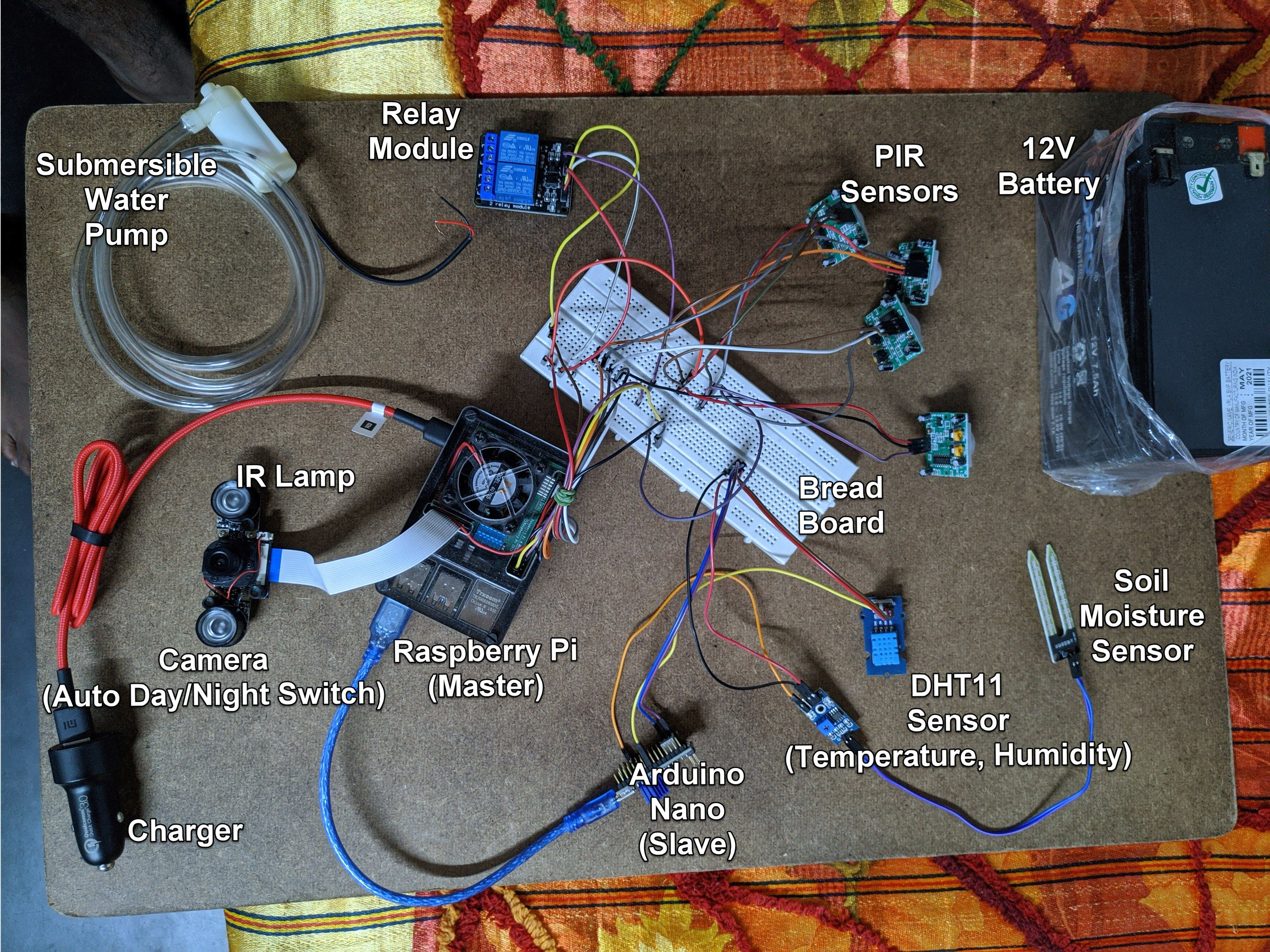
Circuit Diagram
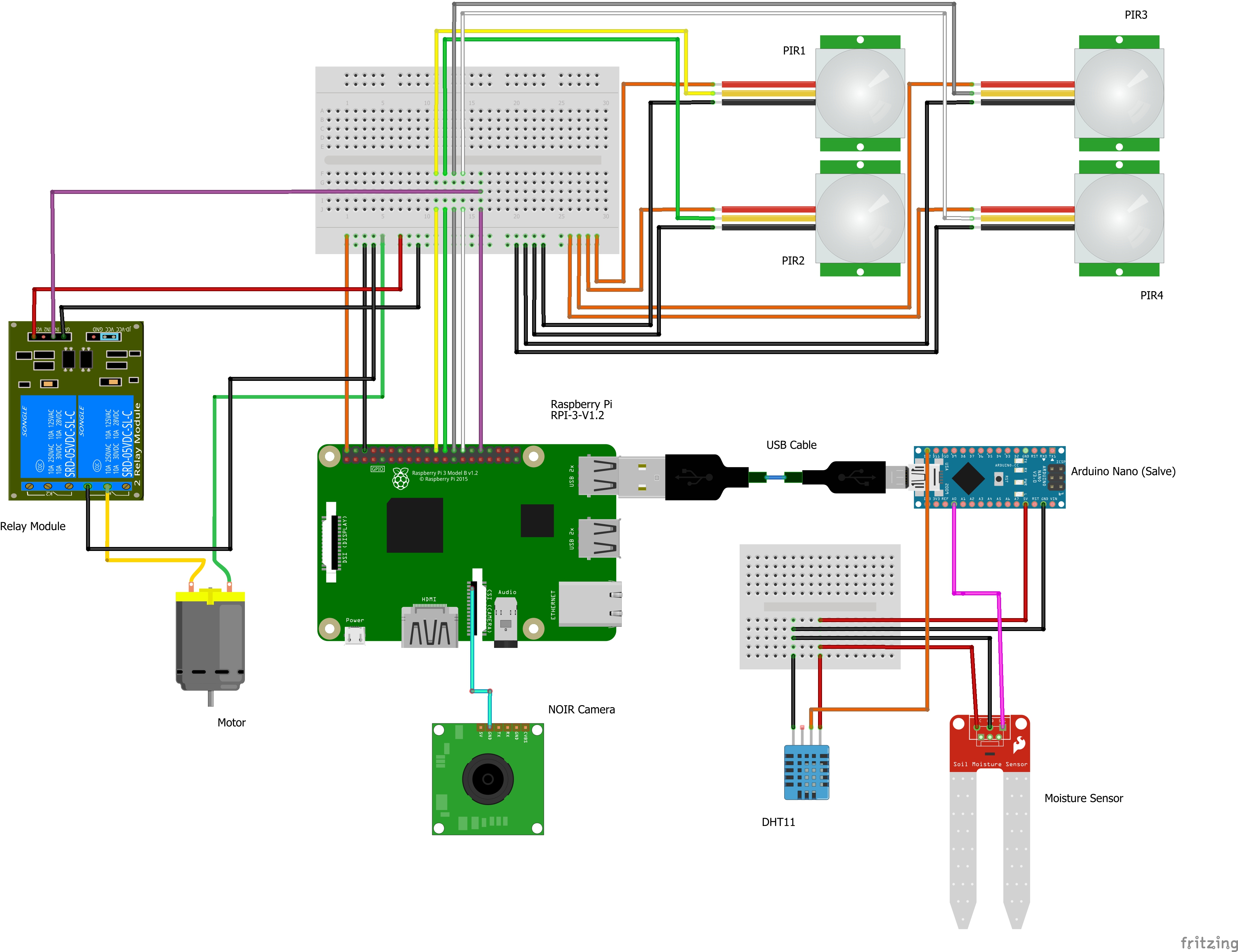
Hardware
Pin Configuration (Default)
-
Raspberry Pi
GPIO Device Use Mode 12Relay To Switch on/off Relay OUT 25PIR1 Motion Detection IN 8PIR2 Motion Detection IN 7PIR3 Motion Detection IN 1PIR3 Motion Detection IN -
Arduino nano
Pin Device Device pin Mode A0Moisture Sensor* Analog Out IN D12DHT11 Signal IN * For multiple sensors use differnet Analog pins -
Connect the Pi camera to CSI Port
-
Use SSH to access the terminal and run the Python Code
-
Connect all the
Vdd'sandGND'sto 5V and GND (or as per instructions given in spec sheet)
Note
-
To get the USB Device ID, Use
ls /dev/tty*Most Probably the Value will be
/dev/ttyUSB0 -
Sensor data should be sent in the following pattern
mositure1,moisture2,moisture3, .... ,moistureN, Temperature,Humidity
ex : 55.29,52.59,32.5,65.26
1 maintainer

Metadata
1 maintainer
Release files for AgroClient 1.1.3
For a detailed explanation of source distributions (sdists) and built distributions (wheels), please see the package formats documentation.
Source distribution (sdist)
| File | Size | Uploaded | Provenance | |
|---|---|---|---|---|
| AgroClient-1.1.3.tar.gz | 5.4 kB | Without provenance | Details |
Built distribution (wheel)
| File | Interpreter | ABI | Platform | Reset |
|---|---|---|---|---|
| AgroClient-1.1.3-py3-none-any.whl | Python 3 | none | any | Details |
Total release size: 24.4 kB
Release files / AgroClient-1.1.3.tar.gz
| Download URL | AgroClient-1.1.3.tar.gz |
|---|---|
| Size | 5.4 kB |
| Tags | Source |
|
SHA-256 checksum How to use checksums |
7aa787aff23b915d3c01576644bee5d4fff1df6574e255ad21aa57317faa060a
|
|
BLAKE2b-256 checksum How to use checksums |
cce7c48d1096d837e74013dea44d7357022480aea733eaca8d5ee690e5cc6297
|
| Upload date | |
|
Uploaded using Trusted Publishing? What is trusted publishing? |
No |
| Uploaded via |
twine/3.4.1 importlib_metadata/4.5.0 pkginfo/1.7.0 requests/2.25.1 requests-toolbelt/0.9.1 tqdm/4.61.1 CPython/3.7.10
|
Release files / AgroClient-1.1.3-py3-none-any.whl
| Download URL | AgroClient-1.1.3-py3-none-any.whl |
|---|---|
| Size | 19.0 kB |
| Tags | Python 3 |
|
SHA-256 checksum How to use checksums |
d4d3dfb55540eef65334ecf4f4762ee35ca229fb855ddef97f401221dd6acdbe
|
|
BLAKE2b-256 checksum How to use checksums |
fba83c91d87d5245af7f823d4dd68d264888f995142512e0e05062101f6da5c0
|
| Upload date | |
|
Uploaded using Trusted Publishing? What is trusted publishing? |
No |
| Uploaded via |
twine/3.4.1 importlib_metadata/4.5.0 pkginfo/1.7.0 requests/2.25.1 requests-toolbelt/0.9.1 tqdm/4.61.1 CPython/3.7.10
|
Security for AgroClient 1.1.3
Provenance
Provenance describes where a file came from. On PyPI, provenance is shared via attestations, which provide a verifiable record of the build or publishing details. View details, limitations and caveats.
No provenance found
None of the files in this release were uploaded with provenance metadata.
A note on package security
PyPI is a repository for distributing packages, not a service for auditing them. While third-party security researchers and our staff do their best to detect and remove malicious packages, PyPI cannot guarantee the quality, security or suitability of any given package.
To learn more about protecting yourself from malicious actors, visit our package security documentation.














