
aiclient-llm




A minimal, unified, and resilient Python client for modern LLMs.
Supports OpenAI, Anthropic (Claude 3), Google (Gemini), and xAI (Grok) with a single, consistent interface.
Documentation 📚
Key Features
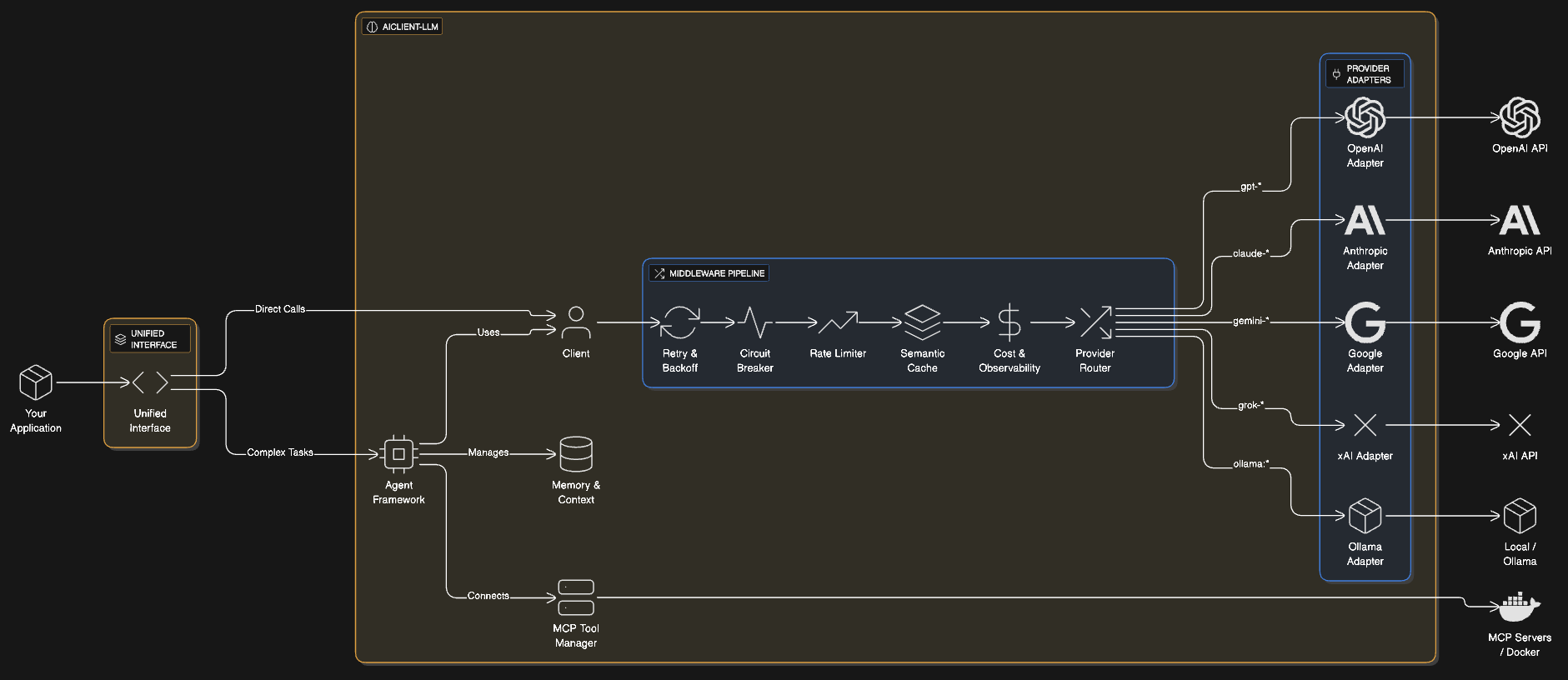
- 🦄 Unified API: Works with OpenAI, Anthropic, Google Gemini, and Ollama.
- ⚡ Streaming Support: Real-time responses with a simple iterator interface.
- 👁️ Multimodal (Vision): Send images (paths, URLs, base64) to vision-capable models.
- 🚀 Prompt Caching: Native support for Anthropic Prompt Caching headers.
- 🏗️ Structured Outputs: Native strict JSON Schema support for OpenAI.
- 🛡️ Resilient: Circuit Breakers, Rate Limiters, and automatic retries.
- 🔭 Observability: Tracing and OpenTelemetry hooks.
- 🤖 Agent Primitives: Built-in ReAct loop for tool-using agents.
- 🔌 Model Context Protocol (MCP): Connect to 16K+ external tools (GitHub, Postgres, filesystem).
- 📊 Middleware: Inspect requests, track costs, or log data.
- 🧠 Memory Management: Built-in conversation history with token-aware truncation
- 🧪 Testing Utilities: Mock providers for deterministic unit tests
- 📦 Batch Processing: Efficiently process thousands of requests concurrently
- 🛡️ Type-Safe Errors: Specific exception types for better error handling
Architecture at a Glance
Installation
pip install aiclient-llm
Quick Start
Basic Chat
from aiclient import Client

client = Client(
    openai_api_key="sk-...",
    anthropic_api_key="sk-ant-..."
)

# Call OpenAI
response = client.chat("gpt-4o").generate("Hello!")
print(response.text)

# Call Claude
response = client.chat("claude-3-opus-20240229").generate("Hello!")
print(response.text)
Multimodal (Vision)
from aiclient.data_types import UserMessage, Text, Image

msg = UserMessage(content=[
    Text(text="What's in this image?"),
    Image(path="./image.png") # Handles base64 automatically
])

response = client.chat("gpt-4o").generate([msg])
print(response.text)
Agents (Tool Use)
from aiclient.agent import Agent

def get_weather(location: str):
    return "Sunny in " + location

agent = Agent(
    model=client.chat("gpt-4o"),
    tools=[get_weather]
)

print(agent.run("Weather in SF?"))
MCP Integration 🔌
Connect to external tools using the Model Context Protocol.
agent = Agent(
    model=client.chat("gpt-4o"),
    mcp_servers={
        "filesystem": {
            "command": "npx",
            "args": ["-y", "@modelcontextprotocol/server-filesystem", "./workspace"]
        }
    }
)

# Agent can now use file system tools!
print(agent.run("List all Python files in the current directory"))
Local LLMs (Ollama) 🏠
Use the provider:model syntax to route requests to local models (e.g., via Ollama).
# Connects to http://localhost:11434/v1 by default
client.chat("ollama:llama3").generate("Why is the sky blue?")

# Connect to custom URL (e.g. LMStudio)
client = Client(ollama_base_url="http://localhost:1234/v1")
client.chat("ollama:mistral").generate("Hi")
Streaming
for chunk in client.chat("gpt-4o").stream("Write a poem"):
    print(chunk.text, end="", flush=True)
Configuration
Embeddings
# Generate embeddings using the unified interface
vector = await client.embed("Hello world", model="text-embedding-3-small")

# Batch generation
vectors = await client.embed_batch(["Hello", "World"], model="text-embedding-3-small")
Structured Outputs
from pydantic import BaseModel

class Character(BaseModel):
    name: str
    class_type: str

# Guaranteed JSON response
char = client.chat("gpt-4o").generate(
    "Create a wizard",
    response_model=Character
)
print(char.name)
Production Resilience 🛡️
Circuit Breakers
Prevent cascade failures when a provider is down.
from aiclient import CircuitBreaker

cb = CircuitBreaker(failure_threshold=5, recovery_timeout=60)
client.add_middleware(cb)
Rate Limiters
Respect API rate limits automatically.
from aiclient import RateLimiter

rl = RateLimiter(requests_per_minute=60)
client.add_middleware(rl)
Fallback Chains
Automatically ensure high availability.
from aiclient import FallbackChain

fallback = FallbackChain(client, ["gpt-4o", "claude-3-opus", "gemini-1.5-pro"])
response = fallback.generate("Critical query")
Observability 🔭
Cost Tracking
Track spending in real-time across all providers.
from aiclient import CostTrackingMiddleware

tracker = CostTrackingMiddleware()
client.add_middleware(tracker)

# ... after requests ...
print(f"Total Cost: ${tracker.total_cost_usd:.4f}")
Logging & OpenTelemetry
Full visibility into your AI calls.
from aiclient import LoggingMiddleware, OpenTelemetryMiddleware

# Redact API keys from logs automatically
client.add_middleware(LoggingMiddleware(redact_keys=True))

# Export traces to Jaeger/Zipkin/etc
client.add_middleware(OpenTelemetryMiddleware(service_name="my-app"))
Advanced Features
Semantic Caching
Save money by caching responses based on meaning.
from aiclient import SemanticCacheMiddleware

cache = SemanticCacheMiddleware(embedder=my_embedder, threshold=0.9)
client.add_middleware(cache)
Batch Processing
Efficiently process thousands of requests.
results = await client.batch(
    ["Q1", "Q2", "Q3"],
    process_func,
    concurrency=10
)
Testing 🧪
Write deterministic unit tests without API keys.
from aiclient import MockProvider

def test_feature():
    provider = MockProvider()
    provider.add_response("Mocked AI response")

    # Client will use this response instead of hitting API
    response = provider.parse_response({})
    assert response.text == "Mocked AI response"
Community & Support 🤝
Contributing
We welcome contributions! Please see our Contributing Guide for details on how to set up the dev environment and submit PRs.
- Found a bug? Open an Issue
- Have a feature request? Start a Discussion
Support the Project
If aiclient-llm helps you build something cool, consider buying me a coffee or connecting on LinkedIn! ☕


License 📄
This project is licensed under the Apache 2.0 License - see the LICENSE file for details.
1 maintainer

Metadata
1 maintainer
Release files for aiclient-llm 1.0.0
For a detailed explanation of source distributions (sdists) and built distributions (wheels), please see the package formats documentation.
Source distribution (sdist)
| File | Size | Uploaded | Provenance | Actions |
|---|---|---|---|---|
| aiclient_llm-1.0.0.tar.gz | 745.6 kB | Without provenance | Details for aiclient_llm-1.0.0.tar.gz |
Built distribution (wheel)
| File | Interpreter | ABI | Platform | Actions Reset |
|---|---|---|---|---|
| aiclient_llm-1.0.0-py3-none-any.whl | Python 3 | none | any | Details for aiclient_llm-1.0.0-py3-none-any.whl |
Total release size: 794.5 kB
Release files / aiclient_llm-1.0.0.tar.gz
| Download URL | aiclient_llm-1.0.0.tar.gz |
|---|---|
| Size | 745.6 kB |
| Tags | Source |
|
SHA-256 checksum How to use checksums |
6ad83c2e32a5c91d9223303ddf2367f7adedd3d5f68b27f1c9e824497650897d
|
|
BLAKE2b-256 checksum How to use checksums |
1b22aa0d474581da7ec7394de11d15b3adda1fb13b8cf57b4d3aad99cb92b92e
|
| Upload date | |
|
Uploaded using Trusted Publishing? What is trusted publishing? |
No |
| Uploaded via |
twine/6.2.0 CPython/3.11.14
|
Release files / aiclient_llm-1.0.0-py3-none-any.whl
| Download URL | aiclient_llm-1.0.0-py3-none-any.whl |
|---|---|
| Size | 48.8 kB |
| Tags | Python 3 |
|
SHA-256 checksum How to use checksums |
63a0b039490c4e5c5bf40b22bde8e798cbe194b755e6b69b80600ad65fef46b6
|
|
BLAKE2b-256 checksum How to use checksums |
10da76ecb59ff0771c9b0332fea882c6322b17a3bf80766413c4beb50cbd5737
|
| Upload date | |
|
Uploaded using Trusted Publishing? What is trusted publishing? |
No |
| Uploaded via |
twine/6.2.0 CPython/3.11.14
|
Security for aiclient-llm 1.0.0
Provenance
Provenance describes where a file came from. On PyPI, provenance is shared via attestations, which provide a verifiable record of the build or publishing details. View details, limitations and caveats.
No provenance found
None of the files in this release were uploaded with provenance metadata.
A note on package security
PyPI is a repository for distributing packages, not a service for auditing them. While third-party security researchers and our staff do their best to detect and remove malicious packages, PyPI cannot guarantee the quality, security or suitability of any given package.
To learn more about protecting yourself from malicious actors, visit our package security documentation.














