
Claude AI-API ( Unofficial )
This project provides an unofficial API for Claude AI, allowing users to access and interact with Claude AI .
Current Version == 1.0.12
Table of contents
- Use Cases
- Prerequisites
- Installation
- Usage
- List All Conversations
- Send Message
- Send Message with attachment
- Delete Conversation
- Chat Conversation History
- Create New Chat
- Reset All Conversations
- Rename Chat
- Disclaimer
Use Cases
1. Python Console ChatBot ( Check in usecases folder for sample console chatbot )

2. Discord Chatbot

3. Many more can be done....
Prerequisites
To use this API, you need to have the following:
Python installed on your system requests library installed
pip install requests
Installation
To use the Claude AI Unofficial API, you can either clone the GitHub repository or directly download the Python file.
Terminal :
pip install aioclaude-api
or
Clone the repository:
git clone https://github.com/AmoreForever/Claude-API.git
Usage
Import the claude_api module in your Python script:
from claude_api import Client
-
Next, you need to create an instance of the Client class by providing your Claude AI cookie:
-
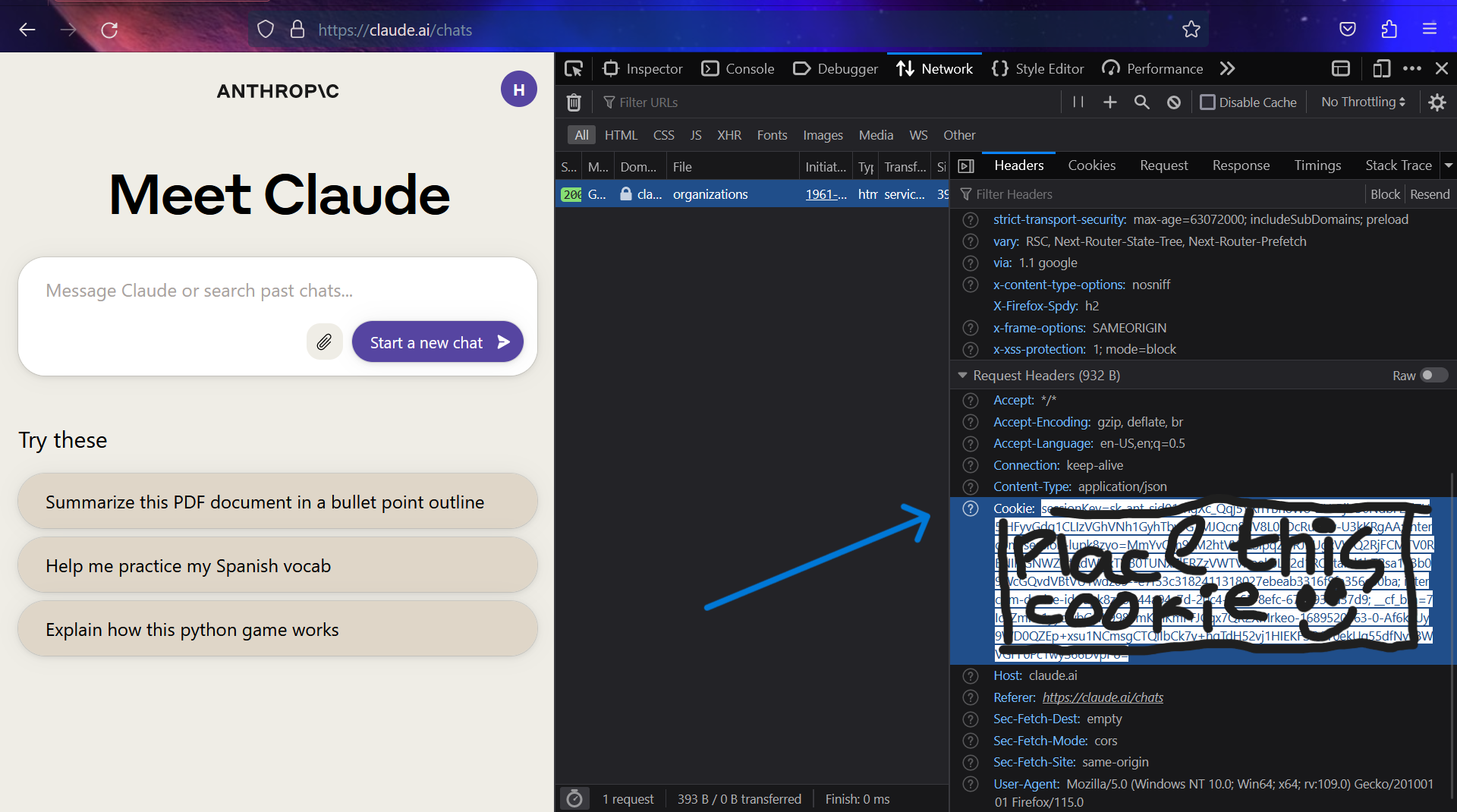
You can get cookie from the browser's developer tools network tab ( see for any claude.ai requests check out cookie ,copy whole value ) or storage tab ( You can find cookie of claude.ai ,there will be four values )
-
(Checkout below image for the format of cookie ,It is Better to Use from network tab to grab cookie easily )
cookie = os.environ.get('cookie')
claude_api = Client(cookie)
List All Conversations
To list all the conversation Id's you had with Claude , you can use the list_all_conversations method:
conversations = claude_api.list_all_conversations()
for conversation in conversations:
    conversation_id = conversation['uuid']
    print(conversation_id)
Send Message
To send a message to Claude, you can use the send_message method. You need to provide the prompt and the conversation ID:
prompt = "Hello, Claude!"
conversation_id = "<conversation_id>" or claude_api.create_new_chat()['uuid']
response = claude_api.send_message(prompt, conversation_id)
print(response)
Send Message with attachment
You can send any type of attachment to claude to get responses using attachment argument in send_message(). Note: Claude currently supports only some file types.
prompt = "Hey,Summarize me this document.!"
conversation_id = "<conversation_id>" or claude_api.create_new_chat()['uuid']
response = claude_api.send_message(prompt, conversation_id,attachment="path/to/file.pdf")
print(response)
Delete Conversation
To delete a conversation, you can use the delete_conversation method:
conversation_id = "<conversation_id>"
deleted = claude_api.delete_conversation(conversation_id)
if deleted:
    print("Conversation deleted successfully")
else:
    print("Failed to delete conversation")
Chat Conversation History
To get the chat conversation history, you can use the chat_conversation_history method:
conversation_id = "<conversation_id>"
history = claude_api.chat_conversation_history(conversation_id)
print(history)
Create New Chat
To create a new chat conversation (id), you can use the create_new_chat method:
new_chat = claude_api.create_new_chat()
conversation_id = new_chat['uuid']
print(conversation_id)
Reset All Conversations
To reset all conversations, you can use the reset_all method:
reset = claude_api.reset_all()
if reset:
    print("All conversations reset successfully")
else:
    print("Failed to reset conversations")
Rename Chat
To rename a chat conversation, you can use the rename_chat method:
conversation_id = "<conversation_id>"
title = "New Chat Title"
renamed = claude_api.rename_chat(title, conversation_id)
if renamed:
    print("Chat conversation renamed successfully")
else:
    print("Failed to rename chat conversation")
Disclaimer
This project provides an unofficial API for Claude AI and is not affiliated with or endorsed by Claude AI or Anthropic. Use it at your own risk.
Please refer to the official Claude AI documentation[https://claude.ai/docs] for more information on how to use Claude AI.
1 maintainer

Release files for aioclaude-api 1.0.22
For a detailed explanation of source distributions (sdists) and built distributions (wheels), please see the package formats documentation.
Source distribution (sdist)
| File | Size | Uploaded | |
|---|---|---|---|
| aioclaude-api-1.0.22.tar.gz | 7.1 kB | Details |
Release files / aioclaude-api-1.0.22.tar.gz
| Download URL | aioclaude-api-1.0.22.tar.gz |
|---|---|
| Size | 7.1 kB |
| Tags | Source |
|
SHA-256 checksum How to use checksums |
df29ab02e10f93d465a15f0a254f236fffcf60a9506cc2a900f076446b854ab8
|
|
BLAKE2b-256 checksum How to use checksums |
5a4a149e2168e5256ca5e384f3613eee54d5a2899e664e71aec6a18c1f4db59f
|
| Upload date | |
|
Uploaded using Trusted Publishing? What is trusted publishing? |
No |
| Uploaded via |
twine/4.0.2 CPython/3.11.4
|














