
AiShell 🤖




A simple Python code that connects to OpenAI's ChatGPT and executes the returned results.
If you are interested in these projects, please checkout AiShell's brother project: YGK-a. YGK-a is a client for the ChatGPT from your terminal, and also supports unix/linux pipelines.
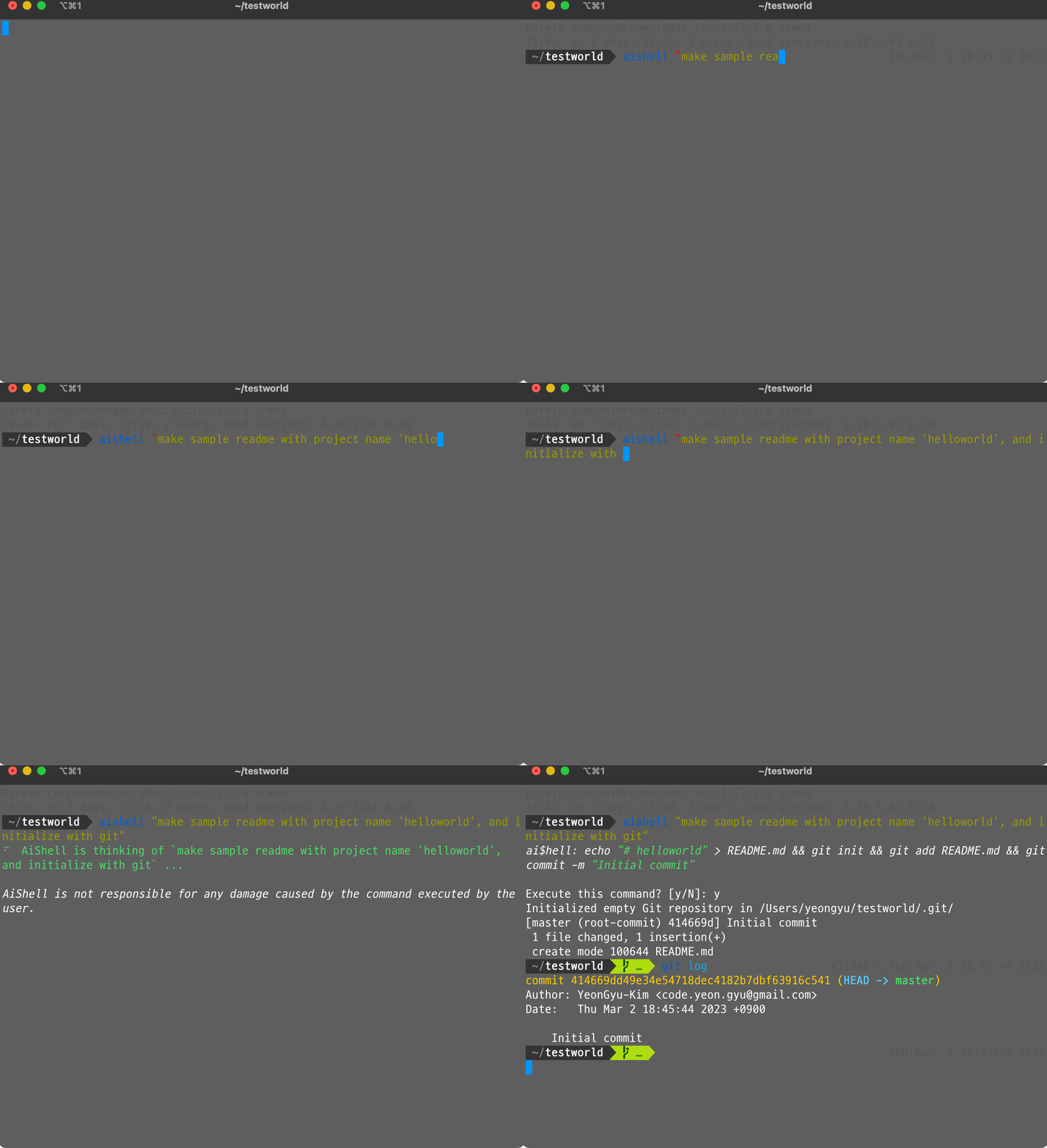
Demo
Key Features 💡
- Interact with your computer using natural language
- Automatically executes the command from the response of ChatGPT
- Good for complex tasks like handling Git and extracting tar files
- No need to search StackOverflow for commands,
AiShellhas got you covered AiShellsimplifies the process of setting up and retrieving tokens or API keys.- With
AiShell, you don't have to worry about the technical details. - Simply install
AiShell, execute it, and you're ready to go!
- With
Prerequisites 📚
- Python 3.9+
- ChatGPT Account (or OpenAI Account)
Getting Started 🚀
To begin using AiShell, start by installing it with pip:
pip install aishell
Once you've installed AiShell, you can start using it right away.
For example, to print "Hello World" using AiShell, enter the following command:
aishell 'print Hello World'
Advanced Settings 🛠
By default, AiShell is configured to use the reverse-engineered ChatGPT client and retrieve login information from your browser, so you don't need to configure anything to use AiShell. However, for those who want to use different models with an OpenAI API Key, you can configure it as follows:
- Create an account on OpenAI.
- Go to https://platform.openai.com/account/api-keys and copy your API key.
- Modify or create the
~/.ygka_openai_config.jsonfile as follows:
{
    ...
    "language_model": "official_chatgpt",
    "openai_api_key": "<your OpenAI API key>"
}
Here, you can add your OpenAI API key. This will enable AiShell to use the official chatgpt api and the API key when executing commands.
Contributions 💬
Feel free to contribute to AiShell by adding more functionality or fixing bugs.
1 maintainer

Metadata
1 maintainer
Release files for aishell 2023.4.16.post1
For a detailed explanation of source distributions (sdists) and built distributions (wheels), please see the package formats documentation.
Source distribution (sdist)
| File | Size | Uploaded | |
|---|---|---|---|
| aishell-2023.4.16.post1.tar.gz | 5.1 kB | Details |
Built distribution (wheel)
| File | Interpreter | ABI | Platform | Reset |
|---|---|---|---|---|
| aishell-2023.4.16.post1-py3-none-any.whl | Python 3 | none | any | Details |
Total release size: 12.1 kB
Release files / aishell-2023.4.16.post1.tar.gz
| Download URL | aishell-2023.4.16.post1.tar.gz |
|---|---|
| Size | 5.1 kB |
| Tags | Source |
|
SHA-256 checksum How to use checksums |
13fbd6c3efa1309e43637f5f569a061f0fe12bbe48cdb81079c6cbf496ec1427
|
|
BLAKE2b-256 checksum How to use checksums |
b4e1b0bc55f23995b4798fe101eff6f82e8f6d08ea60af207452bb774d3b24a2
|
| Upload date | |
|
Uploaded using Trusted Publishing? What is trusted publishing? |
No |
| Uploaded via |
poetry/1.4.2 CPython/3.9.16 Linux/5.15.0-1035-azure
|
Release files / aishell-2023.4.16.post1-py3-none-any.whl
| Download URL | aishell-2023.4.16.post1-py3-none-any.whl |
|---|---|
| Size | 7.1 kB |
| Tags | Python 3 |
|
SHA-256 checksum How to use checksums |
1d3f88306d0cb4dde340668c583ca3470869e80bfef7e36f1cb722cb0ccbebe0
|
|
BLAKE2b-256 checksum How to use checksums |
e483c4f5e42946a7ca03845695163b6e72c43f1dc8c75ea2a9c65e30efa5b829
|
| Upload date | |
|
Uploaded using Trusted Publishing? What is trusted publishing? |
No |
| Uploaded via |
poetry/1.4.2 CPython/3.9.16 Linux/5.15.0-1035-azure
|














