

FreeMoCap Blender Addon






This is a Blender add-on for loading and visualizing the output of the freemocap software.
The core functionality is run automatically at the end of a standard freemocap recording session, but this add-on allows for manual loading and visualization of the pre-processed freemocap recording data in Blender.
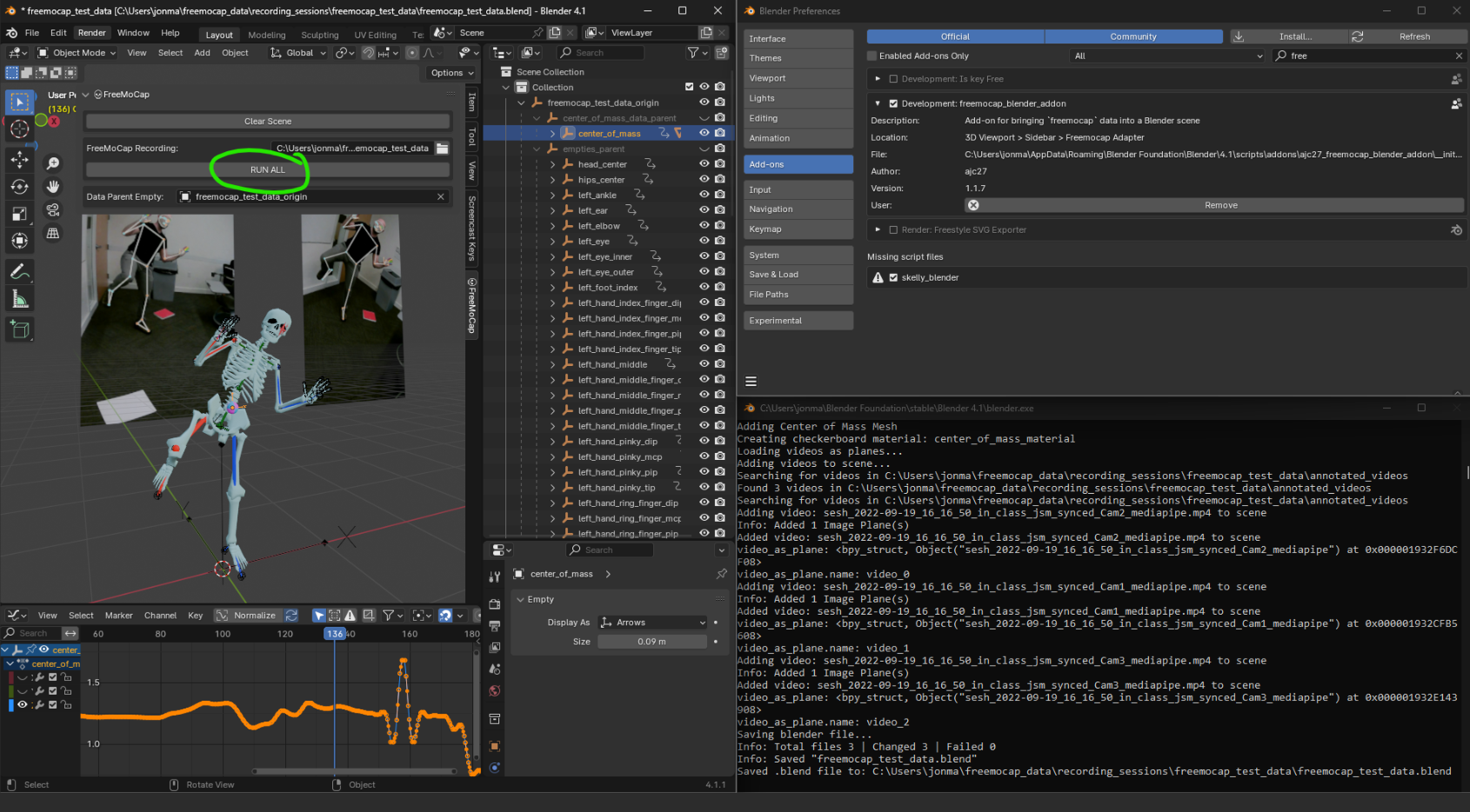
Installation
- Download the
freemocap_blender_addon.zip(from the latest release) - Open Blender
Edit>Preferences>Add-ons>Install...- Select the
freemocap_blender_addon.zip(likely from yourDownloads/folder) - Verify installation by searching
freemocapin the addon tab and ensuring the box next tofreemocap_blender_addonis checked
Usage
NOTE - We strongly recommend activating your System Console before running this addon, as it will show oodles of valuable information about the underlying process. On Windows, you can toggle this console on from the
Windowmenu in a running instance of Blender. On Mac/Linux, you must launch blender from a Terminal by typingblenderinto a terminal after install.
Pre-requisites - Data!
You must have should have a fully processed freemocap recording folder on your computer somewhere.
If you are processing a recording from the freemocap software, it will probably in in [path_to_your_home_directory]/freemocap_data/recording_sessions/[recording_name]
If you have downloaded and processed the test data from the Data dropdown in the menu bar of the freemoap software, the addon should detect that automatically and set that path as the default.
You may download a pre-processed freemocap_test_data recording on the freemocap==1.3.0 release notes:
Running the skeleton building pipeline
- In the
3D viewportwindow, pressnto show the sidebar - Select the
💀FreeMoCaptab - Set the path to the FreeMoCap recording you want to load (path should point to the directory that contains the
output_data/andannotated_videos/folders) - Press the
RUN_ALL(keep an eye on the terminal window for useful output)
💀✨ Time for skeletons \o/
If all went well, there should now be a friendly spooky skeleton in your scene along with the annotated images-as-planes, and a new .blend file saved to the specified recording folder named [recording_folder_name].blend (i.e. the same way it comes out of a standard freemocap recording session)
Considerations:
- The rig has a TPose as rest pose for easier retargeting.
- For best results, your recording should include a few seconds where the particapant is standing still with their feet clearly visible flat on the ground.
- If the data comes out rotated relative to gravity, it can be globally manipulated using the parent
emptyobject (usually named[recording_name]_parent_empty) in the scene. - This is a Work-In-Progress with significant refactors/overhauls planned for the near future. You will always be able to re-process old freemocap recordings using new versions of software, but things like naming conventions, armature configuration, etc may change without notice! Save your work often and back up your data often :D
Special Thanks
Special thanks to @ajc27-git for the original work developing this addon and supporting the freemocap community! Check out their work at: https://www.youtube.com/@fluxrenders
Join the FreeMoCap Discord Community for support, feedback, and collaboration!
Click this link to join the our community Discord server - https://discord.gg/XpRQJnqZxf
2 maintainers


Metadata
2 maintainers
Release files for ajc27-freemocap-blender-addon 2026.4.1041
For a detailed explanation of source distributions (sdists) and built distributions (wheels), please see the package formats documentation.
Source distribution (sdist)
| File | Size | Uploaded | Provenance | Actions |
|---|---|---|---|---|
| ajc27_freemocap_blender_addon-2026.4.1041.tar.gz | 2.7 MB | Without provenance | Details for ajc27_freemocap_blender_addon-2026.4.1041.tar.gz |
Built distribution (wheel)
| File | Interpreter | ABI | Platform | Actions Reset |
|---|---|---|---|---|
| ajc27_freemocap_blender_addon-2026.4.1041-py3-none-any.whl | Python 3 | none | any | Details for ajc27_freemocap_blender_addon-2026.4.1041-py3-none-any.whl |
Total release size: 5.7 MB
Release files / ajc27_freemocap_blender_addon-2026.4.1041.tar.gz
| Download URL | ajc27_freemocap_blender_addon-2026.4.1041.tar.gz |
|---|---|
| Size | 2.7 MB |
| Tags | Source |
|
SHA-256 checksum How to use checksums |
83b0a138c29259d8b764f76409b3886b777425209721c3f97a09ae7f4ba33b08
|
|
BLAKE2b-256 checksum How to use checksums |
ef5528d142d468a9f71cc813b93b270326c3d45143137a576c50721840e28ac3
|
| Upload date | |
|
Uploaded using Trusted Publishing? What is trusted publishing? |
No |
| Uploaded via |
twine/6.2.0 CPython/3.9.25
|
Release files / ajc27_freemocap_blender_addon-2026.4.1041-py3-none-any.whl
| Download URL | ajc27_freemocap_blender_addon-2026.4.1041-py3-none-any.whl |
|---|---|
| Size | 3.0 MB |
| Tags | Python 3 |
|
SHA-256 checksum How to use checksums |
70666316b41d64c1aaba4364f9acb4478e6bc9ca76e8bde5a57b62755f3298ef
|
|
BLAKE2b-256 checksum How to use checksums |
8db7581c61dcff3520ce49ec2e5c3390f63714a85ea9741dae2c89e689425ed6
|
| Upload date | |
|
Uploaded using Trusted Publishing? What is trusted publishing? |
No |
| Uploaded via |
twine/6.2.0 CPython/3.9.25
|
Security for ajc27-freemocap-blender-addon 2026.4.1041
Provenance
Provenance describes where a file came from. On PyPI, provenance is shared via attestations, which provide a verifiable record of the build or publishing details. View details, limitations and caveats.
No provenance found
None of the files in this release were uploaded with provenance metadata.
A note on package security
PyPI is a repository for distributing packages, not a service for auditing them. While third-party security researchers and our staff do their best to detect and remove malicious packages, PyPI cannot guarantee the quality, security or suitability of any given package.
To learn more about protecting yourself from malicious actors, visit our package security documentation.














