
alchemy-viz
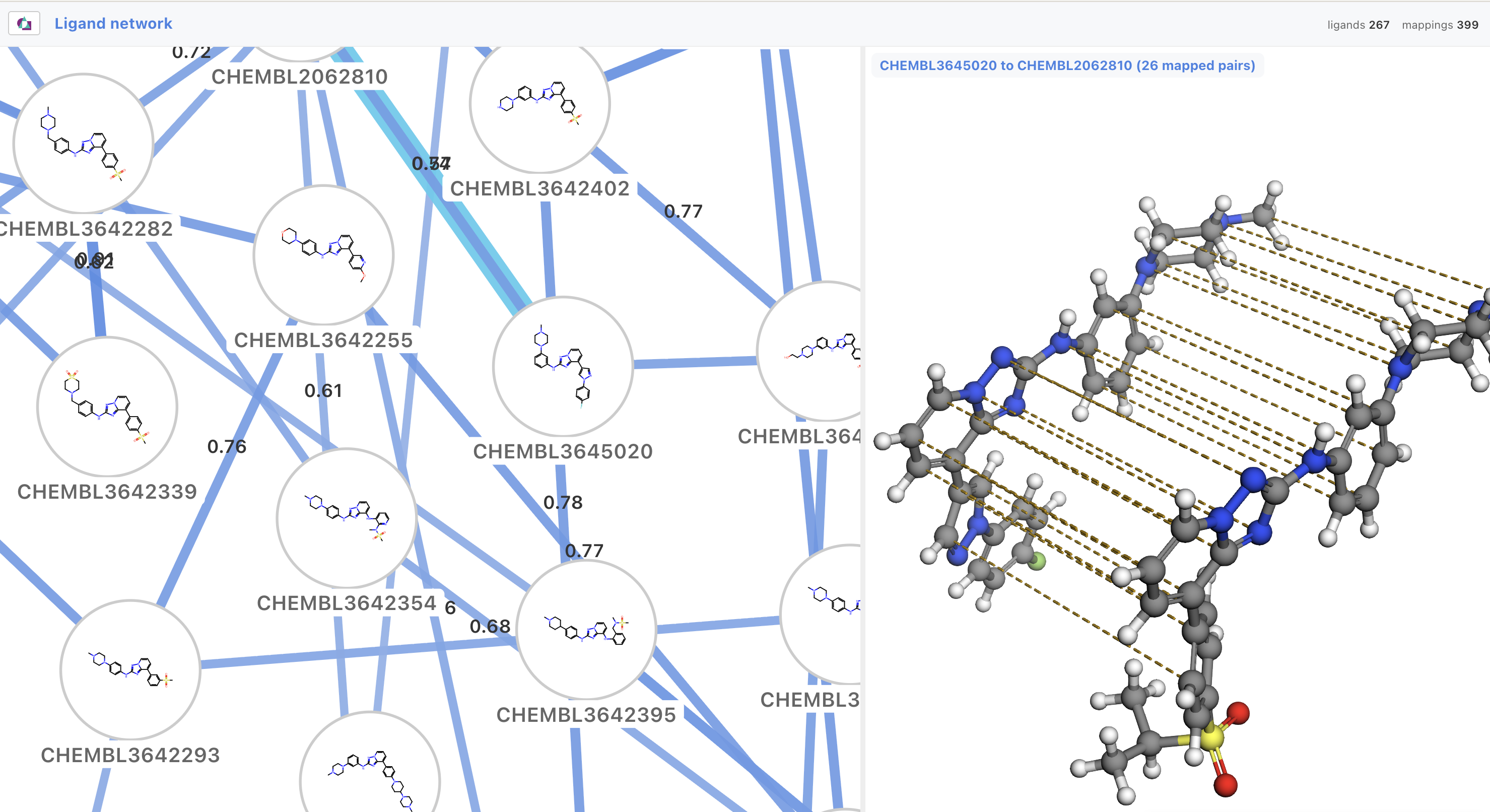
Browser-based visualizations for OpenFE and gufe objects: ligands, proteins, atom mappings, ligand networks and alchemical campaigns.
Install
conda activate my-openfe-env
pip install "alchemy-viz[notebook]"   # the notebook extra is optional
gufe must be installed from conda-forge, not pip.
Use
From the shell, alchemy-viz accepts as inputs anything from openfe plan-rbfe-network:
alchemy-viz network_setup/network_setup.json -o campaign.html
alchemy-viz network_setup/ligand_network.graphml     # writes <input>.html beside it
alchemy-viz ligand.json -o -                         # or stdout
One self-contained HTML file is created.
From Python, on the object itself:
from alchemy_viz import view, to_html

view(network)        # a LigandNetwork, drawn in a notebook cell
view(ligand)         # a SmallMoleculeComponent, ProteinComponent, ChemicalSystem...
html = to_html(obj)  # the same page as a string; writes nothing
view() takes a live gufe object or an alchemy-viz payload dict.
Embedding into a webpage
Embed the visualization module directly into your own websites. Until the npm package is published, load the built bundle straight from this repository via jsDelivr, which serves files from public GitHub repos with a JavaScript MIME type:
<script type="module" src="https://cdn.jsdelivr.net/gh/omsf/alchemy-viz@main/python/alchemy_viz/_assets/alchemy-viz.js"></script>
<alchemy-view id="view" style="width:100%;height:600px"></alchemy-view>
<script type="module">
  const payload = await (await fetch("payload.json")).json();
  document.getElementById("view").payload = payload;
</script>
Replace @main with a tag (e.g. @v0.1.4) or commit SHA to pin a version.
Documentation
| Doc | Description |
|---|---|
cli.md |
alchemy-viz object.json - input formats, options, errors |
openfe.md |
view() on your own objects, a network_setup/ directory, planning in Python |
notebooks.md |
how the notebook integration works |
views.md |
|
embedding.md |
mounting the bundle in a page of your own |
troubleshooting.md |
blank cells, missing depictions, payloads that will not draw |
Two notebooks: demo is basic usage while gallery shows the examples as images so you can see the outputs in github
Development
Requires pixi.
git clone https://github.com/omsf/alchemy-viz.git
cd alchemy-viz
pixi install
pixi run dev     # vite: /gallery.html, /gallery-all.html, /parity.html, / (dropzone)
pixi run test    # both suites
pixi run ci      # what CI runs: lint, tests, generated-artifact freshness
Adding a view
- Add a
$deftoschema/alchemy-viz.schema.json, named exactly for thetypeconst it declares - both validators find a branch by that name. - Build the payload in
python/alchemy_viz/(components.py,networks.pyoralchemical.py) and add it to theisinstancedispatch. Ask the gufe object to serialize itself; never reach into its JSON. pixi run types.- Write
ts/src/views/<type>.ts: a class extendingAlchemyElement<Payload>with onerenderView(host, payload), returning{ onResize, cleanup }if it owns anything that must be released. - Add the tag to
VIEW_TAGSints/src/alchemy-view.tsand an import ints/src/index.ts. pixi run examples, add mutation rows, thenpixi run build && pixi run test.- Add a row to the table in
docs/views.mdand aNOTESentry inscripts/make_gallery.py, thenpixi run gallery. Neither is checked by CI, so a new view is invisible in the docs until this step.
A declared type with no view renders as "no visualization for X yet", which is correct behaviour; a view whose type the schema does not declare fails the tests.
Releasing
setuptools-scm derives the version from the git tag, so tagging is the release:
git tag -a v0.1.0 -m "v0.1.0" && git push origin v0.1.0
Support
This work was supported by the National Science Foundation under Grant No. 2303740, via the Open Molecular Science Foundation.
Licence
MIT.
1 maintainer

Metadata
1 maintainer
Release files for alchemy-viz 0.1.5
For a detailed explanation of source distributions (sdists) and built distributions (wheels), please see the package formats documentation.
Source distribution (sdist)
| File | Size | Uploaded | Provenance | |
|---|---|---|---|---|
| alchemy_viz-0.1.5.tar.gz | 167.3 kB | With provenance | Details |
Built distribution (wheel)
| File | Interpreter | ABI | Platform | Reset |
|---|---|---|---|---|
| alchemy_viz-0.1.5-py3-none-any.whl | Python 3 | none | any | Details |
Total release size: 313.5 kB
Release files / alchemy_viz-0.1.5.tar.gz
| Download URL | alchemy_viz-0.1.5.tar.gz |
|---|---|
| Size | 167.3 kB |
| Tags | Source |
|
SHA-256 checksum How to use checksums |
f0ed032327d540e7fa6989b34b3ea1bd688354921718c82a216206a7222fca1e
|
|
BLAKE2b-256 checksum How to use checksums |
41ceb3bcc22596212fe83fdfcd279ed0498b75e1df2a4ac00a112bfc60e9b9ce
|
| Upload date | |
|
Uploaded using Trusted Publishing? What is trusted publishing? |
Yes |
| Uploaded via |
twine/7.0.0 CPython/3.13.14
|
Provenance
Provenance describes where a file came from. On PyPI, provenance is shared via attestations, which provide a verifiable record of the build or publishing details. View details, limitations and caveats.


PyPI Publish Attestation
PyPI verified that this artifact, at this checksum, originated from the publisher listed below.
Signed by GitHub Actions, verified by PyPI on Oct 13, 2026.
Transparency logRelease files / alchemy_viz-0.1.5-py3-none-any.whl
| Download URL | alchemy_viz-0.1.5-py3-none-any.whl |
|---|---|
| Size | 146.2 kB |
| Tags | Python 3 |
|
SHA-256 checksum How to use checksums |
cee299d003424c99e92ab2e95a924340f5fecf86cc78ade0ee982370ecf55526
|
|
BLAKE2b-256 checksum How to use checksums |
3691ae833c762e2fa745b198758ccf012386ac8b0448f4e8c348189d1c486132
|
| Upload date | |
|
Uploaded using Trusted Publishing? What is trusted publishing? |
Yes |
| Uploaded via |
twine/7.0.0 CPython/3.13.14
|
Provenance
Provenance describes where a file came from. On PyPI, provenance is shared via attestations, which provide a verifiable record of the build or publishing details. View details, limitations and caveats.
PyPI Publish Attestation
PyPI verified that this artifact, at this checksum, originated from the publisher listed below.
Signed by GitHub Actions, verified by PyPI on Oct 13, 2026.
Transparency logSecurity for alchemy-viz 0.1.5
Provenance
Provenance describes where a file came from. On PyPI, provenance is shared via attestations, which provide a verifiable record of the build or publishing details. View details, limitations and caveats.
Full provenance
All 2 files in this release have been uploaded with provenance metadata.
Attestation for alchemy_viz-0.1.5.tar.gz
PyPI Publish Attestation
PyPI verified that this artifact, at this checksum, originated from the publisher listed below.
Signed by GitHub Actions, verified by PyPI on Oct 13, 2026.
Transparency logA note on package security
PyPI is a repository for distributing packages, not a service for auditing them. While third-party security researchers and our staff do their best to detect and remove malicious packages, PyPI cannot guarantee the quality, security or suitability of any given package.
To learn more about protecting yourself from malicious actors, visit our package security documentation.














