
Install in local
If you want to download the lastest version directly from GitHub, you can close this repository
git clone https://github.com/mdausort/TFE22-540
TFE22-540
The different steps to follow in order to obtain our results :
-
The first thing to do when receiving the data is to anonymise it and convert it with MRIcron. A naming convention is adopted "sub#_E1" or "sub#_E2" representing respectively the first and the second diffusion scan for each patient. While "sub#_T1_E." stands for the anatomical scan.
-
Those files have to be downloaded on the clusters in alcoholic_study to be preprocessed by Elikopy:
- data_1 file containing all "_E1";
- data_2 file containing all "_E2";
- reverse_encoding (respectivelly in the two previous files) containing the so-called corrected diffusion scans with the same naming convention than for the diffusion scan. If the DICOM files are corrupted, you can use
reverse_corr.pyto obtain the right files and have a correct conversion in NIFTI; - T1 file containing all the anatomical scans (E1 and E2).
-
useful_fct.py: Creation of the needed directories (already done for this study but have to be repeated if new patients → only thing to change is the patient_numbers variable). -
- 4.1) Submit only the Patient list job.
- 4.2) Submit only the Preprocessing job.
- 4.3) Submit only the Mask de matière blanche job.
- 4.4) Submit the Microstructural model one at the time.
- Rest of this file can be used but was not necessary for us.
-
perso_path.py: Before doing the following steps, you have to adapt the parameter of the perso_path_string function, on_cluster. If you put it at False, you have to change also the perso_path variable. And finally, you can also adapt the patient_numbers variable. -
atlas_registration.py: Now that all patients have been pre-processed, we can perform an analysis by region. Thus, all the regions used are accessible through a list built with theatlas_modif_name.pyfile and called by other files. They are divided into "WM", "GM", "Lobes", "Subcortical" and "Cerebellum" areas. However, all those regions are not in the proper space so they need to be transformed to fit to each patient space and we usedatlas_registration.pycode in order to do that.
→ To lauch this, usejob_submission.pyfirst line of patientlist_wrapper command only. -
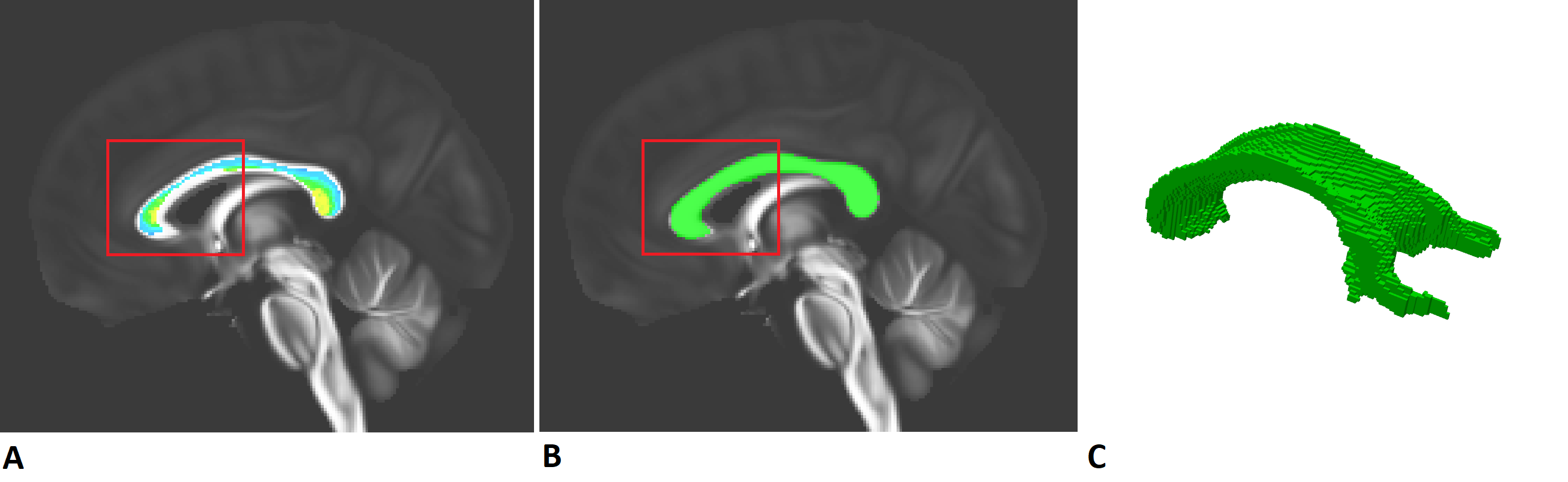
Corpus_callosum_reg.py: This is the code corresponding to the creation of our CC. As we can see on the following image, the downloaded Corpus Callosum was not of good quality (Fig A.) so we drew it ourselves (thanks to MRIcron) as depicted in Fig B. and its 3D representation (Fig C.). However, you don't need the registration_CC_on_perfect function and the last part of this file (MASK FA). You will only need to resubmit the reg_CC_on_sub if you have new patients.
→ To lauch this, usejob_submission.pythrid line of patientlist_wrapper command only.
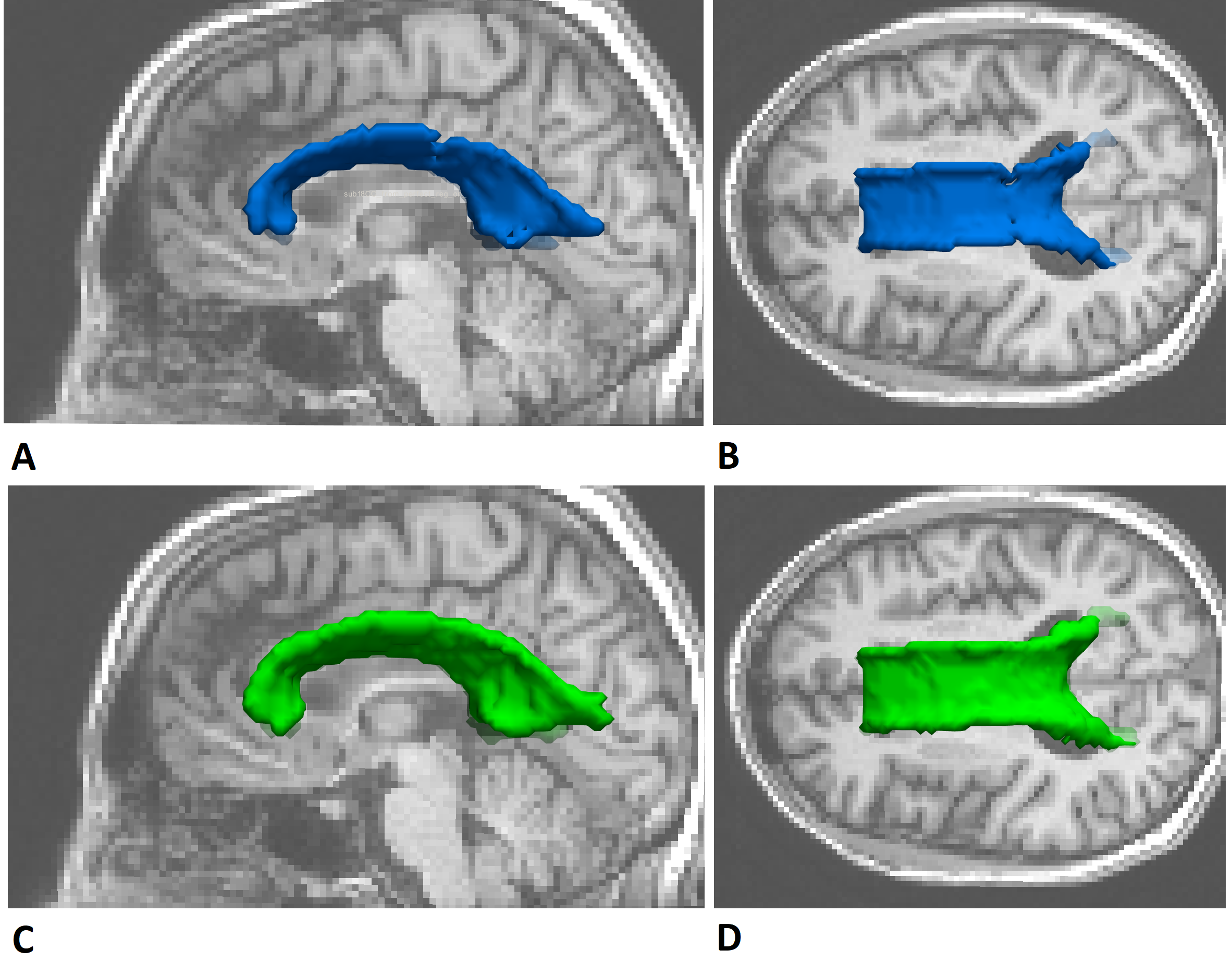
opening_closing.py: Just run this code to get a really smooth and good CC for each patient by applying some morphological operations. The upper part of the following image represents the drawn Corpus Callosum registered on one patient and the bottom part represents it after two morphological operations.
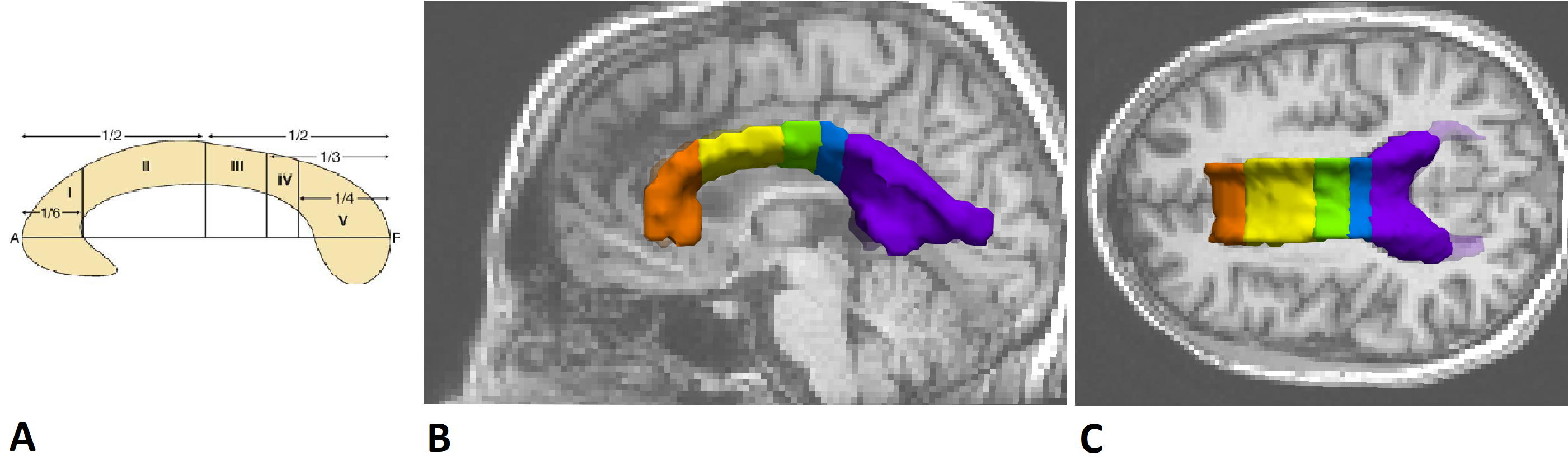
Corpus_callosum_division.py: Code to obtained a subdivision of the CC.
→ To lauch this, usejob_submission.pyfourth line of patientlist_wrapper command only.
-
f0_f1_to_ftot.py: Creation of some files for DIAMOND and MF models. -
FA_DMD.py: Creation of weigthed version of the DTI metric for DIAMOND model.
→ To lauch this, usejob_submission.pyfifth line of patientlist_wrapper command only and after the sixth line only. -
moyenne_par_ROI.py: Creation of different excels containing the different metric evolution.
→ To lauch this, usejob_submission.pyseventh line of patientlist_wrapper command only. -
clustering.py: Creation of the clusters based on the method inplemented inDTI_kmeans_clustering.py, then creation of excel called Result_ttest. The second codeclustering_v2.pyis another method of clustering. -
analyse_ttest.py: Creation of all the plots concerning the analysis of each model separately (they are saved in the file Plots in Analyse). Then, creation of excel called Cluster_ROI used to do the coherence analysis. -
DTI_tissue_classification.py: To analyse change in volume for WM, GM and CSF. -
volume_zones.py: To analyse change in volume for certain areas of the brain. -
comportement.py: To analyse the data coming from behavioral information.
1 maintainer

Metadata
1 maintainer
Release files for alcoholic-tfe22540 0.1.12
For a detailed explanation of source distributions (sdists) and built distributions (wheels), please see the package formats documentation.
Source distribution (sdist)
| File | Size | Uploaded | Provenance | Actions |
|---|---|---|---|---|
| alcoholic_tfe22540-0.1.12.tar.gz | 56.2 kB | Without provenance | Details for alcoholic_tfe22540-0.1.12.tar.gz |
Release files / alcoholic_tfe22540-0.1.12.tar.gz
| Download URL | alcoholic_tfe22540-0.1.12.tar.gz |
|---|---|
| Size | 56.2 kB |
| Tags | Source |
|
SHA-256 checksum How to use checksums |
e031d20537d9e6fbea5c5a94f84b697a452e8cbb6a1a093b1767560436de17de
|
|
BLAKE2b-256 checksum How to use checksums |
3f62ce5b670cc9839ca1bb8c1764a5427a5630948bfa9bf7dd148864867eff71
|
| Upload date | |
|
Uploaded using Trusted Publishing? What is trusted publishing? |
No |
| Uploaded via |
twine/4.0.2 CPython/3.9.13
|
Security for alcoholic-tfe22540 0.1.12
Provenance
Provenance describes where a file came from. On PyPI, provenance is shared via attestations, which provide a verifiable record of the build or publishing details. View details, limitations and caveats.
No provenance found
None of the files in this release were uploaded with provenance metadata.
A note on package security
PyPI is a repository for distributing packages, not a service for auditing them. While third-party security researchers and our staff do their best to detect and remove malicious packages, PyPI cannot guarantee the quality, security or suitability of any given package.
To learn more about protecting yourself from malicious actors, visit our package security documentation.














