

AllSafe
Modern Safe and Unique Password Generator. Do Not Worry About Passwords Anymore.
Report Bug
·
Request Feature
Table of Contents
About The Project
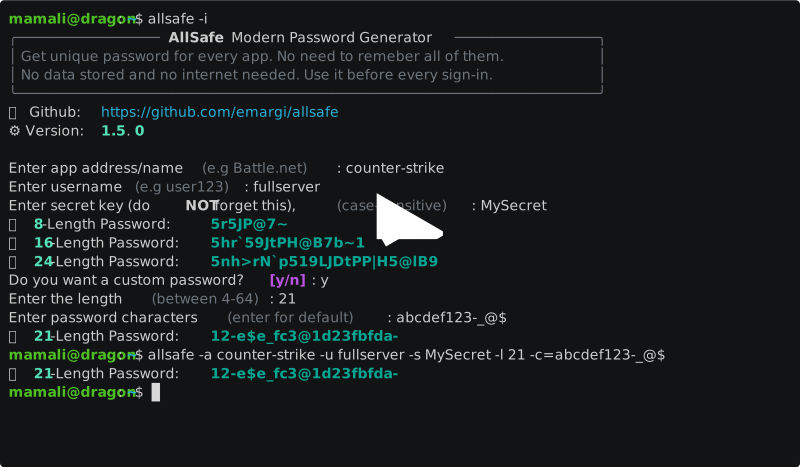
AllSafe is a terminal tool to generate unique password for each application or website you want to sign up in.
[!NOTE] This tool will never store any of your data and does NOT need an internet connection. so you do not have to worry about your data-safety.
AllSafe will give you a unique password for every app based on the given info, so everytime you pass the same info, you will get the same password
Why do we need unique passwords?
with having a unique password for each website, you will not need to worry about other passwords in case one of the websites has a security breach or your password gets leaked somehow.
How do we not forget the passwords?
You don't, you just have to memorize your secret codes (safe enough to use one for all passwords). with the same secret code and the same data, you will get the same password. so no need to worry about storing or memorizing your passwords.
How does the algorithm work?
Your secret code will turn your data into some weird characters. the weird characters are encrypted into a hash. the algorithm gets rid of some keys in the hash. the incomplete hash is seperated into small parts based on the password length. each small part will be converted into a decimal number. each decimal number is divided by the number of usable characters, and a character will be chosen for the password based on the remainder.
If my password gets exposed, will my secret code be revealed?
No, even if they find a way to guess the hash, they will have the incomplete hash. although the complete hash is based on some weird characters.
Installation
Linux
- Install
pipx: Use the package manager of your wish on your OS (e.g. apt)
sudo apt install pipx
pipx ensurepath
- Install
AllSafe:
- Trust PyPi's Build?
pipx install allsafe
- Not Trust PyPi's Build?
pipx install git+https://github.com/emargi/allsafe
Windows
First, make sure you have python and pip installed on your system.
- Trust PyPi's Build?
pip install allsafe
- Not Trust PyPi's Build?
pip install git+https://github.com/emargi/allsafe
Usage
Interactive Mode
Run:
allsafe
or alternatively:
allsafe -i
Commandline Arguments
required arguments:
allsafe -a APP -u USERNAME -s SECRET
see full help:
allsafe -h
Contributing
Contributions are what make the open source community such an amazing place to learn, inspire, and create. Any contributions you make are greatly appreciated.
Note that we use Semantic Versioning in the project and you have to change the __version__ variables in every file that contains it, before a commit.
If you have a suggestion that would make this better, please fork the repo and create a pull request. You can also simply open an issue with the tag "enhancement". Don't forget to give the project a star! Thanks again!
- Fork the Project
- Commit your Changes (
git commit -m 'Add some AmazingFeature') - Open a Pull Request
License
Distributed under the MIT License. See LICENSE.txt for more information.
Credits
- This README file is based on Best-README-Template
1 maintainer

Release files for AllSafe 1.5.2
For a detailed explanation of source distributions (sdists) and built distributions (wheels), please see the package formats documentation.
Source distribution (sdist)
| File | Size | Uploaded | |
|---|---|---|---|
| allsafe-1.5.2.tar.gz | 9.3 kB | Details |
Built distribution (wheel)
| File | Interpreter | ABI | Platform | Reset |
|---|---|---|---|---|
| allsafe-1.5.2-py3-none-any.whl | Python 3 | none | any | Details |
Total release size: 19.5 kB
Release files / allsafe-1.5.2.tar.gz
| Download URL | allsafe-1.5.2.tar.gz |
|---|---|
| Size | 9.3 kB |
| Tags | Source |
|
SHA-256 checksum How to use checksums |
f090ba6c97ffe5f753c79ddf2cf29aa257e32b779f69cd0d7782f68efafdf1ef
|
|
BLAKE2b-256 checksum How to use checksums |
862214520d573ec3c9947bdf42a135f33e0667f3b090ace8098f6c661554949e
|
| Upload date | |
|
Uploaded using Trusted Publishing? What is trusted publishing? |
No |
| Uploaded via |
twine/6.0.1 CPython/3.12.1
|
Release files / allsafe-1.5.2-py3-none-any.whl
| Download URL | allsafe-1.5.2-py3-none-any.whl |
|---|---|
| Size | 10.2 kB |
| Tags | Python 3 |
|
SHA-256 checksum How to use checksums |
36e661aafc85138c3d9777aa7d03970f419d21cbc49c51241422437c122985ca
|
|
BLAKE2b-256 checksum How to use checksums |
2b70bc9bdeaa623ac51d5dae5175227cdf1faf9a100d50e5eb850d66b2d30da1
|
| Upload date | |
|
Uploaded using Trusted Publishing? What is trusted publishing? |
No |
| Uploaded via |
twine/6.0.1 CPython/3.12.1
|














