
✨ AminoLightPy ✨
Elegant and powerful Python framework for creating AminoApps bots and scripts


📋 Features • 🚀 Usage • 📝 Example • 📚 Documentation • 📌 Notes
Features
| 🔥 Feature | 📄 Description |
|---|---|
| ⚡ Optimization | Most of the code has been rewritten for maximum performance |
| ⚙️ Backward compatibility | Write code with correct syntax without compatibility issues |
| 🎮 Commands support | Go even further with new requests and capabilities |
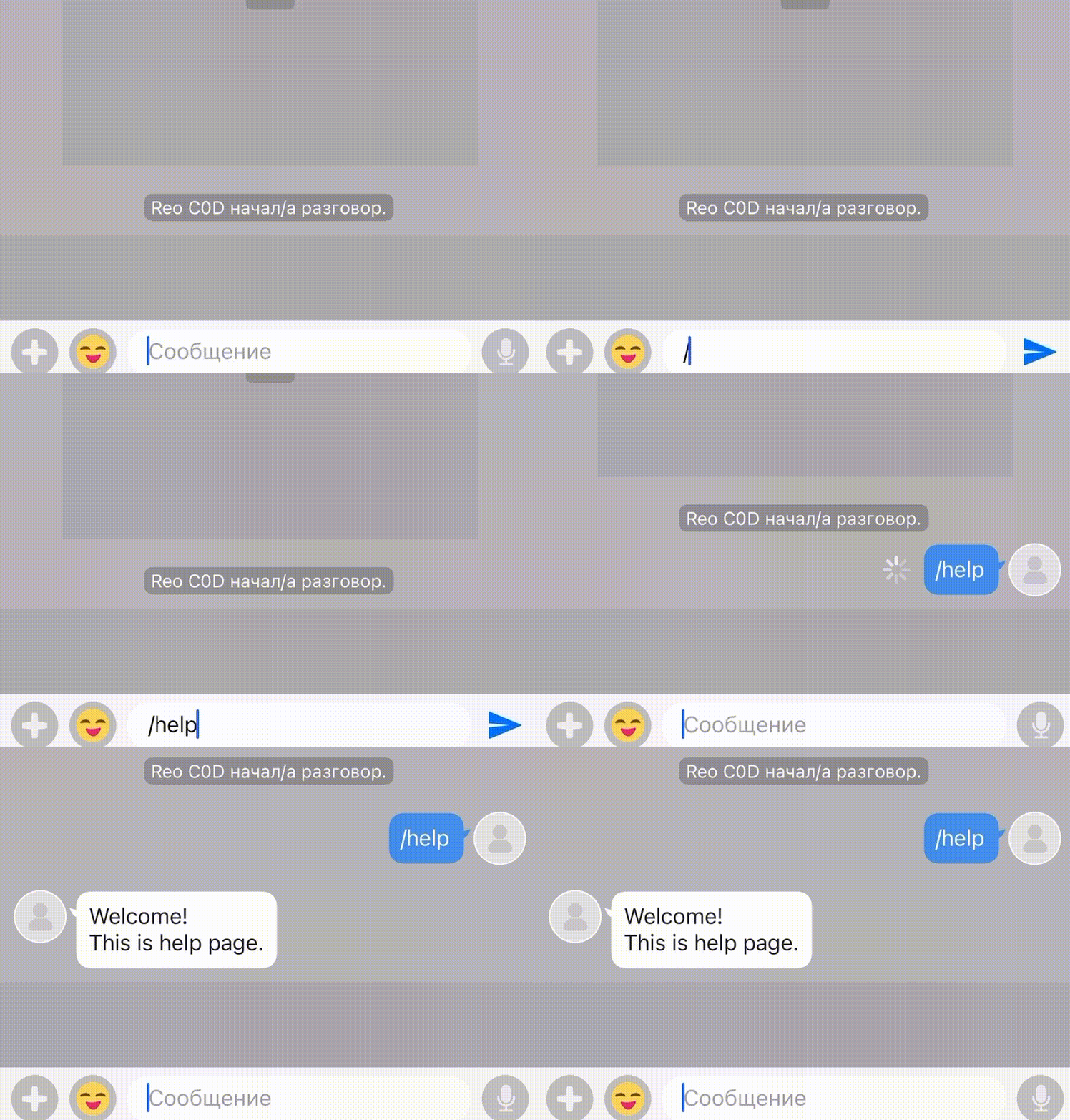
| 🍎 Supported on iPhones | Works for free, without jailbreak and restrictions |
🚀 Installation and Usage
Install the package
pip install amino.light.py
Basic usage
Import the Client and SubClient objects into your bot's code:
from AminoLightPy import Client, SubClient

# Your help message
help_message = """
👋 Welcome!
📚 This is help page.
"""

# Create Client object
client = Client()

# Login into account
client.login("example_mail@gmail.com", "example_password")

# And display the help!
@client.event("on_text_message")
def on_message(data):
    # Do not answer to myself
    if data.message.author.userId != client.profile.userId:
        # Create SubClient object
        sub_client = SubClient(comId=data.comId, profile=client.profile)

        # Process help command
        if data.message.content.startswith('/help'):
            sub_client.send_message(chatId=data.message.chatId, message=help_message)
Example
Simply copy the code above and type /help in the chat to see your bot in action.
Also, take a look at interactive examples in our documentation!
Documentation
Complete API reference for building amazing Amino bots
🔹 Client
Main API connection class
🔸 Initialization
from AminoLightPy import Client

# Initialize client with default settings
client = Client()
# OR
client = Client(socket_enabled=False)
#if you not need websocket (faster)

# With custom settings
client = Client(deviceId="your_device_id", proxies={"http": "http://proxy.example.com"})
🔸 Authentication
# Universal login (recommended)
client.login(email_or_phone="example@gmail.com", password="your_password")

# Alternative authentication methods
client.login_email(email="example@gmail.com", password="your_password")
client.login_phone(phoneNumber="+1234567890", password="your_password")
client.login_sid(SID="your_sid_here")  # SIDs are cached automatically when using client.login()

# OR

client.login(email_or_phone="example@gmail.com", password="your_password", self_device=False)
# If you want a random DeviceId for each login
🔸 Event Handling
@client.event("on_text_message")
def on_message(data):
    print(f"Received message: {data.message.content}")

@client.event("on_image_message")
def on_image(data):
    print(f"Received image from: {data.message.author.nickname}")
| Available Events | Description |
|---|---|
on_text_message | Triggered when a text message is received |
on_image_message | Triggered when an image message is received |
on_youtube_message | Triggered when a YouTube link is shared |
on_voice_message | Triggered when a voice message is received |
on_sticker_message | Triggered when a sticker is received |
on_join_chat | Triggered when someone joins a chat |
on_leave_chat | Triggered when someone leaves a chat |
🔸 Community Operations
# Get list of joined communities
communities = client.sub_clients(size=100)

# Search for a community
found_communities = client.search_community("amino_id")

# Join/Leave community
client.join_community(comId=123456)
client.leave_community(comId=123456)

# Send join request
client.request_join_community(comId=123456, message="i want to join😭🙏")
🔹 SubClient
Community-specific operations
🔸 Initialization
from AminoLightPy import Client, SubClient

client = Client()
client.login("email", "password")

# Create a SubClient for a specific community
sub_client = SubClient(comId=123456, profile=client.profile)
🔸 Messaging
# Text message
sub_client.send_message(
    chatId="chat-id-here",
    message="Hello world!"
)

# Image message
with open("image.jpg", "rb") as image:
    sub_client.send_message(
        chatId="chat-id-here",
        file=image
    )
# Warn! You need add `fileType="audio"` for voice message

# Mentions
sub_client.send_message(
    chatId="chat-id-here",
    message="Hello @user!",
    mentionUserIds=["user-id-here"]
)

# Rich content (embedded links)
sub_client.send_message(
    chatId="chat-id-here",
    message="Check this out!",
    linkSnippet={
        "link": "https://example.com",
        "title": "Example Website",
        "mediaType": 100,
        "mediaSourceWidth": 500,
        "mediaSourceHeight": 300
    }
)
🔸 Chat Management
# Create a new chat
sub_client.start_chat(
    userId="user-id",
    message="Hi there!"
)

# Create a group chat
sub_client.start_chat(
    userIds=["user-id-1", "user-id-2"],
    title="Our Group",
    message="Welcome everyone!"
)

# Get joined chats
chats = sub_client.get_chat_threads(start=0, size=100)

# Get chat messages
messages = sub_client.get_chat_messages(
    chatId="chat-id-here",
    start=0,
    size=100
)

# Invite to chat
sub_client.invite_to_chat(
    chatId="chat-id-here",
    userIds=["user-id-1", "user-id-2"]
)

# Leave chat
sub_client.leave_chat(chatId="chat-id-here")
🔸 Content Creation
# Create a blog post
sub_client.post_blog(
    title="My Blog Post",
    content="This is content for my blog post",
    imageList=[open("image_1.png", "rb"), open("image_2.png", "rb")]
)

# Create a wiki
sub_client.post_wiki(
    title="Wiki Title",
    content="Wiki content here",
    icon=open("icon.png", "rb")
)

# Upload media
media = sub_client.upload_media(file=open("image.jpg", "rb"))
🔸 Social Interactions
# Comment on content
sub_client.comment(blogId="blog-id", message="Great post!")
sub_client.comment(wikiId="wiki-id", message="Useful information!")

# Like content
sub_client.like_blog(blogId="blog-id")
sub_client.like_comment(commentId="comment-id")

# Follow/Unfollow users
sub_client.follow(userId="user-id")
sub_client.unfollow(userId="user-id")

# Block/Unblock users
sub_client.block_user(userId="user-id")
sub_client.unblock_user(userId="user-id")
🔸 Moderation (for staff/leaders)
# Hide content
sub_client.hide(blogId="blog-id", reason="Violates community guidelines")

# Ban/Unban users
sub_client.ban(userId="user-id", reason="Spamming")
sub_client.unban(userId="user-id", reason="Appeal accepted")

# Feature content
sub_client.feature(time=1, blogId="blog-id")
sub_client.unfeature(blogId="blog-id")

# Strike users
sub_client.strike(userId="user-id", time=1, title="Spam", reason="Excessive messaging")

# Warn users
sub_client.warn(userId="user-id", reason="Minor rule violation")
🔸 Context Managers
# Show "typing..." indicator
with sub_client.typing(chatId="chat-id-here"):
    # This block will show typing indicator while executing
    time.sleep(2)
    sub_client.send_message(chatId="chat-id-here", message="Hello!")

# Show "recording..." indicator
with sub_client.recording(chatId="chat-id-here"):
    # Prepare a voice message
    time.sleep(3)
    sub_client.send_message(chatId="chat-id-here", file=open("demo.mp3", "rb"), fileType="audio")
For complete API reference, see the official documentation.
Contact and Support
If you can't find what you're looking for or need help with this library:
- Telegram: augustlight
- Discord: engineer48
We will be glad to help!
Notes
This is not my original project. Amino libraries already existed before me. I just wanted to create a simple and effective way to support bots.
This framework works only with Python.
1 maintainer

Metadata
1 maintainer
Release files for amino.light.py 0.2.3
For a detailed explanation of source distributions (sdists) and built distributions (wheels), please see the package formats documentation.
Source distribution (sdist)
| File | Size | Uploaded | |
|---|---|---|---|
| amino_light_py-0.2.3.tar.gz | 52.5 kB | Details |
Built distribution (wheel)
| File | Interpreter | ABI | Platform | Reset |
|---|---|---|---|---|
| amino_light_py-0.2.3-py3-none-any.whl | Python 3 | none | any | Details |
Total release size: 107.4 kB
Release files / amino_light_py-0.2.3.tar.gz
| Download URL | amino_light_py-0.2.3.tar.gz |
|---|---|
| Size | 52.5 kB |
| Tags | Source |
|
SHA-256 checksum How to use checksums |
dcbcf3aa103c0807ce02976d884baefba221abd1f64479693d26086cf8a5fbd2
|
|
BLAKE2b-256 checksum How to use checksums |
f883d2a609f8c278ee0a35914c8f4ccacc54a07ea9f1578c2e04fc87545c20d8
|
| Upload date | |
|
Uploaded using Trusted Publishing? What is trusted publishing? |
No |
| Uploaded via |
twine/6.1.0 CPython/3.13.3
|
Release files / amino_light_py-0.2.3-py3-none-any.whl
| Download URL | amino_light_py-0.2.3-py3-none-any.whl |
|---|---|
| Size | 54.9 kB |
| Tags | Python 3 |
|
SHA-256 checksum How to use checksums |
877ccde8473ff50a9c34c5dcc40b46c125315216d5feeebd5fb5e6c01d70c648
|
|
BLAKE2b-256 checksum How to use checksums |
5c93ac1b68b00513a462fffc11729df876630224be083a50537aa177816a4e33
|
| Upload date | |
|
Uploaded using Trusted Publishing? What is trusted publishing? |
No |
| Uploaded via |
twine/6.1.0 CPython/3.13.3
|














