
A Python client for interacting with the Anakin AI API

Project description
Unofficial Anakin AI Python Client
An unofficial Python client for interacting with the Anakin AI API. This client allows you to easily integrate Anakin AI's powerful AI capabilities into your Python projects.
Features
- Easy-to-use Python interface for Anakin AI API
- Support for both Quick Apps and Chatbot Apps
- Streaming and non-streaming response handling
- Flexible input handling for various app configurations
Installation
Install the Anakin AI Python Client using pip:
pip install anakin-ai
If you encounter any issues with dependencies, you can manually install the required packages:
pip install anakin-ai requests
Setup
Before using the client, you need to set up your Anakin AI API key:
-
Visit the Anakin AI website: https://anakin.ai and sign in to your account. You need to upgrade to a Pro account for using API feature.
-
Go to Account settings, and generate a new API Access Token.
-
Set your local environment:
# Set up a test environment:
python -m venv anakin_test_env
source anakin_test_env/bin/activate  # On Windows, use: anakin_test_env\Scripts\activate

# Install Dependencies
pip install -e .

# Set up your API key:
# Export your Anakin AI API key as an environment variable:
export ANAKIN_AI_API_KEY="your_actual_api_key_here"
# On Windows, use:
set ANAKIN_AI_API_KEY=your_actual_api_key_here
-
Create a Quick App or Chatbot App in Anakin AI.
For example, if the URL is: https://app.anakin.ai/apps/28887, your APP_ID is 28887.
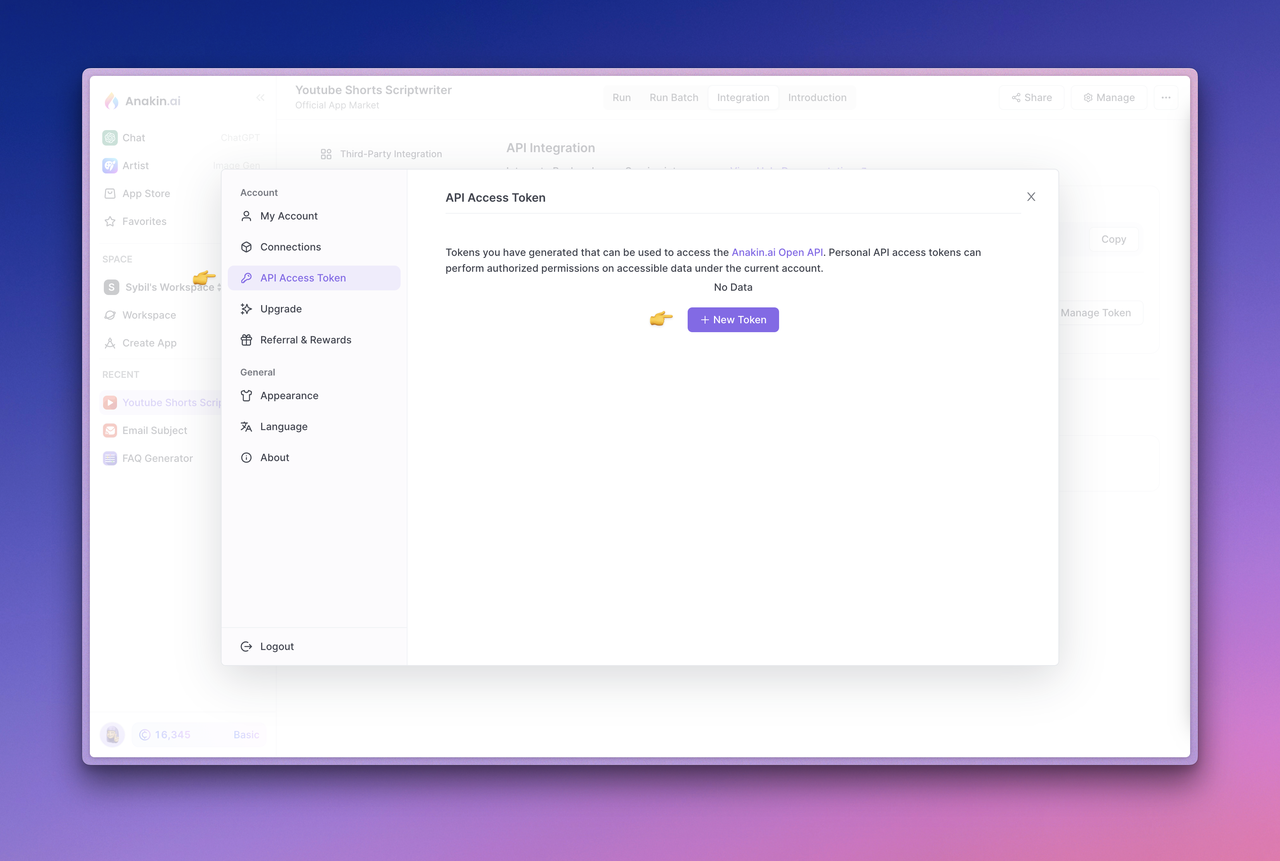

For detailed instructions on API setup, visit the Anakin AI API Integration documentation.
Usage
Here's how to use the Anakin AI Python Client for both Quick Apps and Chatbot Apps:
Quick App
from anakin_ai import AnakinAI
import os
import json

# Initialize the client with your API key
api_key = os.getenv("ANAKIN_AI_API_KEY")
client = AnakinAI(api_key)

# Run a Quick App
QUICK_APP_ID = "YOUR_APP_ID"  # Replace with your actual Quick App ID
inputs = {
    "Input": "Generate a marketing slogan for a cloud service that emphasizes reliability, performance, and efficiency."
}

# Streaming response
print("Testing Quick App with streaming:")
for chunk in client.run_quick_app(QUICK_APP_ID, inputs, stream=True):
    print(chunk, end='', flush=True)
print("\n\nStreaming completed.")

# Non-streaming response
print("\nTesting Quick App without streaming:")
result = client.run_quick_app(QUICK_APP_ID, inputs, stream=False)
print("Quick App Result:", json.dumps(result, indent=2))
Chatbot App
from anakin_ai import AnakinAI
import os
import json

# Initialize the client with your API key
api_key = os.getenv("ANAKIN_AI_API_KEY")
client = AnakinAI(api_key)

# Use a Chatbot App
CHATBOT_APP_ID = "YOUR_APP_ID"  # Replace with your actual Chatbot App ID

# Streaming response
print("Testing Chatbot with streaming:")
content = "What's your name? Are you the clever one?"
for chunk in client.chat_with_bot(CHATBOT_APP_ID, content, stream=True):
    print(chunk, end='', flush=True)
print("\n\nStreaming completed.")

# Non-streaming response
print("\nTesting Chatbot without streaming:")
content = "Tell me a joke about AI."
result = client.chat_with_bot(CHATBOT_APP_ID, content, stream=False)
print("Chatbot Result:", json.dumps(result, indent=2))

# Chatbot conversation example
print("\nTesting Chatbot conversation:")
messages = [
    "Hello, who are you?",
    "What can you do?",
    "Tell me a fun fact about AI."
]
for message in messages:
    print(f"\nUser: {message}")
    response = client.chat_with_bot(CHATBOT_APP_ID, message, stream=False)
    print("Chatbot:", response['content'])
Replace "YOUR_APP_ID" with your actual Anakin AI App IDs for Quick App and Chatbot App respectively.
Differences between Quick App and Chatbot App calls
-
Method names:
- For Quick Apps, use
client.run_quick_app() - For Chatbot Apps, use
client.chat_with_bot()
- For Quick Apps, use
-
Input format:
- Quick Apps take a dictionary of inputs:
{"Input": "Your prompt here"} - Chatbot Apps take a single string as content:
"Your message here"
- Quick Apps take a dictionary of inputs:
-
URL endpoints:
- Quick Apps use:
/quickapps/{app_id}/runs - Chatbot Apps use:
/chatbots/{app_id}/messages
- Quick Apps use:
-
Use case:
- Quick Apps are best for generating content based on specific inputs
- Chatbot Apps are designed for interactive conversations
Both types of apps support streaming and non-streaming responses.
Documentation
For more detailed information about the Anakin AI API and its capabilities, please refer to the official Anakin AI documentation.
Contributing
Contributions to the Anakin AI Python Client are welcome! Please feel free to submit a Pull Request.
License
This project is licensed under the MIT License - see the LICENSE file for details.
Disclaimer
This is an unofficial client library and is not affiliated with, officially maintained, or endorsed by Anakin AI.


Download files
Download the file for your platform. If you're not sure which to choose, learn more about installing packages.
Source Distribution
Built Distribution
Filter files by name, interpreter, ABI, and platform.
If you're not sure about the file name format, learn more about wheel file names.
Copy a direct link to the current filters
File details
Details for the file anakin_ai-0.1.4.tar.gz.
File metadata
- Download URL: anakin_ai-0.1.4.tar.gz
- Upload date:
- Size: 4.9 kB
- Tags: Source
- Uploaded using Trusted Publishing? No
- Uploaded via: twine/5.1.1 CPython/3.12.4
File hashes
| Algorithm | Hash digest | |
|---|---|---|
| SHA256 |
e9eb3da451c1f7ee9e4116a3af1111c6ee43e47ac195c0503467b0d718cbb14b
|
|
| MD5 |
02e09f9871afcf966e1716d8e304264c
|
|
| BLAKE2b-256 |
a08ebe2c18cfdae833aa0148e07b092e01e6108befbf4ba821f560d6159216b1
|
File details
Details for the file anakin_ai-0.1.4-py3-none-any.whl.
File metadata
- Download URL: anakin_ai-0.1.4-py3-none-any.whl
- Upload date:
- Size: 5.1 kB
- Tags: Python 3
- Uploaded using Trusted Publishing? No
- Uploaded via: twine/5.1.1 CPython/3.12.4
File hashes
| Algorithm | Hash digest | |
|---|---|---|
| SHA256 |
0a0e677e09b93805d96396d4f2eb6e2578fcc483f0daafe064dda5e338c7a489
|
|
| MD5 |
c685ac67f7ca7d8421048e3246e1ca3d
|
|
| BLAKE2b-256 |
74c3947491090bdef3a7aaa0e66f56bc539bd04ef255c4f77a264ff604c4bdb4
|






