
# Ansible Jupyter Kernel
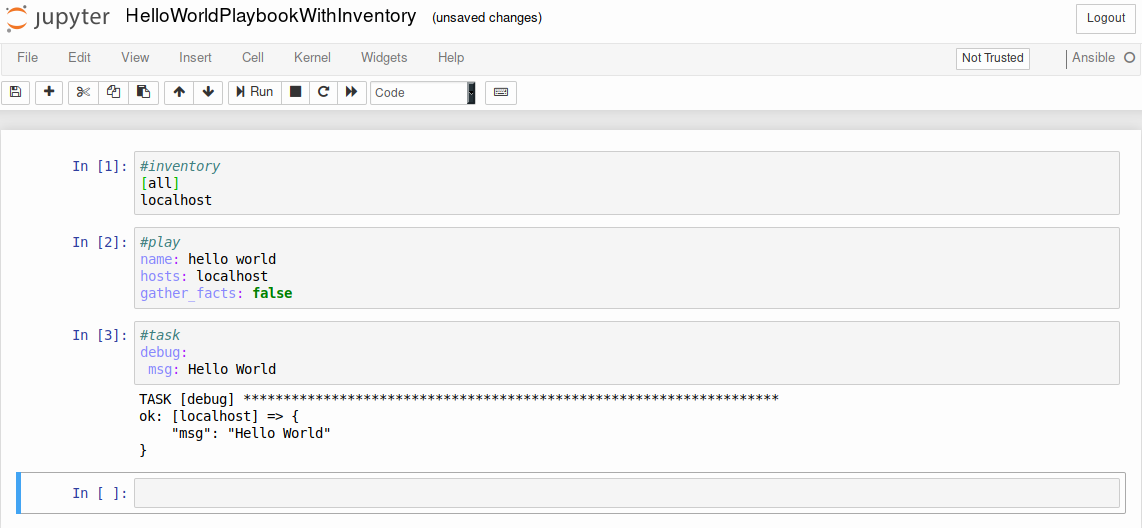
The Ansible [Jupyter](http://jupyter.readthedocs.io/en/latest/) Kernel adds a kernel backend for Jupyter to interface directly with Ansible and construct plays and tasks and execute them on the fly.
## Table of Contents
* [Installation](#installation)
* [From pypi](#from-pypi)
* [From a local checkout](#from-a-local-checkout)
* [Usage](#usage)
* [Using the cells](#using-the-cells)
* [Examples](#examples)
* [Using the development environment](#using-the-development-environment)
## Installation:
`ansible-kernel` is available to be installed from pypi but you can also install it locally. The setup package itself will register the kernel
with `Jupyter` automatically.
### From pypi
pip install ansible-kernel
### From a local checkout
pip install -e .
## Usage
```
jupyter notebook
# In the notebook interface, select Ansible from the 'New' menu
```
### Using the Cells
Normally `Ansible` brings together various components in different files and locations to launch a playbook and performs automation tasks. For this
`jupyter` interface you need to provide this information in cells by denoting what the cell contains and then finally writing your tasks that will make
use of them. There are [Examples](#examples) available to help you, in this section we'll go over the currently supported cell types.
In order to denote what the cell contains you should prefix it with a pound/hash symbol (#) and the type as listed here as the first line as shown in the examples
below.
#### #inventory
The inventory that your tasks will use
```
#inventory
[all]
ahost ansible_connection=local
anotherhost examplevar=val
```
#### #play
This represents the opening block of a typical `Ansible` play
```
#play
name: Hello World
hosts: all
gather_facts: false
```
#### #task
This is the default cell type if no type is given for the first line
```
#task
debug:
```
```
#task
shell: cat /tmp/afile
register: output
```
#### #host_vars
#### #group_vars
#### #vars
This takes an argument that represents the filename for use in later cells
```
#vars example_vars
message hello vars
```
```
#play
name: hello world
hosts: localhost
gather_facts: false
vars_files:
- example_vars
```
#### #template
This takes an argument in order to create a templated file that can be used in later cells
```
#template hello.j2
{{ message }}
```
```
#task
template:
src: hello.j2
dest: /tmp/hello
```
#### #ansible.cfg
Provides overrides typically found in ansible.cfg
```
#ansible.cfg
[defaults]
host_key_checking=False
```
### Examples
You can find various [example notebooks in the repository](https://github.com/ansible/ansible-jupyter-kernel/tree/master/notebooks)
## Using the development environment
It's possible to use whatever python development process you feel comfortable with. The repository itself includes mechanisms for
using [pipenv](https://github.com/pypa/pipenv)
```
pipenv install
...
pipenv shell
```

The Ansible [Jupyter](http://jupyter.readthedocs.io/en/latest/) Kernel adds a kernel backend for Jupyter to interface directly with Ansible and construct plays and tasks and execute them on the fly.
## Table of Contents
* [Installation](#installation)
* [From pypi](#from-pypi)
* [From a local checkout](#from-a-local-checkout)
* [Usage](#usage)
* [Using the cells](#using-the-cells)
* [Examples](#examples)
* [Using the development environment](#using-the-development-environment)
## Installation:
`ansible-kernel` is available to be installed from pypi but you can also install it locally. The setup package itself will register the kernel
with `Jupyter` automatically.
### From pypi
pip install ansible-kernel
### From a local checkout
pip install -e .
## Usage
```
jupyter notebook
# In the notebook interface, select Ansible from the 'New' menu
```
### Using the Cells
Normally `Ansible` brings together various components in different files and locations to launch a playbook and performs automation tasks. For this
`jupyter` interface you need to provide this information in cells by denoting what the cell contains and then finally writing your tasks that will make
use of them. There are [Examples](#examples) available to help you, in this section we'll go over the currently supported cell types.
In order to denote what the cell contains you should prefix it with a pound/hash symbol (#) and the type as listed here as the first line as shown in the examples
below.
#### #inventory
The inventory that your tasks will use
```
#inventory
[all]
ahost ansible_connection=local
anotherhost examplevar=val
```
#### #play
This represents the opening block of a typical `Ansible` play
```
#play
name: Hello World
hosts: all
gather_facts: false
```
#### #task
This is the default cell type if no type is given for the first line
```
#task
debug:
```
```
#task
shell: cat /tmp/afile
register: output
```
#### #host_vars
#### #group_vars
#### #vars
This takes an argument that represents the filename for use in later cells
```
#vars example_vars
message hello vars
```
```
#play
name: hello world
hosts: localhost
gather_facts: false
vars_files:
- example_vars
```
#### #template
This takes an argument in order to create a templated file that can be used in later cells
```
#template hello.j2
{{ message }}
```
```
#task
template:
src: hello.j2
dest: /tmp/hello
```
#### #ansible.cfg
Provides overrides typically found in ansible.cfg
```
#ansible.cfg
[defaults]
host_key_checking=False
```
### Examples
You can find various [example notebooks in the repository](https://github.com/ansible/ansible-jupyter-kernel/tree/master/notebooks)
## Using the development environment
It's possible to use whatever python development process you feel comfortable with. The repository itself includes mechanisms for
using [pipenv](https://github.com/pypa/pipenv)
```
pipenv install
...
pipenv shell
```
2 maintainers


Metadata
2 maintainers
Release files for ansible-kernel 0.3
For a detailed explanation of source distributions (sdists) and built distributions (wheels), please see the package formats documentation.
Source distribution (sdist)
| File | Size | Uploaded | |
|---|---|---|---|
| ansible-kernel-0.3.tar.gz | 20.6 kB | Details |
Built distribution (wheel)
| File | Interpreter | ABI | Platform | Reset |
|---|---|---|---|---|
| ansible_kernel-0.3-py2.py3-none-any.whl | Python 2, Python 3 | none | any | Details |
Total release size: 48.7 kB
Release files / ansible-kernel-0.3.tar.gz
| Download URL | ansible-kernel-0.3.tar.gz |
|---|---|
| Size | 20.6 kB |
| Tags | Source |
|
SHA-256 checksum How to use checksums |
38ed8dc9404d59f893dd8c2fef9c11d4a83d520392587a81f59c60dc86c2920d
|
|
BLAKE2b-256 checksum How to use checksums |
087d82a2ddf0ea6afd39ccff87496d1c403c588c6a0f2edcddc510c3a54b1129
|
| Upload date | |
|
Uploaded using Trusted Publishing? What is trusted publishing? |
No |
Release files / ansible_kernel-0.3-py2.py3-none-any.whl
| Download URL | ansible_kernel-0.3-py2.py3-none-any.whl |
|---|---|
| Size | 28.1 kB |
| Tags | Python 2 Python 3 |
|
SHA-256 checksum How to use checksums |
b604cd9fe452ec62b8aabd7753b00b6ffdadde3208378052b191cc333c460451
|
|
BLAKE2b-256 checksum How to use checksums |
32d54e198d2e3b884aebd09f925610f6af63f03c76d42721b775d59a6a2f16c5
|
| Upload date | |
|
Uploaded using Trusted Publishing? What is trusted publishing? |
No |














