
Antares Launcher
This program is intended to allow the user to send a list of Antares simulations to a remote Linux machine that can run them using SLURM Workload Manager.
Currently, this program:
- Is configured to work with Antares studies from version 7.0 through 8.5 (the configuration can be changed in a YAML file).
- needs a remote UNIX server that uses SLURM Workload Manager.
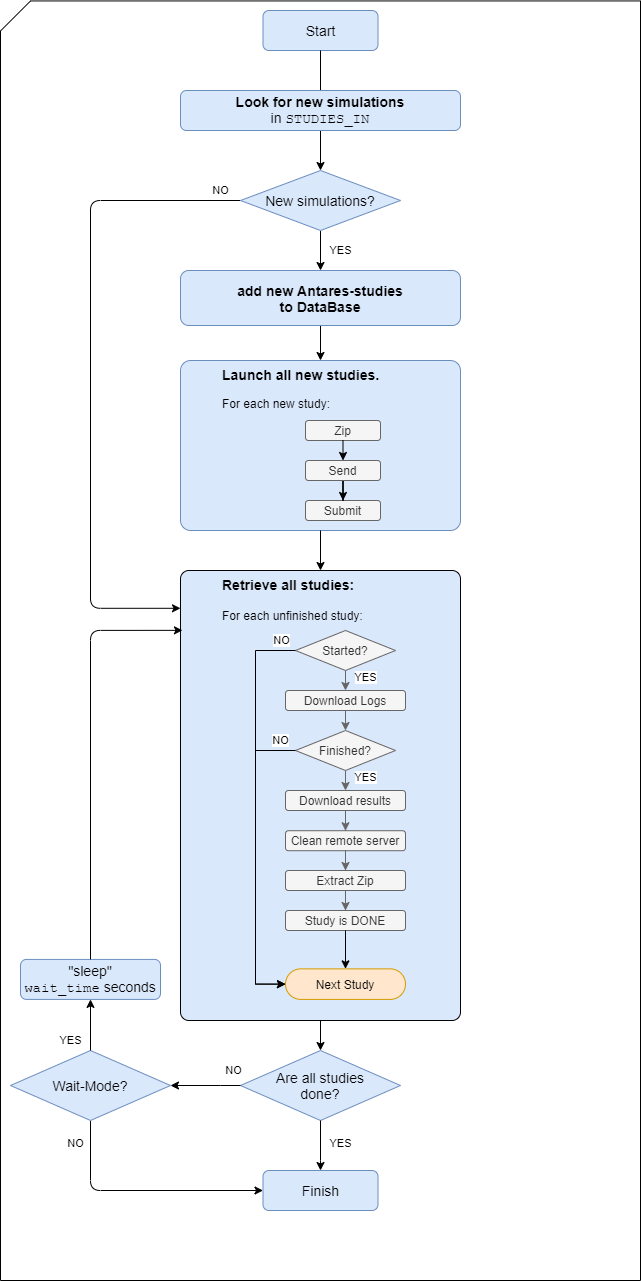
The main workflow diagram is as follows:
Requirements
See setup.py
Minimum version : python 3.11
Main Python libraries
The following libraries are required to run the application in a production (or staging) environment:
- paramiko
- PyYAML
- tinydb
- tqdm
To install this library on production, you can run:
pip install Antares-Launcher
Development and Unit Testing
To start developing, you can clone the repository from GitHub and create a Python virtualenv:
cd ~/workspace/
git clone https://github.com/AntaresSimulatorTeam/antares-launcher.git
cd ~/workspace/antares-launcher/
python3 -m venv venv
source venv/bin/activate
To run the unit tests, you need to install:
- pytest
- pytest-cov
- pytest-xdist
To install this library in development mode for testing, you can run:
pip install -e .[test]
Additional dependencies could also be used for development, for instance:
- black
- check-manifest
- isort
- mypy
Documentation
In this project, we use Sphinx to generate the documentation.
Extra requirements are:
- m2r
- recommonmark
- sphinx
- sphinx_rtd_theme
Installation
Generation of the binary executable
In order to generate the binary file, execute the following command:
pyinstaller --additional-hooks-dir=antareslauncher/hooks/ -F antareslauncher/main_launcher.py -n Antares_Launcher
In order to generate the binary file of the light version of the launcher (reduced set of options), execute the following command:
pyinstaller --additional-hooks-dir=antareslauncher/hooks/ -F antareslauncher/main_launcher_light.py -n Antares_Launcher_Light
The generated file will be inside the dist directory. Note that pyinstaller does not enable the cross-compilation: e binary file generated on windows can only be expected with the windows OS
Use Antares_Launcher
Run Antares_Launcher
Antares Launcher can be used by running the executable file
By default, the program will:
- look for a configuration file necessary for the connection
named ssh_config.json.
If no value is given, it will look for it in default location with this order:
- 1st: current working directory
- 2nd: $HOME/antares_launcher_settings/ssh_config.json
- 3rd: default configuration (json file embedded in the data directory if present).
A default ssh_config.json file can be found in this
repository in the ./data directory of the project
-
look for an rsa-private ssh-key to access to the remote server. The path of the key is specified in the
ssh_config.jsonfile -
look for a directory containing the Antares studies to be run on the remote machine named STUDIES-IN.
-
put the results in the directory named FINISHED
-
create a directory LOGS that contains the logs of the programs and several directories containing the three log files specific of each simulation.
Currently antares_launcher uses a specific configuration attached to the specific setting ofdata/launchAntares-${SCRIPT-VERSION}.sh
Get the how-to
Antares_Launcher --help
will show how to use the program.
SLURM script on the remote machine
In order to submit new jobs to the SLURM queue manager,
Antares_Launcher launches a bash-SLURM script the name of the script is set in data/configuration.yaml.
If Antares_Launcher fails to find this script
an exception will be raised and the execution will stop.
The specification of the script can be found in the class
SlurmScriptFeatures in the module antareslauncher.slurm_script_features.py.
See Deploy Antares Launcher for specific values.
Useful commands
Since the addition of the Makefile to the project, one can now easily set a virtual environment, install requirements, generate binary file, run tests, generate the doc and deploy it...
At the root of the directory, all the available commands can be seen with typing: make
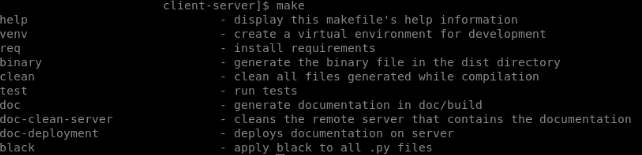
If for example, you would like to run the test, a simple make test will do the trick

Useful commands
Run unit tests:
pytest -v tests/
Run unit tests with code coverage:
pytest --cov=antareslauncher --cov-report=term-missing --cov-report=html --cov-branch tests/
open htmlcov/index.html
Deploy Antares Launcher
Installation on the remote server
In order to be able to accept jobs from Antares_Launcher, the remote machine needs to be ready:
the binaries and script expected by Antares_Launcher need to be installed and
the required ssh-public-keys need to be added to the authorizedkeys file
of the account of the remote server.
Things to do
-
launchAntares-${SCRIPT-VERSION}.shshould be copied to the remove server and ist path should be set indata/configuration.yaml -
Install the Antares solver binary
antares-x.x-solveron the remote server. set its installation path inlaunchAntares-${SCRIPT-VERSION}.sh -
The R Xpansion script,
data/XpansionArgsRun.R, has to be copied to the remote server and its path should be set inlaunchAntares-${SCRIPT-VERSION}.sh.
Important notice
The users currently copy the executable every time they need to use it. This is not practical, an alternative should be developed.
Installation of R packages on the remote server
In order to correctly install or update packages to be used on the remote server the Rrepositories and installation-destination need to be set.
The launchAntares-${SCRIPT-VERSION}.sh set the variable where the Rlibraries are installed runtime,
no need to create a .Renviron file.
2 maintainers


Metadata
2 maintainers
Release files for Antares-Launcher 1.6.0
For a detailed explanation of source distributions (sdists) and built distributions (wheels), please see the package formats documentation.
Source distribution (sdist)
| File | Size | Uploaded | |
|---|---|---|---|
| antares_launcher-1.6.0.tar.gz | 7.6 MB | Details |
Built distribution (wheel)
| File | Interpreter | ABI | Platform | Reset |
|---|---|---|---|---|
| antares_launcher-1.6.0-py3-none-any.whl | Python 3 | none | any | Details |
Total release size: 7.7 MB
Release files / antares_launcher-1.6.0.tar.gz
| Download URL | antares_launcher-1.6.0.tar.gz |
|---|---|
| Size | 7.6 MB |
| Tags | Source |
|
SHA-256 checksum How to use checksums |
8f6acf42f9b9924111eee49c72b737eb47207ab622f5e3987f7b0ce42caf63ca
|
|
BLAKE2b-256 checksum How to use checksums |
0f16a7b4b0af9fc4f6498a5667922994e166bdef34bbd3d58c4935248e3077c6
|
| Upload date | |
|
Uploaded using Trusted Publishing? What is trusted publishing? |
No |
| Uploaded via |
twine/6.1.0 CPython/3.13.14
|
Release files / antares_launcher-1.6.0-py3-none-any.whl
| Download URL | antares_launcher-1.6.0-py3-none-any.whl |
|---|---|
| Size | 56.5 kB |
| Tags | Python 3 |
|
SHA-256 checksum How to use checksums |
d816aca354cc8b5d142795b9c7e9ab3cb76336a0736e0e4d5d38e8e0460d65b3
|
|
BLAKE2b-256 checksum How to use checksums |
8a077b9489671ca65d9b1da53907ffa56faa212409314ada4a4c32229419a151
|
| Upload date | |
|
Uploaded using Trusted Publishing? What is trusted publishing? |
No |
| Uploaded via |
twine/6.1.0 CPython/3.13.14
|














