
# Getting started
Simple calculator API hosted on APIMATIC
## How to Build
You must have Python ```2 >=2.7.9``` or Python ```3 >=3.4``` installed on your system to install and run this SDK. This SDK package depends on other Python packages like nose, jsonpickle etc.
These dependencies are defined in the ```requirements.txt``` file that comes with the SDK.
To resolve these dependencies, you can use the PIP Dependency manager. Install it by following steps at [https://pip.pypa.io/en/stable/installing/](https://pip.pypa.io/en/stable/installing/).
Python and PIP executables should be defined in your PATH. Open command prompt and type ```pip --version```.
This should display the version of the PIP Dependency Manager installed if your installation was successful and the paths are properly defined.
* Using command line, navigate to the directory containing the generated files (including ```requirements.txt```) for the SDK.
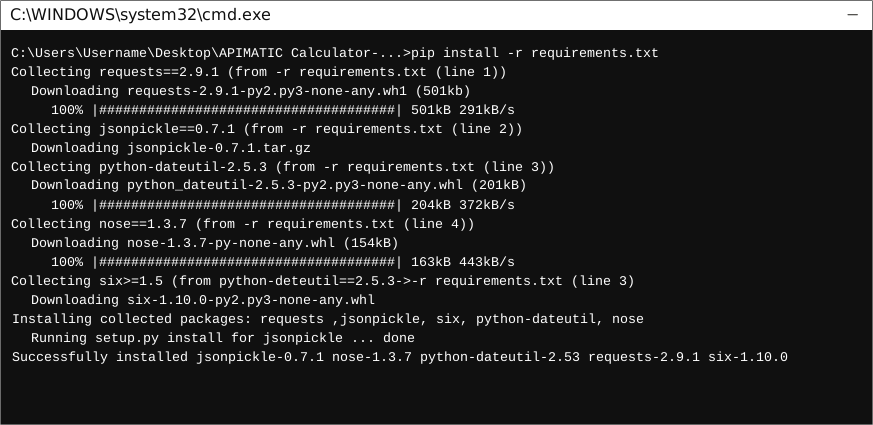
* Run the command ```pip install -r requirements.txt```. This should install all the required dependencies.
## How to Use
The following section explains how to use the Apimaticcalculator SDK package in a new project.
### 1. Open Project in an IDE
Open up a Python IDE like PyCharm. The basic workflow presented here is also applicable if you prefer using a different editor or IDE.
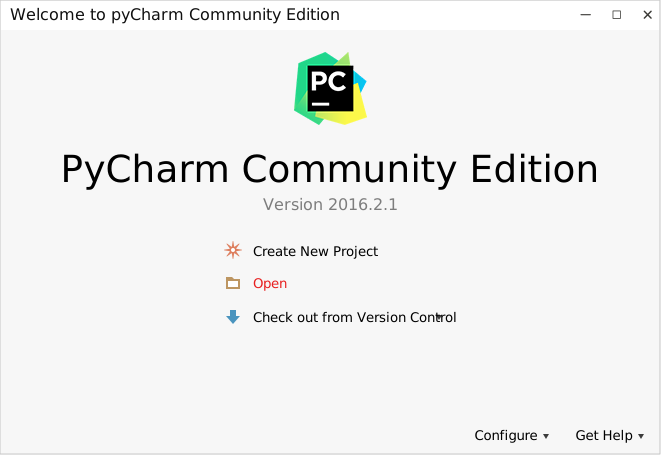
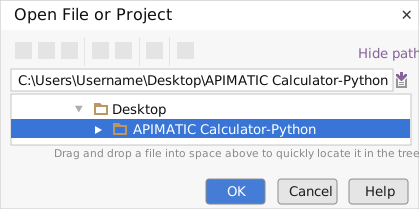
Click on ```Open``` in PyCharm to browse to your generated SDK directory and then click ```OK```.
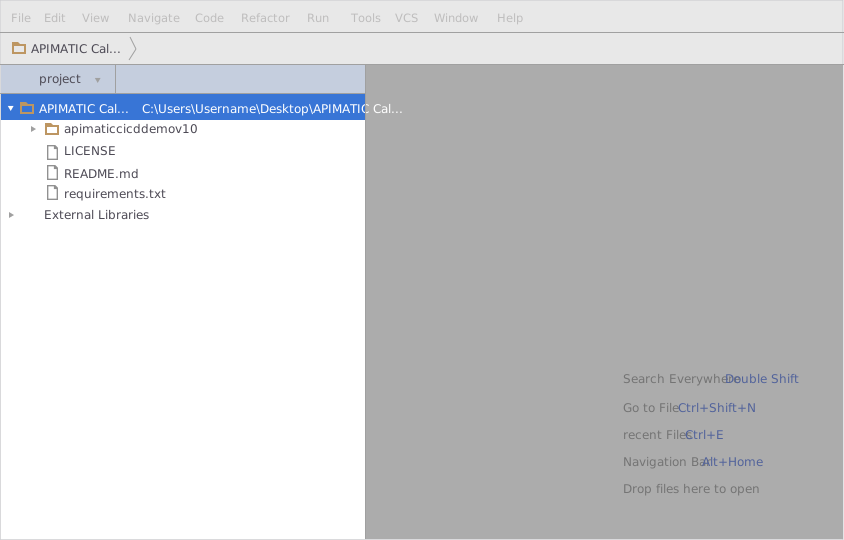
The project files will be displayed in the side bar as follows:
### 2. Add a new Test Project
Create a new directory by right clicking on the solution name as shown below:
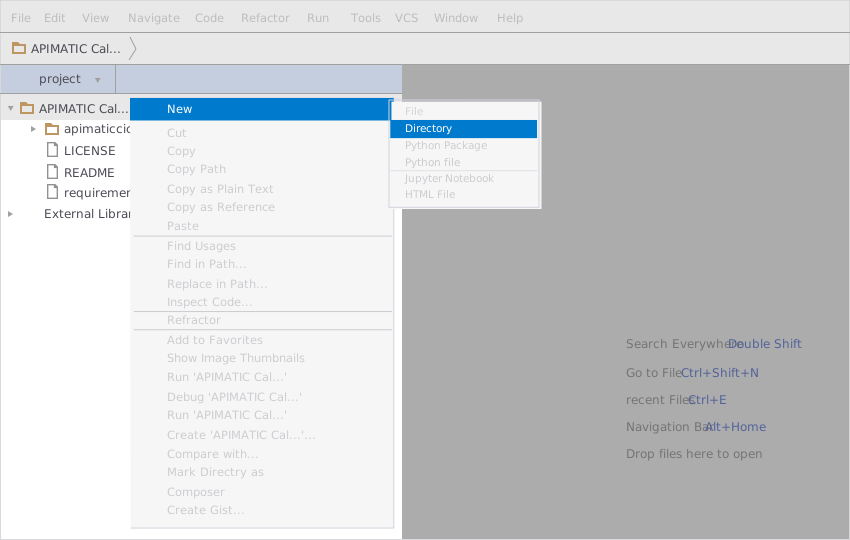
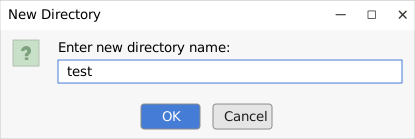
Name the directory as "test"
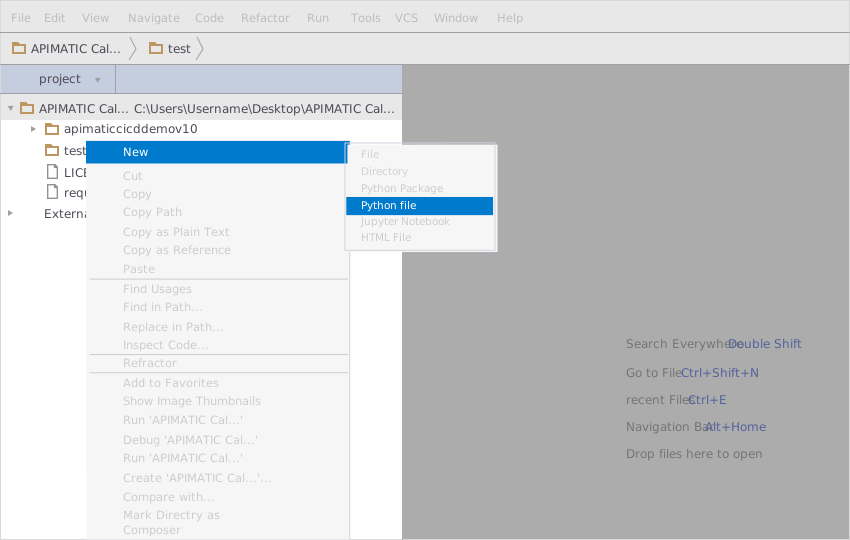
Add a python file to this project with the name "testsdk"
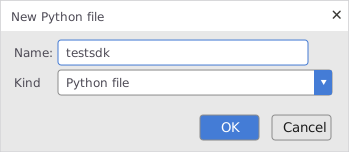
Name it "testsdk"
In your python file you will be required to import the generated python library using the following code lines
```Python
from apimaticcicddemov10.apimaticcicddemov_10_client import Apimaticcicddemov10Client
```
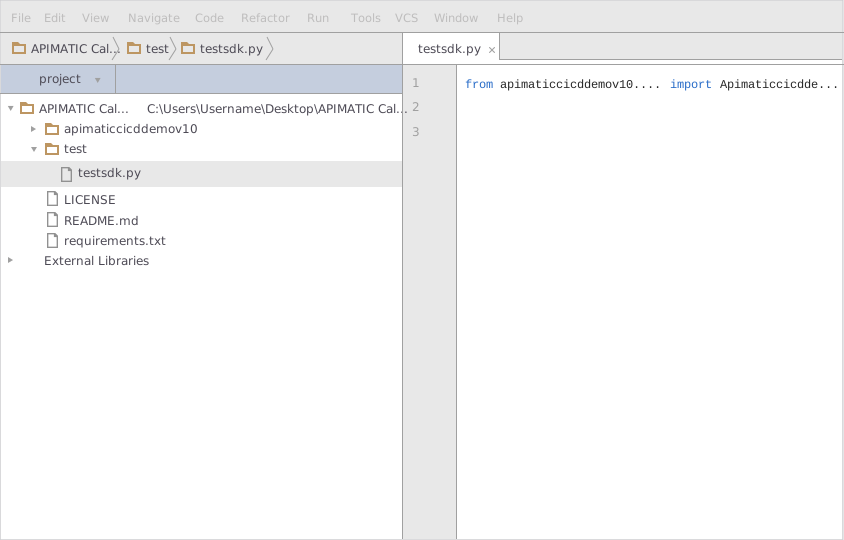
After this you can write code to instantiate an API client object, get a controller object and make API calls. Sample code is given in the subsequent sections.
### 3. Run the Test Project
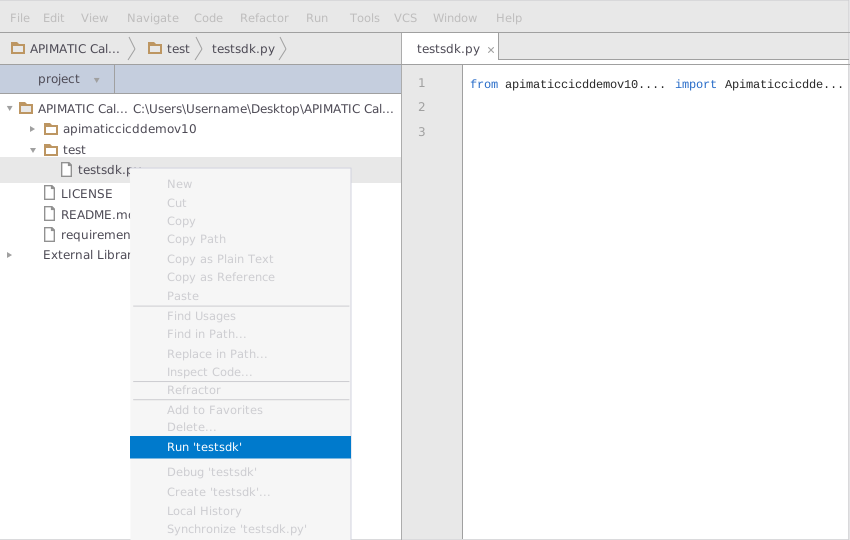
To run the file within your test project, right click on your Python file inside your Test project and click on ```Run```
## How to Test
You can test the generated SDK and the server with automatically generated test
cases. unittest is used as the testing framework and nose is used as the test
runner. You can run the tests as follows:
1. From terminal/cmd navigate to the root directory of the SDK.
2. Invoke ```pip install -r test-requirements.txt```
3. Invoke ```nosetests```
## Initialization
###
API client can be initialized as following.
```python
client = Apimaticcicddemov10Client()
```
# Class Reference
## <a name="list_of_controllers"></a>List of Controllers
* [SimpleCalculatorController](#simple_calculator_controller)
## <a name="simple_calculator_controller"></a> SimpleCalculatorController
### Get controller instance
An instance of the ``` SimpleCalculatorController ``` class can be accessed from the API Client.
```python
simple_calculator_controller = client.simple_calculator
```
### <a name="get_ci_cd_demo_for_calculator"></a> get_ci_cd_demo_for_calculator
> Calculates the expression using the specified operation.
```python
def get_ci_cd_demo_for_calculator(self,
options=dict())
```
#### Parameters
| Parameter | Tags | Description |
|-----------|------|-------------|
| operation | ``` Required ``` | The operator to apply on the variables |
| x | ``` Required ``` | The LHS value |
| y | ``` Required ``` | The RHS value |
#### Example Usage
```python
collect = {}
operation = OperationTypeEnum.MULTIPLY
collect['operation'] = operation
x = 4
collect['x'] = x
y = 5
collect['y'] = y
result = simple_calculator_controller.get_ci_cd_demo_for_calculator(collect)
```
[Back to List of Controllers](#list_of_controllers)
Simple calculator API hosted on APIMATIC
## How to Build
You must have Python ```2 >=2.7.9``` or Python ```3 >=3.4``` installed on your system to install and run this SDK. This SDK package depends on other Python packages like nose, jsonpickle etc.
These dependencies are defined in the ```requirements.txt``` file that comes with the SDK.
To resolve these dependencies, you can use the PIP Dependency manager. Install it by following steps at [https://pip.pypa.io/en/stable/installing/](https://pip.pypa.io/en/stable/installing/).
Python and PIP executables should be defined in your PATH. Open command prompt and type ```pip --version```.
This should display the version of the PIP Dependency Manager installed if your installation was successful and the paths are properly defined.
* Using command line, navigate to the directory containing the generated files (including ```requirements.txt```) for the SDK.
* Run the command ```pip install -r requirements.txt```. This should install all the required dependencies.

## How to Use
The following section explains how to use the Apimaticcalculator SDK package in a new project.
### 1. Open Project in an IDE
Open up a Python IDE like PyCharm. The basic workflow presented here is also applicable if you prefer using a different editor or IDE.

Click on ```Open``` in PyCharm to browse to your generated SDK directory and then click ```OK```.

The project files will be displayed in the side bar as follows:

### 2. Add a new Test Project
Create a new directory by right clicking on the solution name as shown below:

Name the directory as "test"

Add a python file to this project with the name "testsdk"

Name it "testsdk"

In your python file you will be required to import the generated python library using the following code lines
```Python
from apimaticcicddemov10.apimaticcicddemov_10_client import Apimaticcicddemov10Client
```

After this you can write code to instantiate an API client object, get a controller object and make API calls. Sample code is given in the subsequent sections.
### 3. Run the Test Project
To run the file within your test project, right click on your Python file inside your Test project and click on ```Run```

## How to Test
You can test the generated SDK and the server with automatically generated test
cases. unittest is used as the testing framework and nose is used as the test
runner. You can run the tests as follows:
1. From terminal/cmd navigate to the root directory of the SDK.
2. Invoke ```pip install -r test-requirements.txt```
3. Invoke ```nosetests```
## Initialization
###
API client can be initialized as following.
```python
client = Apimaticcicddemov10Client()
```
# Class Reference
## <a name="list_of_controllers"></a>List of Controllers
* [SimpleCalculatorController](#simple_calculator_controller)
## <a name="simple_calculator_controller"></a> SimpleCalculatorController
### Get controller instance
An instance of the ``` SimpleCalculatorController ``` class can be accessed from the API Client.
```python
simple_calculator_controller = client.simple_calculator
```
### <a name="get_ci_cd_demo_for_calculator"></a> get_ci_cd_demo_for_calculator
> Calculates the expression using the specified operation.
```python
def get_ci_cd_demo_for_calculator(self,
options=dict())
```
#### Parameters
| Parameter | Tags | Description |
|-----------|------|-------------|
| operation | ``` Required ``` | The operator to apply on the variables |
| x | ``` Required ``` | The LHS value |
| y | ``` Required ``` | The RHS value |
#### Example Usage
```python
collect = {}
operation = OperationTypeEnum.MULTIPLY
collect['operation'] = operation
x = 4
collect['x'] = x
y = 5
collect['y'] = y
result = simple_calculator_controller.get_ci_cd_demo_for_calculator(collect)
```
[Back to List of Controllers](#list_of_controllers)
1 maintainer

Metadata
1 maintainer
Release files for apimaticcicddemov10 1.0.4
For a detailed explanation of source distributions (sdists) and built distributions (wheels), please see the package formats documentation.
Source distribution (sdist)
| File | Size | Uploaded | Provenance | |
|---|---|---|---|---|
| apimaticcicddemov10-1.0.4.tar.gz | 15.8 kB | Without provenance | Details |
Release files / apimaticcicddemov10-1.0.4.tar.gz
| Download URL | apimaticcicddemov10-1.0.4.tar.gz |
|---|---|
| Size | 15.8 kB |
| Tags | Source |
|
SHA-256 checksum How to use checksums |
1a5997f01061373779632a179660353513f6701cb5110d03f9b264807a29cfb7
|
|
BLAKE2b-256 checksum How to use checksums |
07e6ef7937ad39d0922cdabbfdb35b94f83b560f4cc326fb6deb6bf7bcf500df
|
| Upload date | |
|
Uploaded using Trusted Publishing? What is trusted publishing? |
No |
| Uploaded via |
Python-urllib/3.6
|
Security for apimaticcicddemov10 1.0.4
Provenance
Provenance describes where a file came from. On PyPI, provenance is shared via attestations, which provide a verifiable record of the build or publishing details. View details, limitations and caveats.
No provenance found
None of the files in this release were uploaded with provenance metadata.
A note on package security
PyPI is a repository for distributing packages, not a service for auditing them. While third-party security researchers and our staff do their best to detect and remove malicious packages, PyPI cannot guarantee the quality, security or suitability of any given package.














