
This release is a pre-release and may not be stable for production use.
AppEnlight
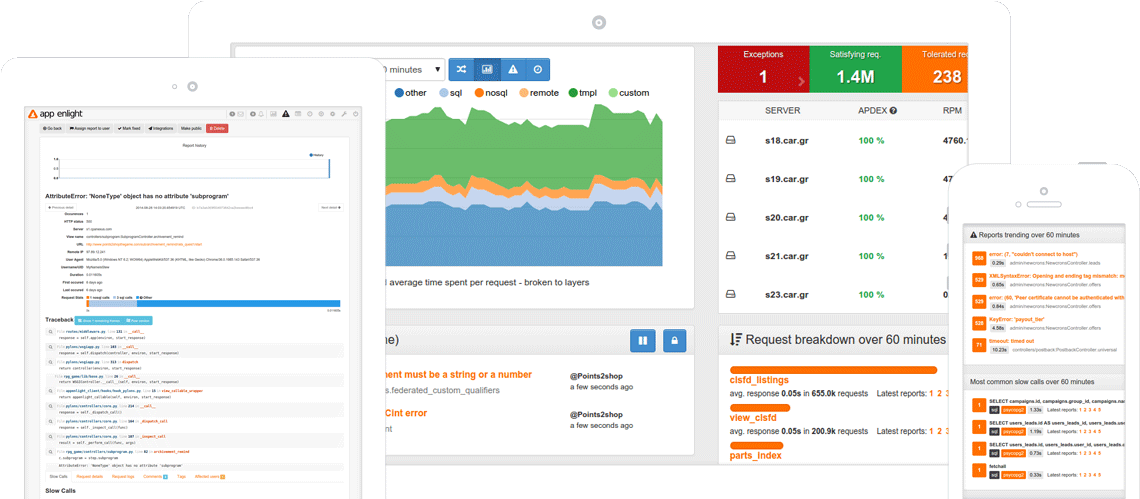
Performance, exception, and uptime monitoring for the Web
Automatic Installation
Use the ansible scripts in the automation repository to build complete instance of application
You can also use packer files in automation/packer to create whole VM's for KVM and VMWare.
Manual Installation
To run the app you need to have meet prerequsites:
- python 3.5+ (currently 3.6 tested)
- running elasticsearch (6.6.2 tested)
- running postgresql (9.5+ required, tested 9.6 and 10.6)
- running redis
Install the app by performing
pip install -r requirements.txt

python setup.py develop
Install the appenlight uptime plugin (ae_uptime_ce package from appenlight-uptime-ce repository).
For production usage you can do:
pip install appenlight
pip install ae_uptime_ce
After installing the application you need to perform following steps:
-
(optional) generate production.ini (or use a copy of development.ini)
appenlight-make-config production.ini -
Setup database structure:
appenlight-migratedb -c FILENAME.ini -
To configure elasticsearch:
appenlight-reindex-elasticsearch -t all -c FILENAME.ini -
Create base database objects
(run this command with help flag to see how to create administrator user)
appenlight-initializedb -c FILENAME.ini -
Generate static assets
appenlight-static -c FILENAME.ini
Running application
To run the main app:
pserve development.ini
To run celery workers:
celery worker -A appenlight.celery -Q "reports,logs,metrics,default" --ini FILENAME.ini
To run celery beat:
celery beat -A appenlight.celery --ini FILENAME.ini
To run appenlight's uptime plugin:
appenlight-uptime-monitor -c FILENAME.ini
Real-time Notifications
You should also run the `channelstream websocket server for real-time notifications
channelstream -i filename.ini
Additional documentation
Visit https://getappenlight.com for additional server and client documentation.
Testing
To run test suite:
py.test appenlight/tests/tests.py --cov appenlight (this looks for testing.ini in repo root)
Development
To develop appenlight frontend:
cd frontend
npm install
grunt watch
1 maintainer

Metadata
1 maintainer
Release files for appenlight 2.0.0rc1
For a detailed explanation of source distributions (sdists) and built distributions (wheels), please see the package formats documentation.
Source distribution (sdist)
| File | Size | Uploaded | Provenance | Actions |
|---|---|---|---|---|
| appenlight-2.0.0rc1.tar.gz | 3.8 MB | Without provenance | Details for appenlight-2.0.0rc1.tar.gz |
Built distribution (wheel)
| File | Interpreter | ABI | Platform | Actions Reset |
|---|---|---|---|---|
| appenlight-2.0.0rc1-py3-none-any.whl | Python 3 | none | any | Details for appenlight-2.0.0rc1-py3-none-any.whl |
Total release size: 7.7 MB
Release files / appenlight-2.0.0rc1.tar.gz
| Download URL | appenlight-2.0.0rc1.tar.gz |
|---|---|
| Size | 3.8 MB |
| Tags | Source |
|
SHA-256 checksum How to use checksums |
4cdda121dacbd5a528a94d99ed73db72e8781ad17123fd1b1b6405366a7d782f
|
|
BLAKE2b-256 checksum How to use checksums |
fd82cdd7eb82af455b0416bb8eefed6e10d4040c4054617d928135f476080931
|
| Upload date | |
|
Uploaded using Trusted Publishing? What is trusted publishing? |
No |
| Uploaded via |
twine/1.13.0 pkginfo/1.5.0.1 requests/2.21.0 setuptools/41.0.0 requests-toolbelt/0.9.1 tqdm/4.31.1 CPython/3.6.7
|
Release files / appenlight-2.0.0rc1-py3-none-any.whl
| Download URL | appenlight-2.0.0rc1-py3-none-any.whl |
|---|---|
| Size | 4.0 MB |
| Tags | Python 3 |
|
SHA-256 checksum How to use checksums |
685d025ada09ec0cb5269deba6a08686f1799bd6e94f66fdd528bb1eb62a56be
|
|
BLAKE2b-256 checksum How to use checksums |
cb30cf878246f823063189767e3d139045fd8069a03e92d70b9267c23c7b8c8e
|
| Upload date | |
|
Uploaded using Trusted Publishing? What is trusted publishing? |
No |
| Uploaded via |
twine/1.13.0 pkginfo/1.5.0.1 requests/2.21.0 setuptools/41.0.0 requests-toolbelt/0.9.1 tqdm/4.31.1 CPython/3.6.7
|
Security for appenlight 2.0.0rc1
Provenance
Provenance describes where a file came from. On PyPI, provenance is shared via attestations, which provide a verifiable record of the build or publishing details. View details, limitations and caveats.
No provenance found
None of the files in this release were uploaded with provenance metadata.
A note on package security
PyPI is a repository for distributing packages, not a service for auditing them. While third-party security researchers and our staff do their best to detect and remove malicious packages, PyPI cannot guarantee the quality, security or suitability of any given package.
To learn more about protecting yourself from malicious actors, visit our package security documentation.













