
ANTARES data browser for micro-ARPES spatial maps
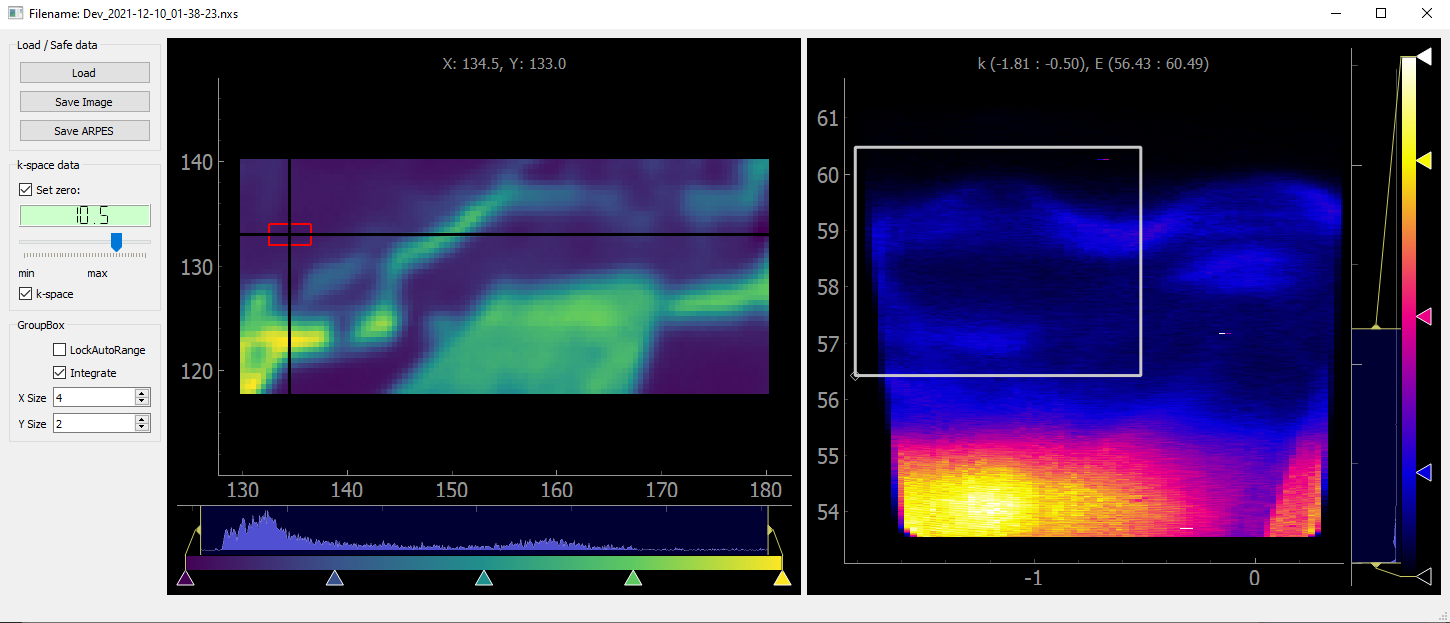
This is an interactive software allowing to visualize and treat the micro-ARPES spatial maps from ANTARES beamline at syncrotron radiation facility SOLEIL (France). The micro-ARPES data are stored in Nexus files with HDF5.
Main features:
- visualize the ARPES image from the selected point in spatial map,
- visualize integrated ARPES image from the selected area,
- convert ARPES data from real (E vs. angle) to momentum (E vs. k) space
- select the region of interest in real and momentum space and integrate the spatial map inside the selected region,
- save images (cvg, jpg etc.) and data (ARPES or spatial) in 'csv' format.
1 maintainer

Metadata
1 maintainer
Release files for ARPES-GUI 0.0.4
For a detailed explanation of source distributions (sdists) and built distributions (wheels), please see the package formats documentation.
Source distribution (sdist)
| File | Size | Uploaded | Provenance | |
|---|---|---|---|---|
| ARPES_GUI-0.0.4.tar.gz | 2.3 kB | Without provenance | Details |
Built distribution (wheel)
| File | Interpreter | ABI | Platform | Reset |
|---|---|---|---|---|
| ARPES_GUI-0.0.4-py3-none-any.whl | Python 3 | none | any | Details |
Total release size: 4.7 kB
Release files / ARPES_GUI-0.0.4.tar.gz
| Download URL | ARPES_GUI-0.0.4.tar.gz |
|---|---|
| Size | 2.3 kB |
| Tags | Source |
|
SHA-256 checksum How to use checksums |
b1af9da3a62b136c9bdf4848b0759634d3104f5f97df0cda370f0bd0566e23cb
|
|
BLAKE2b-256 checksum How to use checksums |
bbf1db6b355123bfbeeb9b422157a4e897bbeaa58f59baf79d408cd508770161
|
| Upload date | |
|
Uploaded using Trusted Publishing? What is trusted publishing? |
No |
| Uploaded via |
twine/3.8.0 pkginfo/1.8.2 readme-renderer/32.0 requests/2.25.1 requests-toolbelt/0.9.1 urllib3/1.26.4 tqdm/4.62.3 importlib-metadata/4.11.1 keyring/23.5.0 rfc3986/2.0.0 colorama/0.4.4 CPython/3.8.8
|
Release files / ARPES_GUI-0.0.4-py3-none-any.whl
| Download URL | ARPES_GUI-0.0.4-py3-none-any.whl |
|---|---|
| Size | 2.4 kB |
| Tags | Python 3 |
|
SHA-256 checksum How to use checksums |
51cbed4bef5cb0640666ef27f0cc9adbed61a18702bb7573712afd063a331dad
|
|
BLAKE2b-256 checksum How to use checksums |
aa33a43bfc9ee6d75deb61f3e1102dd3808df95ef8f4ca0af5c35e0b30f5d4c6
|
| Upload date | |
|
Uploaded using Trusted Publishing? What is trusted publishing? |
No |
| Uploaded via |
twine/3.8.0 pkginfo/1.8.2 readme-renderer/32.0 requests/2.25.1 requests-toolbelt/0.9.1 urllib3/1.26.4 tqdm/4.62.3 importlib-metadata/4.11.1 keyring/23.5.0 rfc3986/2.0.0 colorama/0.4.4 CPython/3.8.8
|
Security for ARPES-GUI 0.0.4
Provenance
Provenance describes where a file came from. On PyPI, provenance is shared via attestations, which provide a verifiable record of the build or publishing details. View details, limitations and caveats.
No provenance found
None of the files in this release were uploaded with provenance metadata.
A note on package security
PyPI is a repository for distributing packages, not a service for auditing them. While third-party security researchers and our staff do their best to detect and remove malicious packages, PyPI cannot guarantee the quality, security or suitability of any given package.













