
askcmd 使用指南
简介
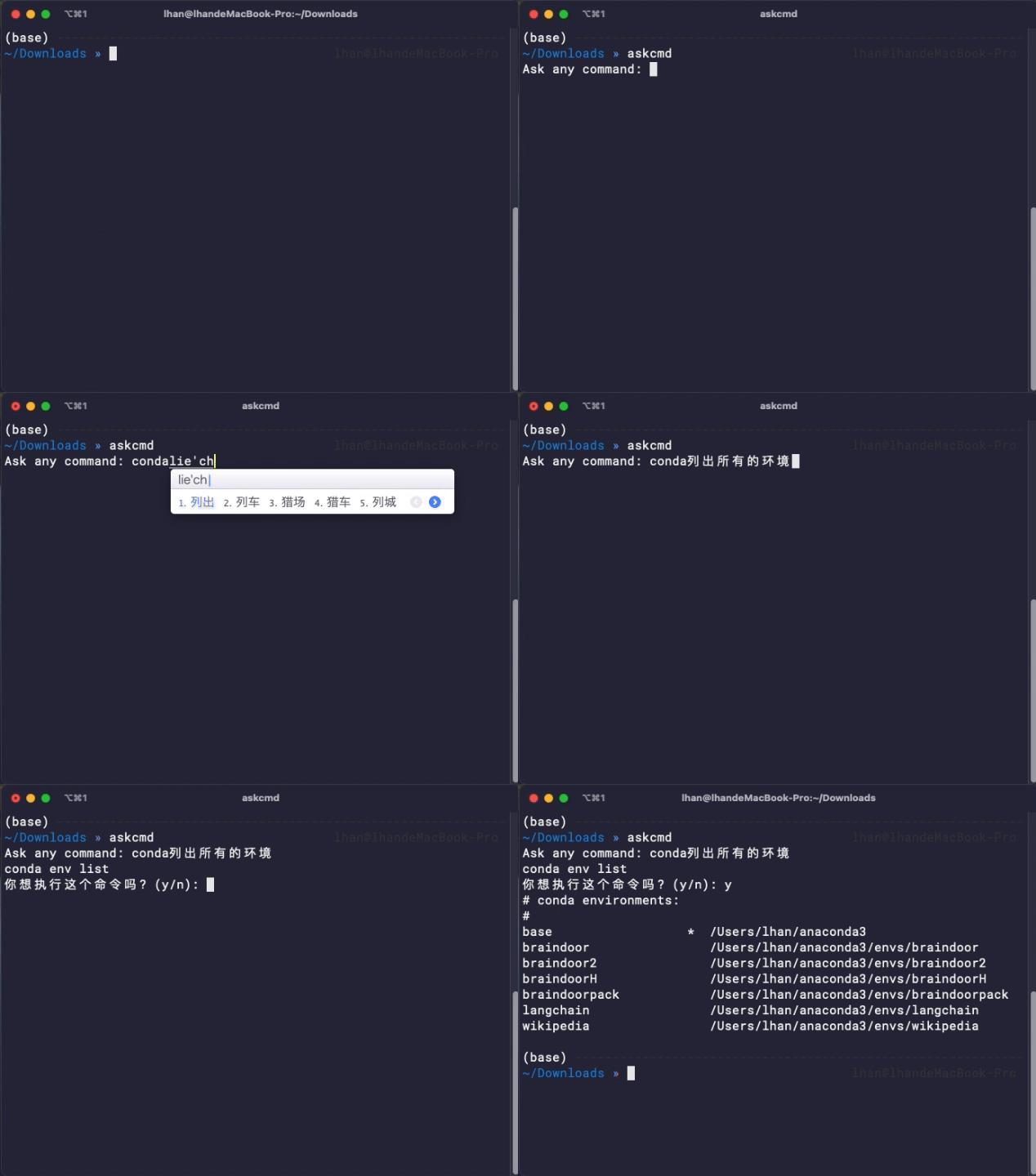
askcmd 是一个轻量简便的命令行工具,帮助用户根据自然语言生成或解释命令行命令。使用 OpenAI 的 gpt-3.5-turbo 模型来生成或解释用户的查询。
- 暂不使用本地模型,避免臃肿,目标是任何机器上随时使用
- 避免繁琐的配置,设置key即用
- 主要针对日常简短的命令,而不是大量的脚本生成,所以尽量的简化
安装
pip安装
pip install askcmd
从源码安装:
git clone https://github.com/newfyu/askcmd.git
cd askcmd
python setup.py install
设置
首次使用以下参数来配置 askcmd:
askcmd --key YOUR_OPENAI_KEY # 首次使用必须设置
askcmd --api-base API_BASE # 可选,设置反向代理地址,如果你的网络无法访问 OpenAI,可尝试设置为比如 "https://api.openai-proxy.com" 等公开的反向代理地址。输入 "none" 移除之前设置的反向代理地址。
askcmd --proxy YOUR_PROXY # 可选,如果你是用自己的本地代理工具,在此处设置代理地址,例如 "http://127.0.0.1:1087"
如果不知道代理怎么设置,直接无脑下面的命令
askcmd --api-base https://api.openai-proxy.com
使用
askcmd
# or
askcmd <任何查询>
1 maintainer

Metadata
1 maintainer
Release files for askcmd 0.1.4
For a detailed explanation of source distributions (sdists) and built distributions (wheels), please see the package formats documentation.
Source distribution (sdist)
| File | Size | Uploaded | |
|---|---|---|---|
| askcmd-0.1.4.tar.gz | 4.3 kB | Details |
Release files / askcmd-0.1.4.tar.gz
| Download URL | askcmd-0.1.4.tar.gz |
|---|---|
| Size | 4.3 kB |
| Tags | Source |
|
SHA-256 checksum How to use checksums |
667a3bcc8a0927fdf22fb61e24354d359cfd3e56a25d548eb42fb9cbd5dcd52a
|
|
BLAKE2b-256 checksum How to use checksums |
824f49d0ae8ddf46484acf6d66cff22aa8bac7953e0aba2524a6233a0d882d3d
|
| Upload date | |
|
Uploaded using Trusted Publishing? What is trusted publishing? |
No |
| Uploaded via |
twine/4.0.2 CPython/3.7.3
|














