
ASPPY - Classic ASP/VBScript Runtime for Python
Run your legacy Classic ASP pages on modern Python infrastructure - no IIS required.
ASPPY is a Python-based runtime that executes Classic ASP (VBScript) pages on Windows, Linux, and macOS. It implements the full Classic ASP object model (Request, Response, Session, Application, Server) alongside broad VBScript built-in coverage, so most legacy ASP applications just work.
And ASPPY is not just a framework on paper - it powers real, live websites in production today, serving real users every day. See them below.
Why ASPPY?
Classic ASP applications represent decades of business logic. Rewriting them is expensive and risky. ASPPY lets you keep your existing .asp files and serve them through a lightweight Python HTTP server - no COM, no Windows dependency, no IIS license. Linux typically runs Python 10–30% faster than Windows, increasing the performance advantage of modern frameworks like ASPPY over Classic ASP/VBScript on IIS.
Radically Simple. By Design.
While other frameworks pile on tooling, ASPPY strips it away. This is what sets it apart:
No build step. Ever.
No npm install. No bundlers. No transpilers. No .ps1 setup scripts. No dependency hell. You edit an .asp file, you hit refresh, it's live. Deployment is a file copy.
The entire runtime is under 900 KB - and human-readable
Not 900 MB. KB. 40 plain Python files plus one generated locale table (~195 KB zipped) that you can open, read, and understand. No black box, no vendor magic. If you want to know how something works, you just read the source - all of it fits in your head.
Compiled, not interpreted line-by-line
ASPPY runs on Python, which compiles code to bytecode before execution. Your ASP pages aren't re-scanned as raw text on every hit.
Compiled ASP pages are cached - zero config, auto-invalidating
Each .asp page is parsed and compiled once, then served from an in-memory cache. Subsequent requests skip straight to execution - no re-parsing, no wasted cycles. And it's completely automatic: nothing to enable, nothing to configure. Edit any .asp file - includes too - and ASPPY detects the change and recompiles on the next request. No restart, no cache-busting, ever.
Performance comparable to IIS
Real-world throughput on par with Classic ASP under IIS - and on Linux, where Python typically runs 10–30% faster than on Windows, ASPPY pulls ahead. Without the Windows Server license.
No giant executables to drag around
No multi-hundred-MB runtime installers, no self-contained EXE blobs, no Docker images you have to babysit. Python + a folder of source files. That's the whole deployment story.
Runs happily on a nano VPS
512 MB RAM, 1 vCPU is enough to serve production traffic. No JVM warm-up, no node_modules eating your disk, no memory-hungry app server - hosting costs measured in single-digit euros per month.
Built for the AI Era - The Perfect Match for Vibe Coding
ASPPY is a dream partner for AI coding tools like Claude Code, OpenCode, Codex, Cursor, GitHub Copilot and all the other important players. Why? Because the entire runtime is a readable codebase of under 900 KB - small enough that any modern LLM (even free models, and certainly the well-known cloud models like Opus, Fable, Gemini, GPT, Kimi, GLM, DeepSeek, and friends) can read and understand it in minutes or less. No million-line framework to guess about, no hidden magic the AI has to hallucinate around - the model sees the whole picture and gets it right the first time.
For experienced ASP developers, this is a genuinely exciting moment: the skills you've built over decades suddenly pair with the most powerful development tools ever created. Describe the app you want, point your AI agent at ASPPY, and watch it develop brand-new web apps or re-create existing ASP/VBScript applications in no time - for nearly free. Legacy modernization, rapid prototyping, full production apps: what used to take weeks of budget and planning now happens in an afternoon. Classic ASP knowledge has never been this valuable - or this much fun to use.
Getting an AI agent up to speed
ASPPY is newer than every model's training cut-off, so no LLM knows anything about it out of the box - and installing a package cannot change that. Knowledge only reaches a model as text in its context window. So the docs travel inside the package, and one command hands them over:
asppy-guide                 # prints developers.md - conventions, object model, gotchas
asppy-guide --list          # every bundled document
asppy-guide --open prompt-builder    # opens a prompt builder in your browser
- Agentic tools (Claude Code, OpenCode, Codex, Cursor, Copilot): run
asppy-guideand give the agent its output before asking for any ASP. Everything is on disk afterpip install- nothing to download. - Chat assistants (Gemini, ChatGPT in a browser): they cannot read your disk. Pipe the brief into your clipboard with
asppy-guide | clipand paste it, or use a prompt builder to generate a complete ready-to-send prompt.
Skip this step and the model will invent an API that doesn't exist. It's the single highest-leverage thing you can do.
To make vibe coding even easier, the ASPPY repo comes with two prompt builders that will be a big help in getting the best out of AI LLM models coding ASP/VBScript for you:
- MVC Prompt Builder - generates the perfect prompt for classic MVC-style ASPPY apps
- SPA (React + ASPPY) Prompt Builder - generates the perfect prompt for single-page apps with a React front-end and an ASPPY back-end
Built with ASPPY — Real Websites, Real Users
ASPPY isn't a proof of concept. It runs production websites in the wild, from SaaS products to healthcare tooling to e-learning - built, deployed, and used by real people every day. Here are a few of them:
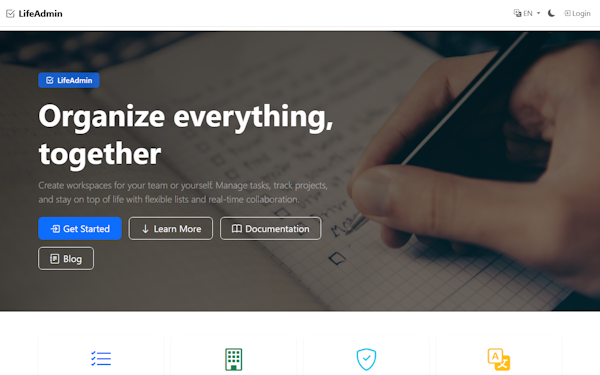
A multilingual SaaS platform for organizing life and work: shared workspaces, task management, project tracking, and real-time collaboration - all served by ASPPY. |
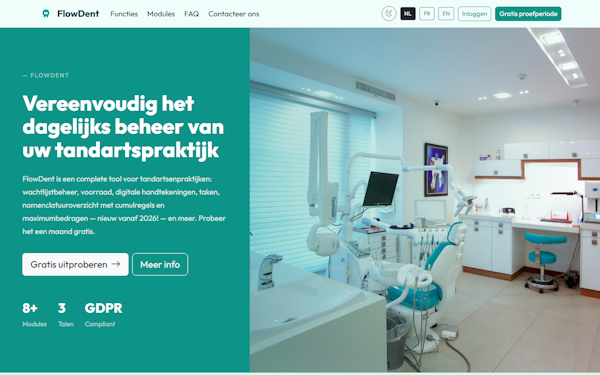
A complete, GDPR-compliant management suite for dental practices: waiting lists, inventory, digital signatures, tasks, and more - trilingual, 8+ modules, running on ASPPY. |
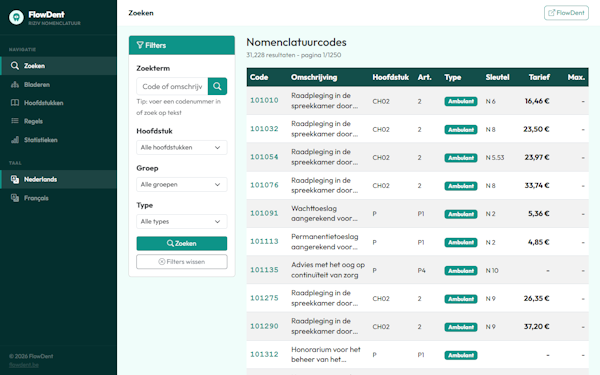
A searchable database of 31,000+ Belgian RIZIV/INAMI nomenclature codes with filters, tariffs, and cumulation rules - data-heavy pages served fast by ASPPY. |
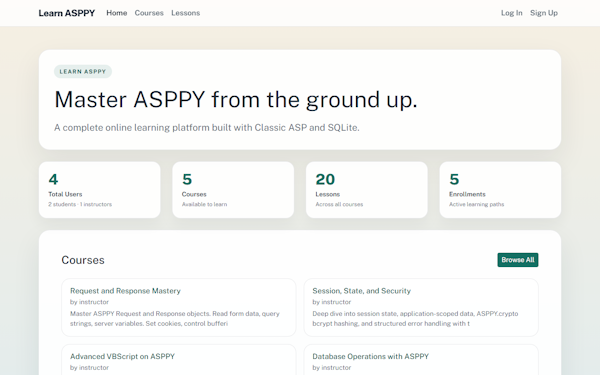
A full e-learning platform (courses, lessons, enrollments, user accounts) built with Classic ASP and SQLite on ASPPY - and it teaches you ASPPY itself. |
Running your own site on ASPPY? Open an issue or PR to get it featured here.
Installation
Prerequisites
Python 3.9 or higher must be installed on your server (Windows, Linux, or macOS).
Download Python at https://www.python.org/downloads/.
ASPPY is a Python application - Python is required on any machine that runs it, including your production hosting server.
Install from PyPI
pip install asppy
That's it. The core runtime has zero third-party dependencies - it runs on nothing but the Python standard library, and SQLite works out of the box.
Optional extras
Some features reach for a third-party library. Each one is imported lazily and only by the feature that needs it, so you install just what your application actually uses:
| Extra | Command | Enables |
|---|---|---|
pdf |
pip install "asppy[pdf]" |
PDF generation (fpdf2) |
image |
pip install "asppy[image]" |
Image resize/crop/filter/watermark (pillow) |
crypto |
pip install "asppy[crypto]" |
bcrypt password hashing (bcrypt) |
odbc |
pip install "asppy[odbc]" |
ADODB via ODBC: Access, Excel, SQL Server, PostgreSQL, MySQL (pyodbc) |
xml |
pip install "asppy[xml]" |
MSXML full XPath 1.0, XSLT and CDATA (lxml, certifi) |
all |
pip install "asppy[all]" |
All of the above |
Skip an extra and the matching feature raises a clear error naming the package to install - nothing else breaks.
Install from source
git clone https://github.com/PieterCooreman/ASPPY.git
cd ASPPY
pip install -e ".[all]"
Quick Start
Put your .asp files in a folder - say www - and serve it:
asppy 0.0.0.0 8080 www
Point your browser at http://localhost:8080 and your .asp pages are live.
On Windows you can also just click start_www.bat in a source checkout.
No
.aspfiles yet? The repo ships ready-to-run examples the PyPI package deliberately leaves out:www_starter/(an MVC scaffold to copy),www/(a minimal welcome page) andwww_test/(the language conformance suite, 34 pages covering the whole VBScript surface).
The five commands
| Command | What it does |
|---|---|
asppy-new myapp |
Create a new app from the MVC starter template - routing, SQLite, views and layout already wired up. Start here. |
asppy [host] [port] [docroot] |
Serve a folder of .asp pages over HTTP. Defaults: 0.0.0.0 8080 web. Pass :: as host for IPv6. |
asppy-render PAGE.asp |
Render one page to stdout or a file - no socket, no browser. Great for diffing output and CI. |
asppy-check FOLDER |
Recursively render every .asp page in a folder and report the ones that fail, with file and line number. |
asppy-guide |
Print the developer/agent brief. asppy-guide --list shows every bundled document. |
Zero to running app, from a bare pip install:
asppy-new myapp
asppy 127.0.0.1 8080 myapp
# render a single page, with a query string and response headers
asppy-render www/default.asp --query "id=42" --show-headers

# render a protected page without logging in
asppy-render www/admin.asp --docroot www --session authed=True

# health-check a whole app (exit code 1 if anything fails - CI friendly)
asppy-check www
Every command also works as a module, which is handy in .bat files, systemd units and Docker CMD lines:
python -m ASPPY 0.0.0.0 8080 www     # same as: asppy 0.0.0.0 8080 www
python -m ASPPY.server 0.0.0.0 8080 www
python -m ASPPY.cli www/default.asp
python -m ASPPY.check www
From a source checkout, python asppycli.py ... and python asppycheck.py ... keep working exactly as before.
The ASPPY Ecosystem
- https://pietercooreman.github.io/ASPPY/ (ASPPY Docs)
- MVC Prompt Builder - ASPPY prompt builder (for MVC) when using vibe coding tools
- SPA (React + ASPPY) Prompt Builder - ASPPY prompt builder (for SPA) when using vibe coding tools
- https://pietercooreman.github.io/ASPPY/ASPPY_The_Vibe_Coders_Guide.html (ebook for both vibe coding tools and developers)
- https://learnasppy.quickersite.com/ (learn ASPPY coding - very basic site for beginning developers)
- https://pietercooreman.github.io/ASP-Runner/ (run ASP/VBScript code in the browser (WebAssembly) - powered by ASPPY)
The Perfect Prompt ?
Refer AI vibe-coding agents (like OpenCode, Claude Code, Codex agents, Cursor, GitHub Copilot) to the developers.md file, which provides important context and guidelines before starting any development in ASPPY. This reduces development time and cost by 30–40% and significantly improves code quality, even when using free AI coding agents.
The prompt builder comes in two flavours:
- MVC Prompt Builder - ASPPY prompt builder when using vibe coding tools
- SPA (React + ASPPY) Prompt Builder - ASPPY prompt builder when using vibe coding tools
What's Supported
| Area | Coverage |
|---|---|
| VBScript built-ins (strings, dates, math, arrays) | Near-complete |
Request / Response / Session / Application / Server |
Near-complete |
Scripting.Dictionary / Scripting.FileSystemObject |
Supported |
ADODB.Connection / Recordset / Command / Stream |
Partial |
| Database backends | SQLite, Access, Excel (read-only), ODBC, PostgreSQL |
VBScript.RegExp |
Supported |
| MSXML HTTP & DOM | Partial (security-sandboxed) |
CDO.Message (SMTP) |
Partial |
| POP3 / IMAP | Partial |
Global.asa events |
Supported |
ASPPY also ships extended helpers beyond classic ASP - JSON encode/decode, ZIP, PDF generation, image processing, and bcrypt password hashing - all accessible from VBScript via the global ASPPY object.
Platform Support
Windows · Linux · macOS
Compatibility Notes
ASPPY targets practical app-level compatibility, not byte-for-byte IIS parity. Edge-case type coercion and COM-level quirks may differ. SQL is executed as-is by the underlying driver - no dialect translation is performed.
If you're migrating a critical application, run your own regression tests against ASPPY alongside IIS before cutting over.
Localization: 60 locales, verified against IIS
ASPPY implements the Classic ASP locale model - Session.LCID, Response.LCID, <%@ LCID %>, GetLocale/SetLocale - across 60 locales. Formatting, parsing and collation are all locale-aware: FormatNumber/FormatCurrency/FormatPercent, FormatDateTime, MonthName/WeekdayName, CDbl/CDate/IsNumeric/IsDate, Weekday, and StrComp with vbTextCompare.
Two deliberate divergences, both chosen so that behaviour is deterministic across hosts:
- Default locale is 1033 (en-US) when nothing is set, rather than the host's system locale.
CStr(date)stays ISO (2024-03-05 14:07:09) while no locale has been selected, so apps that concatenate dates into SQL keep working. Selecting a locale switches it to full IIS formatting.
See the specifications page for the supported locale list and details.
Character encoding: UTF-8 by default - an intentional break from IIS
Classic ASP under IIS defaults to the system ANSI codepage of the host machine - typically 1252 on a Western Windows server, 932 on a Japanese one. ASPPY instead defaults to UTF-8 (codepage 65001) everywhere. This is a deliberate divergence, not an oversight:
- ASPPY runs on Linux and macOS, where "the system ANSI codepage" has no meaningful equivalent. There is no coherent host default to inherit.
- Every modern consumer - browsers,
fetch, JSON APIs, HTML5 - assumes UTF-8. - VBScript strings are Unicode internally. UTF-8 is the only encoding that round-trips them losslessly; every legacy codepage silently substitutes characters it cannot represent.
| Surface | ASPPY default | IIS default |
|---|---|---|
Session.CodePage / Response.CodePage |
65001 |
system ANSI (e.g. 1252) |
Response.Charset |
utf-8 |
unset - header omits charset |
.asp source files |
UTF-8, BOM-tolerant, falls back to cp1252 |
BOM, else @CODEPAGE, else metabase |
Request.Form / Request.QueryString |
decoded as UTF-8 | decoded per Session.CodePage |
Server.URLEncode |
percent-encoded UTF-8 | percent-encoded per current codepage |
What this means when migrating. Pages served as windows-1252 under IIS are served as UTF-8 by ASPPY and labelled as such in the Content-Type header, so browsers render them correctly with no source change. Legacy .asp files saved in windows-1252 also need no conversion - ASPPY detects and decodes them automatically.
You only need to intervene where a non-browser consumer expects legacy bytes: CSV exports opened in Excel, fixed-format files for banking or EDI partners, or older integration endpoints that assume iso-8859-1. Set the encoding explicitly on those responses:
Response.Charset = "windows-1252"
License
ASPPY is released under the MIT License. See LICENSE for details.
Legal Disclaimer
Disclaimer of Affiliation
ASPPY is an independent software project developed by Pieter Cooreman.
ASPPY is not affiliated, associated, authorized, endorsed by, or in any way officially connected with Microsoft Corporation, or any of its subsidiaries or its affiliates. The official Microsoft website can be found at https://www.microsoft.com.
The names "Microsoft," "Active Server Pages," "ASP," and "VBScript," as well as related names, marks, emblems, and images, are registered trademarks of Microsoft Corporation. The use of these trademarks within this project is purely for descriptive, identification, and reference purposes to indicate technical compatibility, and does not imply any association with, or endorsement by, the trademark holder.
1 maintainer

Release files for asppy 1.0
For a detailed explanation of source distributions (sdists) and built distributions (wheels), please see the package formats documentation.
Source distribution (sdist)
| File | Size | Uploaded | |
|---|---|---|---|
| asppy-1.0.tar.gz | 391.3 kB | Details |
Built distribution (wheel)
| File | Interpreter | ABI | Platform | Reset |
|---|---|---|---|---|
| asppy-1.0-py3-none-any.whl | Python 3 | none | any | Details |
Total release size: 851.1 kB
Release files / asppy-1.0.tar.gz
| Download URL | asppy-1.0.tar.gz |
|---|---|
| Size | 391.3 kB |
| Tags | Source |
|
SHA-256 checksum How to use checksums |
a8c2c9bbd45b2cca35f56cd407f550c3641f130db441b709ca84c8779078225f
|
|
BLAKE2b-256 checksum How to use checksums |
fd8523d7e6147081bbc0168ca3bb9a7efcd6ca99bdbbef87477ad61b4740cf55
|
| Upload date | |
|
Uploaded using Trusted Publishing? What is trusted publishing? |
No |
| Uploaded via |
twine/7.0.0 CPython/3.11.15
|
Release files / asppy-1.0-py3-none-any.whl
| Download URL | asppy-1.0-py3-none-any.whl |
|---|---|
| Size | 459.8 kB |
| Tags | Python 3 |
|
SHA-256 checksum How to use checksums |
96bf44b1f79232ac1e61a88c74ad78e9b349c95c24991e761a2f1434e11b3ff3
|
|
BLAKE2b-256 checksum How to use checksums |
d86d29b535380e672f4af67c4bf33352076f6ec4b056d23e118c7b839db29d29
|
| Upload date | |
|
Uploaded using Trusted Publishing? What is trusted publishing? |
No |
| Uploaded via |
twine/7.0.0 CPython/3.11.15
|














