

Welcome to AstroLink





AstroLink is a general purpose clustering algorithm built for extracting meaningful hierarchical structure from astrophysical data sets. In practice AstroLink rarely requires any parameter tuning before application, nevertheless, it has a small number intuitive-to-adjust parameters should this be necessary. As such, it is readily capable of finding an arbitary number of arbitrarily shaped clusters (and their structural relationship within the broader hierarchy) from arbitrarily defined data sets. Clusters found by AstroLink are defined as being statistically distinct overdensities when compared to their surrounds and to the noisy density fluctuations within the data set.
The AstroLink documentation can be found on ReadTheDocs. The original AstroLink science paper also provides further detailed information.
Installation
The Python package astrolink can be installed from PyPI:
python -m pip install astrolink
Or, if you use Anaconda:
conda install -c conda-forge astrolink
Basic usage
AstroLink can be easily applied to any point-based input data expressed as a np.ndarray with shape (n_samples, d_features).
So first we need some data...
import numpy as np
import sklearn.datasets as data

# Generate some structured data with noise
np.random.seed(0)
background = np.random.uniform(-2, 2, (1000, 2))
moons, _ = data.make_moons(n_samples = 2000, noise = 0.1)
moons -= np.array([[0.5, 0.25]])    # centres moons on origin
gauss_1 = np.random.normal(-1.25, 0.2, (500, 2))
gauss_2 = np.random.normal(1.25, 0.2, (500, 2))

P = np.vstack([background, moons, gauss_1, gauss_2])
... then we run AstroLink over that data...
from astrolink import AstroLink

clusterer = AstroLink(P)
clusterer.run()
... and that's it, AstroLink has found the hierarchical clustering structure of P!
Visualising the estimated density field of the input data
For low-dimensional input data, like we have in this example, it is then possible to visualise the estimated density field by plotting the input data and colouring it by the logRho attribute.
import matplotlib.pyplot as plt
from astrolink import visualize

# Plot the data, colour by the clusterer.logRho attribute, and add a colorbar (default)
fig, ax = plt.subplots()
visualize.logRhoOnX(clusterer, P)

# Tidy up
ax.set_title('Estimated Density Field')
ax.set_xlabel('x')
ax.set_ylabel('y')
ax.set_aspect('equal')

# Show plot
plt.show()
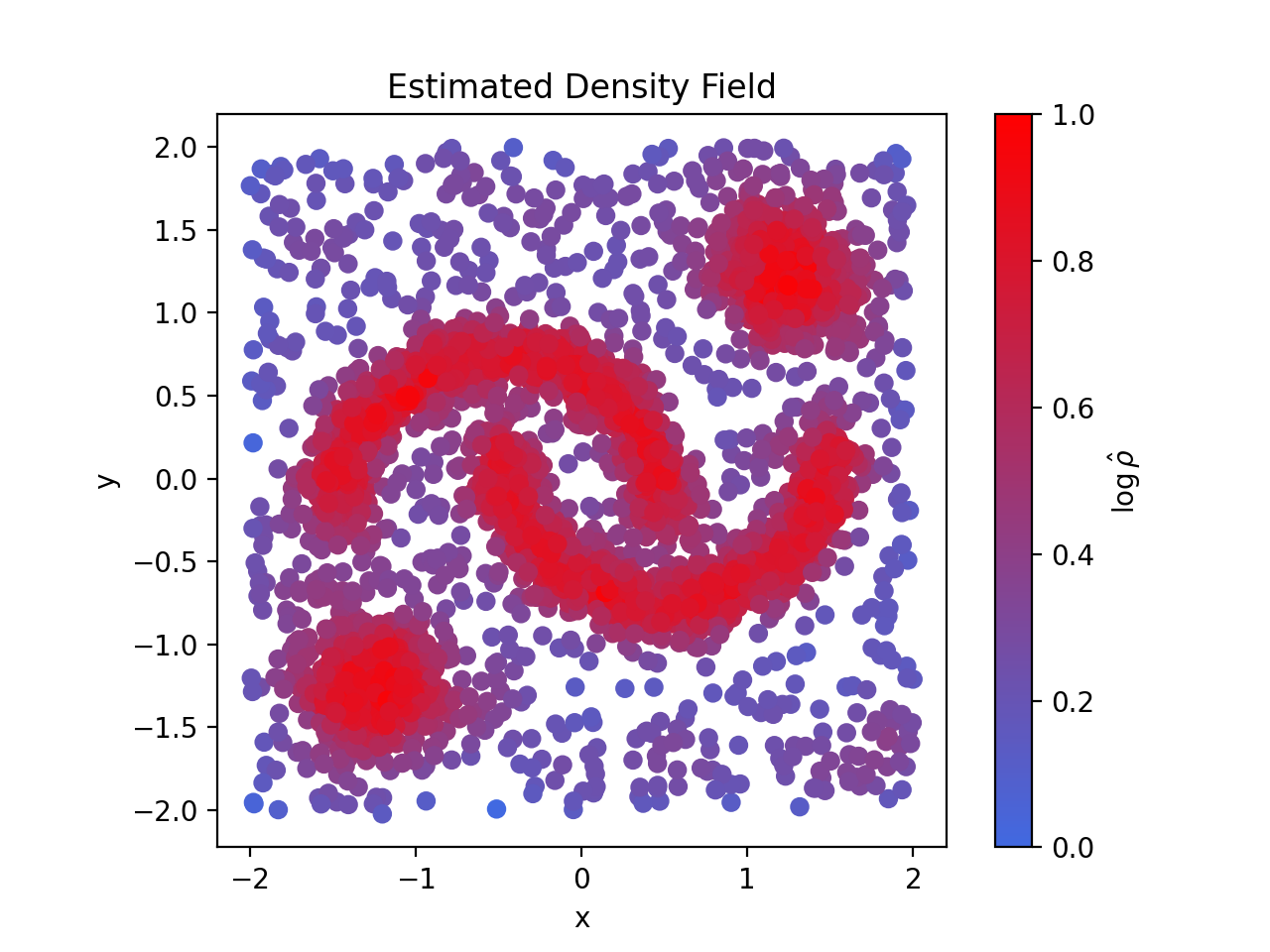
Visualising the clustering structure of the input data
Regardless of the dimensionality of the input data, the clustering structure within it can always be visualised via the 2-dimensional AstroLink ordered-density plot.
# Plot clusterer.logRho[clusterer.ordering] without marking any clusters
visualize.orderedDensity(clusterer, fillKwargs = {'alpha': 0})

# Tidy up
plt.title('Ordered-Density Plot')

# Show plot
plt.show()
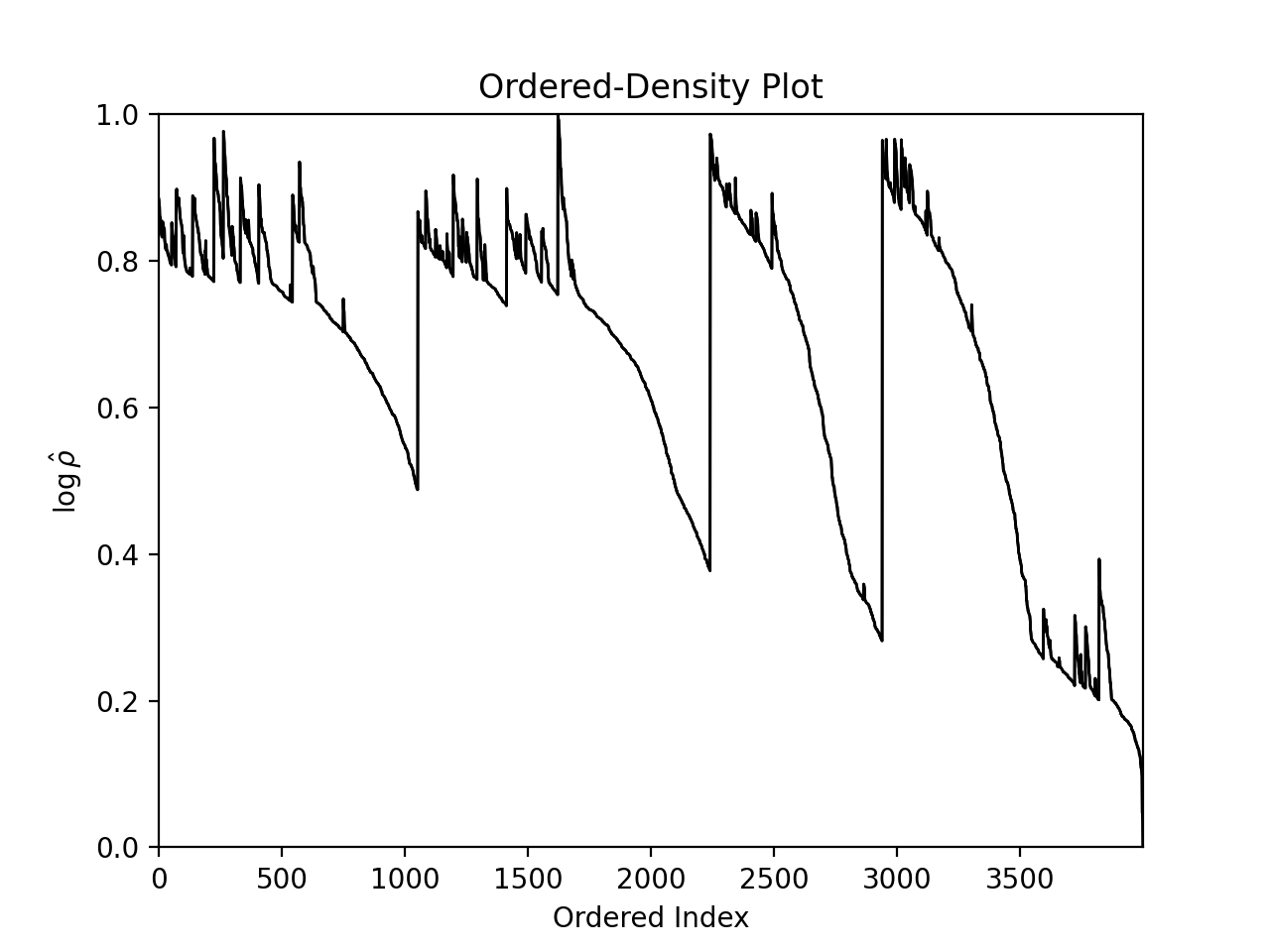
Visualising the clusters found by AstroLink
Although, since the input data in this example can be easily visualised as well, we may as well view this alongside the clusters themselves (as predicted by AstroLink).
# Create two figures
fig1, ax1 = plt.subplots()
fig2, ax2 = plt.subplots()

# Make the ordered-density plot and mark regions with AstroLink clusters
visualize.orderedDensity(clusterer, skipZeroth = False, ax = ax1)

# Plot the data and colour by the AstroLink cluster ids
visualize.labelsOnX(clusterer, P, skipZeroth = False, ax = ax2, scatterKwargs = {'edgecolor': 'k', 'lw': 0.1})

# Tidy up
ax1.set_title('Ordered-Density Plot (Coloured by Cluster ID)')
ax2.set_title('Input Data (Coloured by Cluster ID)')
ax2.set_xlabel('x')
ax2.set_ylabel('y')
ax2.set_aspect('equal')
ax2.legend(framealpha = 1)

# Show plot
plt.show()
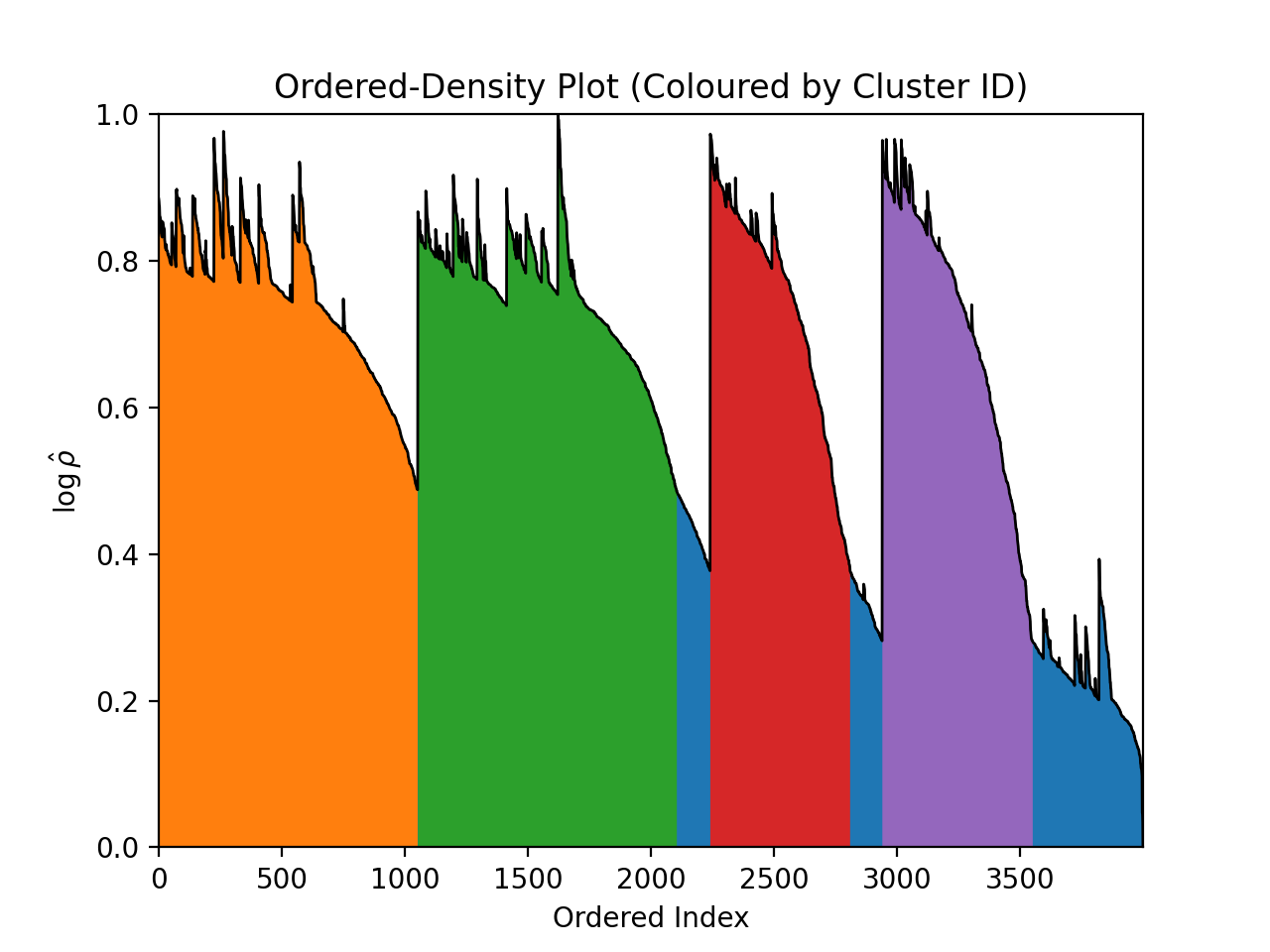
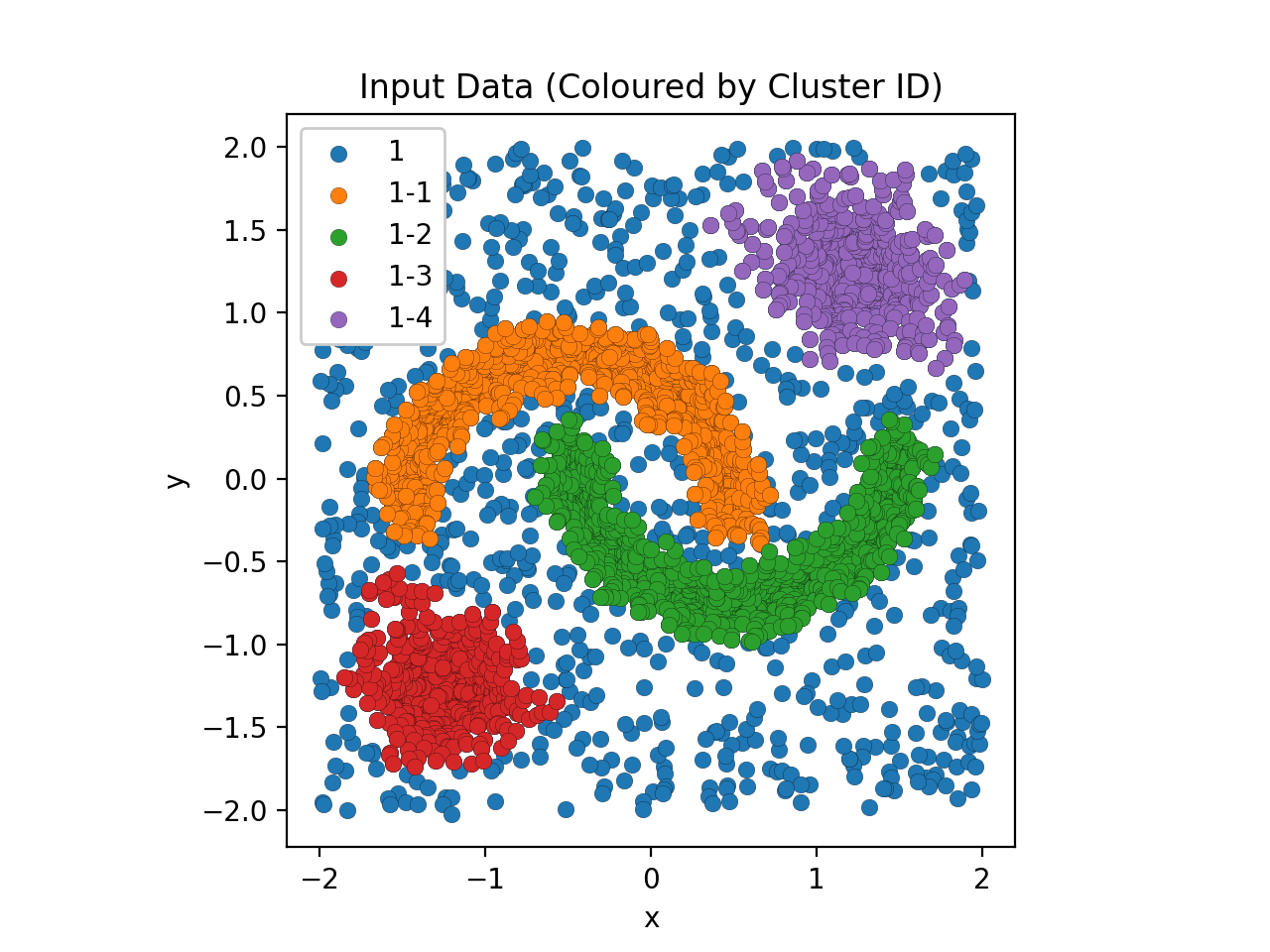
Extracting the clusters for further analysis
To do further analysis on the clustering output, the user may wish to know which points (with respect to the order in which they appear within the input data) belong to the clusters that AstroLink has found. These sets can be constructed from the ordering and clusters attributes.
cluster_members = [clusterer.ordering[clst[0]:clst[1]] for clst in clusterer.clusters]
Development installation
If you want to contribute to the development of astrolink, we recommend
the following editable installation from this repository:
git clone https://github.com/william-h-oliver/astrolink.git
cd astrolink
python -m pip install --editable .[tests]
Having done so, the test suite can then be run using pytest:
python -m pytest
Citing
If you have used AstroLink in a scientific publication, please use the following citation:
@ARTICLE{Oliver2024,
       author = {{Oliver}, William H. and {Elahi}, Pascal J. and {Lewis}, Geraint F. and {Buck}, Tobias},
        title = "{The hierarchical structure of galactic haloes: differentiating clusters from stochastic clumping with ASTROLINK}",
      journal = {\mnras},
     keywords = {methods: data analysis, methods: statistical, galaxies: star clusters: general, galaxies: structure, Astrophysics - Astrophysics of Galaxies},
         year = 2024,
        month = may,
       volume = {530},
       number = {3},
        pages = {2637-2647},
          doi = {10.1093/mnras/stae1029},
archivePrefix = {arXiv},
       eprint = {2312.14632},
 primaryClass = {astro-ph.GA},
       adsurl = {https://ui.adsabs.harvard.edu/abs/2024MNRAS.530.2637O},
      adsnote = {Provided by the SAO/NASA Astrophysics Data System}
}
Acknowledgments
This repository was set up using the SSC Cookiecutter for Python Packages.
1 maintainer

Metadata
1 maintainer
Release files for astrolink 0.5.4
For a detailed explanation of source distributions (sdists) and built distributions (wheels), please see the package formats documentation.
Source distribution (sdist)
| File | Size | Uploaded | Provenance | Actions |
|---|---|---|---|---|
| astrolink-0.5.4.tar.gz | 57.1 MB | With provenance | Details for astrolink-0.5.4.tar.gz |
Release files / astrolink-0.5.4.tar.gz
| Download URL | astrolink-0.5.4.tar.gz |
|---|---|
| Size | 57.1 MB |
| Tags | Source |
|
SHA-256 checksum How to use checksums |
c7331d74c20a0eab59fb54a6137d69aa5ecf0f6293e91393f9bcbebfd8ec16f0
|
|
BLAKE2b-256 checksum How to use checksums |
f46bb4db5d441f13b6584fbb1bffd824ca6293b7749a1f613796f25b6334ae67
|
| Upload date | |
|
Uploaded using Trusted Publishing? What is trusted publishing? |
Yes |
| Uploaded via |
twine/6.1.0 CPython/3.12.8
|
Provenance
Provenance describes where a file came from. On PyPI, provenance is shared via attestations, which provide a verifiable record of the build or publishing details. View details, limitations and caveats.


PyPI Publish Attestation
PyPI verified that this artifact, at this checksum, originated from the publisher listed below.
Signed by GitHub Actions, verified by PyPI on Nov 13, 2025.
Transparency logSecurity for astrolink 0.5.4
Provenance
Provenance describes where a file came from. On PyPI, provenance is shared via attestations, which provide a verifiable record of the build or publishing details. View details, limitations and caveats.
Full provenance
All 1 file in this release has been uploaded with provenance metadata.
Attestation for astrolink-0.5.4.tar.gz
PyPI Publish Attestation
PyPI verified that this artifact, at this checksum, originated from the publisher listed below.
Signed by GitHub Actions, verified by PyPI on Nov 13, 2025.
Transparency logA note on package security
PyPI is a repository for distributing packages, not a service for auditing them. While third-party security researchers and our staff do their best to detect and remove malicious packages, PyPI cannot guarantee the quality, security or suitability of any given package.
To learn more about protecting yourself from malicious actors, visit our package security documentation.














