
Overview
Audio2Topics Package 🔊🗂️


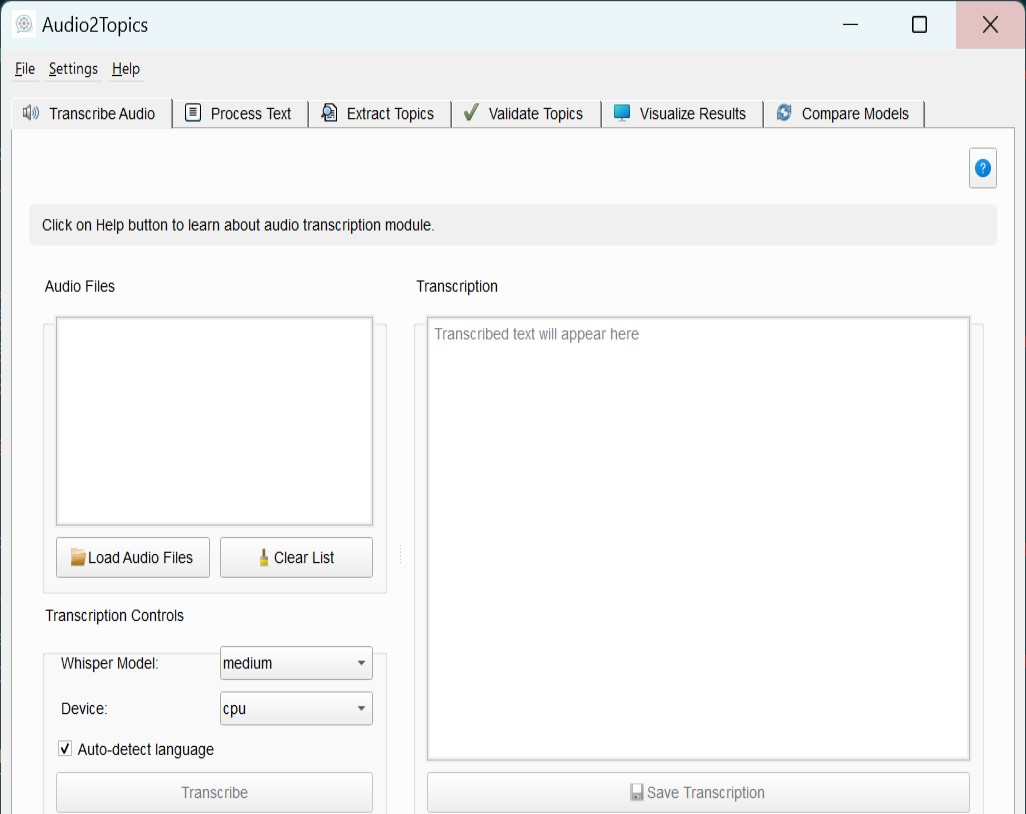
Audio2Topics is python packge that automizes topic extraction from voice and text files. The package is originally designed to aid researchers that performs interview research. Interview research typically incorporates a series of steps, starting from planning research questions, performing interviews, transcribing, and thorough manual text analysis to extract the main themes and topics of the transcribed text. This manual analysis phase is usually long and time-consuming. Additionally, the feasibility of manual analysis is limited by the volume of transcribed data. Audio2Topics accelerating this step by automtically converting voice files of interviews into topics simply and effectively.
The application provides an end-to-end pipeline that handles:
- Audio transcription using OpenAI's Whisper
- Text preprocessing and cleaning
- Topic modeling with multiple algorithms
- Topic validation and optimization
- Advanced visualizations
- Model comparison and evaluation
Audio2Topics bridges the gap between audio content and text analysis, making topic discovery accessible to researchers, content creators, analysts, and anyone who needs to identify key themes in audio materials.
The full documentation is here: https://mohsenaskar.github.io/python-libraries-docs/audio2topics/
Key Features
- Automated Audio Transcription: Convert audio files to text using state-of-the-art speech recognition
- Advanced Text Processing: Clean and normalize text with customizable preprocessing options
- Multiple Topic Modeling Approaches: Choose from BERTopic, LDA, and NMF algorithms
- Interactive Topic Exploration: Visualize and explore topics through multiple visualization techniques
- Topic Quality Validation: Assess topic coherence, diversity, and coverage
- Topic Highlighting: See how topics appear in original text with color highlighting
- Model Comparison: Compare different topic modeling approaches side by side
- LLM Integration: Enhance topic interpretability with AI-generated descriptions
- Comprehensive Reporting: Generate detailed reports with findings and visualizations
Workflow Overview
The Audio2Topics application guides users through a structured workflow:
- Audio Transcription → 2. Text Processing → 3. Topic Modeling → 4. Validation & Visualization → 5. Topics Comparison
1. Audio Transcription
The first step involves converting audio files to text using OpenAI's Whisper model:
- Upload audio files (MP3, WAV, M4A)
- Select Whisper model size (tiny to large)
- Transcribe with automatic language detection
- Review and save transcriptions
2. Text Processing
The transcribed text is then prepared for topic modeling:
- Clean text by removing stopwords, special characters, etc.
- Apply stemming or lemmatization
- Process multiple documents simultaneously
- Analyze text statistics for quality assessment
3. Topic Modeling
The core functionality extracts topics from processed text:
- Choose from multiple algorithms (BERTopic, NMF, LDA)
- Configure parameters like number of topics and n-gram range
- Extract topics with adaptive processing for challenging data
- Refine topics with LLM-generated descriptions
4. Validation & Visualization
Assess topic quality and explore results:
- Validate topics with coherence and diversity metrics
- Find the optimal number of topics for your data
- Create visualizations from word clouds to interactive topic maps
- Highlight topics in original text
- Compare different topic modeling approaches
- Generate reports for sharing and documentation
5. Comparison Module
The comparison tool enables side-by-side evaluation of different topic modeling approaches.
- Can compare between upto 5 topic modeling runs
- Creats supporting visualizations
- Create comparsion summary report
Installation and Setup
System Requirements
- Python 3.10 or higher
- 4GB RAM minimum (8GB+ recommended for larger models)
- NVIDIA GPU with CUDA support (optional, for faster processing)
Dependencies
Audio2Topics relies on several key libraries:
- PyQt5 for the user interface
- OpenAI Whisper for speech recognition
- NLTK and spaCy for text processing
- BERTopic, scikit-learn, and UMAP for topic modeling
- Matplotlib, seaborn, and wordcloud for visualizations
- OpenAI/Anthropic APIs for LLM integration (optional)
Installation Steps
-
Install the package
pip install audio2topics -
Configure API Keys (Optional)
- For LLM topic refinement, configure OpenAI or Anthropic API keys in the settings menu
-
Launch the application To start the tool, activate the Python enviroment where the tool was installed and type:
audio2topics
in the terminal.
Use Cases
Audio2Topics serves a wide range of applications across different domains:
Academic Research
- Analyze interview recordings for qualitative research
- Process lecture content to identify key themes
- Extract topics from academic presentations and symposia
Best Practices
Audio Recording Quality
- Use clear recordings with minimal background noise
- Ensure adequate volume levels
- Use lossless formats when possible
Document Preparation
- Split long recordings into shorter segments
- Group related content into meaningful documents
- Remove irrelevant sections before processing
Topic Modeling Strategy
- Start with a small subset of documents to test different approaches
- Use the Comparison tab to identify the best method for your data
- Validate topic quality before drawing conclusions
- Use LLM refinement for clearer topic interpretations
- Combine quantitative metrics with human judgment
Reporting and Sharing
- Export visualizations in appropriate formats for your audience
- Include topic words and example documents in reports
- Provide context for topics through LLM-generated descriptions
- Use interactive formats (HTML) for detailed exploration
References and Resources
Underlying Technologies
License
Released under the MIT License: For more details, see the LICENSE file.
Copyright (C) 2025 audio2topics
Developed by: Mohsen Askar ceaser198511@gmail.com
Citation
If you use Audio2Topics in your research, please cite:
@software{audio2topics2025,
    title = {Audio2Topics: A Python package to automatically extract topics from audio or text files},
    author = {Mohsen Askar},
    e-mail = {ceaser198511@gmail.com},
    year = {2025},
    url = {https://pypi.org/project/audio2topics/}
}
1 maintainer

Metadata
1 maintainer
Release files for audio2topics 1.1.2
For a detailed explanation of source distributions (sdists) and built distributions (wheels), please see the package formats documentation.
Source distribution (sdist)
| File | Size | Uploaded | Provenance | Actions |
|---|---|---|---|---|
| audio2topics-1.1.2.tar.gz | 387.3 kB | Without provenance | Details for audio2topics-1.1.2.tar.gz |
Built distribution (wheel)
| File | Interpreter | ABI | Platform | Actions Reset |
|---|---|---|---|---|
| audio2topics-1.1.2-py3-none-any.whl | Python 3 | none | any | Details for audio2topics-1.1.2-py3-none-any.whl |
Total release size: 837.4 kB
Release files / audio2topics-1.1.2.tar.gz
| Download URL | audio2topics-1.1.2.tar.gz |
|---|---|
| Size | 387.3 kB |
| Tags | Source |
|
SHA-256 checksum How to use checksums |
ac106a29ab003259160ecfe30d9026b80e3b1255c90ce3f07eae2074ced2f1f7
|
|
BLAKE2b-256 checksum How to use checksums |
0187d0662669ab47e754c2333dd35f89ce9752d49f551771a7c682fde83352df
|
| Upload date | |
|
Uploaded using Trusted Publishing? What is trusted publishing? |
No |
| Uploaded via |
twine/6.0.1 CPython/3.10.13
|
Release files / audio2topics-1.1.2-py3-none-any.whl
| Download URL | audio2topics-1.1.2-py3-none-any.whl |
|---|---|
| Size | 450.1 kB |
| Tags | Python 3 |
|
SHA-256 checksum How to use checksums |
476947aa57a50d1ae2952806d6b89b4e20a7c488e1837d47e57576bb056bc73d
|
|
BLAKE2b-256 checksum How to use checksums |
42495308481d5ddc474e65c82537dbc15df9bf63c1d737e1092c2b801817f9fd
|
| Upload date | |
|
Uploaded using Trusted Publishing? What is trusted publishing? |
No |
| Uploaded via |
twine/6.0.1 CPython/3.10.13
|
Security for audio2topics 1.1.2
Provenance
Provenance describes where a file came from. On PyPI, provenance is shared via attestations, which provide a verifiable record of the build or publishing details. View details, limitations and caveats.
No provenance found
None of the files in this release were uploaded with provenance metadata.
A note on package security
PyPI is a repository for distributing packages, not a service for auditing them. While third-party security researchers and our staff do their best to detect and remove malicious packages, PyPI cannot guarantee the quality, security or suitability of any given package.
To learn more about protecting yourself from malicious actors, visit our package security documentation.














