
CustomerEchoEase
Problem Statement
Customer Support Executives often spend substantial time summarizing and documenting customer interactions post calls, adding an extra burden to their workflow. After each call, they manually input the customer's concerns into systems for further analysis by support teams and managers.
Aim:
Consider an executive who spends 15 minutes summarizing each of the 8 calls they attend daily. This totals an additional 2 hours spent on summarization, time that could have been used to handle 2-3 more customer requests. The aim of CustomerEchoEase is to enhance customer support efficiency, freeing up valuable time for executives to focus on tasks that truly matter.
Overview
The Customer Echo Ease utility (A Generative AI based utility) is designed to fast-track the Time-To-Resolution (TAT) for customer care executives and support teams. By processing monologue/dialogue-based audio files (typically customer requests, complaints, or feedback) in WAV or MP3 format, this utility provides valuable insights to enhance customer support operations.
Project Demo
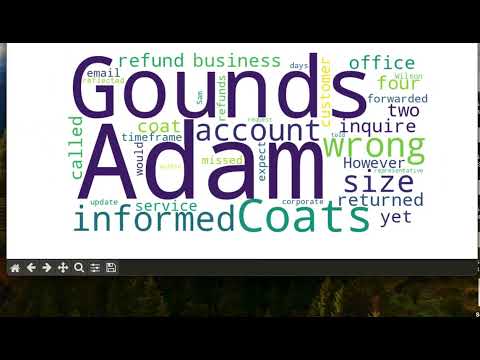
Watch a brief demo of the project for a quick glimpse:
You can also find at :
https://pypi.org/project/AudioSummariser/
Features
-
Text Summarization: Quickly generates a summarized text from audio files, enabling faster Call-to-Action (CTA) and issue resolution.
-
Sentiment Analysis: Evaluates the sentiment of the customer during the call, providing a better understanding of the overall conversation tone.
-
Fine-grained Sentiment Analysis: Conducts sentiment analysis on a word-by-word basis, providing detailed insights into the sentiment of each word used in the conversation.
-
Noise Reduction Techniques: Implements advanced methods, including stopwords removal and tokenization, to enhance the accuracy and meaningfulness of the results by eliminating unnecessary noise from the text.
-
Word Clouds: Visualizes the most frequently used words in the conversation through appealing word clouds.
-
Top 5 Words Bar Graphs: Presents a bar chart showcasing the top 5 most frequently used words, aiding in identifying key themes.
-
Overall Sentiment Pie Chart: Represents the overall sentiment distribution of the conversation in the form of a pie chart.
How It Works
-
Audio Input: Upload the audio file in WAV or MP3 format containing customer interactions.
-
Text Summarization: The utility processes the audio content and generates a concise text summary.
-
Sentiment Analysis: Analyzes the sentiment of the customer during the call (Positive, Negative, or Neutral).
-
Word Clouds: Creates visually appealing word clouds depicting the most used words in the conversation.
-
Graphs and Charts: Displays bar graphs for the top 5 most used words and a pie chart for overall sentiment distribution.
Getting Started
-
Prerequisites:
- Ensure you have the necessary Python libraries installed (requirements.txt).
- Set up Google Drive API credentials for file uploading.
-
Installation:
pip install -r requirements/requirements.txt
You can also use :
pip install AudioSummariser==0.1.0 -
Usage:
- Run the application and upload your audio file.
- Explore the generated summaries, sentiment analysis, and visualizations.
-
Models:
- OpenAI's whisper for Audio to Text Conversion
- Gemini-Pro for Text Summarisation. [Tried GPT, Bart-cnn, bart-base but the accuracy received is most in gemini-pro]
Screenshots


Note - For some of the systems, installing Openai's whisper directly might not work. Use :
"git+https://github.com/openai/whisper.git"
Acknowledgments
- This project was developed to improve the efficiency of customer support teams by HardikGoel.
Feel free to contribute or report issues!
1 maintainer

Metadata
1 maintainer
Release files for AudioSummariser 0.1.1
For a detailed explanation of source distributions (sdists) and built distributions (wheels), please see the package formats documentation.
Source distribution (sdist)
| File | Size | Uploaded | |
|---|---|---|---|
| AudioSummariser-0.1.1.tar.gz | 7.6 kB | Details |
Built distribution (wheel)
| File | Interpreter | ABI | Platform | Reset |
|---|---|---|---|---|
| AudioSummariser-0.1.1-py3-none-any.whl | Python 3 | none | any | Details |
Total release size: 15.3 kB
Release files / AudioSummariser-0.1.1.tar.gz
| Download URL | AudioSummariser-0.1.1.tar.gz |
|---|---|
| Size | 7.6 kB |
| Tags | Source |
|
SHA-256 checksum How to use checksums |
e9c2b11f94d02ec6ac9f92c5cdfddaea852c2526eace44015e7213c6fcd34212
|
|
BLAKE2b-256 checksum How to use checksums |
0062f942ae50098668d7f460ef1c53e3e9b1bd8483ee091a227a167a81fa82b3
|
| Upload date | |
|
Uploaded using Trusted Publishing? What is trusted publishing? |
No |
| Uploaded via |
twine/4.0.2 CPython/3.9.18
|
Release files / AudioSummariser-0.1.1-py3-none-any.whl
| Download URL | AudioSummariser-0.1.1-py3-none-any.whl |
|---|---|
| Size | 7.7 kB |
| Tags | Python 3 |
|
SHA-256 checksum How to use checksums |
cfc4e522f19ff67172e58efa63da19bb77ee2e88277205ef48c3a2194828e37b
|
|
BLAKE2b-256 checksum How to use checksums |
57cc0a3aea24398b4902af14ac892de359f0ddfcf3aa2034d5334bc9df813008
|
| Upload date | |
|
Uploaded using Trusted Publishing? What is trusted publishing? |
No |
| Uploaded via |
twine/4.0.2 CPython/3.9.18
|














