
✨ Aurite Agents Framework

A Python framework for building, testing, and running AI agents.
Aurite Agents is a powerful, configuration-driven framework designed for building and orchestrating sophisticated AI agents. It enables agents to interact with a variety of external tools, prompts, and resources through the Model Context Protocol (MCP), allowing them to perform complex, multi-step tasks.
Whether you're creating advanced AI assistants, automating processes, or experimenting with agentic workflows, Aurite provides the modular building blocks and robust infrastructure you need.
Key Features
- Hierarchical Configuration: Organize your components with a powerful Workspace -> Project system that allows for shared configurations and clear separation of concerns.
- Declarative Components: Define agents, LLMs, tools, and workflows in simple JSON or YAML files.
- Interactive CLI & TUIs: A rich command-line interface (
aurite) and two built-in Textual User Interfaces (TUIs) for interactive chat and configuration editing. - Extensible Tooling: Connect to any tool or service using the Model Context Protocol (MCP), with built-in support for local and remote servers.
- Flexible Orchestration: Chain agents together in
linear_workflowsfor sequential tasks or write custom Python logic incustom_workflowsfor complex orchestration. - REST API: A comprehensive FastAPI server that exposes all framework functionality for programmatic access and UI development.
Getting Started
The best way to start with Aurite is by installing the Python package and using the interactive initializer.
- Install the package:
pip install aurite
- Initialize your first project:
aurite initThis command will launch an interactive wizard to set up your workspace and first project.
For a complete walkthrough, see the Package Installation Guide.
Developers who wish to contribute to the framework should follow the Repository Installation Guide.
Core Concepts
1. Workspaces & Projects
Aurite uses a hierarchical system to organize your work, defined by a special .aurite file.
- Workspace: A top-level container that can manage multiple projects and share common configurations (e.g., a standard set of LLMs).
- Project: A self-contained directory holding all the configurations for a specific application or task.
This structure allows for clean separation and promotes reusable components. Learn more in the Projects and Workspaces Guide.
2. Components
Your application is built by defining and combining different types of components in .json or .yaml files.
- Agents: The core actors, powered by an LLM and capable of using tools.
- LLMs: Configurations for different language models (e.g., GPT-4, Claude 3).
- MCP Servers: Connections to external tools and resources.
- Linear Workflows: A sequence of agents to be executed in order.
- Custom Workflows: Complex orchestration logic defined in your own Python code.
3. Interfaces
Aurite provides multiple ways to interact with the framework:
- Web Interface (Aurite Studio): Modern React web application for visual agent management, workflow design, and real-time execution monitoring.
- TypeScript/JavaScript API: Production-ready API client for building web applications and integrations with full type safety and streaming support.
- Command-Line Interface (CLI): The primary tool for managing your projects. Use it to
init,list,show,run, andedityour components. - Textual User Interfaces (TUIs): Rich, in-terminal applications for interactive chat with agents (
aurite run <agent_name>) and live configuration editing (aurite edit). - REST API: A complete FastAPI server (
aurite api) that exposes all framework functionality for UIs and programmatic control.
Frontend Framework
Aurite includes a comprehensive TypeScript/JavaScript frontend ecosystem that provides both programmatic access and visual interfaces for the Python framework.
Frontend Packages
- @aurite/api-client - Production-ready TypeScript client library with full type safety, retry logic, and streaming support for all framework APIs.
- @aurite/aurite-studio - Modern React web interface providing visual management and execution of agents, workflows, and configurations.
Key Frontend Features
- 🔒 Type Safety: Full TypeScript support with comprehensive type definitions
- 🔄 Real-time Streaming: Live agent responses and execution monitoring
- 🎨 Modern UI: Intuitive React interface with responsive design
- 🧪 Production Ready: Extensive testing, error handling, and deployment tools
- 📖 Rich Examples: Comprehensive examples and integration guides
For complete setup instructions, examples, and API documentation, see the Frontend Documentation.
Architecture Overview
The framework is built on a layered architecture that separates concerns from the user-facing entrypoints down to the external tool connections.
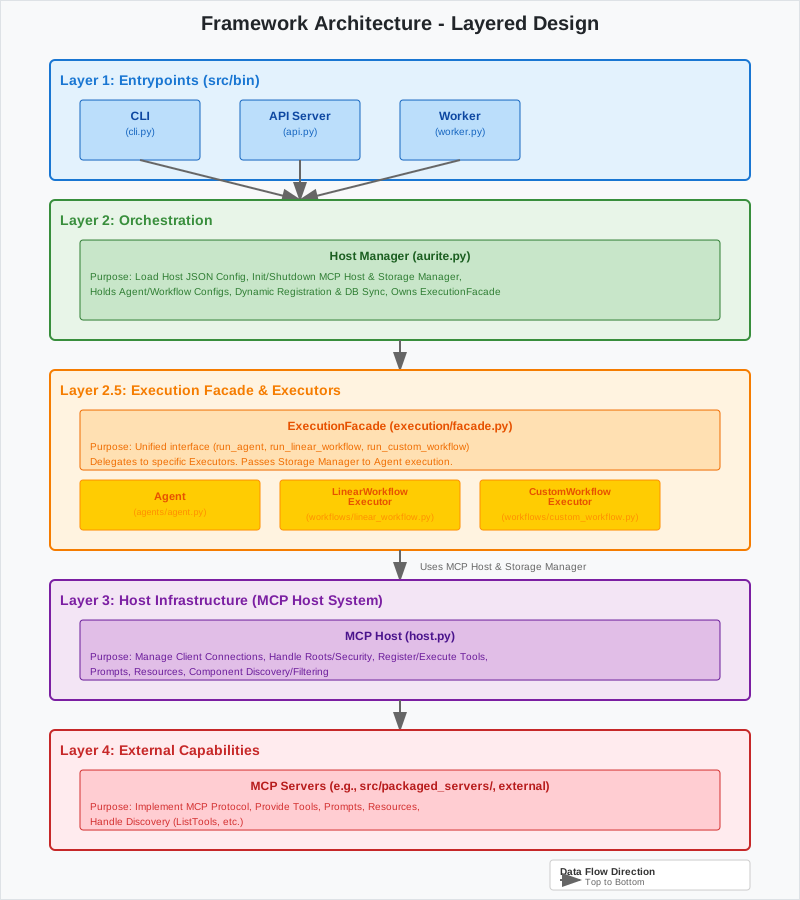
For a deep dive into the framework's design, see the Architecture Overview.
Documentation
- Getting Started
- Frontend
- Usage Guides
- Configuration
- Architecture
⭐ Star this Repository!
Found Aurite Agent Framework useful? Give us a star! ⭐
Your support helps us:
- 🚀 Prioritize new features based on community interest
- 📈 Attract more contributors to accelerate development
- 🎯 Focus our roadmap on what matters most to developers
- 🌟 Build a thriving ecosystem around AI agent development
Join us in building the future of AI agents & workflows with Aurite!
Join Our Community
- 🐛 Report Issues: Found a bug? Open an issue
- 💡 Feature Requests: Have an idea? Start a discussion
- 🤝 Contribute: Check our Contributing Guidelines below
- 📧 Contact: Reach out at hello@aurite.ai
📄 Citation
If you use Aurite Agents in your research or projects, please cite:
BibTeX
@software{aurite_agents_2025,
  title={Aurite Agents Framework: A Python Framework for Building and Orchestrating AI Agents},
  author={Ryan W and Blake R and Jiten Oswal},
  year={2025},
  version={0.3.28},
  publisher={GitHub},
  url={https://github.com/Aurite-ai/aurite-agents},
  note={Configuration-driven AI agent framework with MCP integration and multi-LLM support},
  keywords={artificial intelligence, agents, python, framework, MCP, multi-LLM},
  abstract={A configuration-driven AI agent framework with Model Context Protocol (MCP) integration and multi-LLM support for building and orchestrating intelligent agents},
  license={MIT}
}
🔗 Related Work & Ecosystem
Built With
- Model Context Protocol (MCP) - Tool integration standard
- FastAPI - Modern web framework for APIs
- Textual - Rich terminal user interfaces
- Pydantic - Data validation and settings management
Integrations
- LLM Providers: OpenAI, Anthropic, Google, and more via LiteLLM
- Tools: Any MCP-compatible server or custom Python tools
- Deployment: Docker, cloud platforms, local development
Community Projects
- MCP Servers Registry - Official MCP tools
- Aurite Community Examples - Templates and examples
Contributing
Contributions are welcome! Please follow standard fork/pull request workflows. Ensure tests pass and documentation is updated for any changes.
2 maintainers


Metadata
2 maintainers
Release files for aurite 0.4.2
For a detailed explanation of source distributions (sdists) and built distributions (wheels), please see the package formats documentation.
Source distribution (sdist)
| File | Size | Uploaded | Provenance | Actions |
|---|---|---|---|---|
| aurite-0.4.2.tar.gz | 659.5 kB | Without provenance | Details for aurite-0.4.2.tar.gz |
Built distribution (wheel)
| File | Interpreter | ABI | Platform | Actions Reset |
|---|---|---|---|---|
| aurite-0.4.2-py3-none-any.whl | Python 3 | none | any | Details for aurite-0.4.2-py3-none-any.whl |
Total release size: 1.4 MB
Release files / aurite-0.4.2.tar.gz
| Download URL | aurite-0.4.2.tar.gz |
|---|---|
| Size | 659.5 kB |
| Tags | Source |
|
SHA-256 checksum How to use checksums |
bd130f91c765297cd34330eb916a4d17e3d17daf0a1e8d62f888ec9478a361a1
|
|
BLAKE2b-256 checksum How to use checksums |
828cf2e607cf9e482467685b5fdfa93b5e7d5191394f3c0ce03f4d7de1c06b4c
|
| Upload date | |
|
Uploaded using Trusted Publishing? What is trusted publishing? |
No |
| Uploaded via |
poetry/2.1.3 CPython/3.10.12 Linux/6.8.0-87-generic
|
Release files / aurite-0.4.2-py3-none-any.whl
| Download URL | aurite-0.4.2-py3-none-any.whl |
|---|---|
| Size | 716.7 kB |
| Tags | Python 3 |
|
SHA-256 checksum How to use checksums |
0d70b6c0b9d6dd1eee1c83880a513e1fcc161548669438b6b8cd6a3d6d76dc96
|
|
BLAKE2b-256 checksum How to use checksums |
e7230c5a015f2499e9d65fd7c1ed086a58122ce0f70cec4fa0b9a1ee8a126808
|
| Upload date | |
|
Uploaded using Trusted Publishing? What is trusted publishing? |
No |
| Uploaded via |
poetry/2.1.3 CPython/3.10.12 Linux/6.8.0-87-generic
|
Security for aurite 0.4.2
Provenance
Provenance describes where a file came from. On PyPI, provenance is shared via attestations, which provide a verifiable record of the build or publishing details. View details, limitations and caveats.
No provenance found
None of the files in this release were uploaded with provenance metadata.
A note on package security
PyPI is a repository for distributing packages, not a service for auditing them. While third-party security researchers and our staff do their best to detect and remove malicious packages, PyPI cannot guarantee the quality, security or suitability of any given package.
To learn more about protecting yourself from malicious actors, visit our package security documentation.














