
Authipy



A secure, offline Two-Factor Authentication (2FA) desktop application.
Features • Installation • Usage • Contributing
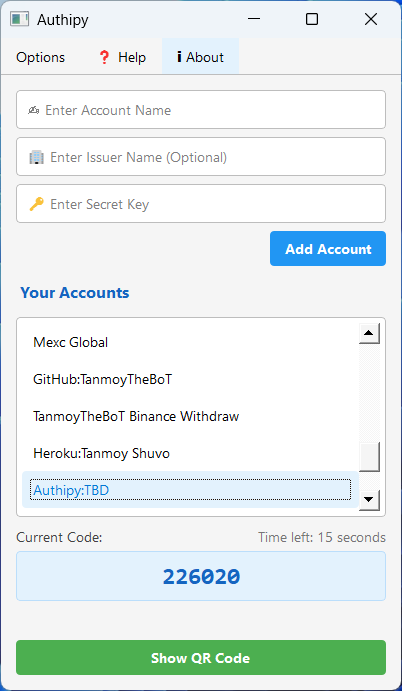
Features
- 🔒 Secure TOTP code generation
- 💾 Local-only storage
- 📱 QR code import/export
- 🗑️ Recycle bin feature
- 📋 One-click copying
- ⚡ Modern Qt interface
Installation
Method 1: Windows Executable (Recommended)
- Download the latest
Authipy.exefrom Releases - Run directly - No installation required
Method 2: PyPI Package
pip install authipy
authipy  # to run
Method 3: Build from Source
- Clone the repository:
git clone https://github.com/TanmoyTheBoT/authipy.git
cd authipy
- Create and activate virtual environment (recommended):
python -m venv venv
venv\\Scripts\\activate   # Windows
- Install dependencies:
pip install -r requirements.txt
- Install in development mode:
pip install -e .
- Run the application:
authipy
- Build executable (optional):
# Install PyInstaller
pip install pyinstaller Pillow sip

# Build single-file executable
pyinstaller --clean --noconsole --onefile --icon=docs/images/test.jpg --name Authipy src/authipy/main.py
The executable will be created in the dist directory.
Usage
Add New Account
- Click "Add Account"
- Enter:
- Service name (required)
- Secret key (required)
- Issuer name (optional)
Generate Codes
- Select account from list
- Code displays automatically
- Click code to copy
Manage Accounts
- Right-click for options
- Use recycle bin
- Import/Export accounts
Data Location
- Windows:
%USERPROFILE%\.config\authipy - Offline storage only
Contributing
- Fork the repository
- Install dev dependencies:
pip install -r requirements-dev.txt
- Make changes
- Run tests:
pytest
pytest --cov=src --cov-report=html  # coverage report
- Submit Pull Request
Support
License
Built with ❤️ by TanmoyTheBoT
1 maintainer

Metadata
1 maintainer
Release files for Authipy 0.0.4
For a detailed explanation of source distributions (sdists) and built distributions (wheels), please see the package formats documentation.
Source distribution (sdist)
| File | Size | Uploaded | |
|---|---|---|---|
| authipy-0.0.4.tar.gz | 10.1 kB | Details |
Built distribution (wheel)
| File | Interpreter | ABI | Platform | Reset |
|---|---|---|---|---|
| authipy-0.0.4-py3-none-any.whl | Python 3 | none | any | Details |
Total release size: 18.7 kB
Release files / authipy-0.0.4.tar.gz
| Download URL | authipy-0.0.4.tar.gz |
|---|---|
| Size | 10.1 kB |
| Tags | Source |
|
SHA-256 checksum How to use checksums |
50dd25b68246e5c78c47a434a885b5cda32fe3666987be4579f9061386775c4f
|
|
BLAKE2b-256 checksum How to use checksums |
f62e2cdb7f33facdddd04580b44a40894bfee1e7694feea88eee3ace2c43b753
|
| Upload date | |
|
Uploaded using Trusted Publishing? What is trusted publishing? |
No |
| Uploaded via |
twine/6.1.0 CPython/3.13.2
|
Release files / authipy-0.0.4-py3-none-any.whl
| Download URL | authipy-0.0.4-py3-none-any.whl |
|---|---|
| Size | 8.6 kB |
| Tags | Python 3 |
|
SHA-256 checksum How to use checksums |
b87e901590a3e1944e264c1c4ed06c46f8abf07ee022de1b483e95a7d73cabc7
|
|
BLAKE2b-256 checksum How to use checksums |
78c0e183bafb12e3a2e1c12bbc3d6c1882355f993fadac1fb83249a3d793c35d
|
| Upload date | |
|
Uploaded using Trusted Publishing? What is trusted publishing? |
No |
| Uploaded via |
twine/6.1.0 CPython/3.13.2
|














