
This release is a pre-release and may not be stable for production use.
AutoArena
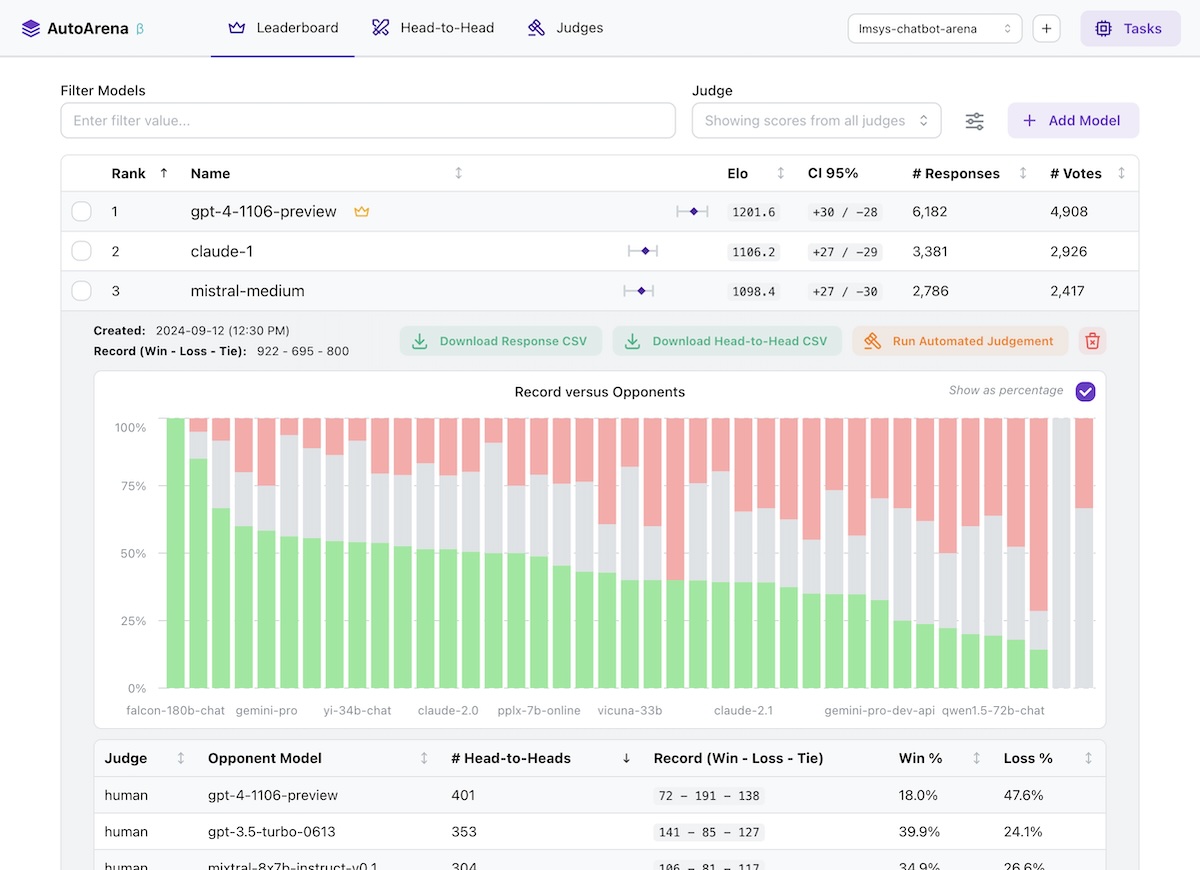
Create leaderboards ranking LLM outputs against one another using automated judge evaluation


- 🏆 Rank outputs from different LLMs, RAG setups, and prompts to find the best configuration of your system
- ⚔️ Perform automated head-to-head evaluation using judges from OpenAI, Anthropic, Cohere, and more
- 🤖 Define and run your own custom judges, connecting to internal services or implementing bespoke logic
- 💻 Run application locally, getting full control over your environment and data
🤔 Why Head-to-Head Evaluation?
- LLMs are better at judging responses head-to-head than they are in isolation (arXiv:2408.08688) — leaderboard rankings computed using Elo scores from many automated side-by-side comparisons should be more trustworthy than leaderboards using metrics computed on each model's responses independently!
- The LMSYS Chatbot Arena has replaced benchmarks for many people as the trusted true leaderboard for foundation model performance (arXiv:2403.04132). Why not apply this approach to your own foundation model selection, RAG system setup, or prompt engineering efforts?
- Using a "jury" of multiple smaller models from different model families like
gpt-4o-mini,command-r, andclaude-3-haikugenerally yields better accuracy than a single frontier judge likegpt-4o— while being faster and much cheaper to run. AutoArena is built around this technique, called PoLL: Panel of LLM evaluators (arXiv:2404.18796). - Automated side-by-side comparison of model outputs is one of the most prevalent evaluation practices (arXiv:2402.10524) — AutoArena makes this process easier than ever to get up and running.
🔥 Getting Started
Install from PyPI:
pip install autoarena
Run as a module and visit localhost:8899 in your browser:
python -m autoarena
With the application running, getting started is simple:
- Create a project via the UI.
- Add responses from a model by selecting a CSV file with
promptandresponsecolumns. - Configure an automated judge via the UI. Note that most judges require credentials, e.g.
X_API_KEYin the environment where you're running AutoArena. - Add responses from a second model to kick off an automated judging task using the judges you configured in the
previous step to decide which of the models you've uploaded provided a better
responseto a givenprompt.
That's it! After these steps you're fully set up for automated evaluation on AutoArena.
📄 Formatting Your Data
AutoArena requires two pieces of information to test a model: the input prompt and corresponding model response.
prompt: the inputs to your model. When uploading responses, any other models that have been run on the same prompts are matched and evaluated using the automated judges you have configured.response: the output from your model. Judges decide which of two models produced a better response, given the same prompt.
📂 Data Storage
Data is stored in ./data/<project>.duckdb files in the directory where you invoked AutoArena. See
data/README.md for more details on data storage in AutoArena.
🦾 Development
AutoArena uses uv to manage dependencies. To set up this repository for development, run:
uv venv && source .venv/bin/activate
uv pip install --all-extras -r pyproject.toml
uv tool run pre-commit install
uv run python3 -m autoarena serve --dev
To run AutoArena for development, you will need to run both the backend and frontend service:
- Backend:
uv run python3 -m autoarena serve --dev(the--dev/-dflag enables automatic service reloading when source files change) - Frontend: see
ui/README.md
To build a release tarball in the ./dist directory:
./scripts/build.sh
1 maintainer

Metadata
1 maintainer
Release files for autoarena 0.1.0b8
For a detailed explanation of source distributions (sdists) and built distributions (wheels), please see the package formats documentation.
Source distribution (sdist)
| File | Size | Uploaded | Provenance | Actions |
|---|---|---|---|---|
| autoarena-0.1.0b8.tar.gz | 1.2 MB | Without provenance | Details for autoarena-0.1.0b8.tar.gz |
Release files / autoarena-0.1.0b8.tar.gz
| Download URL | autoarena-0.1.0b8.tar.gz |
|---|---|
| Size | 1.2 MB |
| Tags | Source |
|
SHA-256 checksum How to use checksums |
c0680d1030371aa922668f69eaa6b0ae201938e19790bfa84b900787279c94cd
|
|
BLAKE2b-256 checksum How to use checksums |
b46d071112832a6c7595e46eed919af2c93a26588ae2437031ad05062fe2caf7
|
| Upload date | |
|
Uploaded using Trusted Publishing? What is trusted publishing? |
No |
| Uploaded via |
twine/5.1.1 CPython/3.12.6
|
Security for autoarena 0.1.0b8
Provenance
Provenance describes where a file came from. On PyPI, provenance is shared via attestations, which provide a verifiable record of the build or publishing details. View details, limitations and caveats.
No provenance found
None of the files in this release were uploaded with provenance metadata.
A note on package security
PyPI is a repository for distributing packages, not a service for auditing them. While third-party security researchers and our staff do their best to detect and remove malicious packages, PyPI cannot guarantee the quality, security or suitability of any given package.
To learn more about protecting yourself from malicious actors, visit our package security documentation.














