
Axon
Axon is a Python RPC-proxy framework that enables developers to host services on edge devices and access them over local networks or the Internet. Axon allows developers to deploy services from the edge, utilizing any available devices on hand, rather than using expensive cloud computing and without opening a port on their network. Moreover, calls to services deployed with Axon are made through developer-friendly RPC proxies that match the interface of the variables being served. Axon can expose services quickly and easily, requiring only a few extra lines of code on top of a service’s core logic.
Installation
pip install axon-ECRG
QuickStart
RPC Decorator
Developers may deploy services by passing Python variables or functions into Axon. The simplest way to expose code to distributed access with Axon is with the rpc decorator:
import axon

@axon.worker.rpc()
def print_msg(msg):
	print(msg)

axon.worker.init()
This function may then be accessed from another machine using a stub object created with the IP address of the machine and the rpc endpoint. Each function in the worker script with the rpc decorator is represented with an attribute on this stub object, since the function print_msg was passed into the rpc decorator, the stub object created from that worker has a callable print_msg attribute. Calling this function on the stub will transmit any parameters to the worker, which will execute the function and transmit the result back to client.
import axon

rpc_stub = axon.client.get_stub("localhost/rpc")
await rpc_stub.print_msg("Hello World!")
Service Function
Axon can be used to expose variables to distributed access with the service function. In the following example worker script, a list is exposed to access from remote machines.
import axon

l = [1,2,3,4,5]
axon.worker.service(l, "list_service")

axon.worker.init()
Clients may create stubs linked to exposed variables using stub objects created with the IP address of the worker machine and an endpoint matching the string passed in with the object. In this example, a stub can be created from the list object by using the list_service endpoint.
import axon

list_stub = axon.client.get_stub("localhost/list_service")
await list_stub.pop() # returns 5
await list_stub[1] # returns 2
Note that the stub object created from the list service has all the attributes of the list function. The .pop() function call in the client example will trigger the execution of the .pop() function on the original list object in the worker script, removing the last element, 5, and transmitting it back to the client as the return value. This also applies for dunder methods like __get_item__, and so normal list indexing works on the stub object by transmitting the index to worker, which transmits back the corresponding list element. Stubs are meant to be code-compatable replacements for the object they represent, where code execution happens on a remote machine instead of locally.
A global stub can be made for a worker by simply using no endpoint. This stub will have attributes that are themselves stubs connected to each service and rpc exposed on that worker.
import axon

stub = axon.client.get_stub("localhost")

await stub.rpc.print_msg("Hello World!")

await stub.list_service.pop() # returns 5
await stub.list_service[1] # returns 2
Concurrency
By default, axon RPC requests return an AsyncResultHandle that allows for concurrent code execution during a request with asyncio. The result of the RPC invocation is obtained by calling using the 'await' keyword on the result handle. Another for option when asyncio is impractical is to call .join():
rpc_stub = axon.client.get_stub("localhost/rpcs")
rpc_stub.print_msg("Hello World!").join()

list_stub = axon.client.get_stub("localhost/list_service")
list_stub.pop().join() # returns 5
list_stub[1].join() # returns 2
When syncronous behavior is desired, developers may pass in a stub_type option to make syncronous calls:
rpc_stub = axon.client.get_stub("localhost/rpcs", stub_type=axon.stubs.SyncStub)
rpc_stub.print_msg("Hello World!")

list_stub = axon.client.get_stub("localhost/list_service", stub_type=axon.stubs.SyncStub)
list_stub.pop() # returns 5
list_stub[1] # returns 2
Torch Module Example
There is a strong case for Axon services to be used to invoke computationally expensive funtions on remote machines in distributed computing enviroments. An example of this would be to host a torch module representing a neural network on a worker machine with a strong GPU, that then runs inferences for remote clients. In that case, the worker script could look like the following:
import axon
import torch
F = torch.nn.functional

class ConvNet(torch.nn.Module):

    def __init__(self):
        super(ConvNet, self).__init__()

        self.conv1 = torch.nn.Conv2d(1, 6, (3, 3))
        self.conv2 = torch.nn.Conv2d(6, 16, (3, 3))

        self.fc1 = torch.nn.Linear(400, 200)
        self.fc2 = torch.nn.Linear(200, 100)
        self.fc3 = torch.nn.Linear(100, 10)

    def forward(self, x):

        x = self.conv1(x)
        x = F.relu(x)
        x = F.max_pool2d(x, (2, 2))

        x = F.max_pool2d(F.relu(self.conv2(x)), (2, 2))
        x = x.view(-1, 400)

        x = F.relu(self.fc1(x))
        x = F.relu(self.fc2(x))
        x = F.softmax(self.fc3(x), dim=1)

        return x

net = ConvNet()

axon.worker.register_ServiceNode(net, 'conv_serv', depth=1)

print('serving!')
axon.worker.init()
And a client that accesses this service:
import torch
import axon

x = torch.randn([32, 1, 28, 28])
net = axon.client.get_ServiceStub('localhost/conv_serv', stub_type=axon.stubs.SyncStub)
y = net(x)
Edge Hosting Capability
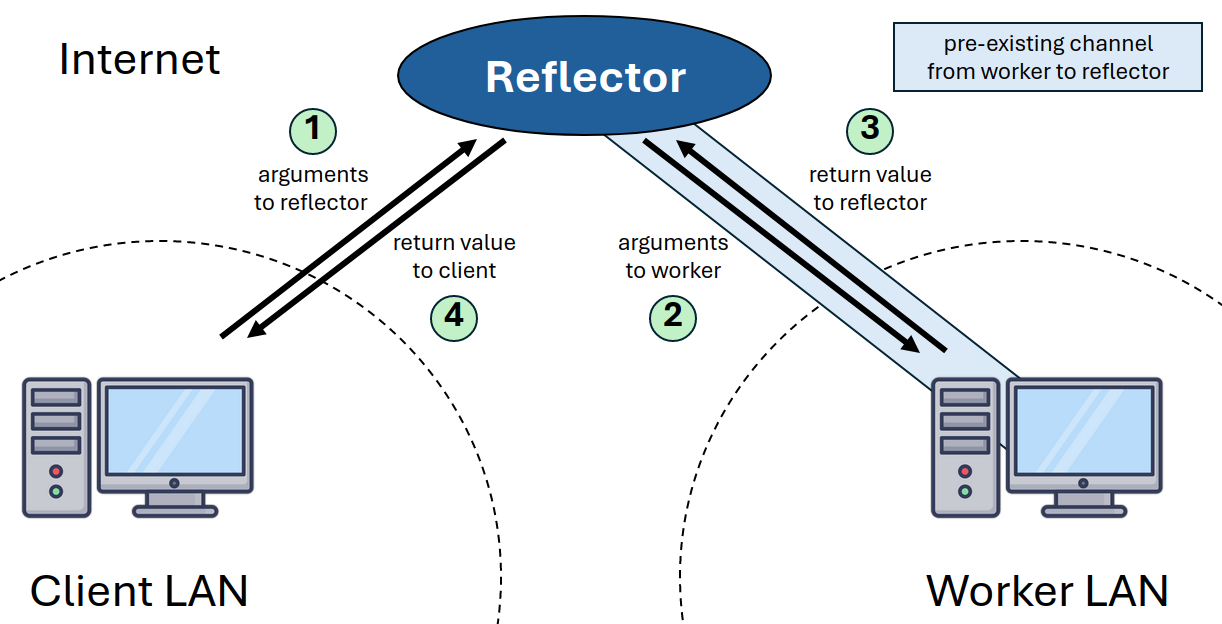
Axon allows developers to host services on local devices while exposing them to access from anywhere in the world. Normally, local networks block incoming TCP connection requests, keeping user devices safe from the threats of the public internet. Anyone wishing to offer worldwide access to a service on a local device would need to open a port on their router; a significant security consideration. Axon workers may take service requests through a pre-established connection to a trusted third party on the internet, known as a reflector. The reflector would then take requests from clients on the worker's behalf, and pass them down to the worker through this connection.
1 maintainer

Metadata
1 maintainer
Release files for axon-ECRG 0.2.4
For a detailed explanation of source distributions (sdists) and built distributions (wheels), please see the package formats documentation.
Source distribution (sdist)
| File | Size | Uploaded | Provenance | |
|---|---|---|---|---|
| axon_ecrg-0.2.4.tar.gz | 21.6 kB | Without provenance | Details |
Built distribution (wheel)
| File | Interpreter | ABI | Platform | Reset |
|---|---|---|---|---|
| axon_ECRG-0.2.4-py3-none-any.whl | Python 3 | none | any | Details |
Total release size: 49.0 kB
Release files / axon_ecrg-0.2.4.tar.gz
| Download URL | axon_ecrg-0.2.4.tar.gz |
|---|---|
| Size | 21.6 kB |
| Tags | Source |
|
SHA-256 checksum How to use checksums |
4fd49d868bebd16e52e55e22b937ac7adc42ac0283df24dab858cd547232f878
|
|
BLAKE2b-256 checksum How to use checksums |
92cc7322957162bff73607e5c961b8f7b7edbe597480e80f65357ebce807d86b
|
| Upload date | |
|
Uploaded using Trusted Publishing? What is trusted publishing? |
No |
| Uploaded via |
twine/5.1.1 CPython/3.12.3
|
Release files / axon_ECRG-0.2.4-py3-none-any.whl
| Download URL | axon_ECRG-0.2.4-py3-none-any.whl |
|---|---|
| Size | 27.4 kB |
| Tags | Python 3 |
|
SHA-256 checksum How to use checksums |
b121d310e25da3ae271dfa7e0e7b9526df2a9b92ea4e94f5da6d3b432986c67e
|
|
BLAKE2b-256 checksum How to use checksums |
e526eba36e3c3f53c2a8ec103b0ea61fdc22a5354c2c9bc0fa0267917654d955
|
| Upload date | |
|
Uploaded using Trusted Publishing? What is trusted publishing? |
No |
| Uploaded via |
twine/5.1.1 CPython/3.12.3
|
Security for axon-ECRG 0.2.4
Provenance
Provenance describes where a file came from. On PyPI, provenance is shared via attestations, which provide a verifiable record of the build or publishing details. View details, limitations and caveats.
No provenance found
None of the files in this release were uploaded with provenance metadata.
A note on package security
PyPI is a repository for distributing packages, not a service for auditing them. While third-party security researchers and our staff do their best to detect and remove malicious packages, PyPI cannot guarantee the quality, security or suitability of any given package.
To learn more about protecting yourself from malicious actors, visit our package security documentation.














