
Azure Web PubSub client library for Python
Azure Web PubSub is a cloud service that helps developers easily build real-time features in web applications with publish-subscribe patterns at scale.
Any scenario that requires real-time messaging between server and clients or among clients following publish-subscribe patterns can benefit from using Web PubSub. Developers no longer need to poll the server by sending repeated HTTP requests at intervals, which is wasteful and hard-to-scale.
As shown in the diagram below, your clients establish WebSocket connections with your Web PubSub resource. This client library:
- simplifies managing client connections
- simplifies sending messages among clients
- automatically retries after unintended drops of client connection
- reliably deliveries messages in number and in order after recovering from connection drops

Details about the terms used here are described in key concepts section.
This library is hosted on pypi.
Getting started
Currently supported environments
Prerequisites
1. Install the azure-messaging-webpubsubclient package
pip install azure-messaging-webpubsubclient
2. Connect with your Web PubSub resource
A client uses a Client Access URL to connect and authenticate with the service, which follows a pattern of wss://<service_name>.webpubsub.azure.com/client/hubs/<hub_name>?access_token=<token>. A client can have a few ways to obtain the Client Access URL. For this quick start, you can copy and paste one from Azure Portal shown below.
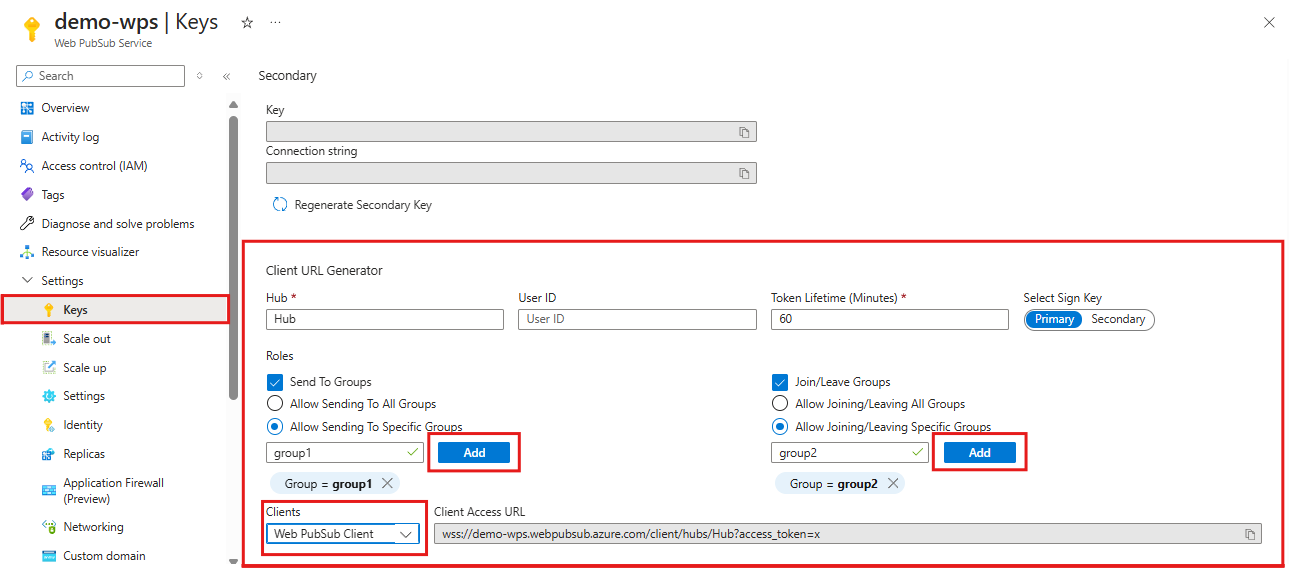
As shown in the diagram above, the client has the permissions to send messages to and join a specific group named "group1".
from azure.messaging.webpubsubclient import WebPubSubClient

client = WebPubSubClient("<<client-access-url>>")
with client:
    # The client can join/leave groups, send/receive messages to and from those groups all in real-time
    ...
3. Join groups
Note that a client can only receive messages from groups that it has joined and you need to add a callback to specify the logic when receiving messages.
# ...continues the code snippet from above

# Registers a listener for the event 'group-message' early before joining a group to not miss messages
group_name = "group1";
client.subscribe(CallbackType.GROUP_MESSAGE, lambda e: print(f"Received message: {e.data}"));

# A client needs to join the group it wishes to receive messages from
client.join_group(groupName);
4. Send messages to a group
# ...continues the code snippet from above

# Send a message to a joined group
client.send_to_group(group_name, "hello world", WebPubSubDataType.TEXT);

# In the Console tab of your developer tools found in your browser, you should see the message printed there.
Examples
Add callbacks for connected, disconnected and stopped events
- When a client is successfully connected to your Web PubSub resource, the
connectedevent is triggered.
client.subscribe(CallbackType.CONNECTED, lambda e: print(f"Connection {e.connection_id} is connected"))
- When a client is disconnected and fails to recover the connection, the
disconnectedevent is triggered.
client.subscribe(CallbackType.DISCONNECTED, lambda e: print(f"Connection disconnected: {e.message}"))
- The
stoppedevent will be triggered when the client is disconnected and the client stops trying to reconnect. This usually happens after theclient.close()is called, orauto_reconnectis disabled or a specified limit to trying to reconnect has reached. If you want to restart the client, you can callclient.open()in the stopped event.
client.subscribe(CallbackType.STOPPED, lambda : print("Client has stopped"))
A client consumes messages from the application server or joined groups
A client can add callbacks to consume messages from your application server or groups. Please note, for group-message event the client can only receive group messages that it has joined.
# Registers a listener for the "server-message". The callback will be invoked when your application server sends message to the connectionID, to or broadcast to all connections.
client.subscribe(CallbackType.SERVER_MESSAGE, lambda e: print(f"Received message {e.data}"))

# Registers a listener for the "group-message". The callback will be invoked when the client receives a message from the groups it has joined.
client.subscribe(CallbackType.GROUP_MESSAGE, lambda e: print(f"Received message from {e.group}: {e.data}"))
Handle rejoin failure
When a client is disconnected and fails to recover, all group contexts will be cleaned up in your Web PubSub resource. This means when the client reconnects, it needs to rejoin groups. By default, the client has auto_rejoin_groups option enabled.
However, you should be aware of auto_rejoin_groups's limitations.
- The client can only rejoin groups that it's originally joined by the client code not by the server side code.
- "rejoin group" operations may fail due to various reasons, e.g. the client doesn't have permission to join the groups. In such cases, you need to add a callback to handle this failure.
# By default auto_rejoin_groups=True. You can disable it by setting to False.
client = WebPubSubClient("<client-access-url>", auto_rejoin_groups=True);

# Registers a listener to handle "rejoin-group-failed" event
client.subscribe(CallbackType.REJOIN_GROUP_FAILED, lambda e: print(f"Rejoin group {e.group} failed: {e.error}"))
Operation and retry
By default, the operation such as client.join_group(), client.leave_group(), client.send_to_group(), client.send_event() has three retries. You can configure through the key-word arguments. If all retries have failed, an error will be thrown. You can keep retrying by passing in the same ack_id as previous retries so that the Web PubSub service can deduplicate the operation.
try:
  client.join_group(group_name)
except SendMessageError as e:
  client.join_group(group_name, ack_id=e.ack_id)
Specify subprotocol
You can change the subprotocol to be used by the client. By default, the client uses json.reliable.webpubsub.azure.v1. You can choose to use json.reliable.webpubsub.azure.v1 or json.webpubsub.azure.v1.
from azure.messaging.webpubsubclient.models import WebPubSubProtocolType
# Change to use json.webpubsub.azure.v1
const client = new WebPubSubClient("<client-access-url>", protocol_type=WebPubSubProtocolType.JSON);
from azure.messaging.webpubsubclient.models import WebPubSubProtocolType
# Change to use json.reliable.webpubsub.azure.v1
const client = new WebPubSubClient("<client-access-url>", protocol_type=WebPubSubProtocolType.JSON_RELIABLE);
Key concepts
Connection
A connection, also known as a client or a client connection, represents an individual WebSocket connection connected to the Web PubSub. When successfully connected, a unique connection ID is assigned to this connection by the Web PubSub. Each WebPubSubClient creates its own exclusive connection.
Recovery
If a client using reliable protocols disconnects, a new WebSocket tries to establish using the connection ID of the lost connection. If the new WebSocket connection is successfully connected, the connection is recovered. Throughout the time a client is disconnected, the service retains the client's context as well as all messages that the client was subscribed to, and when the client recovers, the service will send these messages to the client. If the service returns WebSocket error code 1008 or the recovery attempt lasts more than 30 seconds, the recovery fails.
Reconnect
Reconnection happens when the client connection drops and fails to recover. Reconnection starts a new connection and the new connection has a new connection ID. Unlike recovery, the service treats the reconnected client as a new client connection. The client connection needs to rejoin groups. By default, the client library rejoins groups after reconnection.
Hub
A hub is a logical concept for a set of client connections. Usually, you use one hub for one purpose, for example, a chat hub, or a notification hub. When a client connection is created, it connects to a hub, and during its lifetime, it belongs to that hub. Different applications can share one Web PubSub by using different hub names.
Group
A group is a subset of connections to the hub. You can add a client connection to a group, or remove the client connection from the group, anytime you want. For example, when a client joins a chat room, or when a client leaves the chat room, this chat room can be considered to be a group. A client can join multiple groups, and a group can contain multiple clients.
User
Connections to Web PubSub can belong to one user. A user might have multiple connections, for example when a single user is connected across multiple devices or multiple browser tabs.
Client Lifetime
Each of the Web PubSub clients is safe to cache and be used as a singleton for the lifetime of the application. The registered event callbacks share the same lifetime with the client. This means you can add or remove callbacks at any time and the registration status will not change after reconnection or the client being stopped.
Troubleshooting
This library uses the standard logging library for logging. If you want detailed DEBUG level logging, including payload of request, you can set logging_enable=True in client or per-operation
Next steps
You can also find more samples here.
Additional resources
-
Learn more about client permission, see permissions
Contributing
If you'd like to contribute to this library, please read the contributing guide to learn more about how to build and test the code.
1 maintainer

Release files for azure-messaging-webpubsubclient 1.1.0
For a detailed explanation of source distributions (sdists) and built distributions (wheels), please see the package formats documentation.
Source distribution (sdist)
| File | Size | Uploaded | |
|---|---|---|---|
| azure-messaging-webpubsubclient-1.1.0.tar.gz | 47.6 kB | Details |
Built distribution (wheel)
| File | Interpreter | ABI | Platform | Reset |
|---|---|---|---|---|
| azure_messaging_webpubsubclient-1.1.0-py3-none-any.whl | Python 3 | none | any | Details |
Total release size: 86.2 kB
Release files / azure-messaging-webpubsubclient-1.1.0.tar.gz
| Download URL | azure-messaging-webpubsubclient-1.1.0.tar.gz |
|---|---|
| Size | 47.6 kB |
| Tags | Source |
|
SHA-256 checksum How to use checksums |
73fe2fd3a37c4b8cd4e788197e77fdeed9aab8681fb3bf293fd5b25cff789e4c
|
|
BLAKE2b-256 checksum How to use checksums |
170373f2fff522b333cbbe0f1acba331b38aa5a4e58e95cc3d2c3b345673bc9e
|
| Upload date | |
|
Uploaded using Trusted Publishing? What is trusted publishing? |
No |
| Uploaded via |
RestSharp/106.13.0.0
|
Release files / azure_messaging_webpubsubclient-1.1.0-py3-none-any.whl
| Download URL | azure_messaging_webpubsubclient-1.1.0-py3-none-any.whl |
|---|---|
| Size | 38.7 kB |
| Tags | Python 3 |
|
SHA-256 checksum How to use checksums |
d1eef163e99b47a3e222d6a192dc3bcd83ae9343fa8a1e1242046edf6acae663
|
|
BLAKE2b-256 checksum How to use checksums |
a63dac08b9d650d85a56e223d26d4efc3f3b93114f1b002046b95b167917fda8
|
| Upload date | |
|
Uploaded using Trusted Publishing? What is trusted publishing? |
No |
| Uploaded via |
RestSharp/106.13.0.0
|














