
Backend.AI Integration for Jupyter
Your Jupyter notebooks are running on the Backend.AI Cloud!
Migration Guide for v0.1.x "Sorna" Users
Now we use the v1.0.0 release of [Backend.AI Client for Python] (https://pypi.python.org/pypi/backend.ai-client).
To use the latest version, please remove all existing "Sorna" kernel configurations and re-install them.
$ python -m sorna.integration.jupyter.install --clean-only
Removing existing Sorna kernel: C11 on Sorna
...

$ pip uninstall sorna-jupyter-integration
...

$ pip install backend.ai-integration-jupyter
...

$ python -m ai.backend.integration.jupyter.install
Installing Backend.AI Jupyter kernel spec: Python 3 on Backend.AI
...
Note that you also need to reconfigure your existing notebooks to use the new kernels. This is a safe operation -- you can change the backend kernel without losing/modifying the content of notebooks.
Installation and Usage
First, grab your API keypair in Backend.AI Cloud.
$ pip install jupyter backend.ai-integration-jupyter
$ python -m ai.backend.integration.jupyter.install
$ export BACKEND_ACCESS_KEY=...
$ export BACKEND_SECRET_KEY=...
$ jupyter notebook
Then you will see Backend.AI kernels in the new notebook menu:
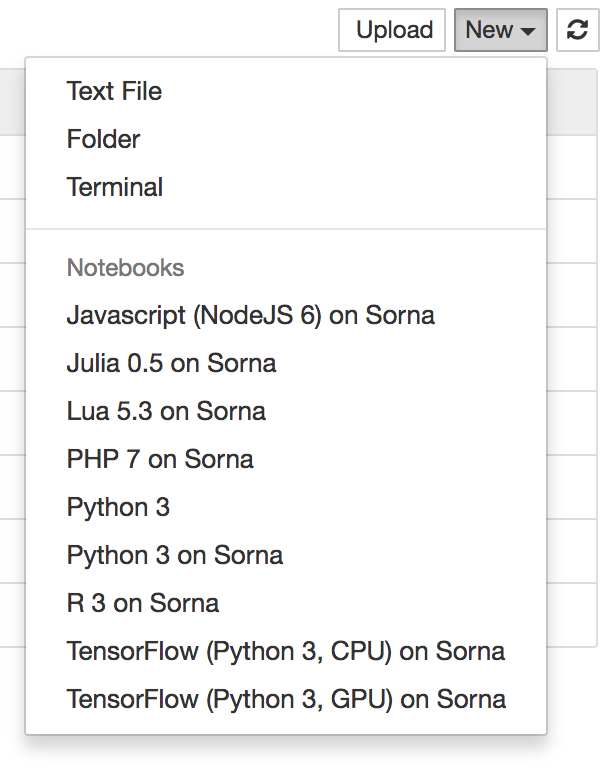
More kernels will become available soon!
NOTE: Currently only Python-based kernels support cross-cell contexts (i.e., variables are kept across different notebook cells which is the default behavior of Jupyter notebooks you already know). With other language kernels, each cell is executed as a separate process, meaning that a new context is used whenever you execute a cell.
Development
Add --sys-prefix argument to tell the installer to recognize editable
installation under your virtual environment.
$ python -m venv venv
$ source venv/bin/activate
$ pip install jupyter
$ pip install -e .  # editable installation
$ python -m ai.backend.integration.jupyter.install --sys-prefix
$ export BACKEND_ACCESS_KEY=...
$ export BACKEND_SECRET_KEY=...
$ jupyter notebook
Uninstall
To list and uninstall existing kernelspecs registered to Jupyter, use
jupyter-kernelspec command.
Changes
0.3.2 (2018-11-09)
- Update TensorFlow/PyTorch kernel versions.
0.3.1 (2018-09-23)
- This was a technical release to fix dependencies.
0.3.0 (2018-09-23)
- Upgrade backend.ai-client to v1.4 series.
0.2.5 (2018-06-19)
-
Support Jupyter notebook 5.0 or higher which has migrated to Tornado 5.0+.
-
Upgrade backend.ai-client to v1.3.4 or higher to keep pace with Jupyter notebook 5.0 support.
0.2.4 (2018-03-20)
- Upgrade backend.ai-client to v1.3 series.
0.2.3 (2018-03-12)
- Upgrade backend.ai-client to v1.2 series.
0.2.2 (2018-01-05)
-
Add support for Python 3.5 as well.
-
Adapt to the latest API with explicit modes in the execution loop.
-
Upgrade the client library to v1.1.5 release.
0.2.1 (2017-10-24)
- Adapt to the latest API with explicit run IDs per execution.
0.2.0 (2017-09-19)
-
Change the project name to "Backend.AI Jupyter Integration" and the import path to "ai.backend.integration".
-
This version is now paired with the Backend.AI Client for Python v1.0.0 release.
-
Add support for Python 3.5 (along with the new Backend.AI client library).
-
README is provided in ReST to remove dev-dependency to pypandoc.
0.1.3 (2017-09-19)
-
This is a transitional release to make notice of package renaming on PyPI.
-
Add C/C++/Java kernels.
0.1.2 (2017-04-07)
- Add PyTorch kernels.
0.1.1 (2017-03-29)
- Add syntax highlighting support.
0.1.0 (2017-03-16)
- Initial preview release.
1 maintainer

Metadata
1 maintainer
Release files for backend.ai-integration-jupyter 0.3.2
For a detailed explanation of source distributions (sdists) and built distributions (wheels), please see the package formats documentation.
Source distribution (sdist)
| File | Size | Uploaded | Provenance | |
|---|---|---|---|---|
| backend.ai-integration-jupyter-0.3.2.tar.gz | 8.0 kB | Without provenance | Details |
Built distribution (wheel)
| File | Interpreter | ABI | Platform | Reset |
|---|---|---|---|---|
| backend.ai_integration_jupyter-0.3.2-py3-none-any.whl | Python 3 | none | any | Details |
Total release size: 20.9 kB
Release files / backend.ai-integration-jupyter-0.3.2.tar.gz
| Download URL | backend.ai-integration-jupyter-0.3.2.tar.gz |
|---|---|
| Size | 8.0 kB |
| Tags | Source |
|
SHA-256 checksum How to use checksums |
cbaa2dca7cf7cecea9d62b2a5253d2b7846cb3620e155adceab5d881ba618f5b
|
|
BLAKE2b-256 checksum How to use checksums |
8273df406334baf629cecd559e212dd200a24d9b34aa810832dbd7426bf098ef
|
| Upload date | |
|
Uploaded using Trusted Publishing? What is trusted publishing? |
No |
| Uploaded via |
twine/1.11.0 pkginfo/1.4.2 requests/2.19.1 setuptools/40.5.0 requests-toolbelt/0.8.0 tqdm/4.24.0 CPython/3.5.4
|
Release files / backend.ai_integration_jupyter-0.3.2-py3-none-any.whl
| Download URL | backend.ai_integration_jupyter-0.3.2-py3-none-any.whl |
|---|---|
| Size | 12.9 kB |
| Tags | Python 3 |
|
SHA-256 checksum How to use checksums |
2470cf87efddfa7d8de48eec6477973570b1ef7f28a89f57f2ffffe98571e7b0
|
|
BLAKE2b-256 checksum How to use checksums |
90b9d2fc222128dd20ad409dc6b23733b057b93504fdfd4298a24ff1ea7923b4
|
| Upload date | |
|
Uploaded using Trusted Publishing? What is trusted publishing? |
No |
| Uploaded via |
twine/1.11.0 pkginfo/1.4.2 requests/2.19.1 setuptools/40.5.0 requests-toolbelt/0.8.0 tqdm/4.24.0 CPython/3.5.4
|
Security for backend.ai-integration-jupyter 0.3.2
Provenance
Provenance describes where a file came from. On PyPI, provenance is shared via attestations, which provide a verifiable record of the build or publishing details. View details, limitations and caveats.
No provenance found
None of the files in this release were uploaded with provenance metadata.
A note on package security
PyPI is a repository for distributing packages, not a service for auditing them. While third-party security researchers and our staff do their best to detect and remove malicious packages, PyPI cannot guarantee the quality, security or suitability of any given package.
To learn more about protecting yourself from malicious actors, visit our package security documentation.














