
Welcome to BDP
BDP (Block Diagrams in Python) aims to become a Python fronted for TikZ when it comes to drawing block diagrams in order to facilitate the process. BDP wraps the TikZ statements into the Python objects so that users can describe diagrams in pure Python. However, inserting raw TikZ in BDP is also possible. Figure below shows an BDP example image which represents the BDP compilation process.
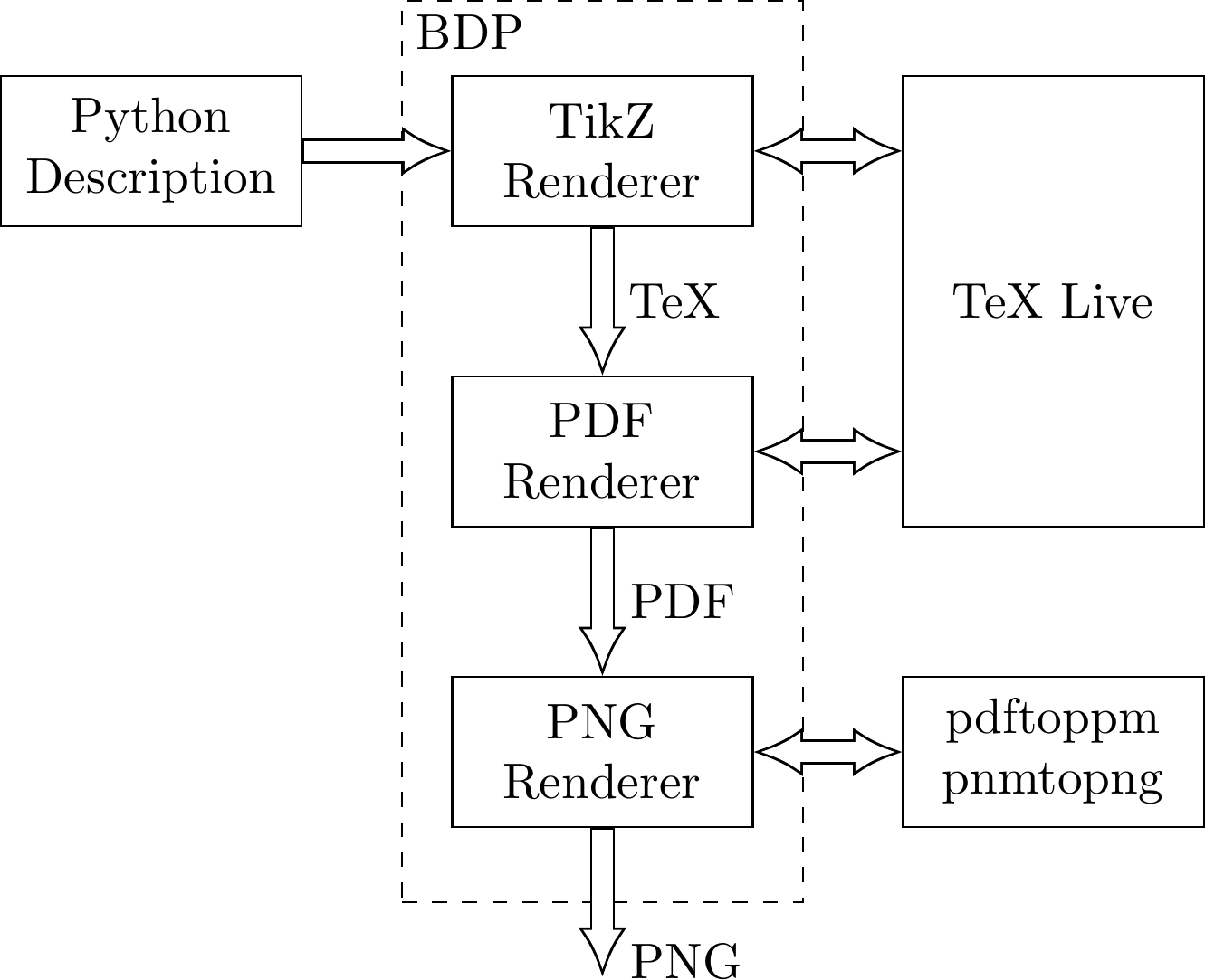
Figure can be rendered with the compile_process.py BDP diagram. It can be rendered into the PNG with BDP via command line:
# bdp compile_process.py -p
For a complete list of command line options please take a look at command_line chapter of the documentation.
Why BDP?
BDP brings following benefits:
Diagram description in Python which should render it more readable
Step-by-step debugging of the diagram description
Use the tools and design environments available for Python development (debugging, code completion, refactoring, documentation utilities…)
Use vast Python library of packages
BDP features
BDP package comprises:
Python classes that wrap the Tikz statements
Class for rendering PDF and PNG images from the Python description
Shell entry point for rendering BDP images from command line
Sphinx extensions for embedding BDP images into the Sphinx documents
Image below is a more complex example, which shows how power of Python programming can be used to generate diagrams with BDP. Image shows an UML-like diagram of few major BDP templates.
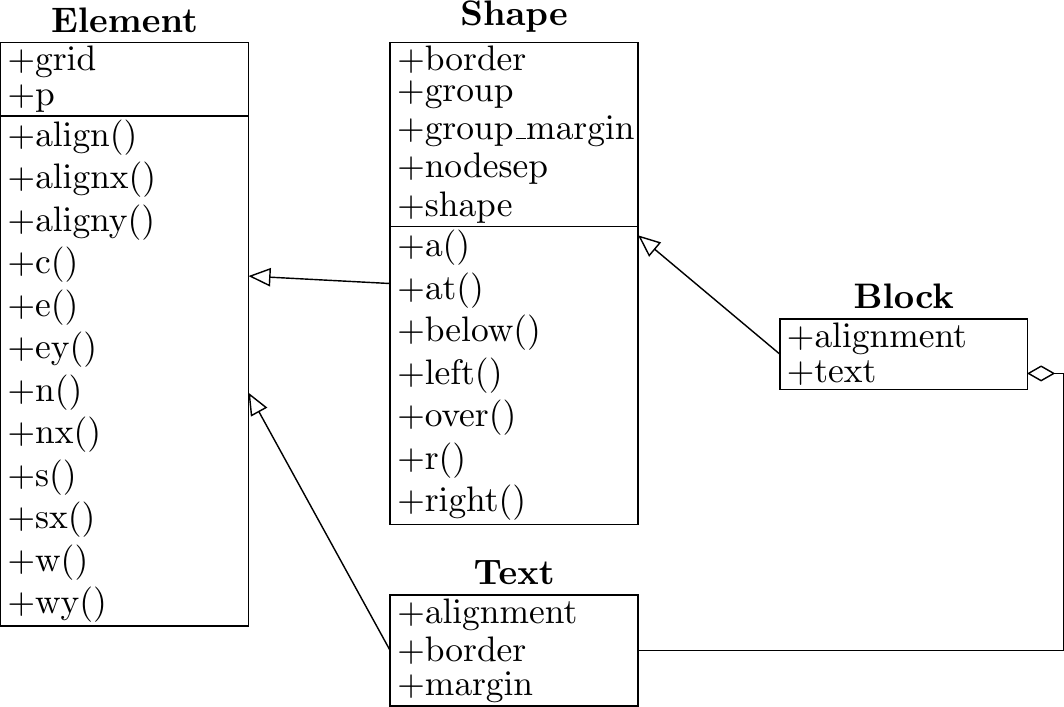
Figure can be rendered with the uml.py BDP diagram.
Where to start?
Installation
BDP package currently supports only Python 3. Following are alternative ways to install BDP.
Install BDP using pip:
pip3 install bdp
Install BDP using easy_install:
easy_install3 bdp
Install BDP from source:
python3 setup.py install
BDP requires TeX Live, which could be installed on a Debian or a Debian-derived systems, with:
# sudo apt-get install texlive
For converting PDF to PNG, pdftoppm, pnmcrop and pnmtopng are needed, which could be installed on a Debian or a Debian-derived systems, with:
# sudo apt-get install poppler-utils
# sudo apt-get install netpbm
Read the documentation
Read the BDP documentation
Checkout the examples
BDP images used in documentation are located in the images repository documentation folder.
Get involved
Pull your copy from github repository
1 maintainer

Metadata
1 maintainer
Release files for bdp 0.2.1
For a detailed explanation of source distributions (sdists) and built distributions (wheels), please see the package formats documentation.
Source distribution (sdist)
| File | Size | Uploaded | Provenance | |
|---|---|---|---|---|
| bdp-0.2.1.tar.gz | 29.9 kB | Without provenance | Details |
Built distribution (wheel)
| File | Interpreter | ABI | Platform | Reset |
|---|---|---|---|---|
| bdp-0.2.1-py3-none-any.whl | Python 3 | none | any | Details |
Total release size: 56.2 kB
Release files / bdp-0.2.1.tar.gz
| Download URL | bdp-0.2.1.tar.gz |
|---|---|
| Size | 29.9 kB |
| Tags | Source |
|
SHA-256 checksum How to use checksums |
d27fc2ce48b6c56f5ad13bab260128daa3f6438e4378acf05925c77b51755b75
|
|
BLAKE2b-256 checksum How to use checksums |
9cd47072a9689e2f338e0b4fa6ec17241091a21e51017463184cb120f7f6b5d8
|
| Upload date | |
|
Uploaded using Trusted Publishing? What is trusted publishing? |
No |
| Uploaded via |
twine/1.11.0 pkginfo/1.4.2 requests/2.19.1 setuptools/40.2.0 requests-toolbelt/0.8.0 tqdm/4.25.0 CPython/3.6.6
|
Release files / bdp-0.2.1-py3-none-any.whl
| Download URL | bdp-0.2.1-py3-none-any.whl |
|---|---|
| Size | 26.3 kB |
| Tags | Python 3 |
|
SHA-256 checksum How to use checksums |
75492f67401a558e4bc06bd23d9609833278f282a67c453955338018758ae0bd
|
|
BLAKE2b-256 checksum How to use checksums |
a280f34d0ea3eaa3bdb6e3f94b1abc529d9c93d3547ec4495e4e955bb422c800
|
| Upload date | |
|
Uploaded using Trusted Publishing? What is trusted publishing? |
No |
| Uploaded via |
twine/1.11.0 pkginfo/1.4.2 requests/2.19.1 setuptools/40.2.0 requests-toolbelt/0.8.0 tqdm/4.25.0 CPython/3.6.6
|
Security for bdp 0.2.1
Provenance
Provenance describes where a file came from. On PyPI, provenance is shared via attestations, which provide a verifiable record of the build or publishing details. View details, limitations and caveats.
No provenance found
None of the files in this release were uploaded with provenance metadata.
A note on package security
PyPI is a repository for distributing packages, not a service for auditing them. While third-party security researchers and our staff do their best to detect and remove malicious packages, PyPI cannot guarantee the quality, security or suitability of any given package.
To learn more about protecting yourself from malicious actors, visit our package security documentation.














