





Bandcamp autotagger plugin for beets. It mostly focuses on
- Staying up-to-date with information Bandcamp provide in the JSON metadata
- Parsing all possible (if relevant) metadata from various places
- For example, a catalog number given in the release or media description
- Correctness of the data
- For example, determining artist names from various artists releases
- Compliance with MusicBrainz fields format, to remove the need for pre-processing if, for example, one wishes to upload the metadata to MB.
Thanks to unrblt for beets-bandcamp providing the idea and initial implementation.
Installation
Recommended method
- Install
beetswithpipxso that it's isolated from your system and other projects
pipx install beets
- Inject
beetcampand other dependencies that you need. The--include-appsflag is required to make sure thatbeetcampis made available in your command line.
pipx inject --include-apps beets beetcamp [python-mpd2 ...]
- Add
bandcampto thepluginslist to your beets configuration file.
Otherwise
Navigate to your beets virtual environment and install the plug-in with
pip install beetcamp
CLI
The plugin exposes some of its functionality through a command-line application
beetcamp:
usage: beetcamp [-h] [-a] [-l] [-t] [-o INDEX] [-p PAGE] (release_url | query)

Get bandcamp release metadata from the given <release-url> or perform
bandcamp search with <query>. Anything that does not start with https://
will be assumed to be a query. Search type flags: -a for albums, -l for
labels and artists, -t for tracks. By default, all types are searched.

positional arguments:
  release_url  Release URL, starting with https:// OR
  query        Search query

optional arguments:
  -h, --help   show this help message and exit
  -a, --album  Search albums
  -l, --label  Search labels and artists
  -t, --track  Search tracks
  -o INDEX, --open INDEX
                        Open search result indexed by INDEX in the browser
  -p PAGE, --page PAGE  Deprecated; accepted for compatibility but has no effect
- Use
beetcamp <bandcamp-release-url>to return release metadata in JSON format. - Use
beetcamp [-alt] <query>to search albums, labels and tracks on Bandcamp and return results in JSON. - Search results are indexed - add
-o <index>in order to open the chosen URL in the browser. -p/--pageis deprecated and ignored because searches now return all available results.
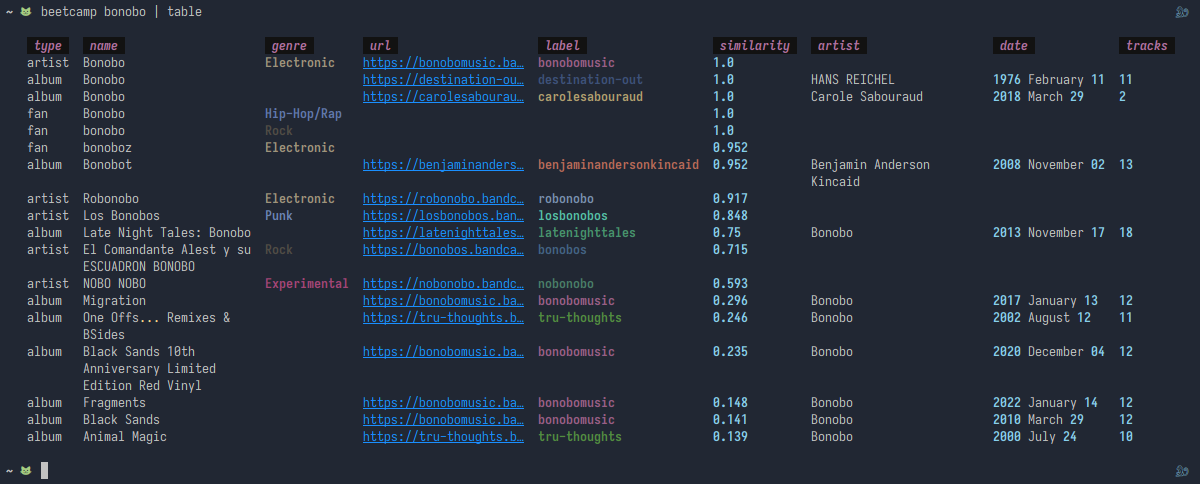
You can see how the data looks below (the output is prettified with rich-tables).
Configuration
Default
bandcamp:
  include_digital_only_tracks: true
  search_max: 2
  art: no
  comments_separator: "\n---\n"
  truncate_comments: no
  exclude_extra_fields: []
  genre:
    capitalize: no
    maximum: 0
    always_include: []
    mode: progressive # classical, progressive or psychedelic
include_digital_only_tracks
- Type: bool
- Default:
true
For media that isn't Digital Media, include all tracks, even if their titles contain
digital only (or alike).
If you have False here, then, for example, a Vinyl media of an album will only include
the tracks that are supposed to be found in that media.
search_max
- Type: int
- Default:
2.
Number of items to fetch through search, maximum is 18. Usually, a matching release should be found among the first two items.
art
- Type: bool
- Default:
false.
Add a source to the
FetchArt plug-in to
download album art for Bandcamp albums (requires FetchArt plug-in enabled).
comments_separator
- Type: string
- Default:
"\n---\n".
The separator that divides release, media descriptions and credits within the comments
field. By default you would get
Description
---
Media description
---
Credits
truncate_comments
- Type: bool
- Default:
false.
MPD users may have experienced issues with songs that have very long comments: if there is a track in the queue with a comments field longer than 4047 characters, MPD fails to return any metadata.
This configuration option truncates the comments field to the maximum length that MPD
can handle, and saves the full comment as a flexible attribute on the album.
exclude_extra_fields
- Type: list
- Default:
empty
List of fields that you do not want to see in the metadata. For example, if you find the
inclusion of comments irrelevant and are not interested in lyrics, you could specify
bandcamp:
  search_max: 5
  exclude_extra_fields:
    - lyrics
    - comments
and the plugin will skip them.
You cannot exclude album, album_id, artist_id, media and data_url album fields.
genre
- Type: object
- Default:
genre:
  capitalize: no
  maximum: 0 # no maximum
  mode: progressive
  always_include: []
genre.capitalize: Classical, Techno instead of default classical, techno. For
consistency, this option also applies to the style field.
genre.maximum caps the maximum number of included genres. This may be of value in those cases where artists/labels begin the list with the most relevant keywords, however be aware it is rarely the case.
genre.mode accepts one of the following options: classical (less genres) or progressive or psychedelic (more genres). Each later one is more flexible regarding what is a valid genre and what is not. See below (we use the list of musicbrainz genres for reference).
genre.always_include: genre patterns that override the mode and always match
successfully. For example, if you want to bypass checks for every keyword that ends with
core, you could specify
genre:
  always_include:
    - "core$"
genre modes
We can place all keywords into the following buckets:
| type | ||
|---|---|---|
| 1 | genre |
a valid single-word musicbrainz genre |
| 1 | more specific genre |
a valid musicbrainz genre made of multiple words |
| 2 | somegenre someothergenre |
each of the words is a valid musicbrainz genre, but the combo is not |
| 3 | very specific genre |
not all words are valid genres, but the very last one is |
| 4 | maybe genre but |
but it is followed by noise at the end |
| 4 | some sort of location | irrelevant |
- classical mode strictly follows the musicbrainz list of genres, therefore it covers type 1 only
- progressive mode, in addition to the above, takes into account each of the words that make up the keyword and will be fine as long as each of those words maps to some sort of genre from the musicbrainz list. It covers types 1 and 2.
- psychedelic (or noise) mode, in addition to the above, treats the keyword as a
valid genre as long as the last word in it maps to some genre - covering types 1
to 3. This one should include the hottest genre naming trends but is also liable to
covering the latest
<some-label>-<genre>or<some-city>-<some-very-generic-genre>trends which may not be ideal. It should though be the best option for those who enjoy detailed, fine-grained stats. - type 4 is ignored in each case (can be overridden and included through the
genre.includeoption).
See below for some examples and a comparison between the modes.
| type | keyword | classical | progressive | psychedelic |
|---|---|---|---|---|
| 1 | techno |
✔ | ✔ | ✔ |
| 1 | funk |
✔ | ✔ | ✔ |
| 1 | ambient |
✔ | ✔ | ✔ |
| 1 | noise |
✔ | ✔ | ✔ |
| 1 | ambient techno |
✔ | ✔ | ✔ |
| 2 | techno funk |
✖ | ✔ | ✔ |
| 4 | funky | ✖ | ✖ | ✖ |
| 4 | bleep | ✖ | ✖ | ✖ |
| 3 | funky techno |
✖ | ✖ | ✔ |
| 4 | bleepy beep | ✖ | ✖ | ✖ |
| 3 | bleepy beep noise |
✖ | ✖ | ✔ |
| 4 | bleepy noise beep |
✖ | ✖ | ✖ |
Usage
This plug-in uses Bandcamp release URL as album_id (.../album/... for albums and
.../track/... for singletons). If no matching release is found during the import you can
select enter Id and paste the URL that you have.
Supported metadata
| field | singleton | album track | album | note |
|---|---|---|---|---|
album |
✔ | |||
album_id |
✔ | release Bandcamp URL | ||
albumartist |
✔ | |||
albumstatus |
✔ | |||
albumtype |
✔ | ✔ | ||
albumtypes |
*✔ | *✔ | ||
artist |
✔ | ✔ | ✔ | |
artist_id |
✔ | ✔ | label / publisher Bandcamp URL | |
artists |
^✔ | ^✔ | ^✔ | |
artists_credit |
^✔ | ^✔ | ^✔ | |
artists_ids |
^✔ | ^✔ | ^✔ | |
artists_sort |
^✔ | ^✔ | ^✔ | |
catalognum |
✔ | ✔ | ||
comments |
✔ | ✔ | release and media descriptions, and credits | |
country |
✔ | ✔ | ||
cover_art_url |
✔ | ✔ | ||
day |
✔ | ✔ | ||
disctitle |
✔ | ✔ | ||
genre |
✔ | ✔ | comma-delimited list of release keywords which match musicbrainz genres | |
index |
✔ | |||
label |
✔ | ✔ | ||
length |
✔ | ✔ | ||
lyrics |
✔ | ✔ | ||
media |
✔ | ✔ | ✔ | |
medium |
✔ | likely to be inaccurate, since it depends on information in the release description | ||
mediums |
✔ | |||
medium_index |
✔ | for now, same as index |
||
medium_total |
✔ | total number of tracks in the release | ||
original_year |
✔ | ✔ | ||
original_month |
✔ | ✔ | ||
original_day |
✔ | ✔ | ||
month |
✔ | ✔ | ||
style |
✔ | ✔ | Bandcamp genre tag | |
title |
✔ | ✔ | ||
track_alt |
✔ | ✔ | ||
track_id |
✔ | track URL | ||
va |
✔ | |||
year |
✔ | ✔ |
* Requires beets>=1.6
^ Requires beets>=2
1 maintainer

Metadata
1 maintainer
Release files for beetcamp 0.26.0
For a detailed explanation of source distributions (sdists) and built distributions (wheels), please see the package formats documentation.
Source distribution (sdist)
| File | Size | Uploaded | Provenance | Actions |
|---|---|---|---|---|
| beetcamp-0.26.0.tar.gz | 62.4 kB | Without provenance | Details for beetcamp-0.26.0.tar.gz |
Built distribution (wheel)
| File | Interpreter | ABI | Platform | Actions Reset |
|---|---|---|---|---|
| beetcamp-0.26.0-py3-none-any.whl | Python 3 | none | any | Details for beetcamp-0.26.0-py3-none-any.whl |
Total release size: 125.7 kB
Release files / beetcamp-0.26.0.tar.gz
| Download URL | beetcamp-0.26.0.tar.gz |
|---|---|
| Size | 62.4 kB |
| Tags | Source |
|
SHA-256 checksum How to use checksums |
b704d4a37fde24292c8a503fe382bbb81baafd3fa0135abede1f6034fb9fd466
|
|
BLAKE2b-256 checksum How to use checksums |
8462446339a0b27f4b2a1bcecf1a995a383b04b11b1efce2044cadf676ece002
|
| Upload date | |
|
Uploaded using Trusted Publishing? What is trusted publishing? |
No |
| Uploaded via |
poetry/2.5.1 CPython/3.12.11 Linux/7.2.7-arch1-1
|
Release files / beetcamp-0.26.0-py3-none-any.whl
| Download URL | beetcamp-0.26.0-py3-none-any.whl |
|---|---|
| Size | 63.3 kB |
| Tags | Python 3 |
|
SHA-256 checksum How to use checksums |
66c2de221b88ab0427f92e09c0c77ca2341a185bf6c8f0deb2c9d9258c3b1509
|
|
BLAKE2b-256 checksum How to use checksums |
395d289df09e89b6fbb871050be72b1eade0404cc5149bb8925a43d2aad1bddf
|
| Upload date | |
|
Uploaded using Trusted Publishing? What is trusted publishing? |
No |
| Uploaded via |
poetry/2.5.1 CPython/3.12.11 Linux/7.2.7-arch1-1
|
Security for beetcamp 0.26.0
Provenance
Provenance describes where a file came from. On PyPI, provenance is shared via attestations, which provide a verifiable record of the build or publishing details. View details, limitations and caveats.
No provenance found
None of the files in this release were uploaded with provenance metadata.
A note on package security
PyPI is a repository for distributing packages, not a service for auditing them. While third-party security researchers and our staff do their best to detect and remove malicious packages, PyPI cannot guarantee the quality, security or suitability of any given package.
To learn more about protecting yourself from malicious actors, visit our package security documentation.














