
6 files were added to this release more than 14 days after its initial publication. Inspect the release files before installing.
bezier
Helper for Bézier Curves, Triangles, and Higher Order Objects






This library provides:
Dive in and take a look!
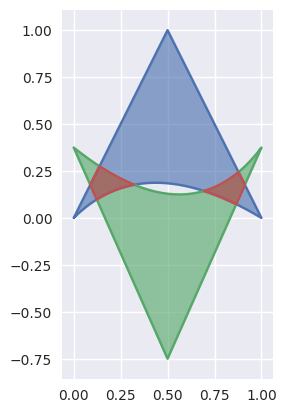
Why Bézier?
A Bézier curve (and surface, etc.) is a parametric curve that uses the Bernstein basis:
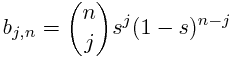
to define a curve as a linear combination:
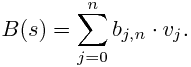
This comes from the fact that the weights sum to one:

This can be generalized to higher order by considering three, four, etc. non-negative weights that sum to one (in the above we have the two non-negative weights s and 1 - s).
Due to their simple form, Bézier curves:
can easily model geometric objects as parametric curves, surfaces, etc.
can be computed in an efficient and numerically stable way via de Casteljau’s algorithm
can utilize convex optimization techniques for many algorithms (such as curve-curve intersection), since curves (and surfaces, etc.) are convex combinations of the basis
Many applications – as well as the history of their development – are described in “The Bernstein polynomial basis: A centennial retrospective”, for example;
Installing
bezier can be installed with pip:
$ pip              install --upgrade bezier
$ python    -m pip install --upgrade bezier --user
$ python2.7 -m pip install --upgrade bezier --user
$ python3.6 -m pip install --upgrade bezier --user
bezier is open-source, so you can alternatively grab the source code from GitHub and install from source.
Getting Started
For example, to create a curve:
>>> nodes1 = np.asfortranarray([
...     [0.0, 0.0],
...     [0.5, 1.0],
...     [1.0, 0.0],
... ])
>>> curve1 = bezier.Curve(nodes1, degree=2)
The intersection (points) between two curves can also be determined:
>>> nodes2 = np.asfortranarray([
...     [0.0 ,  0.0],
...     [0.25,  2.0],
...     [0.5 , -2.0],
...     [0.75,  2.0],
...     [1.0 ,  0.0],
... ])
>>> curve2 = bezier.Curve.from_nodes(nodes2)
>>> intersections = curve1.intersect(curve2)
>>> intersections
array([[ 0.31101776, 0.42857143],
       [ 0.68898224, 0.42857143],
       [ 0.        , 0.        ],
       [ 1.        , 0.        ]])
and then we can plot these curves (along with their intersections):
>>> import matplotlib.pyplot as plt
>>> import seaborn
>>> seaborn.set()
>>>
>>> ax = curve1.plot(num_pts=256)
>>> _ = curve2.plot(num_pts=256, ax=ax)
>>> lines = ax.plot(
...     intersections[:, 0], intersections[:, 1],
...     marker='o', linestyle='None', color='black')
>>> _ = ax.axis('scaled')
>>> _ = ax.set_xlim(-0.125, 1.125)
>>> _ = ax.set_ylim(-0.0625, 0.625)
>>> plt.show()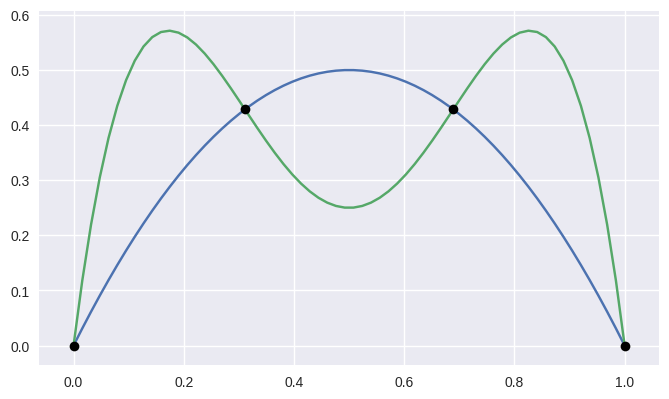
For API-level documentation, check out the Bézier Package documentation.
Development
To work on adding a feature or to run the functional tests, see the DEVELOPMENT doc for more information on how to get started.
License
bezier is made available under the Apache 2.0 License. For more details, see the LICENSE.
1 maintainer

Metadata
1 maintainer
Release files for bezier 0.5.0
For a detailed explanation of source distributions (sdists) and built distributions (wheels), please see the package formats documentation.
Files added late
6 files were uploaded more than 14 days after the first file in this release.
While project maintainers occasionally add legitimate files to an existing release, late additions can also indicate a security compromise.
We recommend inspecting the release files before installing.
Source distribution (sdist)
| File | Size | Uploaded | Provenance | Actions |
|---|---|---|---|---|
| bezier-0.5.0.tar.gz | 528.3 kB | Without provenance | Details for bezier-0.5.0.tar.gz |
Built distributions (wheels)
Total release size: 25.3 MB
Release files / bezier-0.5.0.tar.gz
| Download URL | bezier-0.5.0.tar.gz |
|---|---|
| Size | 528.3 kB |
| Tags | Source |
|
SHA-256 checksum How to use checksums |
81346179e52815b8381a6e9f32a5d10205fe949256c4dc849611d2798556ba47
|
|
BLAKE2b-256 checksum How to use checksums |
a917bcdcb73355d736a33bfdd3c18a9ddd31a9d51b9764534b0eb10ee7ea5133
|
| Upload date | |
|
Uploaded using Trusted Publishing? What is trusted publishing? |
No |
Release files / bezier-0.5.0-cp36-none-win_amd64.whl
File added late
This file was uploaded more than 14 days after the first file in this release.
While project maintainers occasionally add legitimate files to an existing release, late additions can also indicate a security compromise.
We recommend inspecting the release file before installing.
| Download URL | bezier-0.5.0-cp36-none-win_amd64.whl |
|---|---|
| Size | 643.7 kB |
| Tags | CPython 3.6 Windows x86-64 |
|
SHA-256 checksum How to use checksums |
b5244261f3e2ee7469e8e6bd9dfebb3ea3762797983f9f0766eee406c1d9bf6d
|
|
BLAKE2b-256 checksum How to use checksums |
858d277792f3dfdc2971ba4a3aa4737c993021faa516333413fb5b98c4101a62
|
| Upload date | |
|
Uploaded using Trusted Publishing? What is trusted publishing? |
No |
Release files / bezier-0.5.0-cp36-none-win32.whl
File added late
This file was uploaded more than 14 days after the first file in this release.
While project maintainers occasionally add legitimate files to an existing release, late additions can also indicate a security compromise.
We recommend inspecting the release file before installing.
| Download URL | bezier-0.5.0-cp36-none-win32.whl |
|---|---|
| Size | 654.7 kB |
| Tags | CPython 3.6 Windows x86-32 |
|
SHA-256 checksum How to use checksums |
6e8e92e83bc89803f5c89cd7ea844ea79b4e2314432b1e3305ceaf6ab0555c10
|
|
BLAKE2b-256 checksum How to use checksums |
f05c16556b10c1f975d84618ce049331eb0635a14bdd4e5ddc60386ce7084be2
|
| Upload date | |
|
Uploaded using Trusted Publishing? What is trusted publishing? |
No |
Release files / bezier-0.5.0-cp36-cp36m-manylinux1_x86_64.whl
| Download URL | bezier-0.5.0-cp36-cp36m-manylinux1_x86_64.whl |
|---|---|
| Size | 1.8 MB |
| Tags | CPython 3.6 CPython 3.6 pymalloc Linux glibc 2.5+ x86-64 |
|
SHA-256 checksum How to use checksums |
733b55880ab941345d3162e71cdef8aebbb45791b2bc0a1e53b127ee22aa77c7
|
|
BLAKE2b-256 checksum How to use checksums |
d0d9d65b1cdab37b3e12a41ef63de84115b51f2d8a4aee664c3ee1faedee3801
|
| Upload date | |
|
Uploaded using Trusted Publishing? What is trusted publishing? |
No |
Release files / bezier-0.5.0-cp36-cp36m-manylinux1_i686.whl
| Download URL | bezier-0.5.0-cp36-cp36m-manylinux1_i686.whl |
|---|---|
| Size | 1.6 MB |
| Tags | CPython 3.6 CPython 3.6 pymalloc Linux glibc 2.5+ x86-32 |
|
SHA-256 checksum How to use checksums |
b9799e6861acddc879636f839a21186ae5f6cf4428cafad015b39c4f3cbe2267
|
|
BLAKE2b-256 checksum How to use checksums |
468c76866a29450c9ba825136813a9a6bd4bd22759459e4bd5ae193fe0a30f0b
|
| Upload date | |
|
Uploaded using Trusted Publishing? What is trusted publishing? |
No |
Release files / bezier-0.5.0-cp36-cp36m-macosx_10_6_intel.whl
| Download URL | bezier-0.5.0-cp36-cp36m-macosx_10_6_intel.whl |
|---|---|
| Size | 2.5 MB |
| Tags | CPython 3.6 CPython 3.6 pymalloc macOS 10.6+ Intel (x86-64, i386) |
|
SHA-256 checksum How to use checksums |
ddb4d034ad086e72d9ae5174258bf150aa13a497bd76df042d5a8da9826ee83d
|
|
BLAKE2b-256 checksum How to use checksums |
05b47ca7519711518d13edd034c7d3527a299d781ab1dbab41abc5e8e5bf5172
|
| Upload date | |
|
Uploaded using Trusted Publishing? What is trusted publishing? |
No |
Release files / bezier-0.5.0-cp35-none-win_amd64.whl
File added late
This file was uploaded more than 14 days after the first file in this release.
While project maintainers occasionally add legitimate files to an existing release, late additions can also indicate a security compromise.
We recommend inspecting the release file before installing.
| Download URL | bezier-0.5.0-cp35-none-win_amd64.whl |
|---|---|
| Size | 640.7 kB |
| Tags | CPython 3.5 Windows x86-64 |
|
SHA-256 checksum How to use checksums |
a9de293ecf5055aded1aa4e1cc9969f417acd9658c13d313cbef1d8a030ca6c4
|
|
BLAKE2b-256 checksum How to use checksums |
129b6f56dcdda7285a308a83d5eb089f19824409dc92e37c84a362bcb6bf748d
|
| Upload date | |
|
Uploaded using Trusted Publishing? What is trusted publishing? |
No |
Release files / bezier-0.5.0-cp35-none-win32.whl
File added late
This file was uploaded more than 14 days after the first file in this release.
While project maintainers occasionally add legitimate files to an existing release, late additions can also indicate a security compromise.
We recommend inspecting the release file before installing.
| Download URL | bezier-0.5.0-cp35-none-win32.whl |
|---|---|
| Size | 652.6 kB |
| Tags | CPython 3.5 Windows x86-32 |
|
SHA-256 checksum How to use checksums |
ae6f115272823db3994a9ada4ba44c9b12021ccc7c2629f48e17f1620e980744
|
|
BLAKE2b-256 checksum How to use checksums |
1700a8163799ee042cdb17130e8b0f2e55f2f493e2135d6da04d319ff57ce1ea
|
| Upload date | |
|
Uploaded using Trusted Publishing? What is trusted publishing? |
No |
Release files / bezier-0.5.0-cp35-cp35m-manylinux1_x86_64.whl
| Download URL | bezier-0.5.0-cp35-cp35m-manylinux1_x86_64.whl |
|---|---|
| Size | 1.8 MB |
| Tags | CPython 3.5 CPython 3.5 pymalloc Linux glibc 2.5+ x86-64 |
|
SHA-256 checksum How to use checksums |
3227c1c870c5a2b21974205f58a166b6355a90fd852ee9e3c8bc3e738c10b489
|
|
BLAKE2b-256 checksum How to use checksums |
a169f9471e4e17939b80605678fa8f8342f0251c31c91ee440bc5dc74a0dcb06
|
| Upload date | |
|
Uploaded using Trusted Publishing? What is trusted publishing? |
No |
Release files / bezier-0.5.0-cp35-cp35m-manylinux1_i686.whl
| Download URL | bezier-0.5.0-cp35-cp35m-manylinux1_i686.whl |
|---|---|
| Size | 1.6 MB |
| Tags | CPython 3.5 CPython 3.5 pymalloc Linux glibc 2.5+ x86-32 |
|
SHA-256 checksum How to use checksums |
5b649e371fb9ad4e6373f6ea29daa188b79e773a29bfb5ea625ab77e2cec39ec
|
|
BLAKE2b-256 checksum How to use checksums |
8f4004f08db440b301cfbd65253abab556f651cf1a9f4a3c1385d2f05cf5671a
|
| Upload date | |
|
Uploaded using Trusted Publishing? What is trusted publishing? |
No |
Release files / bezier-0.5.0-cp35-cp35m-macosx_10_6_intel.whl
| Download URL | bezier-0.5.0-cp35-cp35m-macosx_10_6_intel.whl |
|---|---|
| Size | 2.5 MB |
| Tags | CPython 3.5 CPython 3.5 pymalloc macOS 10.6+ Intel (x86-64, i386) |
|
SHA-256 checksum How to use checksums |
0ba4d1da278f25761a6e76c601a96f883293b4cc5fee947b7cbd349e78ab74fa
|
|
BLAKE2b-256 checksum How to use checksums |
70796f25c695c6984e9314b33f9d67430a889a98b4ab49a30fbf199382bf387b
|
| Upload date | |
|
Uploaded using Trusted Publishing? What is trusted publishing? |
No |
Release files / bezier-0.5.0-cp27-none-win_amd64.whl
File added late
This file was uploaded more than 14 days after the first file in this release.
While project maintainers occasionally add legitimate files to an existing release, late additions can also indicate a security compromise.
We recommend inspecting the release file before installing.
| Download URL | bezier-0.5.0-cp27-none-win_amd64.whl |
|---|---|
| Size | 648.9 kB |
| Tags | CPython 2.7 Windows x86-64 |
|
SHA-256 checksum How to use checksums |
8733403f6c5c9e74b2ad7cd7d638c232315cd925bda19d4a1b7da69ef54b8b1f
|
|
BLAKE2b-256 checksum How to use checksums |
e14e3c14421642751c1ac8d50a792cf53359c2e48ebbbec7b14a6978a1eb29d8
|
| Upload date | |
|
Uploaded using Trusted Publishing? What is trusted publishing? |
No |
Release files / bezier-0.5.0-cp27-none-win32.whl
File added late
This file was uploaded more than 14 days after the first file in this release.
While project maintainers occasionally add legitimate files to an existing release, late additions can also indicate a security compromise.
We recommend inspecting the release file before installing.
| Download URL | bezier-0.5.0-cp27-none-win32.whl |
|---|---|
| Size | 665.2 kB |
| Tags | CPython 2.7 Windows x86-32 |
|
SHA-256 checksum How to use checksums |
8a53cab25d9dd172a1a5b82dcb22d1b94834419c68f96e5da6f9932d01e94d05
|
|
BLAKE2b-256 checksum How to use checksums |
307d9b3d15e943c36d104a88d583fa12378182254c13c8fed4ef1a2d9ef33666
|
| Upload date | |
|
Uploaded using Trusted Publishing? What is trusted publishing? |
No |
Release files / bezier-0.5.0-cp27-cp27mu-manylinux1_x86_64.whl
| Download URL | bezier-0.5.0-cp27-cp27mu-manylinux1_x86_64.whl |
|---|---|
| Size | 1.7 MB |
| Tags | CPython 2.7 CPython 2.7 pymalloc wide-unicode Linux glibc 2.5+ x86-64 |
|
SHA-256 checksum How to use checksums |
5ccf9a979dd7c12b4c72cb7fb51b1322e00bc4342a2b4aa65f67f62426544bb3
|
|
BLAKE2b-256 checksum How to use checksums |
5f59c66d13e347fd77b62375c5fb9687a444a147b2d1de2d5afea292cbfe1255
|
| Upload date | |
|
Uploaded using Trusted Publishing? What is trusted publishing? |
No |
Release files / bezier-0.5.0-cp27-cp27mu-manylinux1_i686.whl
| Download URL | bezier-0.5.0-cp27-cp27mu-manylinux1_i686.whl |
|---|---|
| Size | 1.6 MB |
| Tags | CPython 2.7 CPython 2.7 pymalloc wide-unicode Linux glibc 2.5+ x86-32 |
|
SHA-256 checksum How to use checksums |
458770fac41e6ea942377bf7a629039a5f3cb8d72b04ead681779e1a80a2fad0
|
|
BLAKE2b-256 checksum How to use checksums |
d7f3b65cc36aa589cead65c1d74ef24f56e931ea55a5cea24b46a07ea04b911b
|
| Upload date | |
|
Uploaded using Trusted Publishing? What is trusted publishing? |
No |
Release files / bezier-0.5.0-cp27-cp27m-manylinux1_x86_64.whl
| Download URL | bezier-0.5.0-cp27-cp27m-manylinux1_x86_64.whl |
|---|---|
| Size | 1.7 MB |
| Tags | CPython 2.7 CPython 2.7 pymalloc Linux glibc 2.5+ x86-64 |
|
SHA-256 checksum How to use checksums |
2073ba703bc70cc667f9e339e47ea43c6435bc4ff99804f7523fc9f02d29704c
|
|
BLAKE2b-256 checksum How to use checksums |
5556ca7d21e3001ed921d151937282bbebcfbc52eaf510dbd1a9f263c72d32ea
|
| Upload date | |
|
Uploaded using Trusted Publishing? What is trusted publishing? |
No |
Release files / bezier-0.5.0-cp27-cp27m-manylinux1_i686.whl
| Download URL | bezier-0.5.0-cp27-cp27m-manylinux1_i686.whl |
|---|---|
| Size | 1.6 MB |
| Tags | CPython 2.7 CPython 2.7 pymalloc Linux glibc 2.5+ x86-32 |
|
SHA-256 checksum How to use checksums |
d43a169ef0fd7f4c086c3c16af564f369898e1545579ac1db3fb3831b042fe6d
|
|
BLAKE2b-256 checksum How to use checksums |
939d94a67f31ab0ba2dd6e579ab9112e4a39d80e3dd9c602eeb00fe0c27ba0fe
|
| Upload date | |
|
Uploaded using Trusted Publishing? What is trusted publishing? |
No |
Release files / bezier-0.5.0-cp27-cp27m-macosx_10_6_intel.whl
| Download URL | bezier-0.5.0-cp27-cp27m-macosx_10_6_intel.whl |
|---|---|
| Size | 2.5 MB |
| Tags | CPython 2.7 CPython 2.7 pymalloc macOS 10.6+ Intel (x86-64, i386) |
|
SHA-256 checksum How to use checksums |
4fc871726ea84de232d567cd31b96d6ce0b2a8fe8dc578c4367d30f61cace7e3
|
|
BLAKE2b-256 checksum How to use checksums |
d7f0991573b365bfafebd4084c756f9c1dfba1f2bede5ed8abb026673c066296
|
| Upload date | |
|
Uploaded using Trusted Publishing? What is trusted publishing? |
No |
Security for bezier 0.5.0
Upload timing
Release files added late
6 files were uploaded more than 14 days after the first file in this release.
While project maintainers occasionally add legitimate files to an existing release, late additions can also indicate a security compromise.
Provenance
Provenance describes where a file came from. On PyPI, provenance is shared via attestations, which provide a verifiable record of the build or publishing details. View details, limitations and caveats.
No provenance found
None of the files in this release were uploaded with provenance metadata.
A note on package security
PyPI is a repository for distributing packages, not a service for auditing them. While third-party security researchers and our staff do their best to detect and remove malicious packages, PyPI cannot guarantee the quality, security or suitability of any given package.
To learn more about protecting yourself from malicious actors, visit our package security documentation.














