
BigQuery View Analyzer




Description
bigquery-view-analyzer is a command-line tool for visualizing dependencies and managing permissions between BigQuery views.
To authorize a view, permissions must be granted at a dataset level for every view/table referenced in the view definition. This requirement cascades down to every view that's referenced by the parent view, they too must have permissions granted for every view/table they reference - and so on. This can quickly become difficult to manage if you have many nested views across multiple datasets and/or projects.
bigquery-view-analyzer automatically resolves these dependencies and applies the relevant permissions to all views and datasets referenced by the parent view.
Installation
$ pip install bigquery-view-analyzer
Usage
$ bqva --help
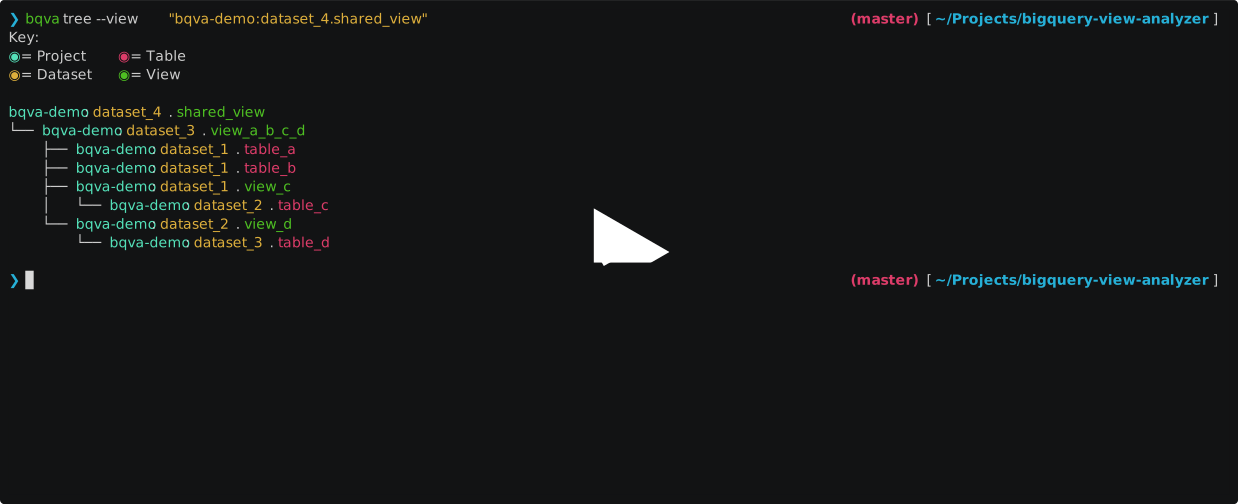
Example: CLI

Given the above datasets and tables in BigQuery, to authorize bqva-demo:dataset_4.shared_view, the following views would need to be authorized with each of the following datasets:
- Authorized views for
dataset_1bqva-demo:dataset_3.view_a_b_c_d
- Authorized views for
dataset_2bqva-demo:dataset_3.view_a_b_c_dbqva-demo:dataset_1.view_c
- Authorized views for
dataset_3bqva-demo:dataset_2.view_dbqva-demo:dataset_4.shared_view
You can easily visualize the above view hierarchy using the bqva tree command.
# View dependency tree and authorization status for 'bqva-demo:dataset_4.shared_view'
$ bqva tree --status --no-key --view "bqva-demo:dataset_4.shared_view"
bqva-demo:dataset_4.shared_view
└── bqva-demo:dataset_3.view_a_b_c_d (⨯)
    ├── bqva-demo:dataset_1.table_a (⨯)
    ├── bqva-demo:dataset_1.table_b (⨯)
    ├── bqva-demo:dataset_1.view_c (⨯)
    │   └── bqva-demo:dataset_2.table_c (⨯)
    └── bqva-demo:dataset_2.view_d (⨯)
        └── bqva-demo:dataset_3.table_d (⨯)
Permissions can be applied automatically to all datasets referenced by the parent view using the bqva authorize command.
# Apply all permissions required by 'bqva-demo:dataset_4.shared_view'
$ bqva authorize --view "bqva-demo:dataset_4.shared_view"
bqva-demo:dataset_4.shared_view
└── bqva-demo:dataset_3.view_a_b_c_d (✓)
    ├── bqva-demo:dataset_1.table_a (✓)
    ├── bqva-demo:dataset_1.table_b (✓)
    ├── bqva-demo:dataset_1.view_c (✓)
    │   └── bqva-demo:dataset_2.table_c (✓)
    └── bqva-demo:dataset_2.view_d (✓)
        └── bqva-demo:dataset_3.table_d (✓)
If you want to revoke permissions for a view, you can do that too!
# Revoke all permissions granted to 'bqva-demo:dataset_4.shared_view'
$ bqva revoke --view "bqva-demo:dataset_4.shared_view"
bqva-demo:dataset_4.shared_view
└── bqva-demo:dataset_3.view_a_b_c_d (⨯)
    ├── bqva-demo:dataset_1.table_a (⨯)
    ├── bqva-demo:dataset_1.table_b (⨯)
    ├── bqva-demo:dataset_1.view_c (⨯)
    │   └── bqva-demo:dataset_2.table_c (⨯)
    └── bqva-demo:dataset_2.view_d (⨯)
        └── bqva-demo:dataset_3.table_d (⨯)
Example: Python library
You can import the library within a Python project to programatically apply permissions to multiple datasets.
from bqva import ViewAnalyzer
from google.cloud import bigquery

client = bigquery.Client()


def auth_views(datasets=[], **kwargs):
    # get all datasets by default if none provided
    if len(datasets) == 0:
        datasets = client.list_datasets(max_results=1)
    for dataset in datasets:
        dataset = client.dataset(dataset)
        tables = client.list_tables(dataset.dataset_id)
        for table in tables:
            if table.table_type == "VIEW":
                view = ViewAnalyzer(
                    project_id=table.project,
                    dataset_id=table.dataset_id,
                    view_id=table.table_id,
                )
                view.apply_permissions()
            print(
                f"Authorised view: {table.project}.{table.dataset_id}.{table.table_id}"
            )


auth_views(["dataset_a", "dataset_b"])
1 maintainer

Metadata
1 maintainer
Release files for bigquery-view-analyzer 21.9.0
For a detailed explanation of source distributions (sdists) and built distributions (wheels), please see the package formats documentation.
Source distribution (sdist)
| File | Size | Uploaded | Provenance | Actions |
|---|---|---|---|---|
| bigquery-view-analyzer-21.9.0.tar.gz | 7.7 kB | Without provenance | Details for bigquery-view-analyzer-21.9.0.tar.gz |
Release files / bigquery-view-analyzer-21.9.0.tar.gz
| Download URL | bigquery-view-analyzer-21.9.0.tar.gz |
|---|---|
| Size | 7.7 kB |
| Tags | Source |
|
SHA-256 checksum How to use checksums |
92b70ce835caea53d1f04c984332f6344357219fb33f411fc2c7c6b35d0f7dd8
|
|
BLAKE2b-256 checksum How to use checksums |
89eb0a86f91db64435b93f0d21d188f85e3c405141e6caf8fec8f9628f6b6e40
|
| Upload date | |
|
Uploaded using Trusted Publishing? What is trusted publishing? |
No |
| Uploaded via |
poetry/1.1.8 CPython/3.7.7 Linux/5.8.0-1035-gcp
|
Security for bigquery-view-analyzer 21.9.0
Provenance
Provenance describes where a file came from. On PyPI, provenance is shared via attestations, which provide a verifiable record of the build or publishing details. View details, limitations and caveats.
No provenance found
None of the files in this release were uploaded with provenance metadata.
A note on package security
PyPI is a repository for distributing packages, not a service for auditing them. While third-party security researchers and our staff do their best to detect and remove malicious packages, PyPI cannot guarantee the quality, security or suitability of any given package.
To learn more about protecting yourself from malicious actors, visit our package security documentation.














