
bluez-peripheral
A bluez-peripheral is a library for building Bluetooth Low Energy (BLE) peripherals/ servers using the Bluez (Linux) GATT API.
Who this Library is For
- Developers using Python and Linux (and Bluez).
- Wishing to develop a bluetooth compatible peripheral (ie. something that other devices connect to).
- With low bandwidth requirements (ie. not streaming audio).
Installation
Install bluez (eg. sudo apt-get install bluez)
pip install bluez-peripheral
GATT Overview
GATT is a BLE protocol that allows you to offer services to other devices. You can find a list of standardised services on the Bluetooth SIG website (you can largely ignore profiles when working with BLE). You should refer to the "Service Characteristics" in these specifications for the purposes of this library.
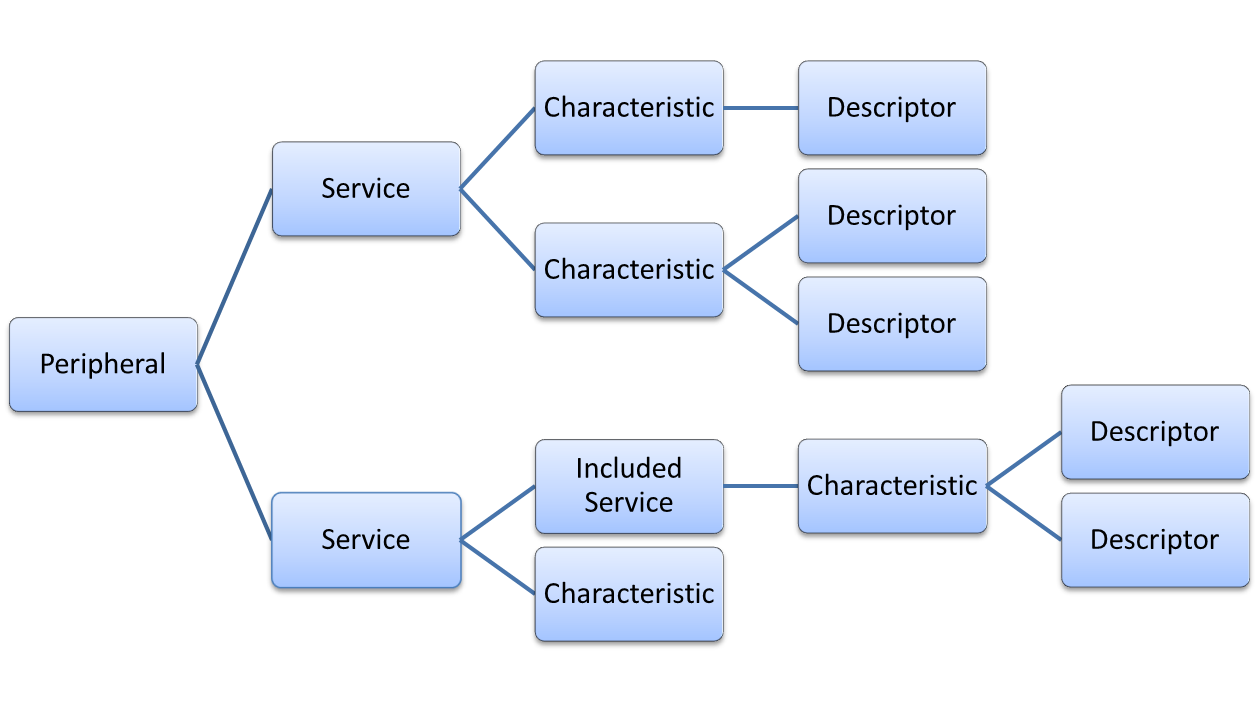
Courtesey of Qt documentation (GNU Free Documentation License)
A peripheral defines a list of services that it provides. Services are a collection of characteristics which expose particular data (eg. a heart rate or mouse position). Characteristics may also have descriptors that contain metadata (eg. the units of a characteristic). Services can optionally include other services. All BLE attributes (Services, Characterisics and Descriptors) are identified by a 16-bit number assigned by the Bluetooth SIG.
Characteristics may operate in a number of modes depending on their purpose. By default characteristics are read-only in this library however they may also be writable and provide notification (like an event system) when their value changes. Additionally some characteristics require security protection. You can read more about BLE on the Bluetooth SIG blog.
Usage
There are a few important things you need to remember when using this library:
- Do not attempt to create the Generic Access Service or a Client Characteristic Configuration Descriptor (if you don't know what this means don't worry). These are both handled automatically by Bluez and attempting to define them will result in errors.
- Services are not implicitly threaded. If you register a service in your main thread blocking that thread will stop your service (and particularly notifications) from working. Therefore you must frequently yeild to the asyncio event loop (for example using asyncio.sleep) and ideally use multithreading.
The easiest way to use the library is to create a class describing the service that you wish to provide.
from bluez_peripheral.gatt.service import Service
from bluez_peripheral.gatt.characteristic import characteristic, CharacteristicFlags as CharFlags

import struct

class HeartRateService(Service):
    def __init__(self):
        # Base 16 service UUID, This should be a primary service.
        super().__init__("180D", True)

    @characteristic("2A37", CharFlags.NOTIFY)
    def heart_rate_measurement(self, options):
        # This function is called when the characteristic is read.
        # Since this characteristic is notify only this function is a placeholder.
        # You don't need this function Python 3.9+ (See PEP 614).
        # You can generally ignore the options argument
        # (see Advanced Characteristics and Descriptors Documentation).
        pass

    def update_heart_rate(self, new_rate):
        # Call this when you get a new heartrate reading.
        # Note that notification is asynchronous (you must await something at some point after calling this).
        flags = 0

        # Bluetooth data is little endian.
        rate = struct.pack("<BB", flags, new_rate)
        self.heart_rate_measurement.changed(rate)
Bluez interfaces with bluez-peripheral using dbus for inter-process communication. For Bluez to start offering your service it needs to be registered on this bus. Additionally if you want devices to pair with your device you need to register an agent to decide how pairing should be completed. Finally you also need to advertise the service to nearby devices.
from bluez_peripheral.util import *
from bluez_peripheral.advert import Advertisement
from bluez_peripheral.agent import NoIoAgent
import asyncio

async def main():
    # Alternativly you can request this bus directly from dbus_next.
    bus = await get_message_bus()

    service = HeartRateService()
    await service.register(bus)

    # An agent is required to handle pairing
    agent = NoIoAgent()
    # This script needs superuser for this to work.
    await agent.register(bus)

    adapter = await Adapter.get_first(bus)

    # Start an advert that will last for 60 seconds.
    advert = Advertisement("Heart Monitor", ["180D"], 0x0340, 60)
    await advert.register(bus, adapter)

    while True:
        # Update the heart rate.
        service.update_heart_rate(120)
        # Handle dbus requests.
        await asyncio.sleep(5)

    await bus.wait_for_disconnect()

if __name__ == "__main__":
    asyncio.run(main())
To communicate with bluez the default dbus configuration requires that you be in the bluetooth user group (eg. sudo useradd -aG bluetooth spacecheese).
For more examples please read the documentation.
1 maintainer

Metadata
1 maintainer
Release files for bluez-peripheral 0.1.5
For a detailed explanation of source distributions (sdists) and built distributions (wheels), please see the package formats documentation.
Source distribution (sdist)
| File | Size | Uploaded | Provenance | Actions |
|---|---|---|---|---|
| bluez_peripheral-0.1.5.tar.gz | 30.1 kB | Without provenance | Details for bluez_peripheral-0.1.5.tar.gz |
Built distribution (wheel)
| File | Interpreter | ABI | Platform | Actions Reset |
|---|---|---|---|---|
| bluez_peripheral-0.1.5-py3-none-any.whl | Python 3 | none | any | Details for bluez_peripheral-0.1.5-py3-none-any.whl |
Total release size: 54.5 kB
Release files / bluez_peripheral-0.1.5.tar.gz
| Download URL | bluez_peripheral-0.1.5.tar.gz |
|---|---|
| Size | 30.1 kB |
| Tags | Source |
|
SHA-256 checksum How to use checksums |
62511b5089f729aab3fd44ba667b1d5de64507c99d41156bdcd1587da21395fb
|
|
BLAKE2b-256 checksum How to use checksums |
6c5602f36dcdf9cb813cf8c5dd176595c1c8fb30d09b4b542e1a06b8c4376e40
|
| Upload date | |
|
Uploaded using Trusted Publishing? What is trusted publishing? |
No |
| Uploaded via |
twine/4.0.0 CPython/3.9.12
|
Release files / bluez_peripheral-0.1.5-py3-none-any.whl
| Download URL | bluez_peripheral-0.1.5-py3-none-any.whl |
|---|---|
| Size | 24.5 kB |
| Tags | Python 3 |
|
SHA-256 checksum How to use checksums |
359d736b66eec76f132d270a5ce467d60587f95d6c0f4d5461dcab7b455d16e3
|
|
BLAKE2b-256 checksum How to use checksums |
c131f83ea3baf994378e28865fa0ea1dad940fea64d634466b8c7a7ae3968eb9
|
| Upload date | |
|
Uploaded using Trusted Publishing? What is trusted publishing? |
No |
| Uploaded via |
twine/4.0.0 CPython/3.9.12
|
Security for bluez-peripheral 0.1.5
Provenance
Provenance describes where a file came from. On PyPI, provenance is shared via attestations, which provide a verifiable record of the build or publishing details. View details, limitations and caveats.
No provenance found
None of the files in this release were uploaded with provenance metadata.
A note on package security
PyPI is a repository for distributing packages, not a service for auditing them. While third-party security researchers and our staff do their best to detect and remove malicious packages, PyPI cannot guarantee the quality, security or suitability of any given package.
To learn more about protecting yourself from malicious actors, visit our package security documentation.














