
░█▀▄░█░░░█░█░█▀▄░▀█▀
░█▀▄░█░░░█░█░█▀▄░░█░
░▀▀░░▀▀▀░▀▀▀░▀░▀░░▀░
Talk to your coding agents.



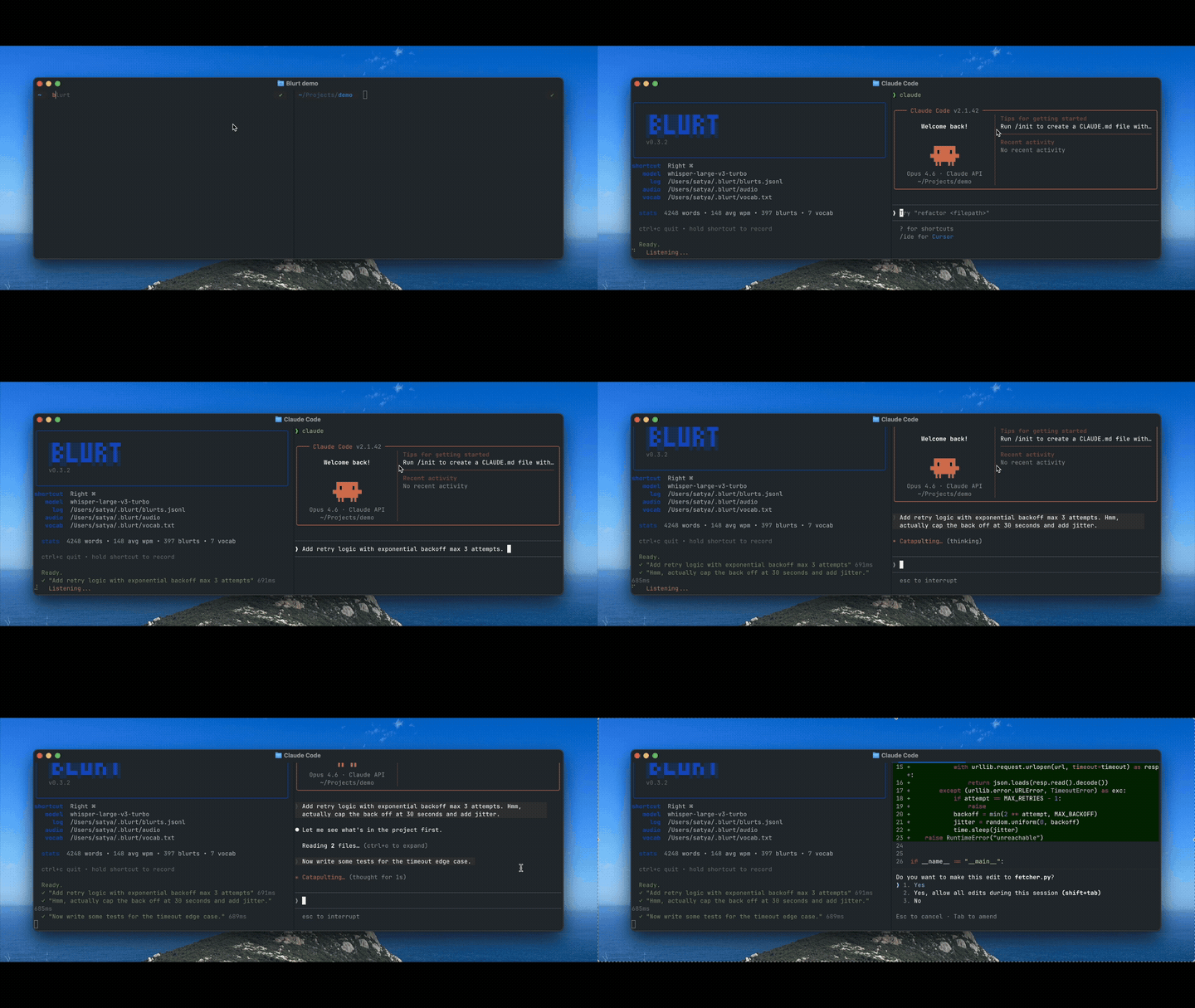
On-device voice-to-text for macOS. Press the ` / ~ key, speak, then press it again - your words go straight into Claude Code, Codex, Cursor, OpenCode or any other agent, wherever your cursor is.
Install
brew tap satyaborg/blurt
brew install blurt
Or via pipx:
pipx install blurt
Requires macOS with Apple Silicon.
First run downloads the selected transcription model once. macOS will prompt for Microphone and Accessibility access (System Settings → Privacy & Security).
Usage
| Action | Description |
|---|---|
| Press the ` / ~ key | Start recording |
| Press the ` / ~ key again | Stop, transcribe, paste at cursor |
| Ctrl + C | Quit |
Change the activation shortcut and restart Blurt:
blurt shortcut tilde       # use the default ` / ~ key
blurt shortcut right-cmd   # use the right Command key
blurt shortcut             # show the configured shortcut
Models
| Mode | Model | Use case |
|---|---|---|
fast |
Qwen3-ASR 0.6B 8-bit | Default, lowest latency |
accurate |
Qwen3-ASR 1.7B 8-bit | Higher accuracy |
blurt mode fast       # use the default 0.6B model
blurt mode accurate   # use the higher-accuracy 1.7B model
The fast mode downloads an approximately 1 GB MLX checkpoint, while accurate mode downloads an approximately 2.5 GB MLX checkpoint. Custom words and filename-shaped repository terms are passed to Qwen as transcription context.
Transcript Casing
blurt case original     # preserve the model's casing
blurt case lowercase    # convert every transcription to lowercase
Custom Words
Teach Blurt words it gets wrong (names, jargon, acronyms):
blurt add "Claude Code"   # add a word
blurt vocab               # list all
blurt rm "Claude Code"    # remove
Words are stored in ~/.blurt/vocab.txt (one per line).
@-mentions
Run Blurt from a git repo and spoken filenames automatically resolve to @path/to/file references that coding agents understand. For example, saying "check init.py for the bug" becomes check @blurt/__init__.py for the bug.
Transcript History
blurt log # view recent transcripts
Logs are stored in ~/.blurt/log.txt.
Update
blurt upgrade
Troubleshooting
| Issue | Fix |
|---|---|
| "Microphone access" prompt doesn't appear | System Settings → Privacy & Security → Microphone → enable your terminal |
| "Accessibility" error | System Settings → Privacy & Security → Accessibility → enable your terminal |
| No audio / recording fails | brew install portaudio then restart your terminal |
| Model download stalls | Check available space in ~/.cache/huggingface/ for the selected model |
Contributing
git clone https://github.com/satyaborg/blurt.git
cd blurt
uv pip install -e ".[dev]"
pytest
Privacy
Everything runs on your Mac. No network calls, no telemetry, no data collection. Audio files are saved locally to ~/.blurt/audio/ and never leave your device.
License
1 maintainer

Metadata
1 maintainer
Release files for blurt 0.10.0
For a detailed explanation of source distributions (sdists) and built distributions (wheels), please see the package formats documentation.
Source distribution (sdist)
| File | Size | Uploaded | |
|---|---|---|---|
| blurt-0.10.0.tar.gz | 1.2 MB | Details |
Built distribution (wheel)
| File | Interpreter | ABI | Platform | Reset |
|---|---|---|---|---|
| blurt-0.10.0-py3-none-any.whl | Python 3 | none | any | Details |
Total release size: 1.3 MB
Release files / blurt-0.10.0.tar.gz
| Download URL | blurt-0.10.0.tar.gz |
|---|---|
| Size | 1.2 MB |
| Tags | Source |
|
SHA-256 checksum How to use checksums |
b318ef064c3f27010d0a5245a5765d105e6fb8151cbc2a2884122971a966f95a
|
|
BLAKE2b-256 checksum How to use checksums |
cf6767f54bb0e9a6b3aa205c66352b5aa51b01d81273018df1a2d242a39439fb
|
| Upload date | |
|
Uploaded using Trusted Publishing? What is trusted publishing? |
Yes |
| Uploaded via |
twine/7.0.0 CPython/3.13.14
|
Provenance
Provenance describes where a file came from. On PyPI, provenance is shared via attestations, which provide a verifiable record of the build or publishing details. View details, limitations and caveats.


PyPI Publish Attestation
PyPI verified that this artifact, at this checksum, originated from the publisher listed below.
Signed by GitHub Actions, verified by PyPI on Aug 31, 2026.
Transparency logRelease files / blurt-0.10.0-py3-none-any.whl
| Download URL | blurt-0.10.0-py3-none-any.whl |
|---|---|
| Size | 26.2 kB |
| Tags | Python 3 |
|
SHA-256 checksum How to use checksums |
e3661cf9d2e026748d3a3b7f881fea0cebd6a6fffbd3ba7e8e212a29e1a2715a
|
|
BLAKE2b-256 checksum How to use checksums |
93219b66130db526c93997b2cce9cb7b80b83a709bd8c14401ba4de83716b52f
|
| Upload date | |
|
Uploaded using Trusted Publishing? What is trusted publishing? |
Yes |
| Uploaded via |
twine/7.0.0 CPython/3.13.14
|
Provenance
Provenance describes where a file came from. On PyPI, provenance is shared via attestations, which provide a verifiable record of the build or publishing details. View details, limitations and caveats.
PyPI Publish Attestation
PyPI verified that this artifact, at this checksum, originated from the publisher listed below.
Signed by GitHub Actions, verified by PyPI on Aug 31, 2026.
Transparency log













