
BraAndKet

BraAndKet is a library for numeral calculations of discrete quantum systems.
Quickstart
Before Using
Please notice that this library is still actively developing. The stability and compatibility of APIs are NOT guaranteed. Breaking changes are happening every day! Using this library right now, you may take your own risk.
Installation
You can install the latest release from PyPI.
pip install braandket
Then you can import this library with name bnk
import braandket as bnk
KetSpace
Any quantum states can exist in some space called Hilbert space. You can use bnk.KetSpace(n) to define such a space,
where n is its dimension. For example, to create a Hilbert space of a q-bit:
qbit = bnk.KetSpace(2)
print(qbit)  # output: KetSpace(2)
You can define a name for a space using named parameter. The name is to describe this space when debugging. The name can
be a str, or any object to be printed out. When printed, the name of space will be shown, which is very helpful when
debugging.
qbit_a = bnk.KetSpace(2, name="a")
print(qbit_a)  # output: KetSpace(2, name=a)

qbit_b = bnk.KetSpace(2, name="b")
print(qbit_b)  # output: KetSpace(2, name=b)
You can call these 4 methods on a KetSpace instance to create ket vectors and operators:
- method
.eigenstate(k)- to get a ket vector, representing the k-th eigenstate - method
.identity()- to get an identity operatorin this Hilbert space
- method
.operator(k,b)- to get an operator - method
.projector(k)- to get a projector


ket_space = bnk.KetSpace(2)

ket_vec = ket_space.eigenstate(0)
identity_op = ket_space.identity()
increase_op = ket_space.operator(1, 0)
zero_proj = ket_space.projector(0)
A KetSpace is accompanied by a BraSpace. You can conveniently get it with .ct property. To avoid confusion, is not
allowed to create any vectors or operations with a BraSpace. Please do so with its corresponding KetSpace.
Calling .ct property, you can get back its KetSpace.
ket_space = bnk.KetSpace(2)
print(ket_space)  # output: KetSpace(2)

bra_space = ket_space.ct
print(bra_space)  # output: BraSpace(2)

print(bra_space.ct is ket_space)  # output: True
QTensors
QTensor is the basic type of computing elements in this library. A QTensor instance holds an np.ndarray as its
values and a tuple of Space instances. Each Space corresponds to an axis of the np.ndarray.
Any vectors, operators and tensors in quantum world are represented by QTensor. All vectors and operators mentioned
above are all QTensor instances.
ket_space = bnk.KetSpace(2)

ket_vec = ket_space.eigenstate(0)
print(ket_vec)
# output: QTensor(spaces=(KetSpace(2),), values=[1. 0.])

identity_op = ket_space.identity()
print(identity_op)
# output: QTensor(spaces=(KetSpace(2), BraSpace(2)), values=[[1. 0.] [0. 1.]])

increase_op = ket_space.operator(1, 0)
print(increase_op)
# output: QTensor(spaces=(KetSpace(2), BraSpace(2)), values=[[0. 0.] [1. 0.]])

zero_proj = ket_space.projector(0)
print(zero_proj)
# output: QTensor(spaces=(KetSpace(2), BraSpace(2)), values=[[1. 0.] [0. 0.]])
You can easily get a conjugate transposed QTensor calling .ct property. It should be noted that sometimes, such
operation does not affect the values, but spaces.
ket_space = bnk.KetSpace(2)

ket_vec = ket_space.eigenstate(0)
bra_vec = ket_vec.ct
print(bra_vec)
# output: QTensor(spaces=(BraSpace(2),), values=[1. 0.])

increase_op = ket_space.operator(1, 0)
decrease_op = increase_op.ct
print(decrease_op)
# output: QTensor(spaces=(BraSpace(2), KetSpace(2)), values=[[0. 0.] [1. 0.]])
QTensor instances can take tensor product using @ operator. They can automatically inspect which spaces to be
performed the "product-sum" (when the bra on the left meets the matching ket on the right), which to be remained.
Example1:

qbit = bnk.KetSpace(2)

amp = qbit.eigenstate(0).ct @ qbit.eigenstate(1)
print(amp)
# output: QTensor(spaces=(), values=0.0)
Example2:

qbit_a = bnk.KetSpace(2, name="a")
qbit_b = bnk.KetSpace(2, name="b")

ket_vec_ab = qbit_a.eigenstate(0) @ qbit_b.eigenstate(1)
print(ket_vec_ab)
# output: QTensor(spaces=(KetSpace(2, name=a), KetSpace(2, name=b)), values=[[0. 1.] [0. 0.]])
Example3:

qbit_a = bnk.KetSpace(2, name="a")
qbit_b = bnk.KetSpace(2, name="b")

tensor_ab = qbit_a.eigenstate(0).ct @ qbit_b.eigenstate(1)
print(tensor_ab)
# output: QTensor(spaces=(BraSpace(2, name=a), KetSpace(2, name=b)), values=[[0. 1.] [0. 0.]])
Example4:
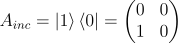

qbit = bnk.KetSpace(2)

ket_vec_0 = qbit.eigenstate(0)
ket_vec_1 = qbit.eigenstate(1)
increase_op = qbit.operator(1, 0)
result = increase_op @ ket_vec_0

print(result)
# output: QTensor(spaces=(KetSpace(2),), values=[0. 1.])

print(result == ket_vec_1)
# output: True
Contribution
This library is completely open source. Any contributions are welcomed. You can fork this repository, make some useful changes and then send a pull request to me on GitHub.
1 maintainer

Metadata
1 maintainer
Release files for BraAndKet 0.8.6.post1
For a detailed explanation of source distributions (sdists) and built distributions (wheels), please see the package formats documentation.
Source distribution (sdist)
| File | Size | Uploaded | |
|---|---|---|---|
| BraAndKet-0.8.6.post1.tar.gz | 16.1 kB | Details |
Built distribution (wheel)
| File | Interpreter | ABI | Platform | Reset |
|---|---|---|---|---|
| BraAndKet-0.8.6.post1-py3-none-any.whl | Python 3 | none | any | Details |
Total release size: 37.8 kB
Release files / BraAndKet-0.8.6.post1.tar.gz
| Download URL | BraAndKet-0.8.6.post1.tar.gz |
|---|---|
| Size | 16.1 kB |
| Tags | Source |
|
SHA-256 checksum How to use checksums |
4f57a509d37886d6598779b4d3929cac9cd0ea9bafe51dfe4b4786ebb97b56d4
|
|
BLAKE2b-256 checksum How to use checksums |
ff44a974917b5adce793c3165bde0a0ab46fc9cf40f5f48e77934156e6b9b8a9
|
| Upload date | |
|
Uploaded using Trusted Publishing? What is trusted publishing? |
No |
| Uploaded via |
twine/4.0.2 CPython/3.12.0
|
Release files / BraAndKet-0.8.6.post1-py3-none-any.whl
| Download URL | BraAndKet-0.8.6.post1-py3-none-any.whl |
|---|---|
| Size | 21.7 kB |
| Tags | Python 3 |
|
SHA-256 checksum How to use checksums |
baa118d0397fa4277091c7ff52149a84caf8b8053ba6327c2057e4509ffafbf7
|
|
BLAKE2b-256 checksum How to use checksums |
db80be67f5c4aba31e954dc9b29a1b132a44e7d91e2a5991c1b21d080b217786
|
| Upload date | |
|
Uploaded using Trusted Publishing? What is trusted publishing? |
No |
| Uploaded via |
twine/4.0.2 CPython/3.12.0
|














