
Surface anaLysis And Modeling (Slam)



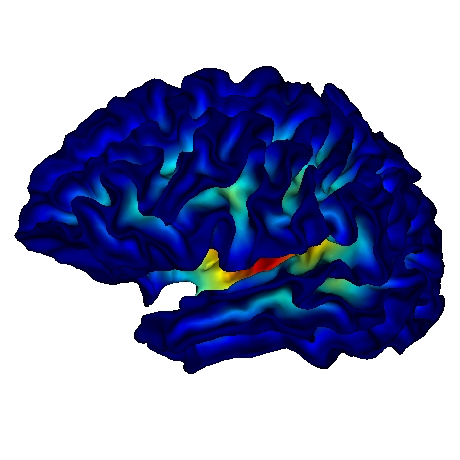
Slam is an open source python package dedicated to the representation of neuroanatomical surfaces stemming from MRI data in the form of triangular meshes and to their processing and analysis. Slam is an extension of Trimesh, an open source python package dedicated to triangular meshes processing.
Main Features
Look at the doc for a complete overview of available features!
-
io: read/write gifti (and nifti) file format -
generate_parametric_surfaces: generation of parametric surfaces with random sampling -
geodesics: geodesic distance computation using tvb-gdist, potpourri3d and networkx -
differential_geometry: several implementations of graph Laplacian (conformal, authalic, FEM...), texture Gradient -
mapping: several types of mapping between the mesh and a sphere, a disc... -
distortion: distortion measures between two meshes, for quantitative analysis of mapping properties -
remeshing: projection of vertex-level information between two meshes based on their spherical representation -
topology: mesh surgery (boundary indentification, large hole closing) -
vertex_voronoi: compute the voronoi of each vertex of a mesh, usefull for numerous applications -
texture: a class to manage properly vertex-level information. -
plot: extension of pyglet and visbrain viewers to visualize slam objects
News in last release
- Deep update of the watershed algorithm that impact many aspects, more details coming
- Acceleration of the watershed algorithm by using potpourri3d for computing geodesic distances
- Acceleration of the computation of the vertex voronoi that is used in many algorithms
For contributors
Code of conduct
The very first thing to do before contributing is to read our Code of conduct.
Have a look at the github project!
We are using a github project to organize the code development and maintenance: https://github.com/orgs/brain-slam/projects/1
If you are interested in contributing, please first have a look at it and contact us by creating a new issue.
Contributors Installation
Prerequisites
- Create an account on Github if you do not already have one
- Sign in GitHub and fork the slam GitHub repository
- We highly recommend to rely on a (conda) virtual environment as provided by miniconda. See miniconda installation instructions if you do not already have one. Then create a virtual environment by typing the following lines in a terminal:
  conda create -q -n slam python=3.12
  conda activate slam
This creates an empty conda virtual environment with Python 3.8 and basic packages (e.g. pip, setuptools) and make it the default python environment.
Installation
- Clone your personal slam fork in your current local directory
git clone https://github.com/<username>/slam
- Perform a full slam installation in editable mode
pip install -e .['dev'] - Set upstream repository to keep your clone up-to-date
git remote add upstream https://github.com/brain-slam/slam.git
You are now ready to modify slam code and submit a pull request
Dependencies
These dependencies, whether mandatory or optional, are managed automatically and transparently for the user during the installation phase and are listed here for the sake of completeness.
Mandatory
In order to work fine, slam requires:
- a Python 3.12 installation
- setuptools
- pip
- numpy
- scipy
- cython
- trimesh
- nibabel
- networkx
- potpourri3d
Distance computation (Optional)
tvb-gdist is recommended for geodesic distance/shortest paths computations
Hall of fame
All contributions are of course much welcome! In addition to the global thank you to all contributors to this project, a special big thanks to:
. https://github.com/alexpron and https://github.com/davidmeunier79 for their precious help for setting up continuous integration tools.
. https://github.com/EtienneCmb for his help regarding visualization and Visbrain (https://github.com/EtienneCmb/visbrain).
. https://github.com/aymanesouani for his implementation of a very nice curvature estimation technique.
. https://github.com/Anthys for implementing the curvature decomposition and many unitests
. to be continued...
Contributors ✨
Thanks goes to these wonderful people (emoji key):
 alexpron 🚧 📆 🤔 💻 |
 JulienLefevreMars 💻 📖 💡 🤔 ⚠️ |
 Tianqi SONG 💻 💡 🤔 |
 Etienne Combrisson 💻 🔧 |
This project follows the all-contributors specification. Contributions of any kind welcome!
1 maintainer

Metadata
1 maintainer
Release files for brain-slam 0.1.3
For a detailed explanation of source distributions (sdists) and built distributions (wheels), please see the package formats documentation.
Source distribution (sdist)
| File | Size | Uploaded | Provenance | Actions |
|---|---|---|---|---|
| brain_slam-0.1.3.tar.gz | 66.3 kB | Without provenance | Details for brain_slam-0.1.3.tar.gz |
Built distribution (wheel)
| File | Interpreter | ABI | Platform | Actions Reset |
|---|---|---|---|---|
| brain_slam-0.1.3-py3-none-any.whl | Python 3 | none | any | Details for brain_slam-0.1.3-py3-none-any.whl |
Total release size: 142.9 kB
Release files / brain_slam-0.1.3.tar.gz
| Download URL | brain_slam-0.1.3.tar.gz |
|---|---|
| Size | 66.3 kB |
| Tags | Source |
|
SHA-256 checksum How to use checksums |
20b75c605c4f4329596fbe9844ce03d72ddafd760b5763f216b799495145fc05
|
|
BLAKE2b-256 checksum How to use checksums |
86b42fa16d005d99896acc477e39f3ad7d8ccb5536efe78019275cf317569640
|
| Upload date | |
|
Uploaded using Trusted Publishing? What is trusted publishing? |
No |
| Uploaded via |
twine/6.2.0 CPython/3.9.25
|
Release files / brain_slam-0.1.3-py3-none-any.whl
| Download URL | brain_slam-0.1.3-py3-none-any.whl |
|---|---|
| Size | 76.6 kB |
| Tags | Python 3 |
|
SHA-256 checksum How to use checksums |
46774a92be86ff48b8b04ea09b17aca71f949e87ee7b1758bbcb9bd04e9bfee6
|
|
BLAKE2b-256 checksum How to use checksums |
391943bba23fd67c95f896e9b8e0bedf659fa78ac97afb7245e6516e41a8ea46
|
| Upload date | |
|
Uploaded using Trusted Publishing? What is trusted publishing? |
No |
| Uploaded via |
twine/6.2.0 CPython/3.9.25
|
Security for brain-slam 0.1.3
Provenance
Provenance describes where a file came from. On PyPI, provenance is shared via attestations, which provide a verifiable record of the build or publishing details. View details, limitations and caveats.
No provenance found
None of the files in this release were uploaded with provenance metadata.
A note on package security
PyPI is a repository for distributing packages, not a service for auditing them. While third-party security researchers and our staff do their best to detect and remove malicious packages, PyPI cannot guarantee the quality, security or suitability of any given package.
To learn more about protecting yourself from malicious actors, visit our package security documentation.














