
Braindrop







Introduction
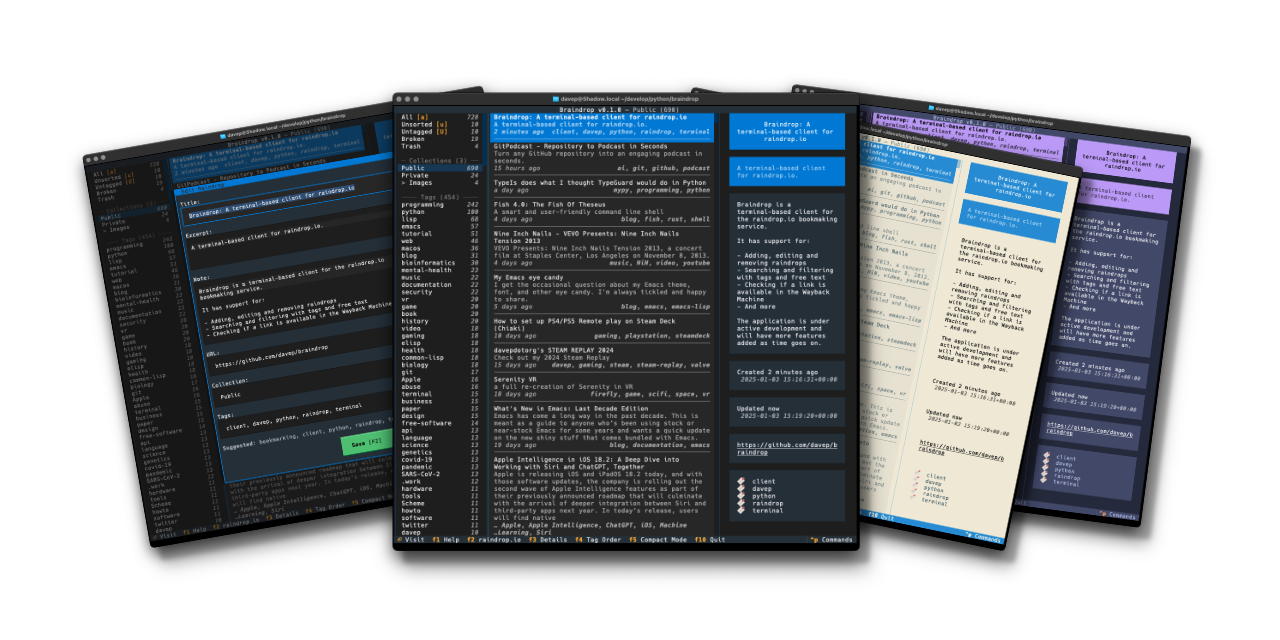
Braindrop is a terminal-based client application for the raindrop.io bookmarking service. It provides the ability to manage and search your bookmarks in the terminal.
Braindrop is and generally always will be fairly opinionated about the "best" way to make use of Raindrop (AKA how I like to use it); but where possible I want to keep it quite general so it will be useful to anyone.
[!NOTE] Braindrop isn't designed as a thin client for the Raindrop API; it isn't a terminal-based browser that does all the work on the server. It is designed to download your data if it looks like it's newer on the server, and then work locally, sending updates back to the server.
If you have a huge Raindrop collection then this might not be the tool for you.
Installing
pipx
The package can be installed using pipx:
$ pipx install braindrop
Once installed run the braindrop command.
uv
The package can be install using uv:
uv tool install --python 3.13 braindrop
If you don't have uv installed you can use uvx.sh to
perform the installation. For GNU/Linux or macOS or similar:
curl -LsSf uvx.sh/braindrop/install.sh | sh
or on Windows:
powershell -ExecutionPolicy ByPass -c "irm https://uvx.sh/braindrop/install.ps1 | iex"
Once installed run the braindrop command.
Getting started
Braindrop only works if you have a raindrop.io account; there is a perfectly usable free tier. If you don't have an account, go get one first.
To use Braindrop you will need an API access token. You can generate one in
your account settings, under Integrations. In Integrations:
- Look for the
For Developerssection - Click on
Create new app - Enter a name for the new app (call it
Braindropfor example, so you know what you're using it for). - Accept the API use terms and guidelines and press
Create - Click on the freshly-created application in the list
- Near the bottom of the dialog that appears, click on
Create test tokenand sayOK. - Copy the test token to your clipboard (or don't worry if you misplace it, you can always come back here to get it again).
Having done the above, when you run up Braindrop the first time it will ask for this token:
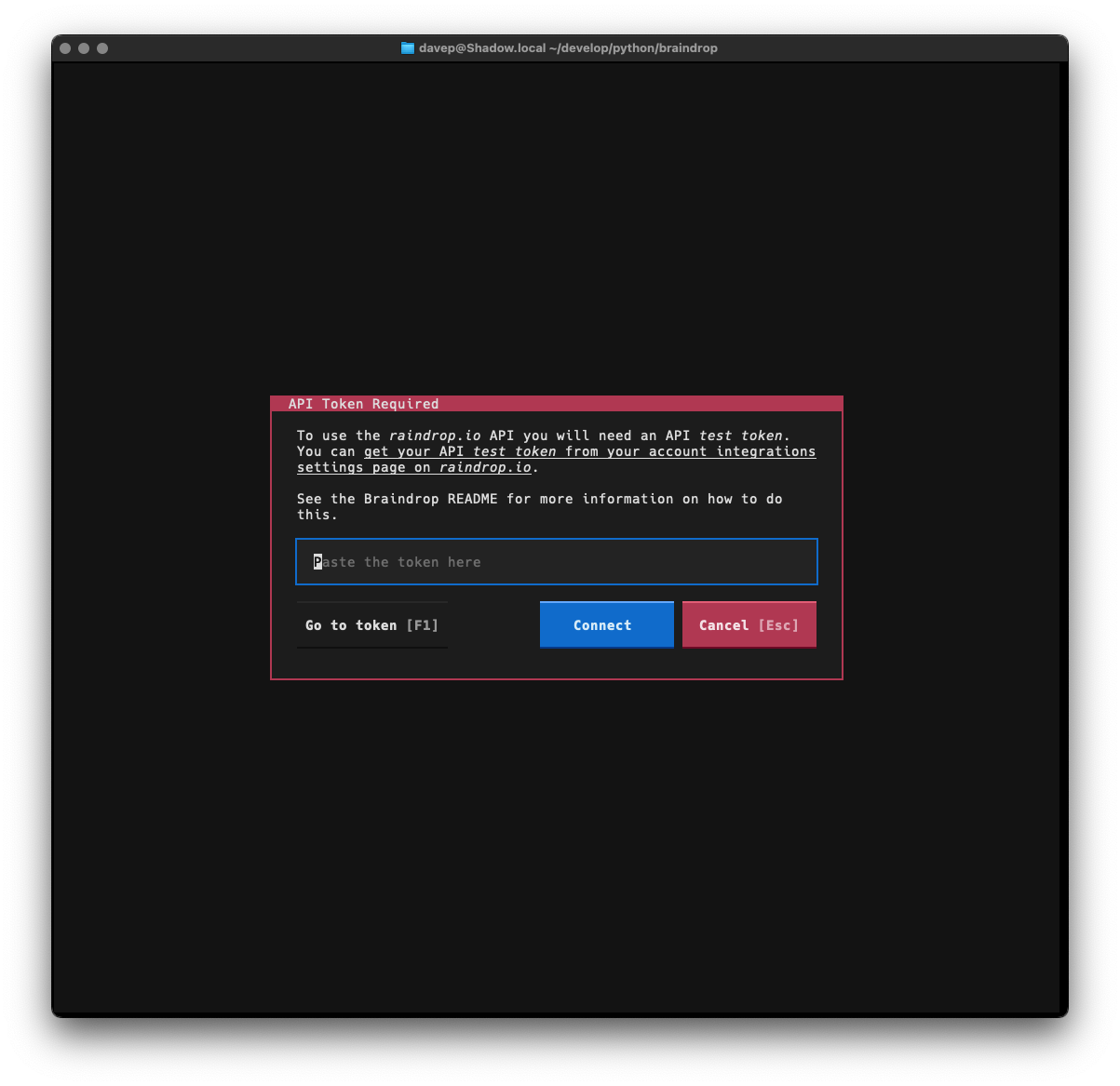
Paste the token into the input field and select Connect. Braindrop will
then download your data and you will be good to go.
NOTE: if it's your preference, you can set the token in an environment
variable called BRAINDROP_API_TOKEN.
Using Braindrop
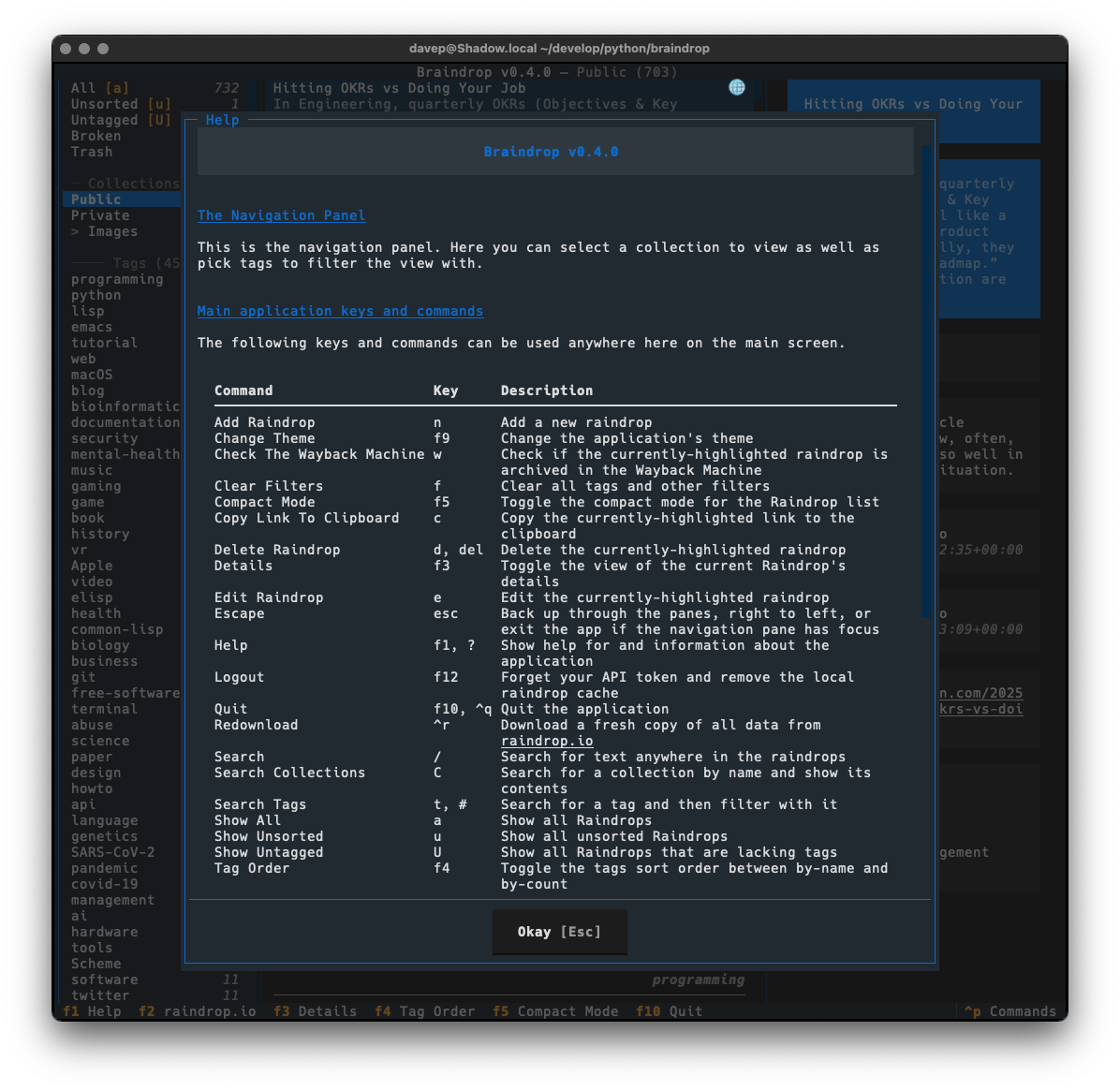
The best way to get to know Braindrop is to read the help screen, once in the main application you can see this by pressing F1.
File locations
Braindrop stores files in a braindrop directory within both
$XDG_DATA_HOME and
$XDG_CONFIG_HOME.
If you wish to fully remove anything to do with Braindrop you will need to
remove those directories too.
Expanding for the common locations, the files normally created are:
~/.config/braindrop/configuration.json-- The configuration file.~/.local/share/braindrop/.token-- The file that holds your API token.~/.local/share/braindrop/raindrops.json-- The locally-held Raindrop data.
Getting help
If you need help, or have any ideas, please feel free to raise an issue or start a discussion.
TODO
See the TODO tag in issues to see what I'm planning.
1 maintainer

Metadata
1 maintainer
Release files for braindrop 1.1.1
For a detailed explanation of source distributions (sdists) and built distributions (wheels), please see the package formats documentation.
Source distribution (sdist)
| File | Size | Uploaded | Provenance | |
|---|---|---|---|---|
| braindrop-1.1.1.tar.gz | 44.3 kB | Without provenance | Details |
Built distribution (wheel)
| File | Interpreter | ABI | Platform | Reset |
|---|---|---|---|---|
| braindrop-1.1.1-py3-none-any.whl | Python 3 | none | any | Details |
Total release size: 108.7 kB
Release files / braindrop-1.1.1.tar.gz
| Download URL | braindrop-1.1.1.tar.gz |
|---|---|
| Size | 44.3 kB |
| Tags | Source |
|
SHA-256 checksum How to use checksums |
b1361ba851330a757365e659158c911d620847389f5b44b4756f55a0abc5ce13
|
|
BLAKE2b-256 checksum How to use checksums |
0e431eda3b7efd30c53ff6c837fff71a71706fa290255190aa7d3abc142eaf00
|
| Upload date | |
|
Uploaded using Trusted Publishing? What is trusted publishing? |
No |
| Uploaded via |
uv/0.12.2 {"installer":{"name":"uv","version":"0.12.2","subcommand":["publish"]},"python":null,"implementation":{"name":null,"version":null},"distro":{"name":"macOS","version":null,"id":null,"libc":null},"system":{"name":null,"release":null},"cpu":null,"openssl_version":null,"setuptools_version":null,"rustc_version":null,"ci":null}
|
Release files / braindrop-1.1.1-py3-none-any.whl
| Download URL | braindrop-1.1.1-py3-none-any.whl |
|---|---|
| Size | 64.4 kB |
| Tags | Python 3 |
|
SHA-256 checksum How to use checksums |
99fa62a157c2ce80424d2ae78a1ef0dd3c58043edd4d9b975cb364bb460c2792
|
|
BLAKE2b-256 checksum How to use checksums |
cfef2c6fd0bc91248410957908c0e5f4cd05c7482fd8f4c76ca3f077eb20acc8
|
| Upload date | |
|
Uploaded using Trusted Publishing? What is trusted publishing? |
No |
| Uploaded via |
uv/0.12.2 {"installer":{"name":"uv","version":"0.12.2","subcommand":["publish"]},"python":null,"implementation":{"name":null,"version":null},"distro":{"name":"macOS","version":null,"id":null,"libc":null},"system":{"name":null,"release":null},"cpu":null,"openssl_version":null,"setuptools_version":null,"rustc_version":null,"ci":null}
|
Security for braindrop 1.1.1
Provenance
Provenance describes where a file came from. On PyPI, provenance is shared via attestations, which provide a verifiable record of the build or publishing details. View details, limitations and caveats.
No provenance found
None of the files in this release were uploaded with provenance metadata.
A note on package security
PyPI is a repository for distributing packages, not a service for auditing them. While third-party security researchers and our staff do their best to detect and remove malicious packages, PyPI cannot guarantee the quality, security or suitability of any given package.
To learn more about protecting yourself from malicious actors, visit our package security documentation.














