
Brainplug
Plug your brain into any AI. A second brain for you and for your AI assistants: Brainplug turns your AI chats, notes, documents, mail and messages into a 3D brain you can explore, and into a memory your assistants plug into: they get a short briefing instead of a pasted prompt, look up only what they need, and save what they learn as notes in your Obsidian vault. Nothing is uploaded.
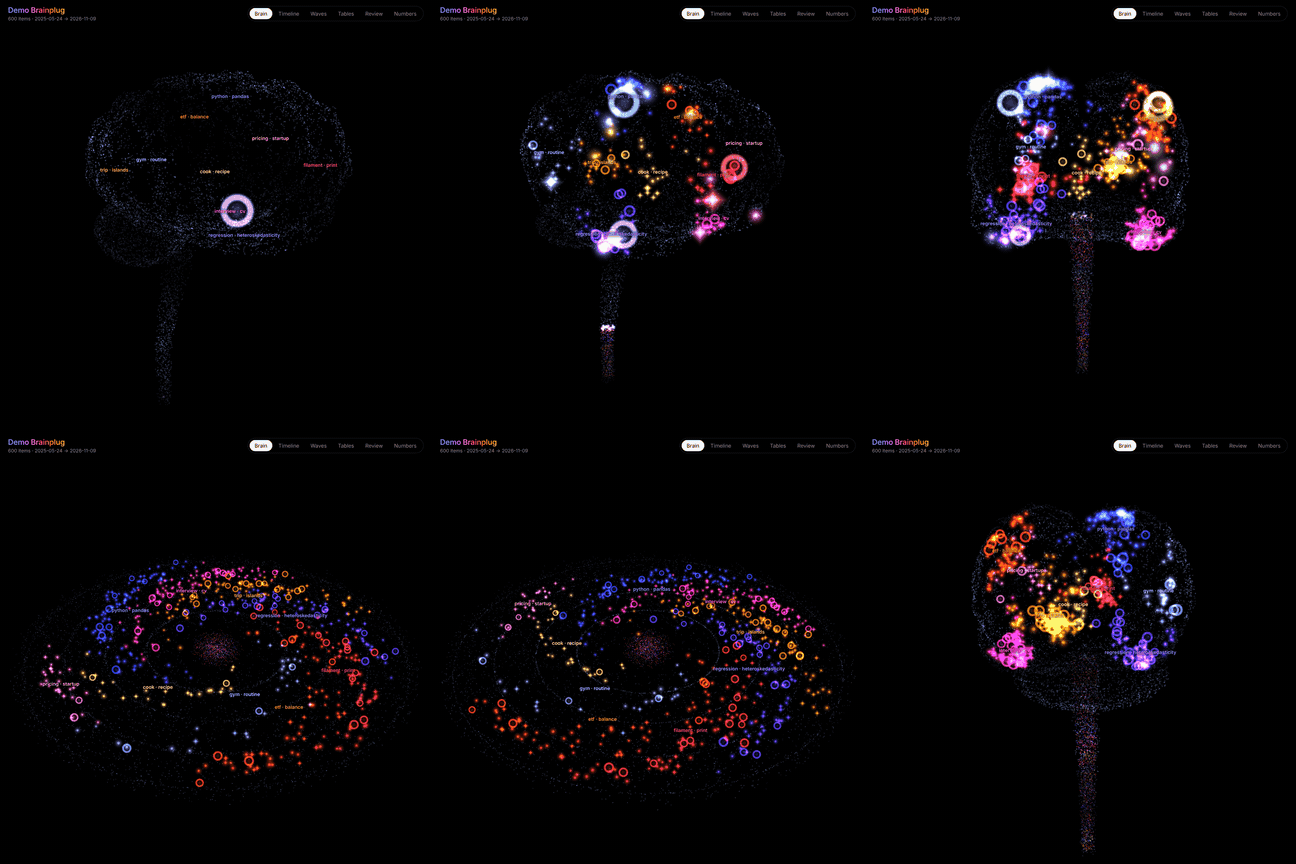
Website and live demo · Make yours in the browser
The animation and the screenshots use invented demo data, not anyone's real writing.
A memory your AI can plug into
Every new chat starts blank, so you paste the same background again and again. With Brainplug the background lives in one place, as Markdown in your own vault, and every assistant reads from it and adds to it:
uv tool install brainplug                    # or: pipx install brainplug
brainplug brain ~/Documents/MyVault           # creates MyVault/Brainplug: "About me" and Memory/
brainplug connect ~/Documents/MyVault         # adds it to Claude Desktop, Claude Code, Cursor, Codex…
brainplug doctor ~/Documents/MyVault          # checks that it answers, end to end
brainplug brain ~/Documents/MyVault --draft-about writes a first draft of your "About me"
note from what you have written, while it is still empty.
Add --sessions to connect to include what you typed to Claude Code and Codex, and put
export files after the vault to include what you wrote before (… MyVault chatgpt-export.zip).
connect finds the assistants installed on this computer (Claude Desktop, Claude Code, Codex,
Cursor, Windsurf, Gemini CLI, VS Code, LM Studio), adds one brainplug entry to each one's
settings with an absolute path (desktop apps do not see your terminal's PATH), keeps
everything else there, and backs the file up first. --print shows what it would change.
Claude Desktop reads its settings only when it starts, and it keeps running after you close
its window: quit it (on Windows, right-click its icon by the clock › Quit; on a Mac, ⌘Q) and
open it again. It has to be the desktop app: claude.ai in a browser, even installed as an app
from Chrome or Edge, cannot start programs on your computer. In a new chat, + › Connectors
lists brainplug once it is running.
| Tool | What the assistant does with it |
|---|---|
context |
Gets a short briefing at the start of a conversation: your "About me" note, what you asked assistants to keep in mind, what you are writing about lately. A few hundred words instead of a pasted prompt. |
recall |
Looks something up across your notes, past chats, mail and memories, and gets excerpts rather than whole files. With order="oldest" it finds when you first raised something. |
remember |
Saves a decision, a preference or a fact as a note in Brainplug/Memory. The next assistant, in any app, finds it. With replaces, it corrects an older memory and keeps the old one archived. |
read, topic, timeline, review, overview |
Reads one item, follows a topic through time, sees what is growing or forgotten. |
forget |
Archives a memory when you ask. The note stays in your vault. |
exclude |
Leaves an item ("that chat isn't mine") or a whole app out of the brain, listed in Brainplug/Excluded.md, where deleting the line brings it back. |
name_topic |
Gives a topic a clearer name you agreed to ("Econometrics" instead of "regression · heteroskedasticity"), saved in Brainplug/Topic names.md and used by the map too. |
It is a Model Context Protocol server that runs on your computer, so it works with assistants that can start one. It has been used end to end by Codex (context, recall, remember); the read-only tools are marked as such, so assistants can run them without asking each time.
What you can say to your assistant
| You say | What happens |
|---|---|
| "What do you know about me?" | context: your About me note, standing preferences, what you are writing about lately. |
| "When did I first write about kelp forests?" | recall oldest first: the earliest items, with their dates and codes. |
| "What was I working on last spring?" | timeline for those months, by topic. |
| "What have I been neglecting?" | review: topics rising, fading and dormant. |
| "Open #k3f9a2." | read: your words in that item, and what it connects to in your other apps. |
| "Remember that I prefer short answers in Spanish." | remember: a note in your vault; as a standing preference it waits for your approval. |
| "My deadline moved to July." | remember with replaces: the old memory is archived, linked to the new one. |
| "That conversation isn't mine." | exclude: it leaves the brain; the export it came from is untouched. |
| "Forget what you saved about the old flat." | forget: the memory is archived, never deleted. |
| "Give my topics better names." | It suggests names from each topic's words; name_topic saves the ones you agree to. |
How it behaves:
- It is all plain notes.
Brainplug/About me.mdis yours: assistants read it and never change it. Each memory is one Markdown note with its date, kind and who saved it, which you can open, edit or delete in Obsidian. New memories can be found at once; notes you edit are picked up in the background a little later. - Standing preferences wait for your yes. A memory an assistant pins, or saves as a
preference, would shape every future conversation with every assistant, so it is saved as
pinned: pendingand used only after you approve it:brainplug brain ~/Documents/MyVault --review, or changependingtotruein the note. This way a web page that tricks one assistant cannot plant instructions for all of them. - Items have codes that do not change, such as
#k3f9a2, so an assistant that found something can still open it after your files change. - It answers at once. Your files are read in the background, and the index is kept in this
computer's cache folder (never a synced folder) so the next start takes a moment instead of
re-reading everything;
--no-cacheturns that off. Changes are picked up in the background. - It starts empty and grows. No exports are needed to begin: point it at a folder and let your assistants fill it. Add exports later to bring in what you wrote before.
- Assistants are told what to save. Only what you said or confirmed, never instructions found in a web page, a file or a tool result. They can archive what they saved, not delete it, and they cannot touch your own notes.
- Without MCP (the ChatGPT or Gemini websites):
brainplug brain ~/Documents/MyVault --contextprints the briefing to paste, and the browser extension keeps what you type there, so it still reaches the brain. - What an assistant reads through these tools is sent to the AI model it runs on, like anything else you show it.
What it reads
| Source | What to give it | What is kept |
|---|---|---|
| ChatGPT | Export .zip (Settings › Data controls › Export data) |
Your side of every conversation |
| Claude | Export .zip (Settings › Privacy › Export data) |
Your side of every conversation |
| Gemini | Google Takeout › My Activity › Gemini Apps, as JSON | Your prompts, regrouped into chats |
| Obsidian | Your vault folder | Notes, frontmatter dates, #tags, [[links]] |
| Notion | "Markdown & CSV" export .zip, or the Notion API |
Pages, tags, links between pages |
| Gmail | Google Takeout .mbox |
Only mail you sent, without quoted replies or signatures |
Exported chats (.txt or .zip) |
Only the messages you sent, one item per chat and day | |
| Word, PDF | .docx and .pdf files |
The text of each document |
| Any notes | A folder of .md / .txt files |
The text of each file |
| Live capture | The browser extension in extension/ |
What you type into ChatGPT, Claude, Gemini, Copilot, Perplexity |
| Claude Code, Codex | --sessions (reads ~/.claude/projects and ~/.codex/sessions) |
What you typed in each session: never the agent's replies or tool output; pasted keys are masked |
| AI memory | Brainplug/Memory in your vault |
What your assistants were asked to remember |
Only your own words go in. The AI's answers and other people's mail and messages are left
out, so the map shows what you care about and not what you were told. Word and PDF files are
the exception: they are read whole, so add the ones you wrote. PDFs found inside a folder
are skipped unless you ask for them (--pdf).
What you get
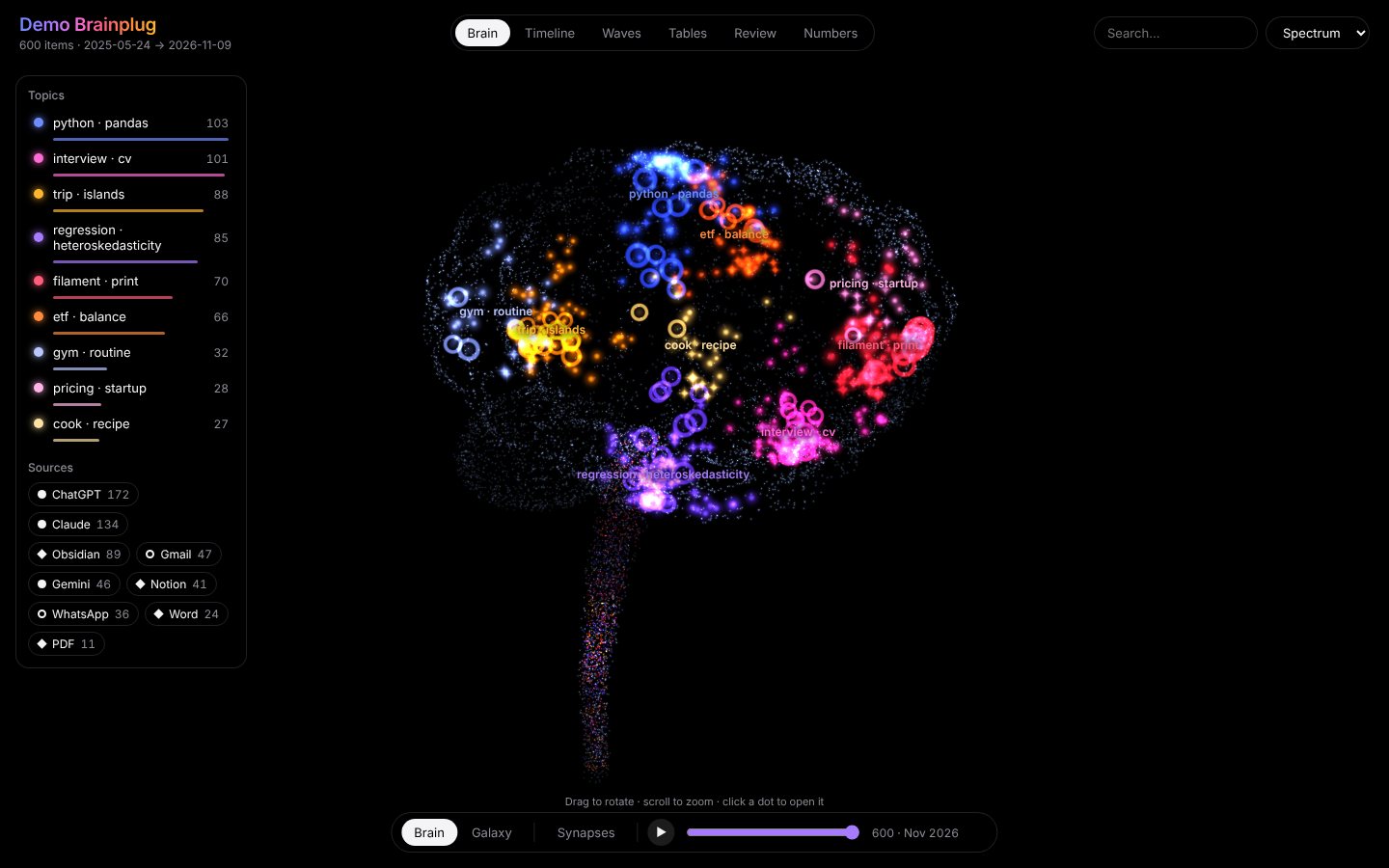 Brain. Each point is something you wrote, coloured by topic. Discs are AI chats, diamonds are notes and documents, rings are messages. |
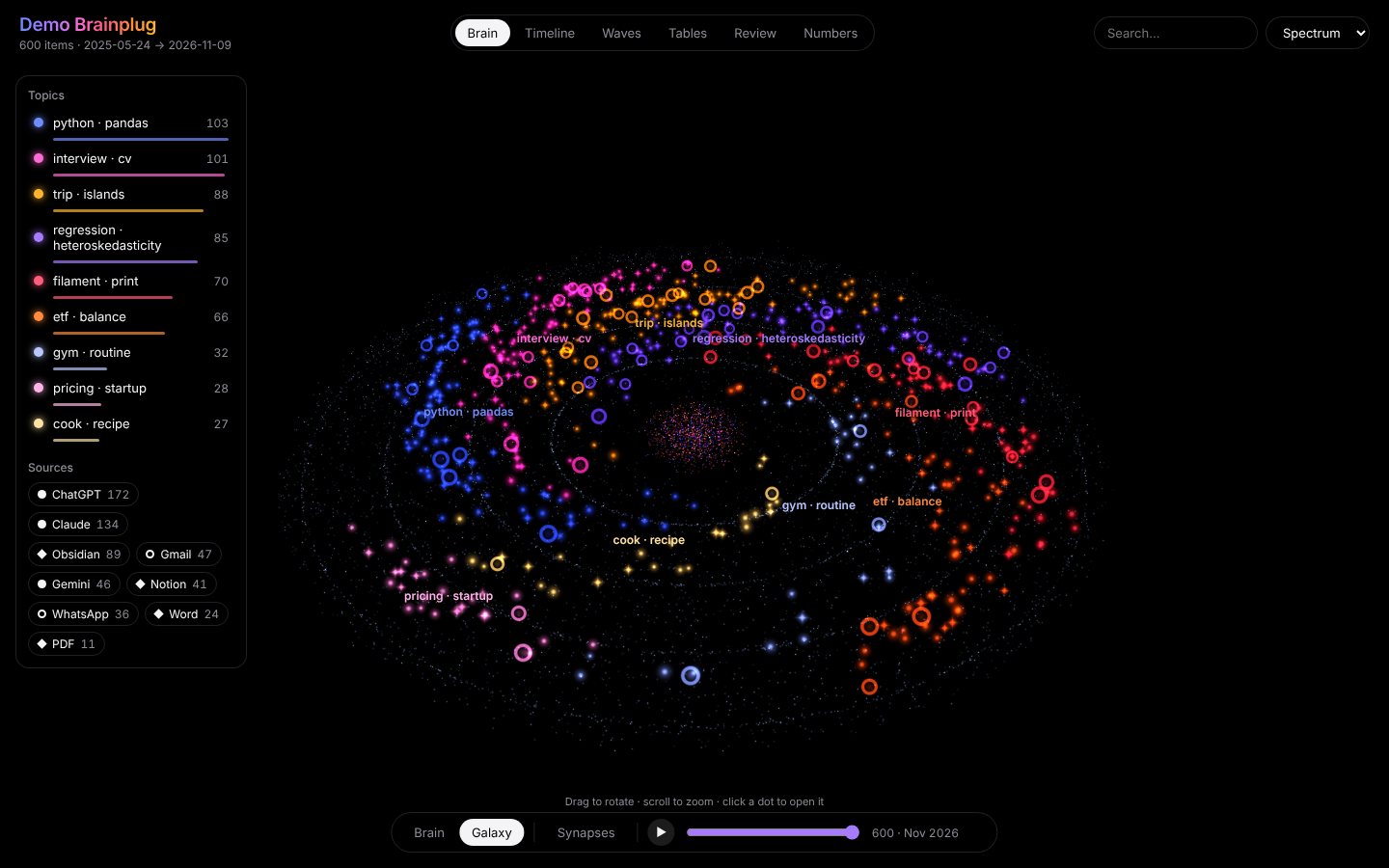 Galaxy. The same points as a spiral: one arm per topic, old ideas at the core. Press play and it grows month by month. |
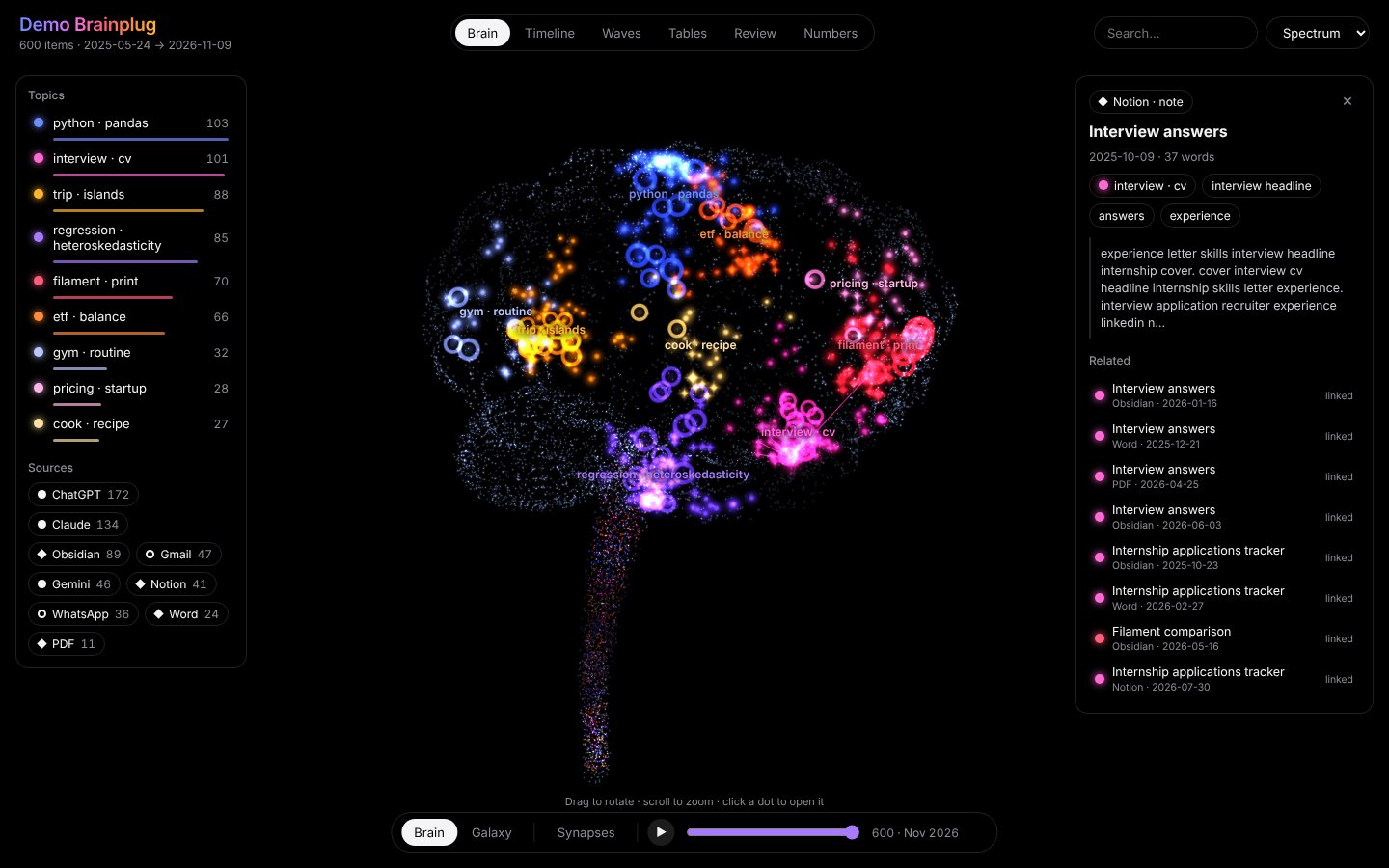 Connections. Open a point to read it and see what it relates to in your other apps. |
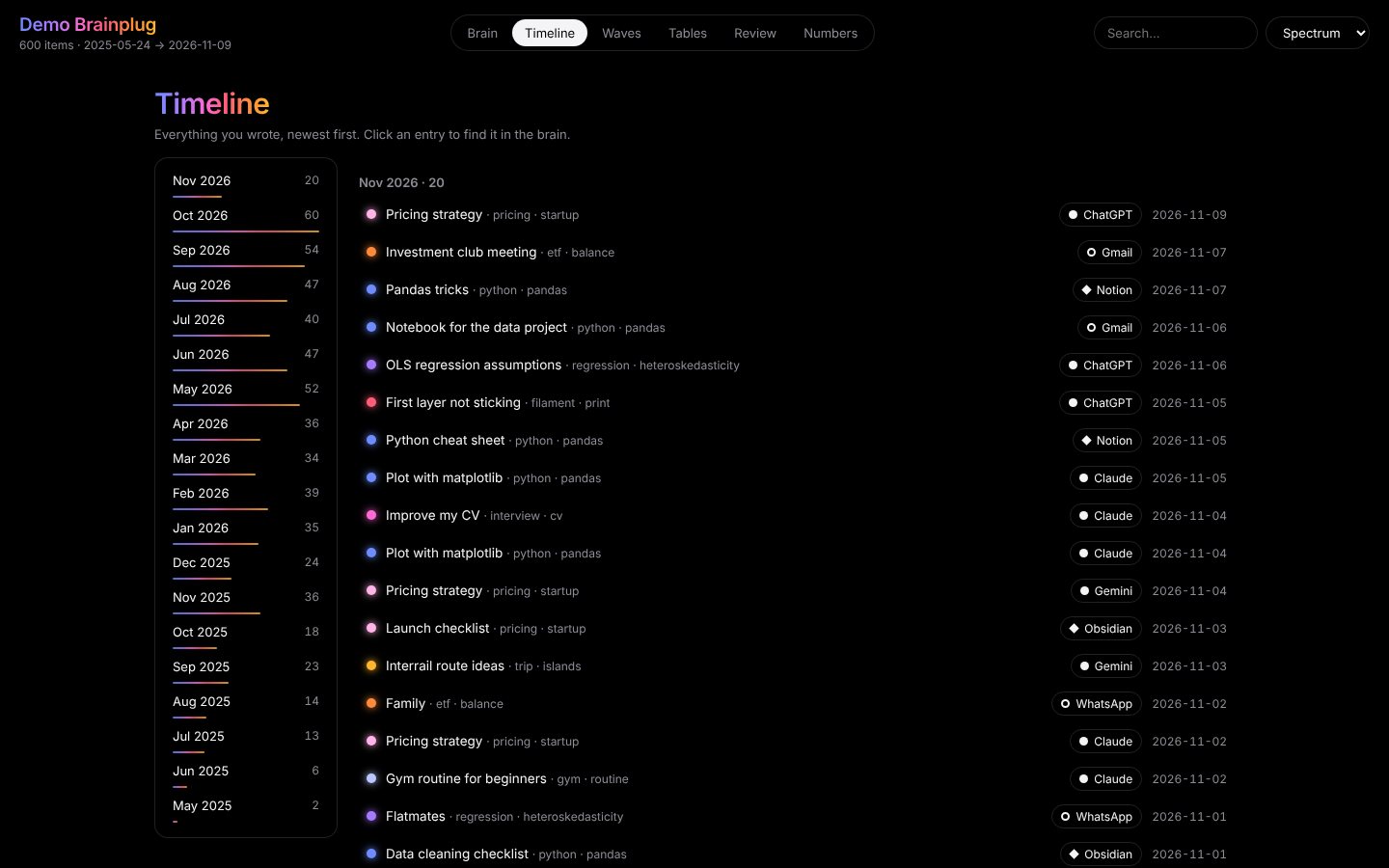 Timeline. Everything in order, filtered by topic, app or search. |
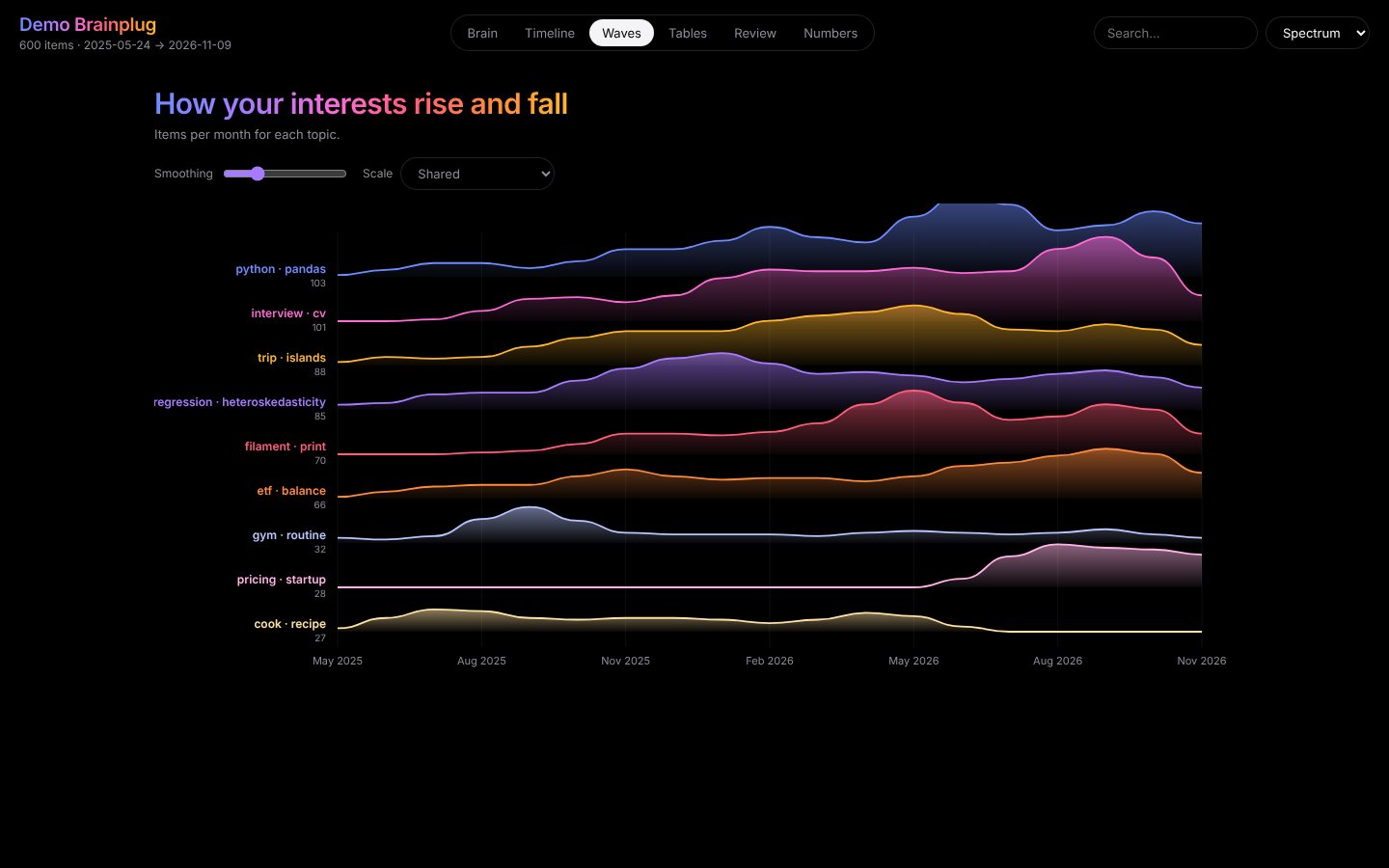 Waves. How each interest rises and falls over time. |
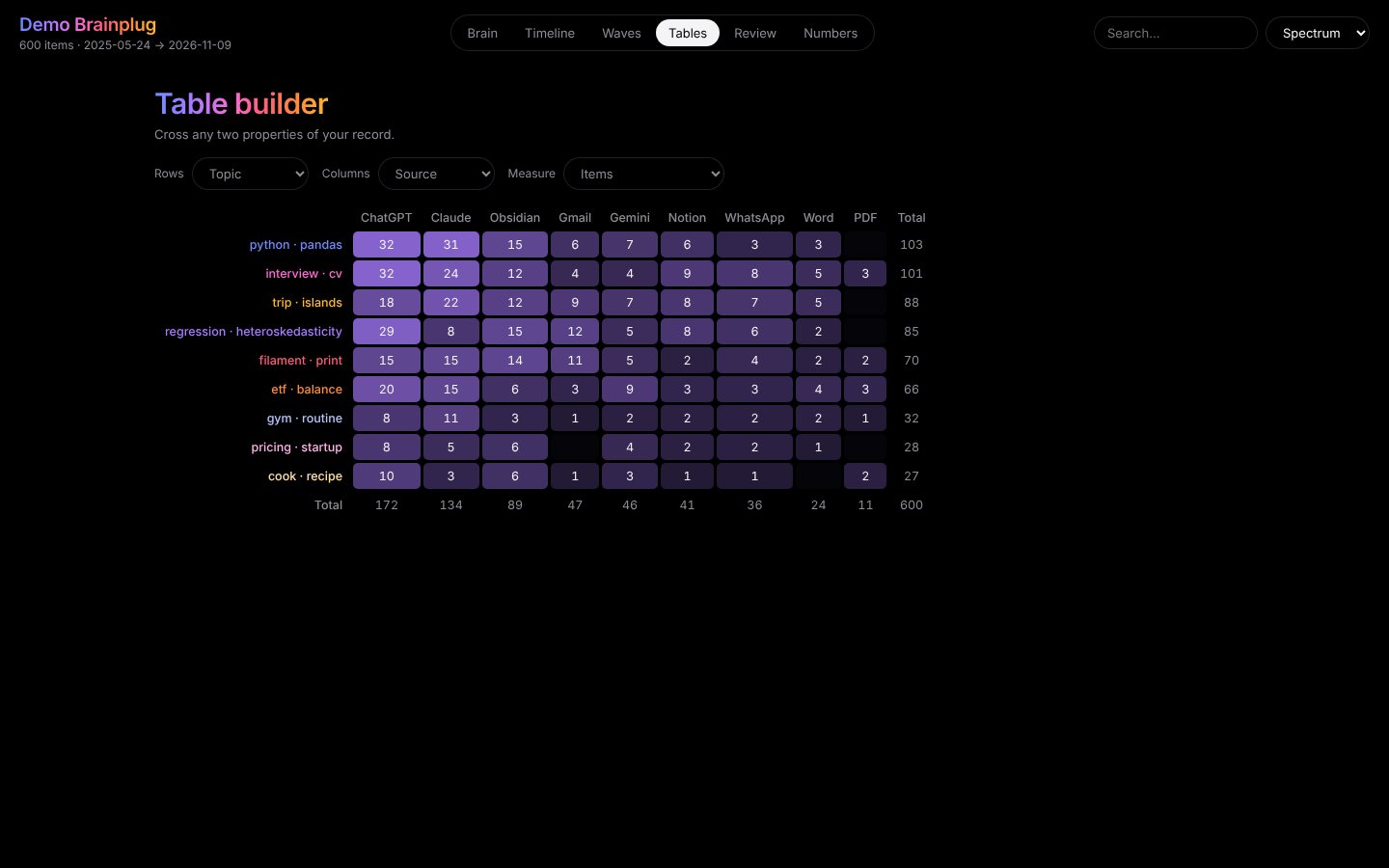 Tables. Cross any two things: topic by app, weekday by time of day. |
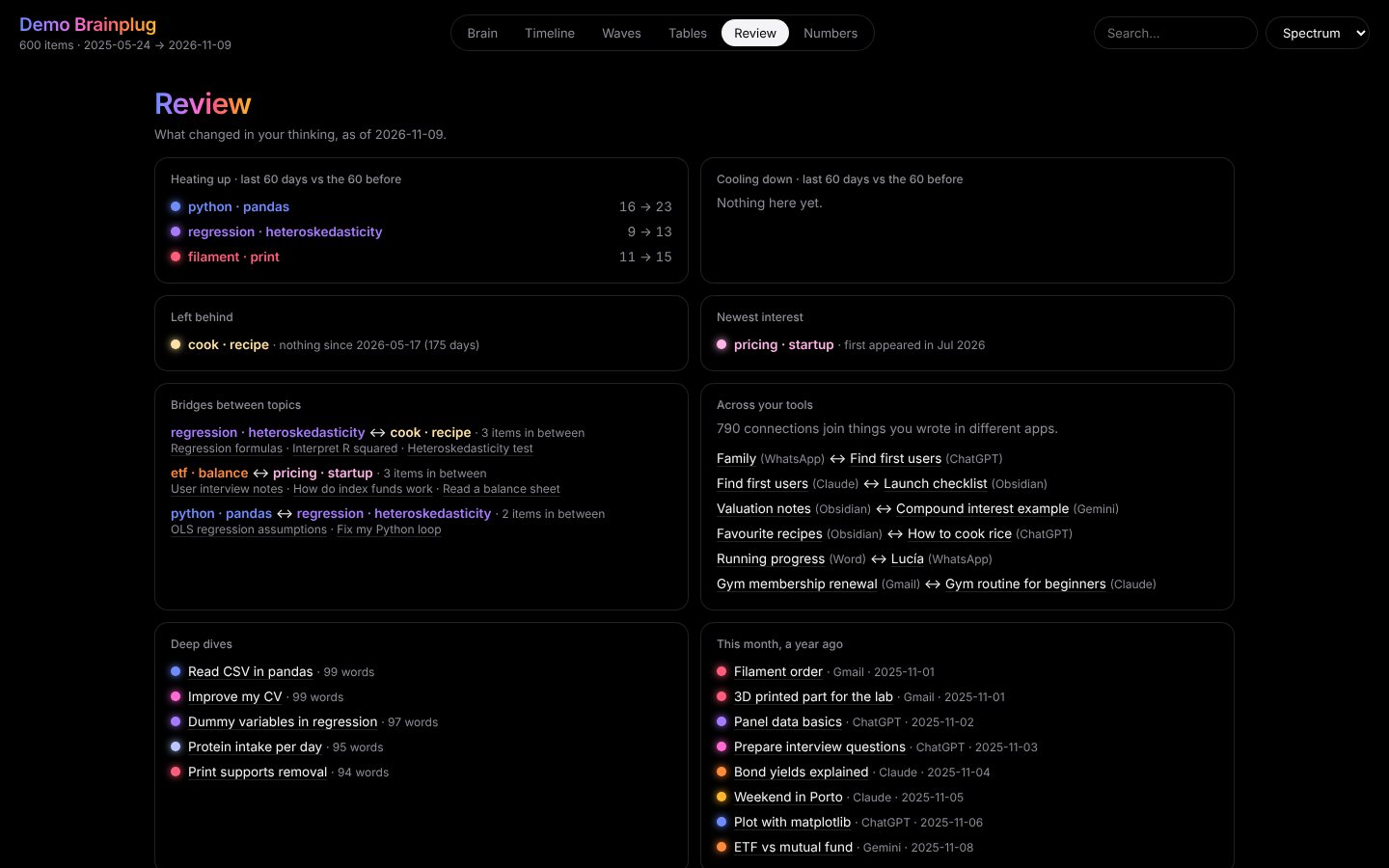 Review. What is growing, what you dropped, where topics meet, and a summary of you to paste into your AI. |
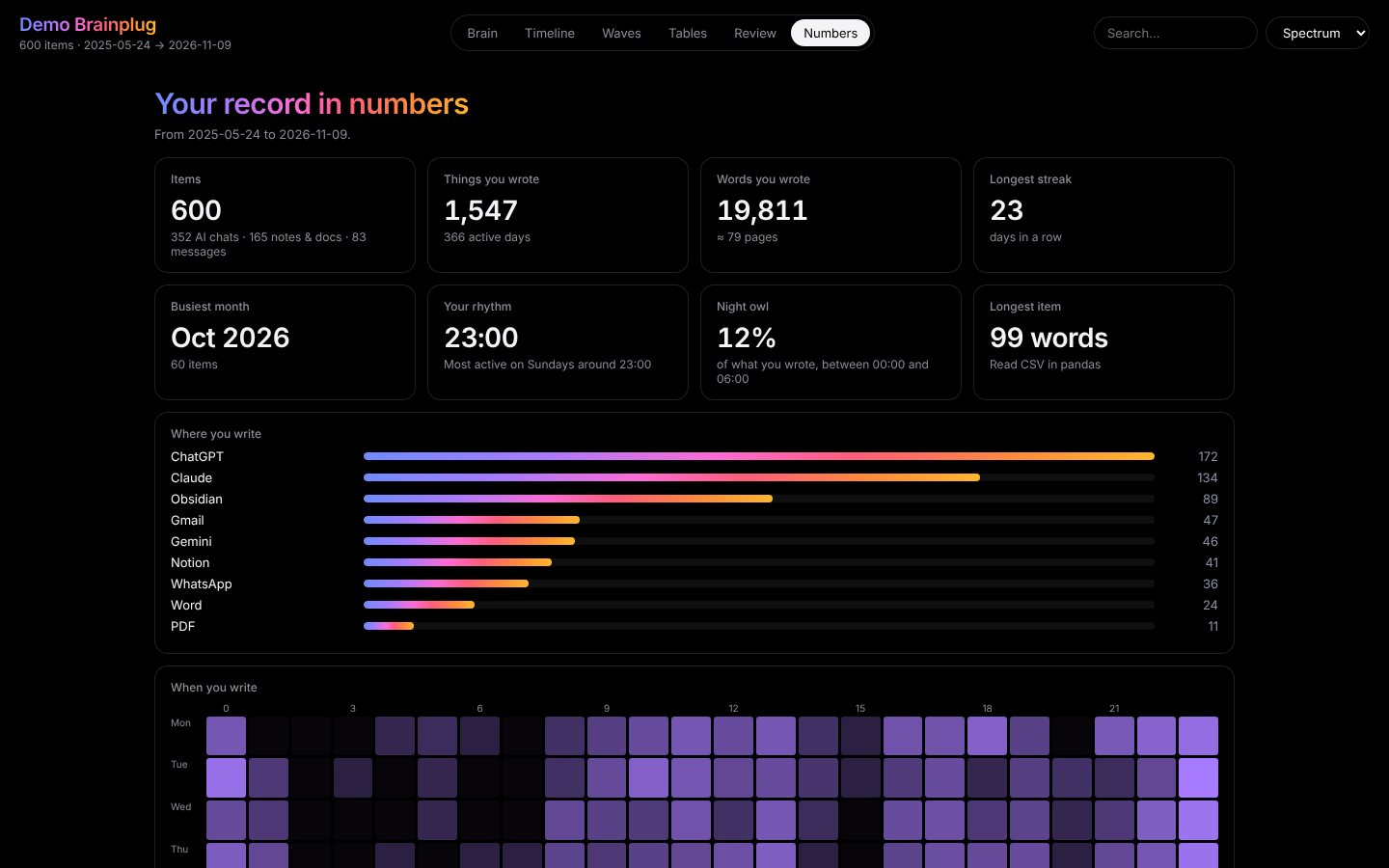 Numbers. Words written, longest streak, the hours you write at. |
The result is one HTML file that opens offline, in English or Spanish.
Three ways to use it
1. In the browser, with nothing to install
Open the app, drop your files
and folders, and press the button. The whole analysis runs in that tab (docs/app/engine/,
plain JavaScript). Once the page has loaded it needs no connection, so you can switch your
wifi off before you add your files, and you can download the result.
For exports of more than about a gigabyte, use the Python version: a browser tab runs out of memory before Python does.
2. On your computer
Needs Python 3.10 or later. Works on Windows, macOS and Linux.
uv tool install brainplug                 # or: pipx install brainplug

brainplug demo --open     # try it with invented data
brainplug app             # drag and drop, in your browser, served from 127.0.0.1 only
Or from the terminal, with any mix of files and folders:
brainplug build chatgpt-export.zip claude-export.zip takeout.zip ~/Documents/MyVault \
    Sent.mbox "WhatsApp Chat with Ana.zip" thesis.pdf \
    --me you@gmail.com --me "Your Name" --lang es -o my_brain.html --open
| Option | What it does |
|---|---|
-o, --out |
Output file (default brainplug.html) |
--me EMAIL_OR_NAME |
Who you are: your email (Gmail) or your name as shown in WhatsApp. Repeatable; usually detected |
--pdf |
Also read the PDFs found inside folders and ZIPs |
--notion |
Also read Notion through its API (see below) |
--sessions |
Also read what you typed to Claude Code and Codex on this computer |
--topics N |
Force the number of topics (default: chosen automatically) |
--rename N=NAME |
Rename topic N (repeatable) |
--private |
Leave titles and text out of the file, so it is safe to share |
--vault DIR |
Also write topics and chats into this Obsidian vault as linked notes |
--json FILE |
Also save the analysis as JSON |
--dataset FILE |
Also save your words as a redacted JSON Lines file (see Privacy) |
--title, --lang en|es, --tz |
Page title, language and time zone |
3. Kept up to date while you write
The extension (extension/) keeps a copy of what you type into ChatGPT, Claude, Gemini,
Copilot and Perplexity, in that browser's own storage. It recognises a sent message by what
you do (Enter or a click, after which the box is empty), so it does not depend on how each
site builds its page, and it never reads the answers. To install it: chrome://extensions ›
turn on Developer mode › Load unpacked › choose the extension folder. The web app notices
the extension and offers to add what it has saved; the popup can also save it as a file.
Sync rebuilds your brain whenever something changes:
brainplug sync --init ~/Documents/MyVault ~/Downloads/brainplug-capture.json -o my_brain.html
brainplug sync            # rebuild once
brainplug sync --watch    # rebuild when a note changes or a new capture file arrives
The settings live in brainplug.json, next to where you ran --init. To have the result on
several devices, point -o (or --vault) at a folder that already syncs: iCloud, Google
Drive, Dropbox, Obsidian Sync. Brainplug has no servers of its own.
Notes on each source
- Gemini. Takeout lists single prompts with no conversation, so chats are rebuilt: by the conversation id when the entry has one, otherwise a new chat starts after 30 minutes without a prompt. Choose JSON in Takeout; the default HTML format is read on a best-effort basis.
- Notion. An export has no creation date unless the page has a date property; pages
without one are marked undated instead of being given a made-up date. To get the real
dates, create an internal integration at notion.so/my-integrations, share your pages with
it, and run
NOTION_TOKEN=secret_… brainplug build --notion. Requests go from your computer straight to api.notion.com. - Gmail. In Takeout select Mail only and, to keep it small, just the "Sent" label. Mailboxes are streamed, never loaded whole.
- WhatsApp. In a chat: More › Export chat › Without media. With two or more chats, you
are the sender who is in all of them; with one, pass
--me "Your Name"if it cannot be told from the file name.03/04is read day-first unless the file shows otherwise. - Obsidian. Dates come from frontmatter (
created,date), then from daily-note file names (2025-03-05.md), then from the file itself.
Privacy
- Nothing is uploaded. No account, no server, no tracking. The web app fetches its own files when it opens and then works offline (a browser test builds a brain with the network switched off); the result embeds three.js, the font and your data.
- The memory server keeps its index in this computer's cache folder (
~/Library/Caches/brainplug,%LOCALAPPDATA%\brainplugor~/.cache/brainplug); delete it any time, or use--no-cache.--sessionsreads the coding agents' logs where they are, keeping only what you typed. See the full privacy policy. --privatekeeps every title, excerpt and keyword out of the file. Topic names are still shown: check them and use--renameif one gives away too much.--datasetwrites your own words as JSON Lines with emails, links, phone numbers, IBANs, long numbers and @handles masked, and without titles or exact dates, in case you ever want to give them to a researcher. This is masking, not anonymisation: names and anything else you wrote are still there, so read the file first. Brainplug does not sell, license or broker anyone's data.- Your exports never belong in the repository:
.gitignoreblocks*.zip,*.mbox,conversations.json, capture files andbrainplug.json.
How it works
your words ─► TF-IDF ─► LSA (SVD) ─► k-means ─► topics and their names
                              │
                              ├─► nearest neighbours + [[links]] ─► connections, bridges
                              ├─► brain layout  (implicit volume, farthest-point sampling, PCA)
                              ├─► galaxy layout (time on the radius, topics on the arms)
                              └─► waves, review and habit statistics
                                             │
                                  one HTML file (three.js point shader)
- Sources. Every format becomes the same
Item: a title, a date and the text you wrote. The mbox reader streams messages and strips quoted replies and signatures. - Topics. TF-IDF with word pairs → truncated SVD → k-means, with the number of topics chosen by silhouette score. Stop words cover English and Spanish.
- Connections. Cosine nearest neighbours in the semantic space, plus the links in your notes. An item nearly as close to another topic's centre as to its own is a bridge.
- Review. Compares the last 60 days with the 60 before, and flags topics with no activity for 90 days or more.
- Two engines. The Python package uses scikit-learn. The web app runs a
dependency-free JavaScript port with its own TF-IDF, randomized SVD and k-means.
tests/test_web.pygives both the same files in every supported format and requires identical numbers and matching topics.
Project structure
brainplug/            the Python package
├── sources.py         every export format → Item
├── notion_api.py      Notion pages with real creation dates
├── analysis.py        topics, connections, layouts, review, statistics
├── brain.py           brain and galaxy geometry
├── pipeline.py        files → HTML in one call
├── sync.py            brainplug.json and --watch
├── memory.py          the notes assistants save (Brainplug/Memory, About me.md)
├── agent.py           the MCP server: context, recall, remember…
├── connect.py         brainplug connect and brainplug doctor
├── export.py          Obsidian notes and the redacted dataset
├── app.py             local drag-and-drop app
├── render.py, templates/, vendor/
docs/                  the website (GitHub Pages)
├── app/               the web app: index.html, worker.js, engine/ (the JavaScript port)
extension/             the live-capture browser extension
scripts/build_web.py   regenerates the files the web app shares with the package
tests/                 pytest suite; tests/browser/ drives Chrome
Tests
pip install -e ".[dev]"
python -m pytest -q
The suite covers every loader, checks that only your own words are kept and that private
mode leaks nothing, runs the app, the sync command and the MCP server (including saving and
recalling a memory) end to end, and
compares the JavaScript engine with the Python one (needs Node.js). tests/browser/ drives
the web app and the extension in a real Chrome; see its README.
What has and has not been tested
Everything above is exercised by the tests, but with invented data written in each app's real export format, not with years of anyone's real exports. In particular:
- Gemini prompt prefixes are known for English and guessed for Spanish.
- The extension is tested in Chrome against stand-in pages served on the real addresses, not against the live sites.
- The Notion API reader is tested against a local stand-in for the API.
- The memory server is tested with the official MCP client library and was used end to end by Codex as its MCP client; not yet inside Claude Desktop or Cursor themselves.
- CI runs the tests on Linux, macOS and Windows, and the browser tests in Chromium.
If a real export trips something up, please open an issue with the shape of the file (not its contents).
Credits
Inspired by mindcorpus and by the "your Obsidian vault is a galaxy" visualisations. Built with scikit-learn, three.js, fflate, pdf.js, pypdf and the Inter typeface.
License
MIT © 2026 Juan Rodríguez. Bundled third-party files keep their own licences: three.js (MIT), fflate (MIT), pdf.js (Apache 2.0) and Inter (SIL Open Font License); see the licence files next to each of them.
1 maintainer

Metadata
1 maintainer
Release files for brainplug 0.4.2
For a detailed explanation of source distributions (sdists) and built distributions (wheels), please see the package formats documentation.
Source distribution (sdist)
| File | Size | Uploaded | Provenance | Actions |
|---|---|---|---|---|
| brainplug-0.4.2.tar.gz | 363.1 kB | With provenance | Details for brainplug-0.4.2.tar.gz |
Built distribution (wheel)
| File | Interpreter | ABI | Platform | Actions Reset |
|---|---|---|---|---|
| brainplug-0.4.2-py3-none-any.whl | Python 3 | none | any | Details for brainplug-0.4.2-py3-none-any.whl |
Total release size: 699.2 kB
Release files / brainplug-0.4.2.tar.gz
| Download URL | brainplug-0.4.2.tar.gz |
|---|---|
| Size | 363.1 kB |
| Tags | Source |
|
SHA-256 checksum How to use checksums |
7e85b3e6e9b3176851e9b48349ed7eb6d30fce8df3841188d9e4a582445ea2ad
|
|
BLAKE2b-256 checksum How to use checksums |
3d05f179e89401cb4af562260d29eb092322ab7827d19ce573068ad1c2de3dfa
|
| Upload date | |
|
Uploaded using Trusted Publishing? What is trusted publishing? |
Yes |
| Uploaded via |
twine/7.0.0 CPython/3.13.16
|
Provenance
Provenance describes where a file came from. On PyPI, provenance is shared via attestations, which provide a verifiable record of the build or publishing details. View details, limitations and caveats.


PyPI Publish Attestation
PyPI verified that this artifact, at this checksum, originated from the publisher listed below.
Signed by GitHub Actions, verified by PyPI on Nov 15, 2026.
Transparency logRelease files / brainplug-0.4.2-py3-none-any.whl
| Download URL | brainplug-0.4.2-py3-none-any.whl |
|---|---|
| Size | 336.0 kB |
| Tags | Python 3 |
|
SHA-256 checksum How to use checksums |
4971a28d1249376c9ee05ecd9f065aafe4912b34ff139ae81ada7722db03e0ee
|
|
BLAKE2b-256 checksum How to use checksums |
486c0c57829eef7cccd55f3b38d977288b3844e21018eaff332ceb108f403ab7
|
| Upload date | |
|
Uploaded using Trusted Publishing? What is trusted publishing? |
Yes |
| Uploaded via |
twine/7.0.0 CPython/3.13.16
|
Provenance
Provenance describes where a file came from. On PyPI, provenance is shared via attestations, which provide a verifiable record of the build or publishing details. View details, limitations and caveats.
PyPI Publish Attestation
PyPI verified that this artifact, at this checksum, originated from the publisher listed below.
Signed by GitHub Actions, verified by PyPI on Nov 15, 2026.
Transparency logSecurity for brainplug 0.4.2
Provenance
Provenance describes where a file came from. On PyPI, provenance is shared via attestations, which provide a verifiable record of the build or publishing details. View details, limitations and caveats.
Full provenance
Both files in this release have been uploaded with provenance metadata.
Attestation for brainplug-0.4.2.tar.gz
PyPI Publish Attestation
PyPI verified that this artifact, at this checksum, originated from the publisher listed below.
Signed by GitHub Actions, verified by PyPI on Nov 15, 2026.
Transparency logA note on package security
PyPI is a repository for distributing packages, not a service for auditing them. While third-party security researchers and our staff do their best to detect and remove malicious packages, PyPI cannot guarantee the quality, security or suitability of any given package.
To learn more about protecting yourself from malicious actors, visit our package security documentation.














