
Broadcaster
Broadcaster helps you develop realtime streaming functionality by providing a simple broadcast API onto a number of different backend services.
It currently supports Redis PUB/SUB, Redis Streams, Apache Kafka, and Postgres LISTEN/NOTIFY, plus a simple in-memory backend, that you can use for local development or during testing.
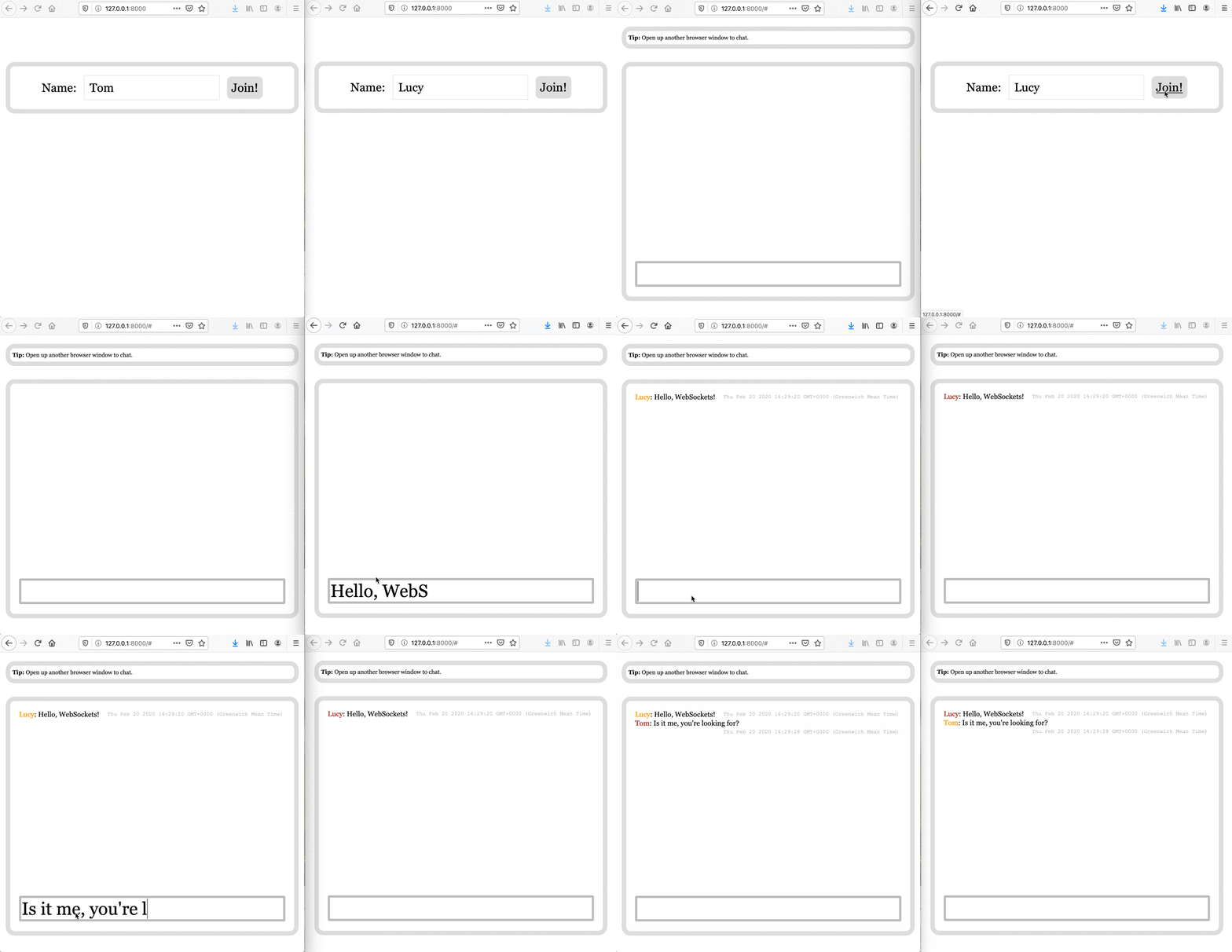
Here's a complete example of the backend code for a simple websocket chat app:
app.py
# Requires: `starlette`, `uvicorn`, `jinja2`
# Run with `uvicorn example:app`
import anyio
from broadcaster import Broadcast
from starlette.applications import Starlette
from starlette.routing import Route, WebSocketRoute
from starlette.templating import Jinja2Templates


broadcast = Broadcast("redis://localhost:6379")
templates = Jinja2Templates("templates")


async def homepage(request):
    template = "index.html"
    context = {"request": request}
    return templates.TemplateResponse(template, context)


async def chatroom_ws(websocket):
    await websocket.accept()

    async with anyio.create_task_group() as task_group:
        # run until first is complete
        async def run_chatroom_ws_receiver() -> None:
            await chatroom_ws_receiver(websocket=websocket)
            task_group.cancel_scope.cancel()

        task_group.start_soon(run_chatroom_ws_receiver)
        await chatroom_ws_sender(websocket)


async def chatroom_ws_receiver(websocket):
    async for message in websocket.iter_text():
        await broadcast.publish(channel="chatroom", message=message)


async def chatroom_ws_sender(websocket):
    async with broadcast.subscribe(channel="chatroom") as subscriber:
        async for event in subscriber:
            await websocket.send_text(event.message)


routes = [
    Route("/", homepage),
    WebSocketRoute("/", chatroom_ws, name='chatroom_ws'),
]


app = Starlette(
    routes=routes, on_startup=[broadcast.connect], on_shutdown=[broadcast.disconnect],
)
The HTML template for the front end is available here, and is adapted from Pieter Noordhuis's PUB/SUB demo.
Requirements
Python 3.8+
Installation
pip install broadcasterpip install broadcaster[redis]pip install broadcaster[postgres]pip install broadcaster[kafka]
Available backends
Broadcast('memory://')Broadcast("redis://localhost:6379")Broadcast("redis-stream://localhost:6379")Broadcast("postgres://localhost:5432/broadcaster")Broadcast("kafka://localhost:9092")
Using custom backends
You can create your own backend and use it with broadcaster.
To do that you need to create a class which extends from BroadcastBackend
and pass it to the broadcaster via backend argument.
from broadcaster import Broadcaster, BroadcastBackend

class MyBackend(BroadcastBackend):

broadcaster = Broadcaster(backend=MyBackend())
Where next?
At the moment broadcaster is in Alpha, and should be considered a working design document.
The API should be considered subject to change. If you do want to use Broadcaster in its current
state, make sure to strictly pin your requirements to broadcaster==0.3.0.
To be more capable we'd really want to add some additional backends, provide API support for reading recent event history from persistent stores, and provide a serialization/deserialization API...
- Serialization / deserialization to support broadcasting structured data.
- A backend for RabbitMQ.
- Add support for
subscribe('chatroom', history=100)for backends which provide persistence. (Redis Streams, Apache Kafka) This will allow applications to subscribe to channel updates, while also being given an initial window onto the most recent events. We might also want to support some basic paging operations, to allow applications to scan back in the event history. - Support for pattern subscribes in backends that support it.
Third Party Packages
MQTT backend
Integrates MQTT with Broadcaster
1 maintainer

Metadata
1 maintainer
Release files for broadcaster 0.3.1
For a detailed explanation of source distributions (sdists) and built distributions (wheels), please see the package formats documentation.
Source distribution (sdist)
| File | Size | Uploaded | Provenance | Actions |
|---|---|---|---|---|
| broadcaster-0.3.1.tar.gz | 6.9 kB | Without provenance | Details for broadcaster-0.3.1.tar.gz |
Built distribution (wheel)
| File | Interpreter | ABI | Platform | Actions Reset |
|---|---|---|---|---|
| broadcaster-0.3.1-py3-none-any.whl | Python 3 | none | any | Details for broadcaster-0.3.1-py3-none-any.whl |
Total release size: 16.5 kB
Release files / broadcaster-0.3.1.tar.gz
| Download URL | broadcaster-0.3.1.tar.gz |
|---|---|
| Size | 6.9 kB |
| Tags | Source |
|
SHA-256 checksum How to use checksums |
35d1e174a98346d184cc6558979548340e877ae841c65c7e354153a84fe675d6
|
|
BLAKE2b-256 checksum How to use checksums |
0f9a937530b4b1339f96423ef314b832aa585250c99de465a6ec1a12da03bbda
|
| Upload date | |
|
Uploaded using Trusted Publishing? What is trusted publishing? |
No |
| Uploaded via |
twine/5.0.0 CPython/3.10.14
|
Release files / broadcaster-0.3.1-py3-none-any.whl
| Download URL | broadcaster-0.3.1-py3-none-any.whl |
|---|---|
| Size | 9.5 kB |
| Tags | Python 3 |
|
SHA-256 checksum How to use checksums |
433023ab6b6b4a8da9cbba95910eff52b1e767141419659be287cfd49f2a3ecb
|
|
BLAKE2b-256 checksum How to use checksums |
17db6789b924f1349739ea3a4eff0ad6877d1c4a2f844e8a15db49fd6335a532
|
| Upload date | |
|
Uploaded using Trusted Publishing? What is trusted publishing? |
No |
| Uploaded via |
twine/5.0.0 CPython/3.10.14
|
Security for broadcaster 0.3.1
Provenance
Provenance describes where a file came from. On PyPI, provenance is shared via attestations, which provide a verifiable record of the build or publishing details. View details, limitations and caveats.
No provenance found
None of the files in this release were uploaded with provenance metadata.
A note on package security
PyPI is a repository for distributing packages, not a service for auditing them. While third-party security researchers and our staff do their best to detect and remove malicious packages, PyPI cannot guarantee the quality, security or suitability of any given package.
To learn more about protecting yourself from malicious actors, visit our package security documentation.














