

BrokerQL is the database interface to Brokers and Finance Market. Use SQL to query quotes, positions, query or place orders, and find investing or trading ideas.
BrokerQL is built with ❤ by trader, and built for traders, portfolio managers, and financial advisors who knows a little about SQL, to decrease daily job of portfolio management.
BrokerQL is inspired by Steampipe.
With BrokerQL you can:
-
Query → Use SQL to query (and join across!) from your Brokers.
-
Modify → Update multiple order's price and quantity with SQL.
BrokerQL CLI: The SQL console for Online Brokers.
The BrokerQL community has grown a suite of plugins that map Brokers to tables.
| US Brokers | IBKR … |
The interactive query shell is one way you can query those tables.
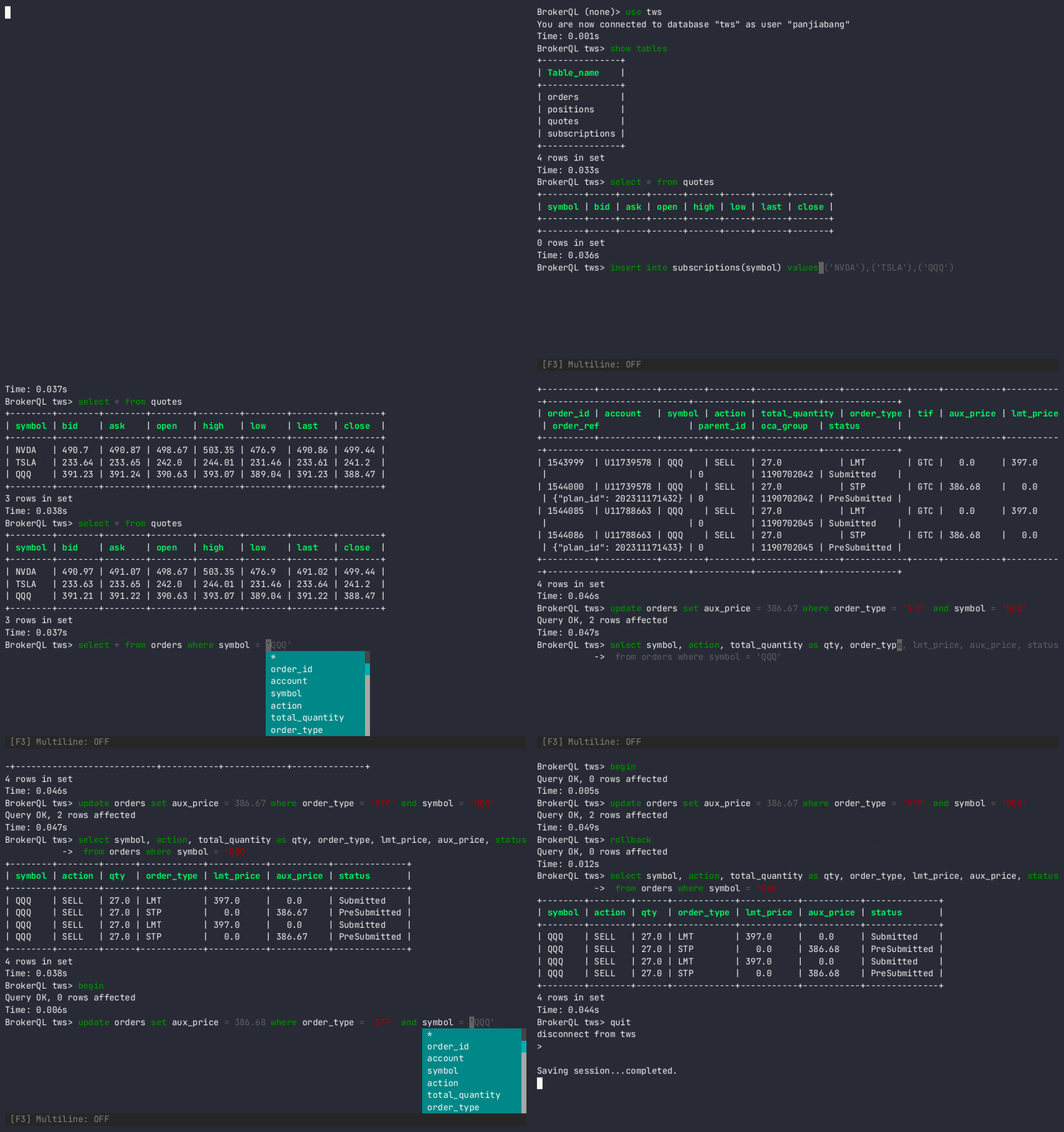
You can also use mysql-client, mycli, DataGrip, or any client that can connect to MySQL.
Get started with the CLI
Install BrokerQL
The download page shows you how but tl;dr:
Linux or Windows or macOS
pip install BrokerQL
macOS only
brew tap BrokerQL/tap
brew install broker-ql
Run BrokerQL query
Make sure your IBKR TWS is running on localhost, and listen to port 7496 for API.
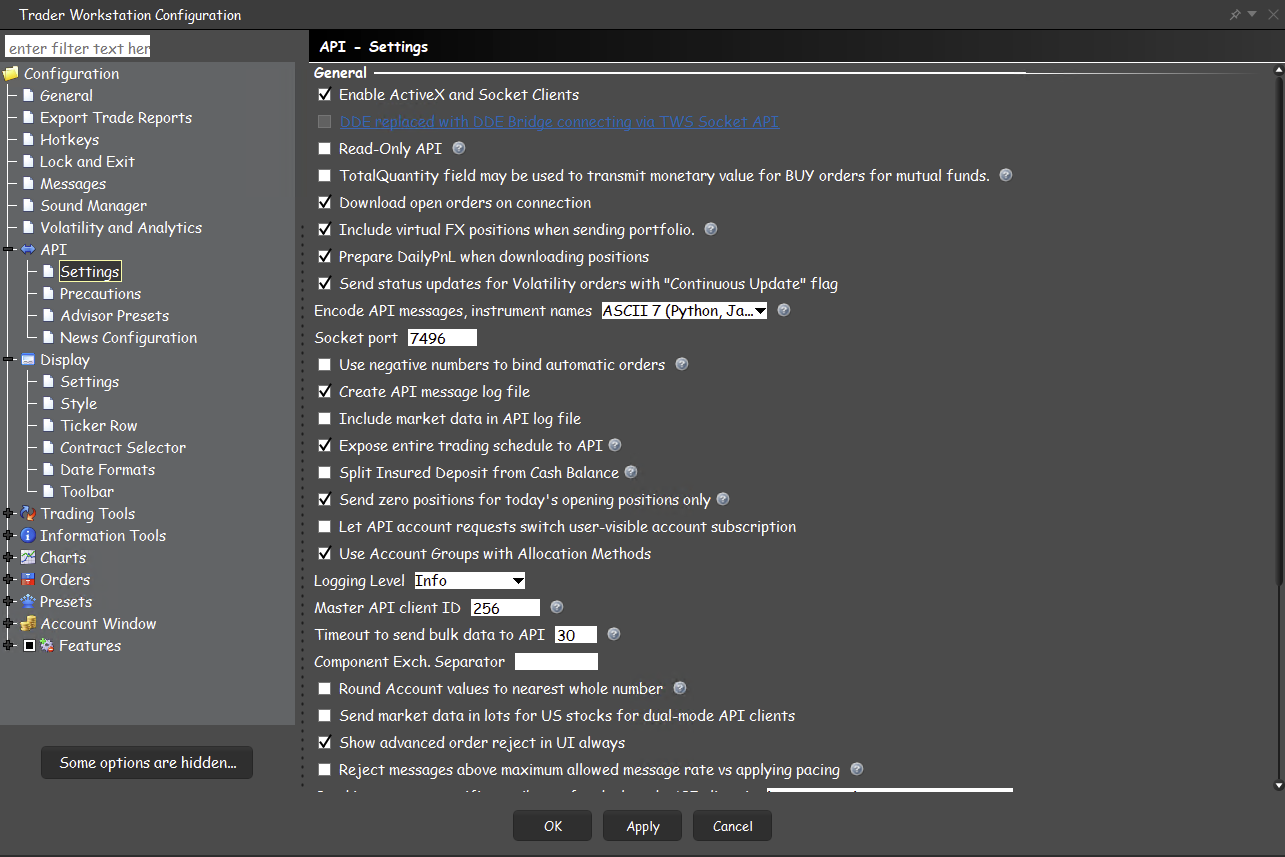
Launch the interactive shell.
broker-ql --cli
Run your first query!
select * from tws.positions;
Learn more about the CLI
-
It's just SQL
-
You can run queries on the command line and include them in scripts.
Build and develop the CLI
Prerequisites:
- Python Version 3.9.
Clone:
git clone git@github.com:BrokerQL/BrokerQL
cd BrokerQL
Create virtualenv, and run the pip command
python -m venv venv
source venv/bin/activate
pip install .
pip install -r requirements-dev.txt
Check the version
$ broker-ql -v
BrokerQL v0.0.1
Try it!
broker-ql --cli
connecting to tws...
tws connected
BrokerQL (none)> nopager
Pager disabled.
Time: 0.000s
BrokerQL (none)> show databases
+--------------------+
| Database           |
+--------------------+
| information_schema |
| mysql              |
| tws                |
+--------------------+
3 rows in set
Time: 0.036s
BrokerQL (none)> use tws
You are now connected to database "tws" as user "panjiabang"
Time: 0.001s
BrokerQL tws> show tables
+---------------+
| Table_name    |
+---------------+
| orders        |
| positions     |
| quotes        |
| subscriptions |
+---------------+
4 rows in set
Time: 0.033s
BrokerQL tws> select * from positions
+-----------+--------+----------+--------------------+
| account   | symbol | position | avg_cost           |
+-----------+--------+----------+--------------------+
| U11739578 | ADBE   |  6.0     | 579.3533333333334  |
| U11739578 | PDD    | 32.0     | 119.65125          |
| U11739578 | URNM   | 62.0     |  49.18850806451613 |
| U11739578 | QQQ    | 27.0     | 385.82703703703703 |
| U11739578 | MSFT   | 12.0     | 378.9533333333333  |
| U11739578 | MHO    | 40.0     | 103.19500000000001 |
+-----------+--------+----------+--------------------+
12 rows in set
Time: 0.037s
Community
We thrive on feedback and community involvement!
Have a question? → Join our Github Discussions or open a GitHub issue.
1 maintainer

Metadata
1 maintainer
Release files for BrokerQL 0.0.2
For a detailed explanation of source distributions (sdists) and built distributions (wheels), please see the package formats documentation.
Source distribution (sdist)
| File | Size | Uploaded | |
|---|---|---|---|
| BrokerQL-0.0.2.tar.gz | 32.0 kB | Details |
Built distribution (wheel)
| File | Interpreter | ABI | Platform | Reset |
|---|---|---|---|---|
| BrokerQL-0.0.2-py3-none-any.whl | Python 3 | none | any | Details |
Total release size: 66.5 kB
Release files / BrokerQL-0.0.2.tar.gz
| Download URL | BrokerQL-0.0.2.tar.gz |
|---|---|
| Size | 32.0 kB |
| Tags | Source |
|
SHA-256 checksum How to use checksums |
147a61207d94f53fcbacbd128f50e18b9c8898b17fdc53bcad99ae80080f0749
|
|
BLAKE2b-256 checksum How to use checksums |
ac8c4c8403d0a8e2f86fa02503a85a614d121f38afd2ae0abce2b3b4c3ad94ae
|
| Upload date | |
|
Uploaded using Trusted Publishing? What is trusted publishing? |
No |
| Uploaded via |
twine/4.0.2 CPython/3.9.18
|
Release files / BrokerQL-0.0.2-py3-none-any.whl
| Download URL | BrokerQL-0.0.2-py3-none-any.whl |
|---|---|
| Size | 34.5 kB |
| Tags | Python 3 |
|
SHA-256 checksum How to use checksums |
00c86f021202186244f7fcd3a43b6b6c46d65f29a439e6b38b85e6212321c929
|
|
BLAKE2b-256 checksum How to use checksums |
0a0f59e79fd01df54479d9877201095a17b3c4106a251b232d80e6ef01fa98e3
|
| Upload date | |
|
Uploaded using Trusted Publishing? What is trusted publishing? |
No |
| Uploaded via |
twine/4.0.2 CPython/3.9.18
|














