
À propos de ce fork
Ce fork a été créé pour améliorer la flexibilité de la configuration LLM dans browser-use.
Ce fork a été fait depuis la version 0.8.0 de browseruse.
Fichier modifié
browser_use/mcp/server.pybrowser_use/config.py
Modifications principales
- Ajout de variables d'environnement manquantes pour la configuration (notamment pour Azure OpenAI et la sélection du modèle LLM).
- Modularité du choix du LLM : il est désormais possible de choisir dynamiquement entre OpenAI et Azure OpenAI via les variables d'environnement, sans modifier le code.
- La logique de sélection du modèle, de la clé API et des endpoints est unifiée et priorise les variables d'environnement officielles.

Enable AI to control your browser





Deutsch | Español | français | 日本語 | 한국어 | Português | Русский | 中文
🤖 Quickstart
With uv (Python>=3.11):
#  We ship every day - use the latest version!
uv pip install browser-use
Download chromium using playwright's shortcut:
uvx playwright install chromium --with-deps --no-shell
Get your API key from Browser Use Cloud and add it to your .env file:
BROWSER_USE_API_KEY=your-key
Run your first agent:
from browser_use import Agent, ChatBrowserUse

agent = Agent(
    task="Find the number of stars of the browser-use repo",
    llm=ChatBrowserUse(),
)
agent.run_sync()
Check out the library docs and cloud docs for more settings.
Stealth Browser Infrastructure
Want to bypass Cloudflare, or any other anti-bot protection?
Simply go to Browser Use Cloud grab a BROWSER_USE_API_KEY and use the use_cloud parameter.
from browser_use import Agent, Browser
from browser_use import ChatBrowserUse

# Use Browser-Use cloud browser service
browser = Browser(
    use_cloud=True,  # Automatically provisions a cloud browser
)

agent = Agent(
    task="Your task here",
    llm=ChatBrowserUse(),
    browser=browser,
)
Demos
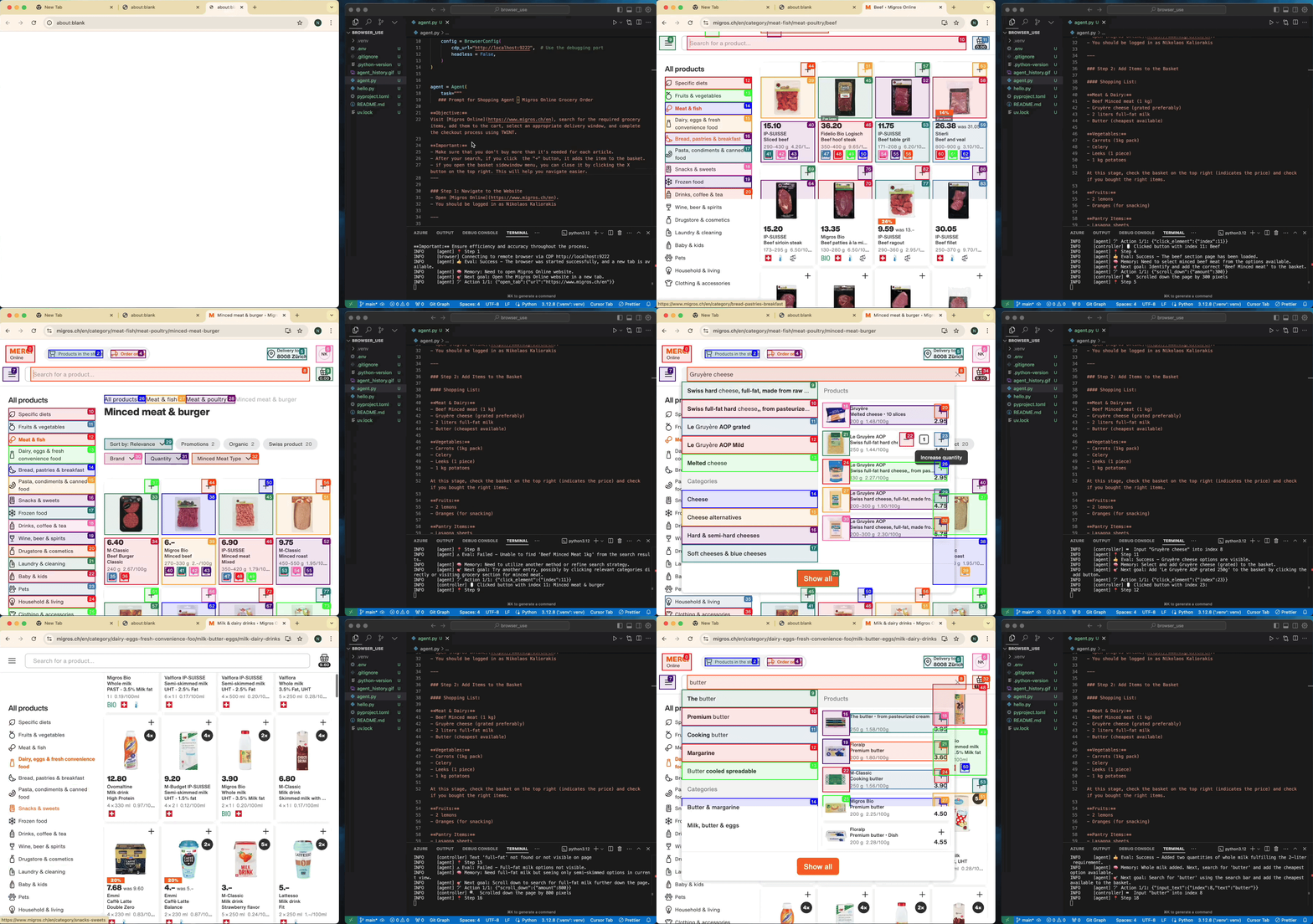
Task: Add grocery items to cart, and checkout.
Task: Read my CV & find ML jobs, save them to a file, and then start applying for them in new tabs, if you need help, ask me.
https://github.com/user-attachments/assets/171fb4d6-0355-46f2-863e-edb04a828d04
See more examples and give us a star!
MCP Integration
This gives Claude Desktop access to browser automation tools for web scraping, form filling, and more. See the MCP docs.
{
  "mcpServers": {
    "browser-use": {
      "command": "uvx",
      "args": ["browser-use[cli]", "--mcp"],
      "env": {
        "OPENAI_API_KEY": "sk-..."
      }
    }
  }
}
Tell your computer what to do, and it gets it done.

Variables d'environnement ajoutées et priorités
Deux variables d'environnement ont été ajoutées dans ce fork pour améliorer la modularité et la configuration dynamique :
AZURE_AD_TOKEN_PROVIDER: Provider de token Azure AD (authentification sans clé API, pour Azure OpenAI).LLM_PROVIDER: Permet de choisir dynamiquement le provider (openaiouazure).AZURE_OPENAI_API_VERSION: Permet de définir la version d'API utilisée pour Azure OpenAI (ex :2025-04-01-preview).LLM_TEMPERATURE: Température du modèle LLM.
Les autres variables (OPENAI_API_KEY, AZURE_OPENAI_KEY, AZURE_OPENAI_ENDPOINT, BROWSER_USE_LLM_MODEL, etc.) existaient déjà dans la configuration officielle et sont simplement respectées/priorisées dans la logique du fork.
Configuration simplifiée via variables d'environnement
Certaines variables d'environnement surchargent toujours les paramètres du fichier config.json (priorité : env > config.json). Cela permet une utilisation simplifiée : si vous n'avez pas besoin de personnaliser des paramètres avancés, il suffit de définir ces variables d'environnement pour faire tourner le MCP, sans avoir à créer ou éditer de fichier config.json.
Variables d'environnement qui overrident la config.json :
OPENAI_API_KEYouAZURE_OPENAI_KEY(clé API LLM)BROWSER_USE_LLM_MODEL(nom du modèle LLM)AZURE_OPENAI_ENDPOINT(endpoint Azure OpenAI)AZURE_OPENAI_API_VERSION(version API Azure)LLM_PROVIDER(provider LLM, ex: openai, azure)AZURE_AD_TOKEN_PROVIDER(provider token Azure AD)LLM_TEMPERATURE(température du modèle LLM)BROWSER_USE_HEADLESS(mode headless du navigateur)BROWSER_USE_ALLOWED_DOMAINS(domaines autorisés)BROWSER_USE_PROXY_URL,BROWSER_USE_NO_PROXY,BROWSER_USE_PROXY_USERNAME,BROWSER_USE_PROXY_PASSWORD(proxy)
Cas d'usage simplifié :
Si vous ne souhaitez pas gérer de fichier
config.json, il suffit de définir ces variables d'environnement (dans.envou dans votre shell) : le serveur MCP utilisera automatiquement ces valeurs et ignorera celles du fichier de config pour ces paramètres.
Pour toute personnalisation avancée (autres paramètres du navigateur, de l'agent, etc.), éditez le fichier config.json généré automatiquement lors du premier lancement.
Tool: retry_with_browser_use_agent
- La description de l'outil
retry_with_browser_use_agenta été modifiée pour que le LLM l'appelle systématiquement dès qu'une tâche est un peu complexe ou comporte plusieurs étapes.
1 maintainer

Metadata
1 maintainer
Release files for browser-use-neo 0.1.0
For a detailed explanation of source distributions (sdists) and built distributions (wheels), please see the package formats documentation.
Source distribution (sdist)
| File | Size | Uploaded | Provenance | Actions |
|---|---|---|---|---|
| browser_use_neo-0.1.0.tar.gz | 351.3 kB | Without provenance | Details for browser_use_neo-0.1.0.tar.gz |
Built distribution (wheel)
| File | Interpreter | ABI | Platform | Actions Reset |
|---|---|---|---|---|
| browser_use_neo-0.1.0-py3-none-any.whl | Python 3 | none | any | Details for browser_use_neo-0.1.0-py3-none-any.whl |
Total release size: 776.7 kB
Release files / browser_use_neo-0.1.0.tar.gz
| Download URL | browser_use_neo-0.1.0.tar.gz |
|---|---|
| Size | 351.3 kB |
| Tags | Source |
|
SHA-256 checksum How to use checksums |
0f23ba50b675312849d08335b252ab3269092eec0783694cb4995ff71bb2d360
|
|
BLAKE2b-256 checksum How to use checksums |
a5cdd9fccf955aa631d4b9b3d1b8f606cfbac7606300aa03d0462fbb69a869fa
|
| Upload date | |
|
Uploaded using Trusted Publishing? What is trusted publishing? |
No |
| Uploaded via |
twine/6.2.0 CPython/3.11.13
|
Release files / browser_use_neo-0.1.0-py3-none-any.whl
| Download URL | browser_use_neo-0.1.0-py3-none-any.whl |
|---|---|
| Size | 425.4 kB |
| Tags | Python 3 |
|
SHA-256 checksum How to use checksums |
532cbd90a1e787d1ad87d119f0ebeac905b3aca11d1d70cf6acd7684a580e736
|
|
BLAKE2b-256 checksum How to use checksums |
a87b2385b44954f821f4c8caf34355e8b1e579c7be9de719d5db1f1e12bd24aa
|
| Upload date | |
|
Uploaded using Trusted Publishing? What is trusted publishing? |
No |
| Uploaded via |
twine/6.2.0 CPython/3.11.13
|
Security for browser-use-neo 0.1.0
Provenance
Provenance describes where a file came from. On PyPI, provenance is shared via attestations, which provide a verifiable record of the build or publishing details. View details, limitations and caveats.
No provenance found
None of the files in this release were uploaded with provenance metadata.
A note on package security
PyPI is a repository for distributing packages, not a service for auditing them. While third-party security researchers and our staff do their best to detect and remove malicious packages, PyPI cannot guarantee the quality, security or suitability of any given package.
To learn more about protecting yourself from malicious actors, visit our package security documentation.














