
BRWording - Text Analytics for Portuguese Wordings
Create an easy Text Analytics in One-Line-Code







Main Features:
- Load
Excel,CSVandTXTfile types - Stemming
- Lemmatization
- Stopwords
- TD-IDF
- Sentimental Analysis
- Graphical interpretation
- Word Cloud
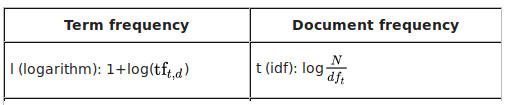
The TF-IDF was calculated by:
How to Install
pip install BRWording
pip install pdfminer-six
How to use
sintax:
from brwording.brwording import wording

w = brwording.wording()

w.load_file('data/example.txt',type='txt')
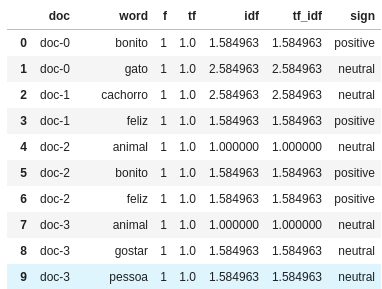
w.build_tf_idf(lemmatizer=True,stopwords=True)

w.tfidf
The fields to load_file are:
3. file: the file path
3. type: file type, can be txt csv or excel
3. header: if you are reading a csv file, so you must tell if this file has a header or not (False or True)
0. sep: if you are reading a csv file, you must tell what kind field separator you want
0. column: if you read a csv or excelfile, you must tell what column you want to parse
The method build_tf_idf has a default Trueoption for both parameters.
Output
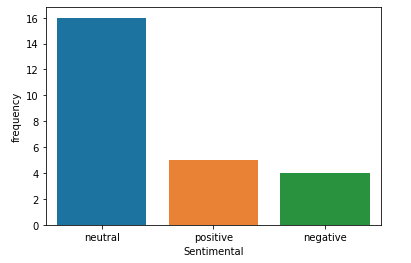
If want to see the sentimental Graphical interpretation
sintax:
w.sentimental_graf()
You can rotate the graph if you pass rotate=True in argument
output
You can print the same information as a table using the follow command:
sintax:
w.sentimental_table()
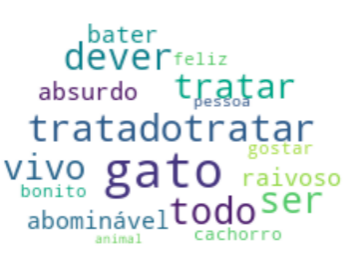
if you want to create a wordcloud, just strike the folowing command, but if you want to create a cloud with your own mask, just pass you image address as picture
sintax:
w.word_cloud(picture='none')
output
Looking for a word into colection
if you want to see what files on your colection has a word, run look3word
sintax:
w.look3word('bonito')
New features are incoming.
enjoi!
1 maintainer

Metadata
1 maintainer
Release files for brwording 0.1.3
For a detailed explanation of source distributions (sdists) and built distributions (wheels), please see the package formats documentation.
Built distribution (wheel)
| File | Interpreter | ABI | Platform | Reset |
|---|---|---|---|---|
| brwording-0.1.3-py3.9.egg | Legacy Egg format | - | - | Details |
Release files / brwording-0.1.3-py3.9.egg
| Download URL | brwording-0.1.3-py3.9.egg |
|---|---|
| Size | 2.7 MB |
| Tags | Egg |
|
SHA-256 checksum How to use checksums |
ea6a78a486a9af521c119521ae9989f3371e19ea85f5ed90d3980ab283372f18
|
|
BLAKE2b-256 checksum How to use checksums |
caccb1feec88873b8bef2594cd102dd7f6576dce49201bd2f7cd34fc4b764b3b
|
| Upload date | |
|
Uploaded using Trusted Publishing? What is trusted publishing? |
No |
| Uploaded via |
twine/3.8.0 colorama/0.4.4 importlib-metadata/4.6.4 keyring/23.5.0 pkginfo/1.8.2 readme-renderer/34.0 requests-toolbelt/0.9.1 requests/2.25.1 rfc3986/1.5.0 tqdm/4.57.0 urllib3/1.26.5 CPython/3.9.7
|














