
Cactool



Introduction
Cactool (or Content Analysis Coding Tool) is a platform which allows researchers to collaboratively code pre-existing social media datasets in their native format for manual content and discourse analysis.
Using Cactool is easy, after the initial installation, you can create users, import your data, set your coding variables, and get started! This allows coders, especially those working in groups, to analyse social media data quicker, more accessibly, and more accurately by viewing posts in context.
Features
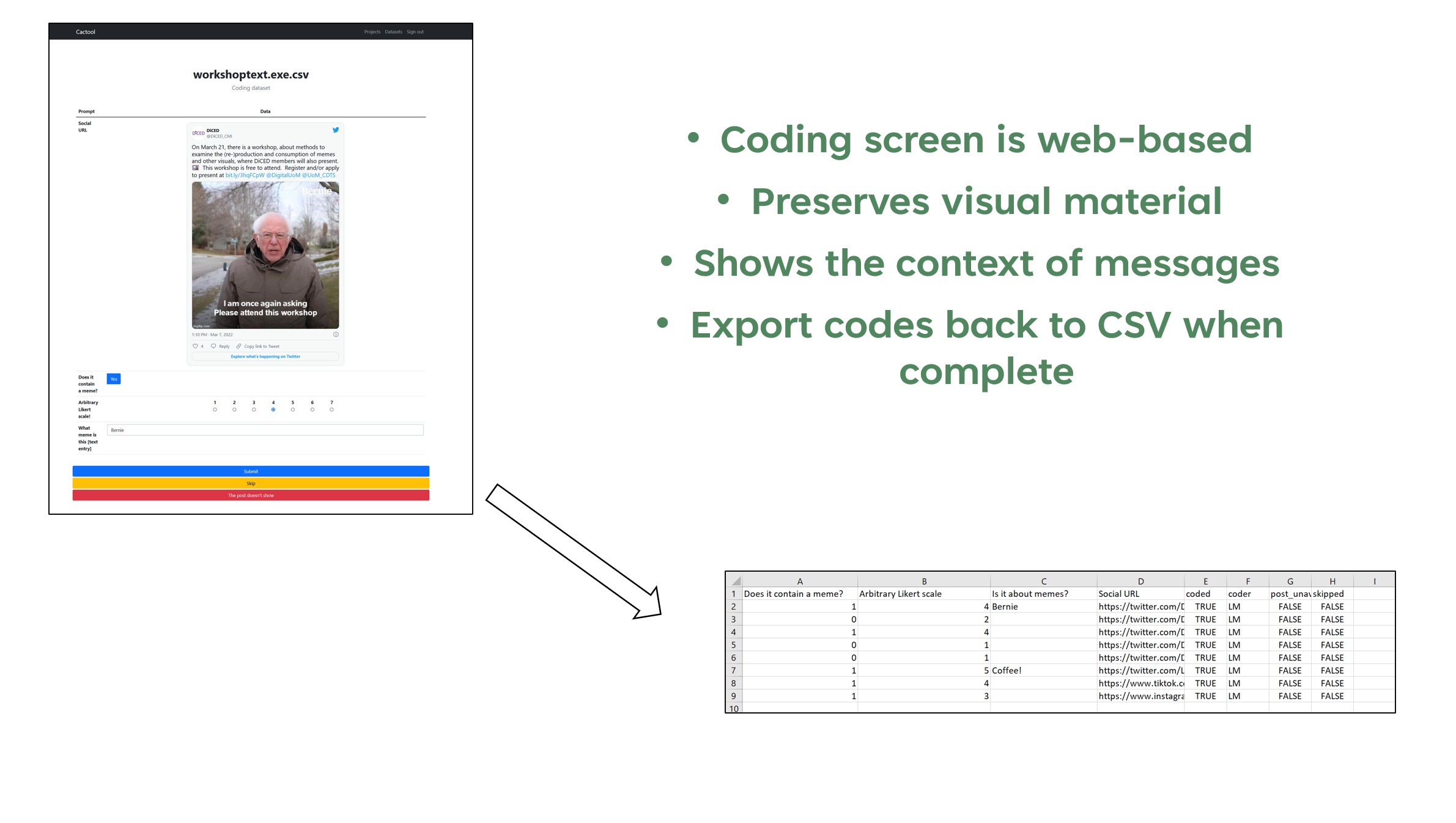
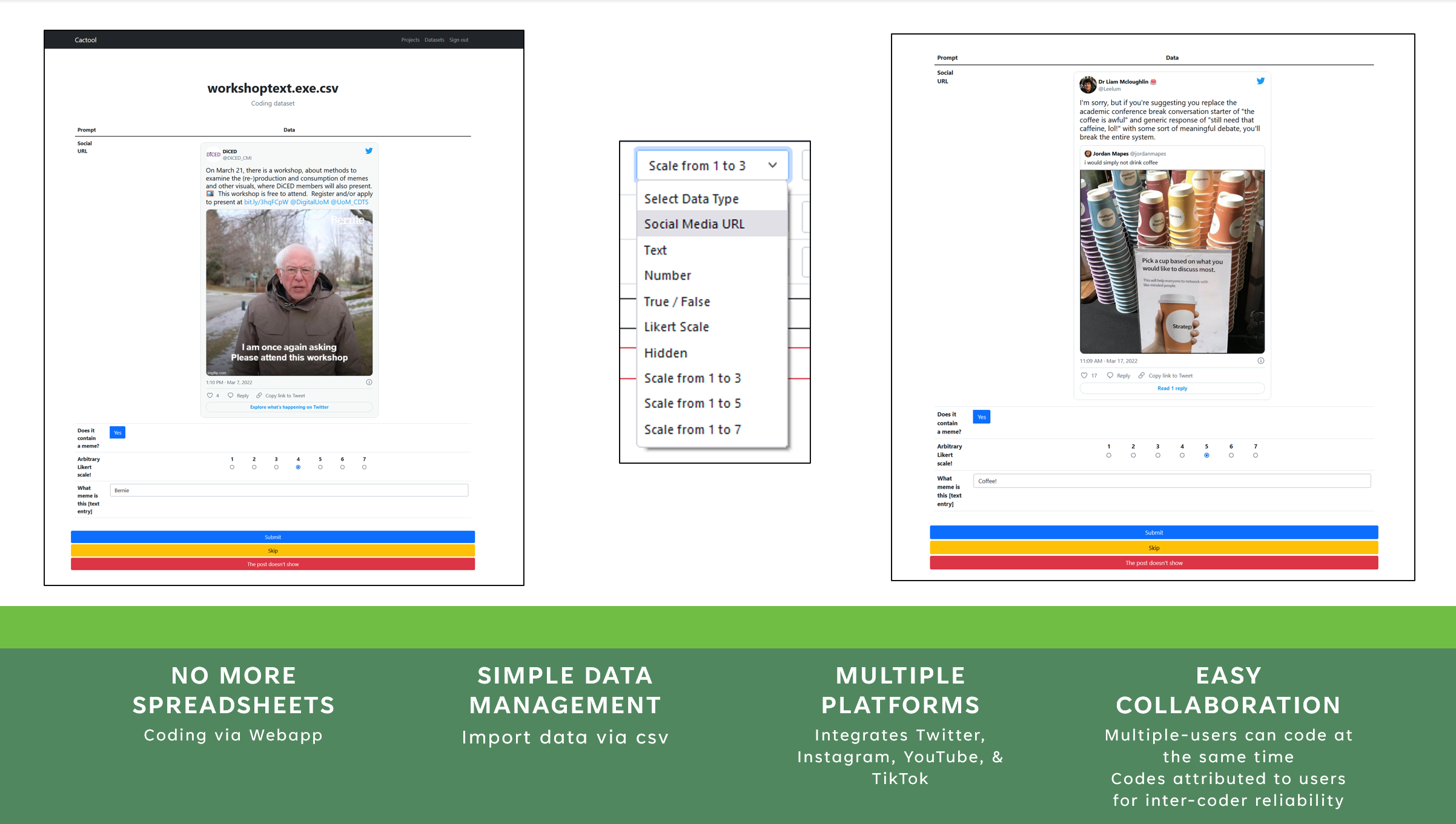
- No more coding via spreadsheets: Coding via your browser (tested working on Chrome, Firefox, Edge, & Safari) with posts visible as they would be on the social media platform. This allows your coders to evaluate social media content in their native format.
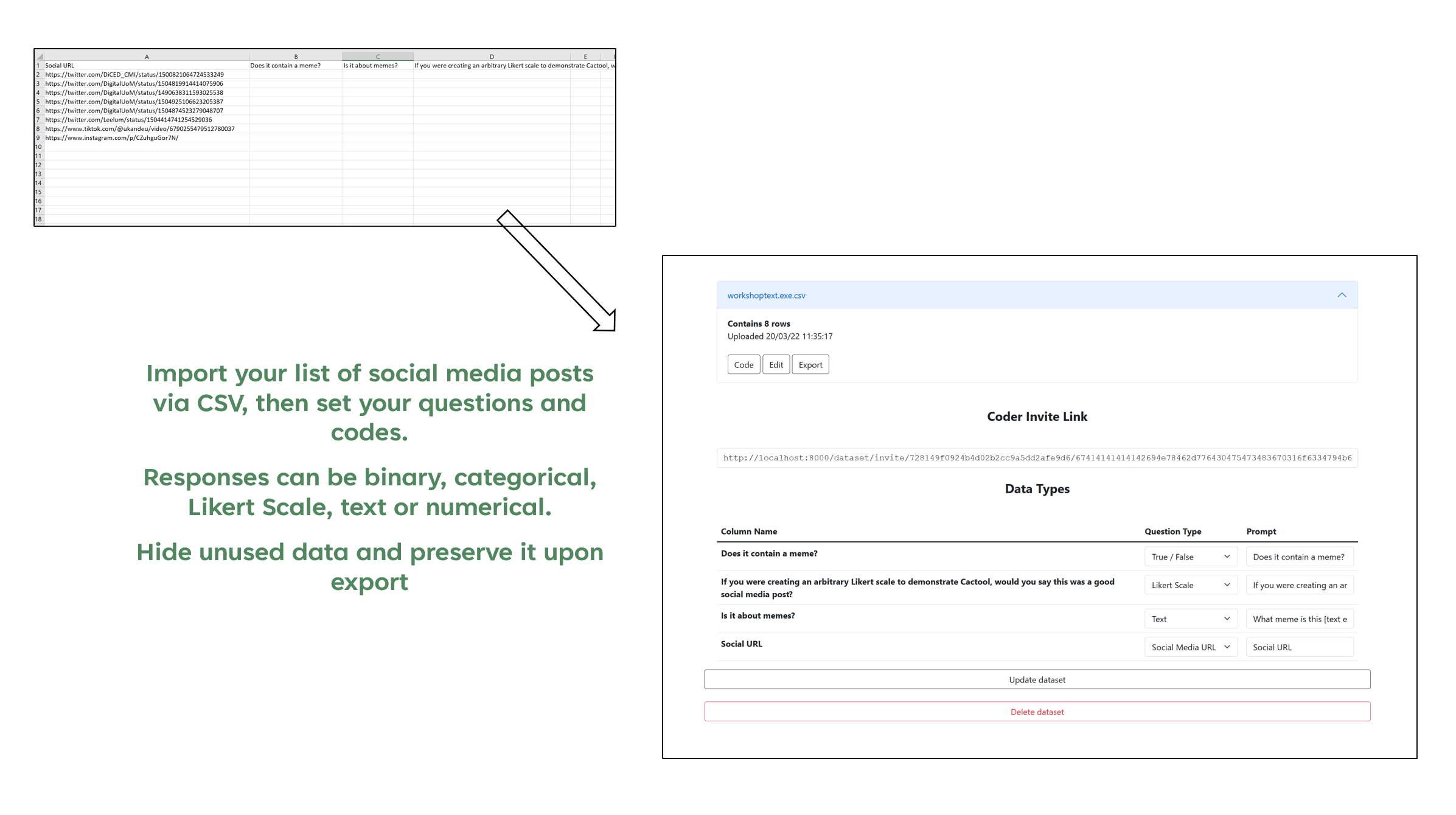
- Simple Import and Export: Take your pre-existing social media URLs from software such as 4Cat, NodeXL, or API Scrapers such as Tweepy and import them as a CSV list. When done, you can export your data via CSV to whatever analysis software you desire.
- Importing of image/text data: Have data from secondary source with no URLs? No Problem.
- Manage Multiple Datasets: Want to split your project by source/themes? You can manage multiple concurrent datasets at the same time.
- Built for collaboration: Cactool comes pre-packaged with user management; codes attributed are attributed to each coder for coder reliability calculation (such as ReCal). Multiple people can be coding at the same time without sharing documents. No need to worry about version control or splitting up data.
- Code on the Go: Cactool is mobile friendly and can be accessed remotely (we recommend using a VPN to connect, see our tutorial for why). This provides researchers interested in social media content and spaciality new avenues of research.
Platform Compatability
Cactool works for across multiple-social media platforms. The following data types are currently supported:
- YouTube
- TikTok
- Mastodon (via OEmbed)
- Image Data (Photos/screenshots)
- Text Strings
- & Some* compatibility with other OEmbed platforms
Documentation
Easy to follow installation instructions and user guides can be found via the documentation on Read the Docs
Installation and usage
You can install Cactool on your local machine or on a server through Docker or directly using PIP (package manager). Running Cactool through a server is useful if you want to have multiple coders, or want to code through your mobile while situated away from your main computer.
Cactool also has some custom build configurations
Docker
1. Install Docker Desktop, and start it.
Note that on Windows, you may need to ensure that WSL (Windows Subsystem for Linux) integration is enabled in Docker. You can find this in the Docker setting in Settings -> Resources-> WSL Integration -> Enable integration with required distros.
2. Clone the repository
git clone https://github.com/cactool/cactool
3. Enter the cactool directory
cd cactool
4. Run docker-compose
Make sure the Docker daemon is running then run
docker-compose up -d
An instance should be accessible on port 80
Directly (with Pip)
1. Install Cactool
pip install cactool
2. Start the website
cactool
The server will be running on port 80 and configuration files can be found in the generated docker-config folder.
Custom Builds
There are some additional configuration settings available. For example those aimed at low-memory machines (such as installing Cactool on a Raspberry Pi), or server users with a public facing instance (such as custom ports, limiting file size uploads, and limiting user-signups. Please read the documents for more.
Credits
The project’s Principle Investigator is Dr Liam McLoughlin, Lecturer in Media & Communication at the University of Liverpool, and development was undertaken by Sam Ezeh
Cactus image created by catalyststuff on Freepik
Funding
Cactool Development was funded by the University of Liverpool’s Research Development and Initiative Fund (RDIF).

Citations
Bibtex
@software{McLoughlin_Ezeh_2022,
  title = {{Cactool: An easy way to collaboratively code social media posts for manual content and discourse analysis (BETA)}},
  author  = {McLoughlin, Liam and Ezeh, Sam},
  year  = {2022},
  doi = {10.5281/zenodo.6070206},
  url = {https://github.com/cactool/cactool},
  license = {MIT}
}
APA
McLoughlin, L., & Ezeh, S. (2022). Cactool: An easy way to collaboratively code social media posts for manual content and discourse analysis (BETA). [Computer software]. URL:https://github.com/cactool/cactool
Images
Outputs
If you've used or cited Cactool in your research, please let us know and we will highlight your paper below. It also helps us understand who and how it's being used!
- The development of Cactool has also resulted in features being added to Python 3.11. "bpo-14265: Adds fully qualified test name to unittest output (GH-32138)"
1 maintainer

Metadata
1 maintainer
Release files for Cactool 0.6.2
For a detailed explanation of source distributions (sdists) and built distributions (wheels), please see the package formats documentation.
Source distribution (sdist)
| File | Size | Uploaded | |
|---|---|---|---|
| Cactool-0.6.2.tar.gz | 679.2 kB | Details |
Built distribution (wheel)
| File | Interpreter | ABI | Platform | Reset |
|---|---|---|---|---|
| Cactool-0.6.2-py3-none-any.whl | Python 3 | none | any | Details |
Total release size: 1.4 MB
Release files / Cactool-0.6.2.tar.gz
| Download URL | Cactool-0.6.2.tar.gz |
|---|---|
| Size | 679.2 kB |
| Tags | Source |
|
SHA-256 checksum How to use checksums |
c2ecf6643669dd4ce21372c53380cc8a1f8d8e9d5e7107c7daf742288a30ffd2
|
|
BLAKE2b-256 checksum How to use checksums |
f40f5b39b29c5543655746417d666f4a14f9bb21fed05fca4020facddb63c348
|
| Upload date | |
|
Uploaded using Trusted Publishing? What is trusted publishing? |
No |
| Uploaded via |
twine/4.0.2 CPython/3.11.3
|
Release files / Cactool-0.6.2-py3-none-any.whl
| Download URL | Cactool-0.6.2-py3-none-any.whl |
|---|---|
| Size | 723.7 kB |
| Tags | Python 3 |
|
SHA-256 checksum How to use checksums |
1ed94c2b78cdea3e7a61281fd2274df72db64cb26548b6d0d01827d5cd5adcd1
|
|
BLAKE2b-256 checksum How to use checksums |
3c358f979f178f54ffeb791ab4f6c6c39d395803e6ce315debef604d01ae2e4d
|
| Upload date | |
|
Uploaded using Trusted Publishing? What is trusted publishing? |
No |
| Uploaded via |
twine/4.0.2 CPython/3.11.3
|














