
Calendar heatmaps from Pandas time series data
Calplot creates heatmaps from Pandas time series data.
Plot Pandas time series data sampled by day in a heatmap per calendar year, similar to GitHub’s contributions plot, using matplotlib.
Installation
To install the latest release via PyPI using pip:
pip install calplot
Usage
See the documentation.
import calplot
import numpy as np; np.random.seed(sum(map(ord, 'calplot')))
import pandas as pd
all_days = pd.date_range('1/1/2019', periods=730, freq='D')
days = np.random.choice(all_days, 500)
events = pd.Series(np.random.randn(len(days)), index=days)
calplot.calplot(events)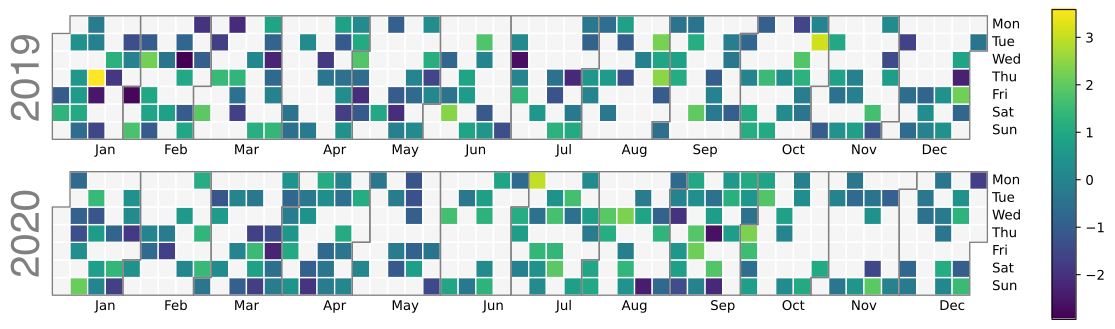
all_days = pd.date_range('1/1/2019', periods=360, freq='D')
days = np.random.choice(all_days, 500)
events = pd.Series(np.random.randn(len(days)), index=days)
calplot.calplot(events, edgecolor=None, cmap='YlGn')
calplot.calplot(events, yearcolor=black, cmap='YlGn')
calplot.calplot(events, textformat='{:.0f}', textfiller='-', cmap='YlGn')
calplot.calplot(events, dropzero=False, cmap='YlGn')
calplot.calplot(events, colorbar=False, suptitle='Random data from standard normal distribution', cmap='YlGn')
calplot.calplot(events, linewidth=0, cmap='YlGn')
Changelog
Package calplot is a fork of calmap 0.0.7-dev with the following changes and additions.
Todo
Adding argument
startdayfor functioncalplotandyearplotto specify the index representing the day of week of the first day in each week in the generated plot. Defaults to 0, which represents Monday. (Implementation of this require non-trivial change to existing code that is inherited from calmap or taken from other projects, including code for pivoting of by_days DataFrame, and for calculation of polygon coordinates for month borders, in addition to new code to handle the ordering of items indaylabelslist.)
Since version 0.1.6 (Dec 2020):
Added argument
textformatfor functioncalplotandyearplotto specify the text format string for grid cell text. Defaults to empty string. Note that text plotting is turned off by setting the argument to empty string.Added argument
textfillerfor functioncalplotandyearplotto specify the fallback text for grid cell text. Defaults to empty string.Added argument
textcolorfor functioncalplotandyearplotto specify the text color for grid cell text. Defaults toblack.
Since version 0.1.5 (Dec 2020):
Added argument
edgecolorfor functioncalplotandyearplotto specify color of seperation lines between months. Defaults togray. Note that lines can be turned off by setting the argument toNonewithout quotes.
Since version 0.1.3 (Aug 2020):
Removed legacy code for compatibility to fix a FutureWarning in
yearplot. Note thatpandas>=1.1is now required to install the package.
Since version 0.1.2 (Jan 2020):
Added argument
dropzerofor functioncalplotandyearplotto specify whether to not fill a cell with a color for days with a zero value. Defaults toTrue.
Since version 0.1.1 (Jan 2020):
Renamed function
calendarplottocalplot.Added argument
colorbarfor functioncalplotto display a colorbar to the right of the heatmap if more than one unique values in plot. Defaults toTrue.Added argument
figsizefor functioncalplot. Defaults to a tighter layout automatically adjusted to fit the number of years in plot.Added argument
suptitlefor functioncalplot. Defaults toNone.Added argument
yearcolorfor functioncalplot. Defaults tolightgray. Note that the default color is in contrast towhitesmoke, which is the default value forfillcolor.Added argument
monthlabelhafor functioncalplotandyearplotto specify horizontal alignment for month labels. Defaults tocenter.Changed default colormap
cmapfor functioncalplottoviridis.
1 maintainer

Metadata
1 maintainer
Release files for calplot 0.1.6.2
For a detailed explanation of source distributions (sdists) and built distributions (wheels), please see the package formats documentation.
Source distribution (sdist)
| File | Size | Uploaded | Provenance | Actions |
|---|---|---|---|---|
| calplot-0.1.6.2.tar.gz | 9.4 kB | Without provenance | Details for calplot-0.1.6.2.tar.gz |
Built distribution (wheel)
| File | Interpreter | ABI | Platform | Actions Reset |
|---|---|---|---|---|
| calplot-0.1.6.2-py3-none-any.whl | Python 3 | none | any | Details for calplot-0.1.6.2-py3-none-any.whl |
Total release size: 20.8 kB
Release files / calplot-0.1.6.2.tar.gz
| Download URL | calplot-0.1.6.2.tar.gz |
|---|---|
| Size | 9.4 kB |
| Tags | Source |
|
SHA-256 checksum How to use checksums |
4a842b51950a1410d1abbb20db50217b04504f2033a27faec90578c528a0f1c1
|
|
BLAKE2b-256 checksum How to use checksums |
6bc3aeeffa38bb728890fd0d1e2f5306ed9ccbca35c9b93c10e9823abc9313a4
|
| Upload date | |
|
Uploaded using Trusted Publishing? What is trusted publishing? |
No |
| Uploaded via |
twine/3.3.0 pkginfo/1.7.0 requests/2.25.1 setuptools/52.0.0.post20210125 requests-toolbelt/0.9.1 tqdm/4.56.0 CPython/3.7.9
|
Release files / calplot-0.1.6.2-py3-none-any.whl
| Download URL | calplot-0.1.6.2-py3-none-any.whl |
|---|---|
| Size | 11.4 kB |
| Tags | Python 3 |
|
SHA-256 checksum How to use checksums |
9316f4c8865cff4c3630397a0028fc1ccecb02b7bd268671cd2ea185593fab12
|
|
BLAKE2b-256 checksum How to use checksums |
961024a4ab03fb2f7e0fc668ec1bfe57010fede434c1ba8aaf63100415aad29c
|
| Upload date | |
|
Uploaded using Trusted Publishing? What is trusted publishing? |
No |
| Uploaded via |
twine/3.3.0 pkginfo/1.7.0 requests/2.25.1 setuptools/52.0.0.post20210125 requests-toolbelt/0.9.1 tqdm/4.56.0 CPython/3.7.9
|
Security for calplot 0.1.6.2
Provenance
Provenance describes where a file came from. On PyPI, provenance is shared via attestations, which provide a verifiable record of the build or publishing details. View details, limitations and caveats.
No provenance found
None of the files in this release were uploaded with provenance metadata.
A note on package security
PyPI is a repository for distributing packages, not a service for auditing them. While third-party security researchers and our staff do their best to detect and remove malicious packages, PyPI cannot guarantee the quality, security or suitability of any given package.
To learn more about protecting yourself from malicious actors, visit our package security documentation.














