
CarConnectivity Plugin for MQTT compatibility with Home Assistant






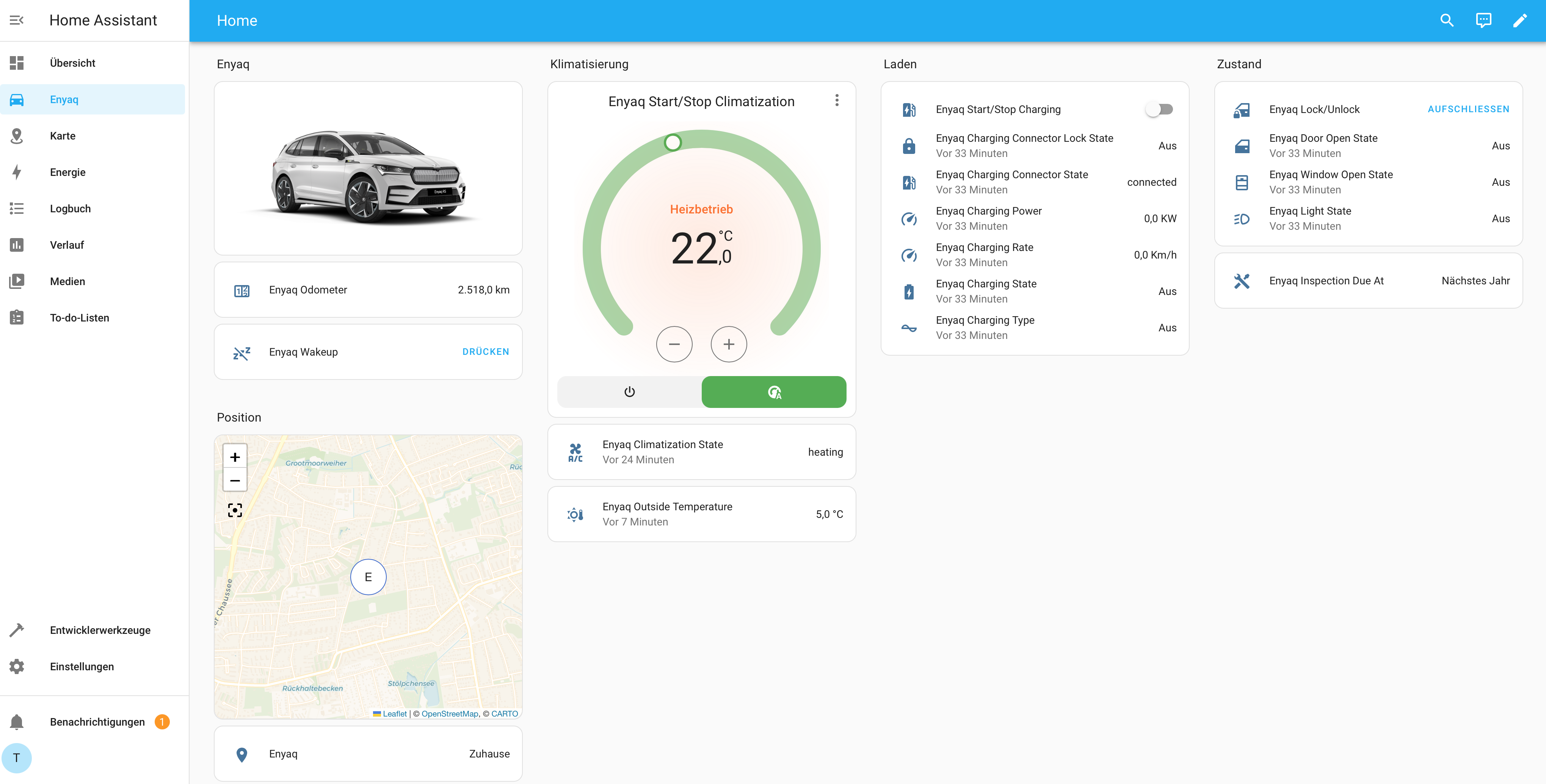
CarConnectivity is a python API to connect to various car services. If you want to provide data to Home Assistant the CarConnectivity MQTT Plugin will enable the MQTT protocol. In order to improve the compatibility with Home Assistant, this plugin adds the Home Assistant Device Discovery for automatically provisioning devices in Home Assistant and adds further topics specifically for Home Assistant.
Install using Pre-packaged Addon
There is a packaged addon available here: carconnectivity-addon
Install using PIP
If you want to use the CarConnectivity Plugin for Home Assistant, the easiest way is to obtain it from PyPI. Just install it using:
pip3 install carconnectivity-plugin-mqtt_homeassistant
after you installed CarConnectivity and the CarConnectivity MQTT Plugin.
Install in your CarConnectivity Docker Container
Add carconnectivity-plugin-mqtt_homeassistant to the ADDITIONAL_INSTALLS environment variable (multiple entries can be separated by a space).
...
  carconnectivity-mqtt:
    image: "tillsteinbach/carconnectivity-mqtt:latest"
    environment:
      - ADDITIONAL_INSTALLS=carconnectivity-plugin-mqtt_homeassistant
...
Configuration
In your carconnectivity.json configuration add a section for the mqtt_homeassistant plugin like this. A documentation of all possible config options can be found here.
{
    "carConnectivity": {
        "connectors": [
            ...
        ]
        "plugins": [
            {
                "type": "mqtt", // Definition for the MQTT Connection
                "config": {
                    "broker": "192.168.0.123", // Broker hostname or IP address
                    "username": "testuser", // Broker username to login
                    "password": "testuser" // Broker password to login
                }
            },
            {
                "type": "mqtt_homeassistant",
                "config": {}
            }
        ]
    }
}
Afterwards you start CarConnectivity in your preferred way, e.g. using
carconnectivity-mqtt carconnectivity.json
Once the device is created in Home Assistant all Entities will display as "Not Available". The reason is that Home Assistant does not know the states yet. In order trigger a resend of all topics, restart CarConnectivity. This will make all entities available.
Updates
If you want to update, the easiest way is:
pip3 install carconnectivity-plugin-mqtt_homeassistant --upgrade
1 maintainer

Metadata
1 maintainer
Release files for carconnectivity-plugin-mqtt-homeassistant 0.6.6
For a detailed explanation of source distributions (sdists) and built distributions (wheels), please see the package formats documentation.
Source distribution (sdist)
| File | Size | Uploaded | Provenance | |
|---|---|---|---|---|
| carconnectivity_plugin_mqtt_homeassistant-0.6.6.tar.gz | 1.7 MB | With provenance | Details |
Built distribution (wheel)
| File | Interpreter | ABI | Platform | Reset |
|---|---|---|---|---|
| carconnectivity_plugin_mqtt_homeassistant-0.6.6-py3-none-any.whl | Python 3 | none | any | Details |
Total release size: 1.7 MB
Release files / carconnectivity_plugin_mqtt_homeassistant-0.6.6.tar.gz
| Download URL | carconnectivity_plugin_mqtt_homeassistant-0.6.6.tar.gz |
|---|---|
| Size | 1.7 MB |
| Tags | Source |
|
SHA-256 checksum How to use checksums |
61e5817b5e825d1e8c9fd7211093e9a0e55a45f7a8932b6879589a44952ac993
|
|
BLAKE2b-256 checksum How to use checksums |
87e69aaa8ef901868faecdb603c8abc1737fe2436cccbd9bb9c9bd75c4d10855
|
| Upload date | |
|
Uploaded using Trusted Publishing? What is trusted publishing? |
Yes |
| Uploaded via |
twine/6.1.0 CPython/3.13.12
|
Provenance
Provenance describes where a file came from. On PyPI, provenance is shared via attestations, which provide a verifiable record of the build or publishing details. View details, limitations and caveats.


PyPI Publish Attestation
PyPI verified that this artifact, at this checksum, originated from the publisher listed below.
Signed by GitHub Actions, verified by PyPI on Jul 5, 2026.
Transparency logRelease files / carconnectivity_plugin_mqtt_homeassistant-0.6.6-py3-none-any.whl
| Download URL | carconnectivity_plugin_mqtt_homeassistant-0.6.6-py3-none-any.whl |
|---|---|
| Size | 16.3 kB |
| Tags | Python 3 |
|
SHA-256 checksum How to use checksums |
b229968724f891e7c1a0ddb27336a80c334aeee8acfb5e84ff178adbc045cc88
|
|
BLAKE2b-256 checksum How to use checksums |
ac39e80100eeae86149e15ea8ad4eb19bd006374a8526971f24a393994d6763b
|
| Upload date | |
|
Uploaded using Trusted Publishing? What is trusted publishing? |
Yes |
| Uploaded via |
twine/6.1.0 CPython/3.13.12
|
Provenance
Provenance describes where a file came from. On PyPI, provenance is shared via attestations, which provide a verifiable record of the build or publishing details. View details, limitations and caveats.
PyPI Publish Attestation
PyPI verified that this artifact, at this checksum, originated from the publisher listed below.
Signed by GitHub Actions, verified by PyPI on Jul 5, 2026.
Transparency logSecurity for carconnectivity-plugin-mqtt-homeassistant 0.6.6
Provenance
Provenance describes where a file came from. On PyPI, provenance is shared via attestations, which provide a verifiable record of the build or publishing details. View details, limitations and caveats.
Full provenance
All 2 files in this release have been uploaded with provenance metadata.
Attestation for carconnectivity_plugin_mqtt_homeassistant-0.6.6.tar.gz
PyPI Publish Attestation
PyPI verified that this artifact, at this checksum, originated from the publisher listed below.
Signed by GitHub Actions, verified by PyPI on Jul 5, 2026.
Transparency logA note on package security
PyPI is a repository for distributing packages, not a service for auditing them. While third-party security researchers and our staff do their best to detect and remove malicious packages, PyPI cannot guarantee the quality, security or suitability of any given package.
To learn more about protecting yourself from malicious actors, visit our package security documentation.














