
CBCTCardiacSegmentation


Author: Mark Gardner
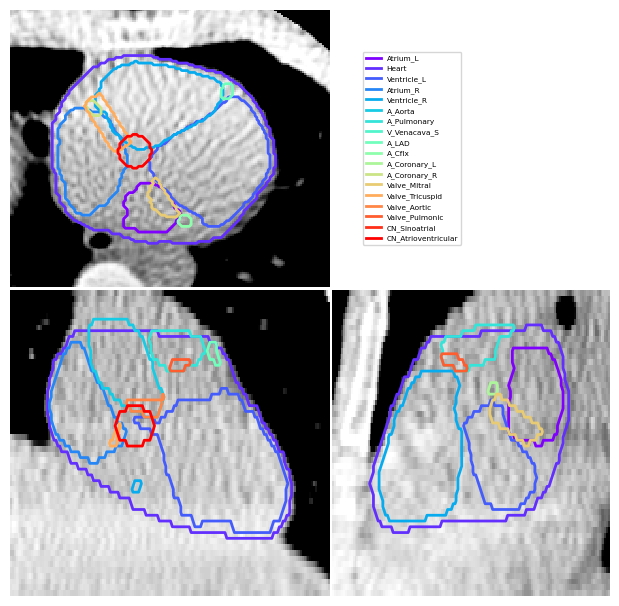
This code will generate cardiac segmentations in CBCT images. The input is dicom or volume files of a CBCT image and an optional planning CT and will output dicom and nifti segmentations of cardiac segmentations that are compatible with the input CBCT image. Currently this works in Linux only
Setup/Build/Install
The module can installed using pip:
pip install CBCTCardiacSegmentation
This code uses the platipy repo (https://github.com/pyplati/platipy). If the platipy module is not automatically installed when installing the CTHeadDeformation code, the platipy library can be installed separately using the installation instructions (https://pyplati.github.io/platipy/getting_started.html). Make sure to also include the cardiac module for platipy (platipy[cardiac])
Install elastix (https://elastix.lumc.nl/index.php) (https://github.com/SuperElastix/elastix/wiki)
Usage
Sample Data can be downloaded from the cancer imaging archive. For this example we will be using data from the 4d-lung dataset. (https://www.cancerimagingarchive.net/collection/4d-lung/)
Download example data
Download the dicom data for one phase of the 4D-CBCT scan, and one phase of the 4D-CT. For example for patientID 100_HM10395, download the <P4^P100^S100^I0, Gated, 0.0%> CBCT dicom data from the Sep 14, 1997, and the <P4^P100^S300^I00003, Gated, 0.0%A> CT dicom data from the Jul 01, 2003.
The CBCT and CT directories can then be set to:
CBCTDicomDir = "<Directory where data was downloaded to>/4D-Lung/100_HM10395/09-15-1997-NA-p4-69351/500.000000-P4P100S100I0 Gated 0.0-90726"
CTDicomDir = "<Directory where data was downloaded to>/4D-Lung/100_HM10395/07-02-2003-NA-p4-14571/1.000000-P4P100S300I00003 Gated 0.0A-29193"
The directory where the created segmentations can also be set
OutputDir = "<Directory where data was downloaded to>/4D-Lung/100_HM10395/CardiacSegmentations
Run in python script
See DemonstrateCBCTSegmentation.py for an example python script.
from  CBCTCardiacSegmentation import CreateCBCTSegmentations
CreateCBCTSegmentations(CBCTDicomDir,OutputDir=OutputDir,PlanningCTDir=CTDicomDir)
Run in a command line
In a command line (such as anaconda command prompt) navigate to the directory that the CTHeadDeformation repo was cloned to and run
python CreateCBCTSegmentations.py <CBCTDicomDir> --OutputDir <OutputDir> --PlanningCTDir <CTDicomDir>
Function Options
A summary of the input options are shown below
 --CBCTDir CBCTDIR     Location of the Cone-beam CT that is to be segmented. Can be a Dicom Series or Volume file.
 --OutputDir OUTPUTDIR
                       Directory where the created segmentations will be created. Default is ./CBCTSegmentations. (Optional)
 --SegmentationMethod SEGMENTATIONMETHOD
                       The method used to segment the CBCT image {Synthetic|Transform|Direct}. Default is Synthetic. (Optional)
 --PlanningCTDir PLANNINGCTDIR
                       Location of the Planning CT that is to be segmented. Can be a Dicom Series or Volume file.
                       Default is None. (Optional)
 --ElastixParamDir ELASTIXPARAMDIR
                       Location of the elastix parameter files used for the registrations. Default is the parameters
                       in the provided ElastixParameterFiles folder. (Optional)
 --StructFile STRUCTFILE
                       Location of the structures contoured from the planning CT File. Default is None
 --ElastixRunDir ElastixRunDir
   					Location of the bin and lib directories from the installed/downaloded version of elastix to be used. Needed for linux implementations
 --KeepTempFiles       If true the temporary files and directories created will not be deleted. If False these files
                       will be deleted. (Optional)
The different segmentation methods are:
- Synthetic: A synthetic CT is created by deforming a planning CT to match the CBCT. CT cardiac segmentation is then applied to this image.
- Transform: The Planning CT is first segmented. The planning CT and CBCT are deformably registered and the output transformation is used to map the planning CT segmentations to the CBCT.
- Direct: The CT segmentation method is directly applied to the CBCT image. May perform unreliably, particularly for noisy CBCT images.
Directory Structure
CBCTCardiacSegmentation - Main code directory. ElastixParameterFiles - Contains parameter files required for elastix. docs - Files and info for the wiki. examples - Files and data for examples of how to run the code. tests - Files for testing the code.
1 maintainer

Metadata
1 maintainer
Release files for CBCTCardiacSegmentation 0.1.1
For a detailed explanation of source distributions (sdists) and built distributions (wheels), please see the package formats documentation.
Source distribution (sdist)
| File | Size | Uploaded | Provenance | Actions |
|---|---|---|---|---|
| cbctcardiacsegmentation-0.1.1.tar.gz | 19.8 kB | Without provenance | Details for cbctcardiacsegmentation-0.1.1.tar.gz |
Built distribution (wheel)
| File | Interpreter | ABI | Platform | Actions Reset |
|---|---|---|---|---|
| cbctcardiacsegmentation-0.1.1-py3-none-any.whl | Python 3 | none | any | Details for cbctcardiacsegmentation-0.1.1-py3-none-any.whl |
Total release size: 40.7 kB
Release files / cbctcardiacsegmentation-0.1.1.tar.gz
| Download URL | cbctcardiacsegmentation-0.1.1.tar.gz |
|---|---|
| Size | 19.8 kB |
| Tags | Source |
|
SHA-256 checksum How to use checksums |
322d8a524a0d6f88b3ae44182175729b074b0eb28e60d470db4d227bbcac2b92
|
|
BLAKE2b-256 checksum How to use checksums |
5df2c9a6a72c11e468551c8504d29a3344d54c227d1984ab83ea73f242a19b7c
|
| Upload date | |
|
Uploaded using Trusted Publishing? What is trusted publishing? |
No |
| Uploaded via |
twine/6.1.0 CPython/3.12.4
|
Release files / cbctcardiacsegmentation-0.1.1-py3-none-any.whl
| Download URL | cbctcardiacsegmentation-0.1.1-py3-none-any.whl |
|---|---|
| Size | 21.0 kB |
| Tags | Python 3 |
|
SHA-256 checksum How to use checksums |
c487b1da7919cb10a10e2c5432db8fc433cb1dc3b8681480e1c3a62c88add064
|
|
BLAKE2b-256 checksum How to use checksums |
808817f9706633fb3dfaa10b0c347d749380d7c06df0bb353768d758429dc15e
|
| Upload date | |
|
Uploaded using Trusted Publishing? What is trusted publishing? |
No |
| Uploaded via |
twine/6.1.0 CPython/3.12.4
|
Security for CBCTCardiacSegmentation 0.1.1
Provenance
Provenance describes where a file came from. On PyPI, provenance is shared via attestations, which provide a verifiable record of the build or publishing details. View details, limitations and caveats.
No provenance found
None of the files in this release were uploaded with provenance metadata.
A note on package security
PyPI is a repository for distributing packages, not a service for auditing them. While third-party security researchers and our staff do their best to detect and remove malicious packages, PyPI cannot guarantee the quality, security or suitability of any given package.
To learn more about protecting yourself from malicious actors, visit our package security documentation.














